Get a working portable Python/Git/Java environment on Windows in SECONDS without having local administrator, regardless of your broken Python or other environment variables. Our open-source script downloads directly from proper sources without any binaries. While the code may not be perfect, it includes many useful PowerShell tricks.
- Run Android apps and pentest without the adware and malware of BlueStacks or NOX.
| Core | Status |
|---|---|
| RMS:Runtime Mobile Security | ✔️ |
| Brida, Burp to Frida bridge | ❌ |
| SaftyNet+ Bypass | ❌ |
| Burp Suite Pro / CloudFlare UserAgent Workaround-ish | ✔️ |
| ZAP Using Burp | ✔️ |
| Google Play | ✔️ |
| Java | ✔️ |
| Android 11 API 30 | ✔️ |
| Magisk | ✔️ |
| Burp | ✔️ |
| Objection | ✔️ |
| Root | ✔️ |
| Python | ✔️ |
| Frida | ✔️ |
| Certs | ✔️ |
| AUTOMATIC1111 | ✔️ |
| SD.Next Stable Diffusion implementation with advanced features | ✔️ |
| AutoGPT | ✔️ |
| Bloodhound | ✔️ |
| PyCharm | ✔️ |
| OracleLinux WSL | ✔️ |
| Ubuntu/Olamma WSL | ✔️ |
| Postgres No admin | ✔️ |
| SillyTavern | ✔️ |
| Volatility 3 | ✔️ |
| Arduino IDE / Duck2Spark | ✔️ |
| Youtube Downloader Yt-dlp | ✔️ |
- Temporarily resets your windows $PATH environment variable to fix any issues with existing python/java installation
- Build a working Python environment in seconds using a tiny 16 meg nuget.org Python binary and portable PortableGit. Our solution doesn't require a package manager like Anaconda.
I would like to make it even easier to use but I don't want to spend more time developing it if nobody is going to use it! Please let me know if you like it and open bugs/suggestions/feature request etc! you can contact me at https://rmccurdy.com !
- Local admin just to install Android AVD Driver:
HAXM Intel driver ( https://github.com/intel/haxm )
OR
AMD ( https://github.com/google/android-emulator-hypervisor-driver-for-amd-processors )
Put ps1 file in a folder
Rightclick Run with PowerShell
OR
From command prompt
powershell -ExecutionPolicy Bypass -Command "[scriptblock]::Create((Invoke-WebRequest "https://raw.githubusercontent.com/freeload101/Java-Android-Magisk-Burp-Objection-Root-Emulator-Easy/main/JAMBOREE.ps1").Content).Invoke();"
More infomation on bypass Root Detection and SafeNet https://www.droidwin.com/how-to-hide-root-from-apps-via-magisk-denylist/
( Watch the Video Tutorial below it's a 3-5 min process. You only have to setup once. After that it's start burp then start AVD )
Update Video with 7minsec Podcast!

(Video Tutorial)

USB Rubber Ducky Scripts & Payloads Python 3 Arduino DigiSpark

Old payloads: https://github.com/hak5/usbrubberducky-payloads/tree/1d3e9be7ba3f80cdb008885fac49be2ba926649d/payloads
PhreakNIC 24: Java Android Magisk Burp Objection Root Emulator Easy (JAMBOREE)
https://www.youtube.com/watch?v=R1eu2Ui1ZLU


Included %USERPROFILE%\AppData\Roaming\BurpSuite\ConfigLibrary_JAMBOREE_Crawl_Level_01.json the "Headed" Browser is no longer supported

Rogdham/python-xz#4 for xz extraction in Python!!!
https://github.com/newbit1/rootAVD RootAVD
Six Degrees of Domain Admin

https://www.youtube.com/@specterops/videos
https://posts.specterops.io/cypher-queries-in-bloodhound-enterprise-c7221a0d4bb3
The BloodHound 4.3 Release Get Global Admin More Often.mp4 20230418
https://www.google.com/search?q=%22shortestPath%22+%22bloodhound%22+site:github.com
https://github.com/drak3hft7/Cheat-Sheet---Active-Directory
https://gist.github.com/jeffmcjunkin/7b4a67bb7dd0cfbfbd83768f3aa6eb12
https://hausec.com/2019/09/09/bloodhound-cypher-cheatsheet/
https://github.com/BloodHoundAD/BloodHound/wiki/Cypher-Query-Gallery
https://bloodhoundhq.slack.com ( not sure how to get invite )
BloodHound Portable for Windows (You can run this without local admin. No Administrator required)
- Download the .ps1 script
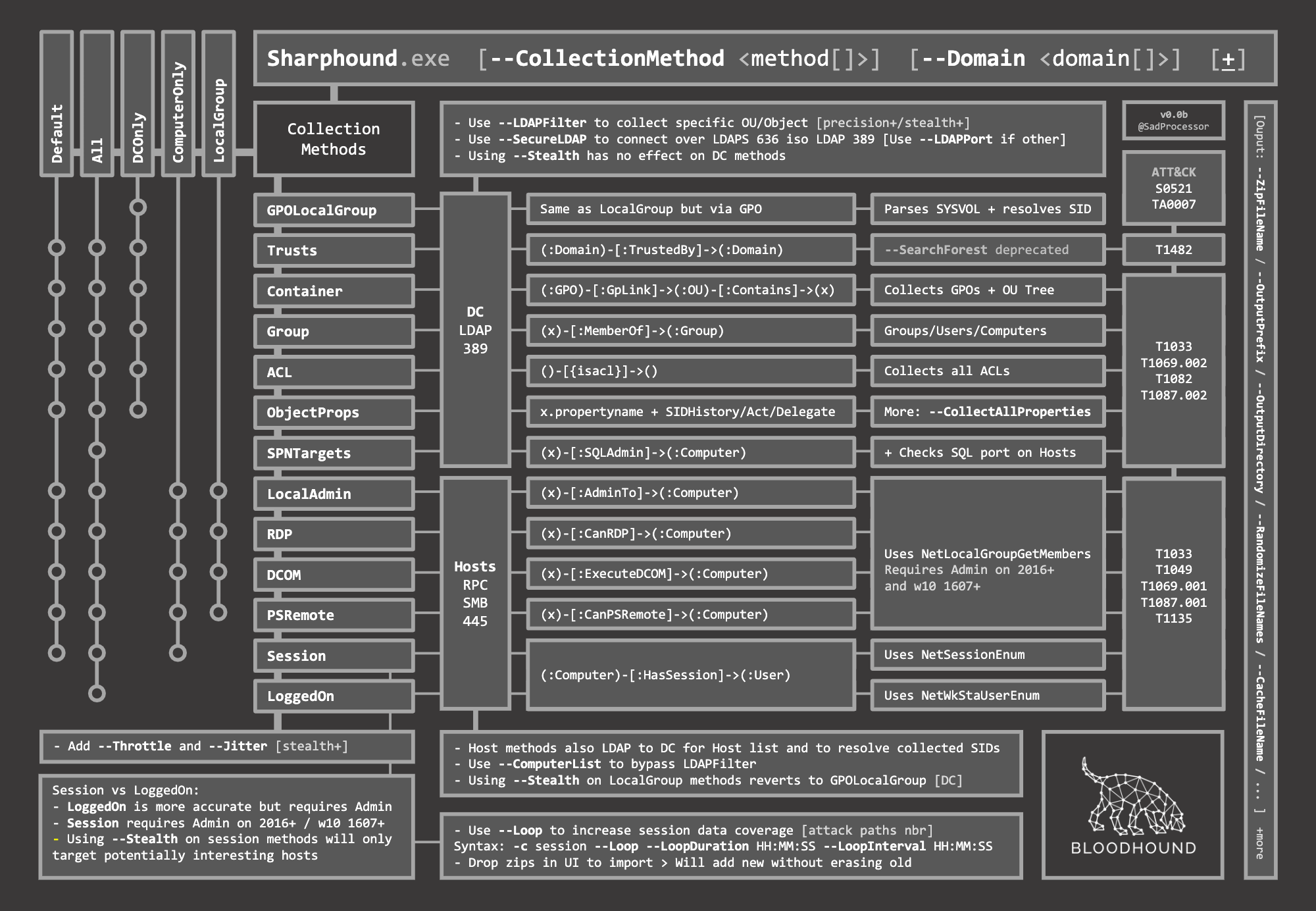
- Click the SharpHound button as a normal domain user Alternatively you can use Runas.exe inside of a VM under domain user context with
runas /netonly /user:"US.COMPANY.DOMAIN.COM\UESERNAME@COMPANY.COM" cmdor try/user:"DOMAIN\USERNAME"to run SharpHound.exe - Click Neo4j to start the database
- Change the default Neo4j password. Wait for Neo4j You must change password at http://localhost:7474
- Click Bloodhound button to start bloodhound
- Import the .zip of JSON files from the output of
SharpHound.exe -s --CollectionMethods All --prettyprint true
Parse Sharphound Output Pretty_Bloodhound.py ( not needed they fixed it )
** You may need to whitelist or disable Bloodhound/Sharphound in your Endpoint Security Software ( Or just obfucate it if your lucky... Resource Hacker or echo '' >> Sharphound.exe etc ... ) **
** Last tested Bloodhound 4.1.0 **

Credit: https://bloodhound.readthedocs.io/en/latest/_images/SharpHoundCheatSheet.png