DNS over TLS (DoT)


-
dot.tiar.appordoh.tiar.app -
IPv4: 174.138.29.175 port 853sdns://AwMAAAAAAAAADjE3NC4xMzguMjkuMTc1AAxkb3QudGlhci5hcHA
-
IPv6: [2400:6180:0:d0::5f73:4001] port 853sdns://AwMAAAAAAAAAG1syNDAwOjYxODA6MDpkMDo6NWY3Mzo0MDAxXQAMZG90LnRpYXIuYXBw
- Filter: Ad, Ad-tracking and Malware (AdBlock)
- DNSSEC Validation
- No EDNS Client Subnet (ECS)
- No logs
- Free


-
Download
DNSecurefrom App Store. -
Select
+and then selectDNS-over-TLS -
Name:
dot.tiar.appthen selectreturn -
Server URL:
dot.tiar.appthen selectreturn

-
Select
Use This Server -
Go to
Settings-VPN & Network-DNSthen selectDNSecureto activate

-
Download
DNS-over-TLSProfile from Github -
Select
View raw-Allow

- Go to
Settings-General-Profile-Tiarap DNS over TLSthen selectInstall
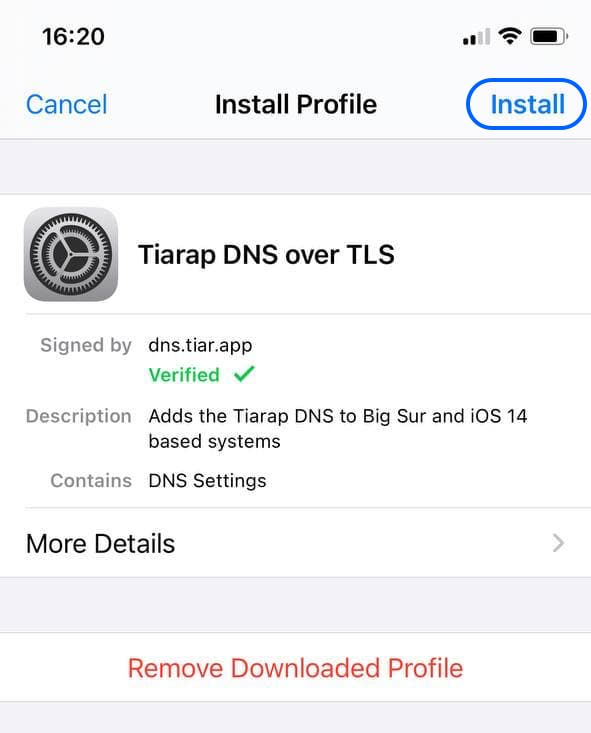
- Go to
Settings-VPN & Network-DNS

-
Select ⚙️ Settings - DNS protection - DNS server
-
Select
+ -
Server name:
dot.tiar.app -
DNS server address:
sdns://AwMAAAAAAAAADjE3NC4xMzguMjkuMTc1AAxkb3QudGlhci5hcHA

- address_data: 174.138.29.175
  tls_auth_name: "dot.tiar.app"
  tls_port: 853`
  - address_data: 2400:6180:0:d0::5f73:4001
    tls_auth_name: "dot.tiar.app"
    tls_port: 853
 forward-zone:
   name: "."
   forward-first: yes
   forward-tls-upstream: yes
   forward-addr: 174.138.29.175@853 #dot.tiar.app
   forward-addr: 2400:6180:0:d0::5f73:4001@853 #dot.tiar.app IPv6
GL.iNet Router


