Sharepoint path.name returning all lower case causing a conflict with conditional to book_name #1813
Comments


|
Good catch and thanks for submitting both issues! Good to see that this crazy hack sort of works. Both fixes will be in 0.26.2. |
Sign up for free
to join this conversation on GitHub.
Already have an account?
Sign in to comment


OS (e.g. Windows 10 or macOS Sierra)
Win 10
Versions of xlwings, Excel and Python (e.g. 0.11.8, Office 365, Python 3.7)
0.26.1, Excel 2201, Python 3.8.8
Describe your issue (incl. Traceback!)
Similar but different to issue #1810
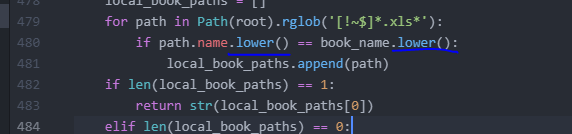
I found that when in our sharepoint environment (previous issue was in our onedrive environment that ended in .us) despite defining path in xlconfig, it could not find the workbook. It appears that "path.name" in utils.py was returning a bookname all in lower case and comparing to a bookname that had capitalization.
I was able to fix by modifying line 480 in my code (479 in the unmodified 0.26.1 version) to convert both strings to ".lower()"
After this fix and issue #1810 fix I'm able to use XLwings in both our onedrive and sharepoint environments.
The text was updated successfully, but these errors were encountered: