

TVRenamer is a Java GUI utility to rename TV episodes from TV listings It will take an ugly filename like Lost.S06E05.Lighthouse.DD51.720p.WEB-DL.AVC-FUSiON.mkv and rename it to Lost [6x05] Lighthouse.mkv
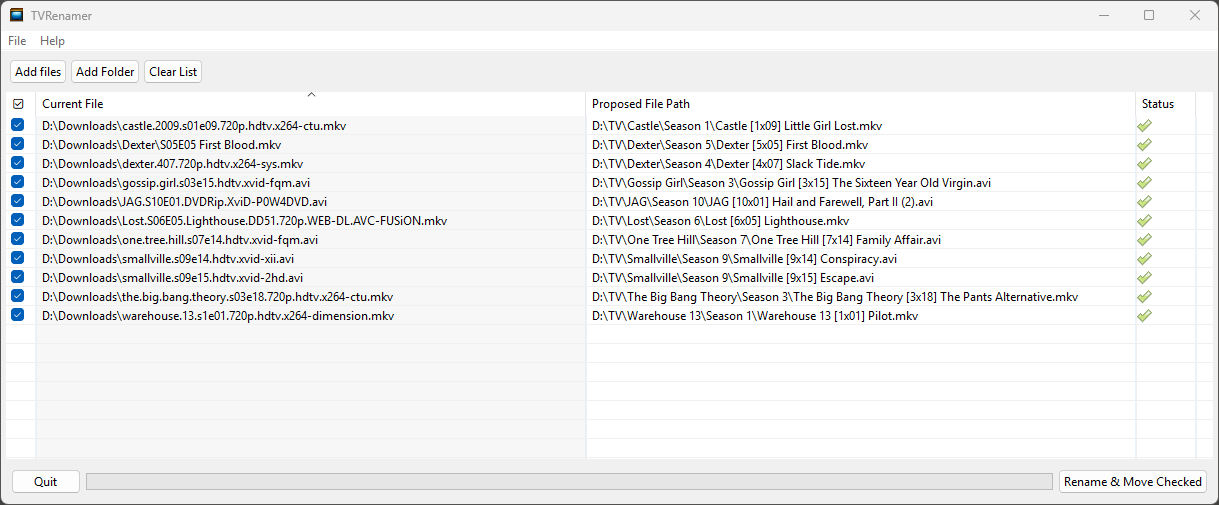
- Rename many different shows at once from information from TVmaze
- Customise the format and content of the resulting filename
- Native look & feel for your operating system
- Drag & Drop or standard 'add file' interface
- Optionally move renamed files, i.e. a NAS or external HDD
Your virus software may display a false positive on TVRenamer. This is reported in the issue: #238 This software is open source and contains no viruses. You can inspect the source and build it yourself if you're interested. We do not know why the virus detection software thinks there's a virus; possibly it's simply because the program will rename your files, which some programs may be overly protective about.
If you get a message from your virus software, we would ask that you report it to the makers of the virus software, as a bug in their product, reporting a false positive.
Again, we assure you the program contains no viruses.
Download the bundle for your operating system and processor. It carries its own Java runtime, so there is nothing to install first:
| Download | For |
|---|---|
macos-aarch64.dmg |
Macs with Apple silicon (M1 and later) |
macos-x86_64.dmg |
Intel Macs |
windows-x86_64-portable.zip |
Windows on Intel or AMD |
On macOS, open the .dmg and drag TVRenamer to your Applications folder.
On Windows, unzip it anywhere and run TVRenamer\TVRenamer.exe from inside.
There is no installer, so it needs no admin rights and you remove it by
deleting the folder. It is not signed yet, so SmartScreen will warn you the
first time: choose 'More info', then 'Run anyway'.
Every platform also has a plain zip. It is much smaller, around 7MB against
50MB, because it has no Java in it. Linux has only this. Note the Windows one
is windows-x86_64.zip, not the -portable zip above. Install
Java 21 or later, then download the zip matching your
operating system and processor:
| Download | For |
|---|---|
linux-x86_64 |
Linux on Intel or AMD |
linux-aarch64 |
Linux on ARM |
macos-aarch64 |
Macs with Apple silicon (M1 and later) |
macos-x86_64 |
Intel Macs |
windows-x86_64 |
Windows on Intel or AMD |
Unzip it wherever you like, then start it from the bin directory inside:
- On Windows: double click
bin\tvrenamer.bat - On macOS and Linux: run
bin/tvrenamerfrom a terminal
On Linux you can add TVRenamer to your desktop's application menu with a 'Custom Application Launcher':
Type: Application
Name: TVRenamer
Command: <where you unzipped it>/bin/tvrenamer
Icon: Can be anything, perhaps [our icon](http://github.com/tvrenamer/tvrenamer/raw/main/src/main/resources/icons/tvrenamer.png)
If the application doesn't start, switch the Type to 'Application in Terminal' so you can read the error.
Releases before 1.0b5 looked up episodes on TheTVDB, whose version 1 API is now retired. Those versions cannot find any show, so upgrade if you are still on one. If you see errors about "unable to connect to internet" on a version older than 0.7.2, upgrade for the same reason.
Java version 21 or later is required. Type java -version into your terminal and ensure the version is at least 21:
$ java -version
openjdk version "21.0.11" 2026-04-21
The download carries a native GUI library for one processor architecture, so it
has to match the Java you run it with. java -version prints the architecture on
its last line. Mixing them gives an UnsatisfiedLinkError on startup, visible
only when you run from a terminal:
Exception in thread "main" java.lang.UnsatisfiedLinkError: Can't load library: .../libswt-pi3-gtk.so
32-bit builds are no longer available. Eclipse stopped shipping 32-bit SWT libraries after 2018, so the last 32-bit release is v1.0b4.
The .dmg is signed and notarised, so it opens without complaint. The zip is
not, so macOS marks everything in it as quarantined. If the unzipped copy
refuses to start, clear that mark on the unpacked directory:
xattr -d -r com.apple.quarantine TVRenamer-<version>-macos-<arch>
If the application crashes it helps us greatly if you can provide us a stacktrace of what went wrong. In order to do this, you just need to run the application in the terminal, then copy the output into a new bug report.
If the application fails to start due to a java error, ensure that your JAVA_HOME environment variable is set correctly.
- On Windows:
- Open the Windows Command Prompt (Windows + r, then type
cmdand push enter) - Navigate to the unzipped TVRenamer directory.
- Execute
bin\tvrenamer.bat
- Open the Windows Command Prompt (Windows + r, then type
- On macOS and Linux:
- Open a terminal.
- Navigate to the unzipped TVRenamer directory.
- Execute
bin/tvrenamer
If you installed the macOS .dmg rather than the zip, run the executable inside
the bundle instead. It prints to the terminal the same way:
/Applications/TVRenamer.app/Contents/MacOS/TVRenamer
The build uses the Gradle wrapper, so you only need a JDK 21 or later:
./gradlew build     # compile and run the tests
./gradlew run       # build and start the application
Gradle picks the SWT native library that matches the machine you build on, so the same build file works on macOS (Intel and Apple silicon), Windows and Linux.
Some of the tests query TVmaze and need an internet connection.
If you'd like to run from source, please see the Quick Start guide, and then look over Development Setup.
Please see the Development Process section if you'd like to contribute! Anything from Java code patches to UI/UX recommendations would be gratefully received.
To contribute to the code side of things you should know Java and it would be helpful if you know some SWT and git. The easiest way to submit changes is via a github pull request based off the main branch.
For anything else (feature requests, comments, fanmail!), create a new issue and set the label to 'Type-Enhancement'.