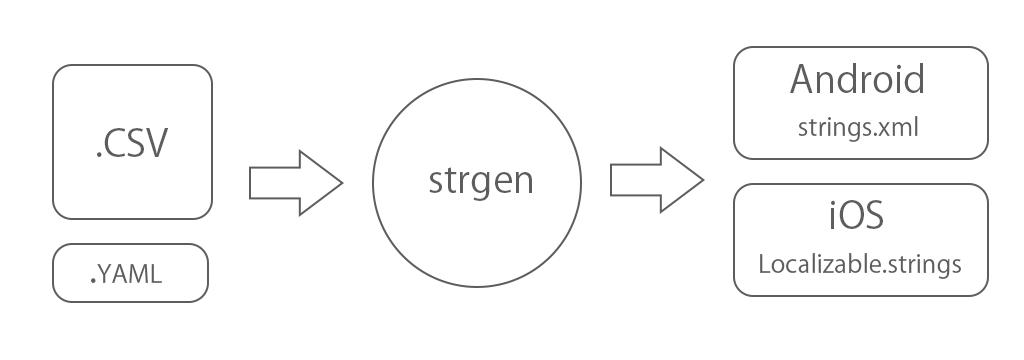
The strgen can create iOS / Android strings file from CSV file.
https://pypi.org/project/strgen/
The strgen can install using pip.
$ pip install strgenPrepare input files.
The source file of multi language strings.
The config file.
$ strgen --config strgen.ymlRun with argument of YAML file path.
If not specified, strgen.yml in the current directory will be used.
The following files will be generated under the build folder.
- build/
- apple/
- LocalizableStrings.swift
- lproj/
- en.lproj/Localizable.strings
- ja-JP.lproj/Localizable.strings
- ...
- google/
- values-en/strings.xml
- values-ja-JP/strings.xml
- ...
- apple/
in apple folder(for iOS/macOS), LocalizableStrings.swift that enumerated the key names is also generated.
import Foundation

class LocalizableStrings {

    enum Key: String {
        case yes
        case no
        case cancel
        case next
        case close
        case escape_test
        case parameter_google
        case parameter_apple
    }

}There are sample that you can easily try.
- Install
strgen$ pip install strgen
- Clone project.
$ git clone https://github.com/daisuke-t-jp/strgen
- Change the current directory to
strgen/sample. - Run
$ strgen --config strgen.yml
- Check
buildfolder.
| id | en | ja-JP | zh-Hans | zh-Hant | ... |
|---|---|---|---|---|---|
| hello_world | Hello world | こんにちは世界 | 你好,世界 | 你好,世界 | ... |
| yes | Yes | はい | 是 | 是 | ... |
| no | No | いいえ | 没有 | 沒有 | ... |
| cancel | Cancel | キャンセル | 取消 | 取消 | ... |
| next | Next | キャンセル | 下一个 | 下一個 | ... |
| close | Next | キャンセル | 下一个 | 下一個 | ... |
| escape_test | escape <'""&?@> test | ||||
| parameter_google | Parameter %1$s, %2$s. | ||||
| parameter_apple | Parameter %1$@, %2$@. |
Start the header line with id.
Next, add the language (language and country code).
The id string will be the key to reference on iOS / Android.
Enter the localized string for each language.
You can leave the localized string blank.
In that case, no localized strings are generated for that language.
strgen.yml
general:
  input_file_path: ./source.csv
  output_path: ./
google:
  enabled: true
  strings_file_name: strings.xml
apple:
  enabled: true
  strings_file_name: Localizable.strings
  swift_file_name: LocalizableStrings.swift
swift_class_name: LocalizableStringsInput CSV file path.
Output path.
The default directory will be the same as the YAML file.
Enabled flag for generate output files.
Default is true.
Generated strings file's name.
Default is strings.xml.
Enabled flag for generate output files.
Default is true.
Generated strings file's name.
Default is Localizable.strings.
Generated swift file's name.
Default is LocalizableStrings.swift.
Generated swift class name.
Default is LocalizableStrings.