[new feature] Article notes field #19134
Conversation


We have a note field for com_categories, com_menus and com_modules
This PR adds the functionality to com_content as it has been requested several times and can be very useful

## To test
Apply the pr AND the database fix (we added a new field)
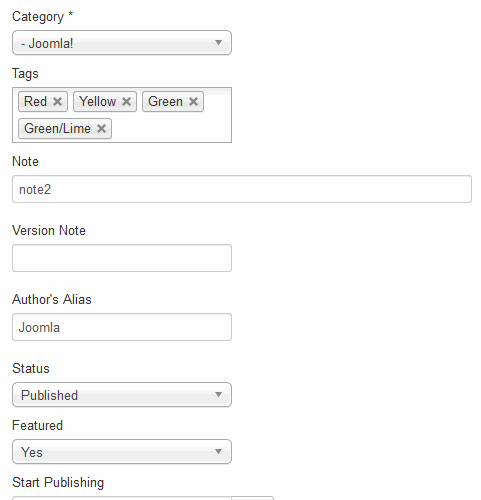
Create an article and on the right above version note you will see a new field called note
Enter a note and save the article
You can now see the note with the article
You can also search by the note
Check the featured article list
Check the article modal list (article xtd-editor button or from creating a new single article menu)

On the frontend you can also add/edit a note. You will see it on the publishing tab above the version note field


| @@ -0,0 +1,4 @@ | |||
| ALTER TABLE `#__content` ADD COLUMN `note` VARCHAR(255) NOT NULL DEFAULT ''; | |||
|
|
|||

There was a problem hiding this comment.
Use '"' (double quote) instead '`' to escape names in postgresql.
There was a problem hiding this comment.
thanks - should be ok now

| @@ -138,6 +138,13 @@ | |||
| <a class="select-link" href="javascript:void(0)" <?php echo $attribs; ?>> | |||
| <?php echo $this->escape($item->title); ?> | |||
| </a> | |||
| <span class="small" title="<?php echo $this->escape($item->path); ?>"> | |||

There was a problem hiding this comment.
Same fix here with the underlined space.
There was a problem hiding this comment.
PHP Notice: Undefined property: stdClass::$path in\administrator\components\com_content\views\articles\tmpl\modal.php on line 141
| type="text" | ||
| label="COM_CONTENT_FIELD_NOTE_LABEL" | ||
| description="COM_CONTENT_FIELD_NOTE_DESC" | ||
| class="span12" |
There was a problem hiding this comment.
Please check the other notes fields in modules and menu. I am sure this si the same
| </div> | ||
| <div class="controls"> | ||
| <?php echo $this->form->getInput('version_note'); ?> | ||
| </div |

|
On the frontend, the note field is wider due to the
|
| <?php echo $this->escape($item->title); ?> | ||
| </a> | ||
| <?php echo $this->escape($item->title); ?></a> | ||
| <span class="small"> |
There was a problem hiding this comment.
might as well - wont do any harm
|
I have tested this item ✅ successfully on c78fdf4 This comment was created with the J!Tracker Application at issues.joomla.org/tracker/joomla-cms/19134. |


There was a problem hiding this comment.
the update is wrong you need a single quote before the
{"common..... and another one at the end fulltext"}}
should be something like
'{"common":{"core_content_item_id":"id","core_title":"title","core_state":"state","core_alias":"alias","core_created_time":"created","core_modified_time":"modified","core_body":"introtext", "core_hits":"hits","core_publish_up":"publish_up","core_publish_down":"publish_down","core_access":"access", "core_params":"attribs", "core_featured":"featured", "core_metadata":"metadata", "core_language":"language", "core_images":"images", "core_urls":"urls", "core_version":"version", "core_ordering":"ordering", "core_metakey":"metakey", "core_metadesc":"metadesc", "core_catid":"catid", "core_xreference":"xreference", "asset_id":"asset_id", "note":"note"}, "special":{"fulltext":"fulltext"}}'
the same fix on postgresql and mssql

|
@alikon all done - thanks |

|
I have tested this item ✅ successfully on e67b603 This comment was created with the J!Tracker Application at issues.joomla.org/tracker/joomla-cms/19134. |

|
@Quy can you please retest? |
|
I have tested this item ✅ successfully on e67b603 This comment was created with the J!Tracker Application at issues.joomla.org/tracker/joomla-cms/19134. |

|
RTC |


|
RTC This comment was created with the J!Tracker Application at issues.joomla.org/tracker/joomla-cms/19134. |


|
Thanks |


We have a note field for com_categories, com_menus and com_modules
This PR adds the functionality to com_content as it has been requested several times and can be very useful
To test
Apply the pr AND the database fix (we added a new field)
Create an article and on the right, above version note you will see a new field called note
Enter a note and save the article
You can now see the note with the article in the list
You can also search by the note
Check the featured article list
Check the article modal list (article xtd-editor button or from creating a new single article menu)
On the frontend you can also add/edit a note. You will see it on the publishing tab above the version note field
Bonus
When adding this field to the frontend beez template I spotted that the version note field wasnt shown there either so I added that at the same time