Add Launch at Login feature #76
Conversation


Remove UI components from AutoLauncher

Recreated AutoLauncher

Add comments for deleting path

Remove UI components from AutoLauncher

Remove Storyboard from AutoLauncher

Delete Breakpoints_v2.xcbkptlist

Delete xcschememanagement.plist

Small fixes

Add back apple signing


|
Hey @leits 👋 |


|
@jogendra I don't quite understand what you mean by that, can you post a picture? |
|
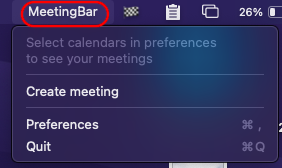
Screenshot from the stable release: (App Icon is showing in the Menu) Screenshot from my Build: (App name (MeetingBar) is shown in the menu instead of the App icon. |

|
Seems like no calendars were loaded (it is the default case) |
|
Does this build work normally? Defaults are recorder per app, and maybe your local app has a different identifier, thus nothing is loaded |
|
Ahha okay. I thought it was something that went wrong from my side. Thanks for clarifying:) @Itaybre You can review requested changes. |


|
LGTM |

|
Thanks, @jogendra! Merged 🚀 |
|
I wrote a blog post about implementing Launch at Login feature. Let me know what do you think about it :) Link: https://jogendra.dev/implementing-launch-at-login-feature-in-macos-apps |
|
@jogendra great post, didn't see any mention to the identifier requirements which is a must if you want to release the app that on the AppStore |
|
@Itaybre Thanks 👍 I think I mentioned bundle identifiers in code snippets and also they are visible in screenshots. Not sure what I missed |
|
@jogendra. Great article! I like the level of detail. 👍 |


Status
DONE
Description
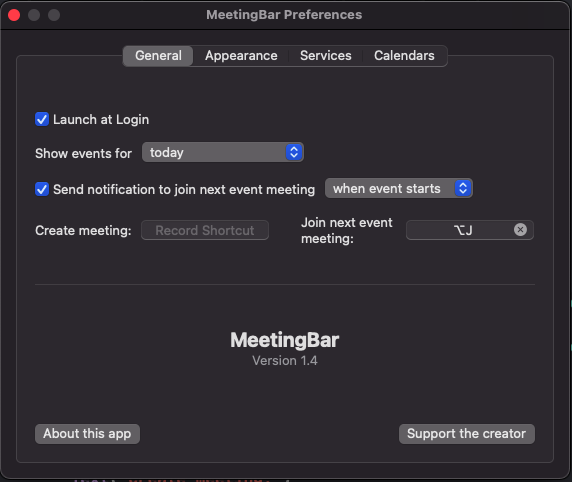
Added Launch at Login feature to app preferences so that users can select if they automatically want to start the app when they start their system.
Feature issue: #27
This is how it looks:
Steps to Test or Reproduce
Go to Preference > General > Launch at Login