
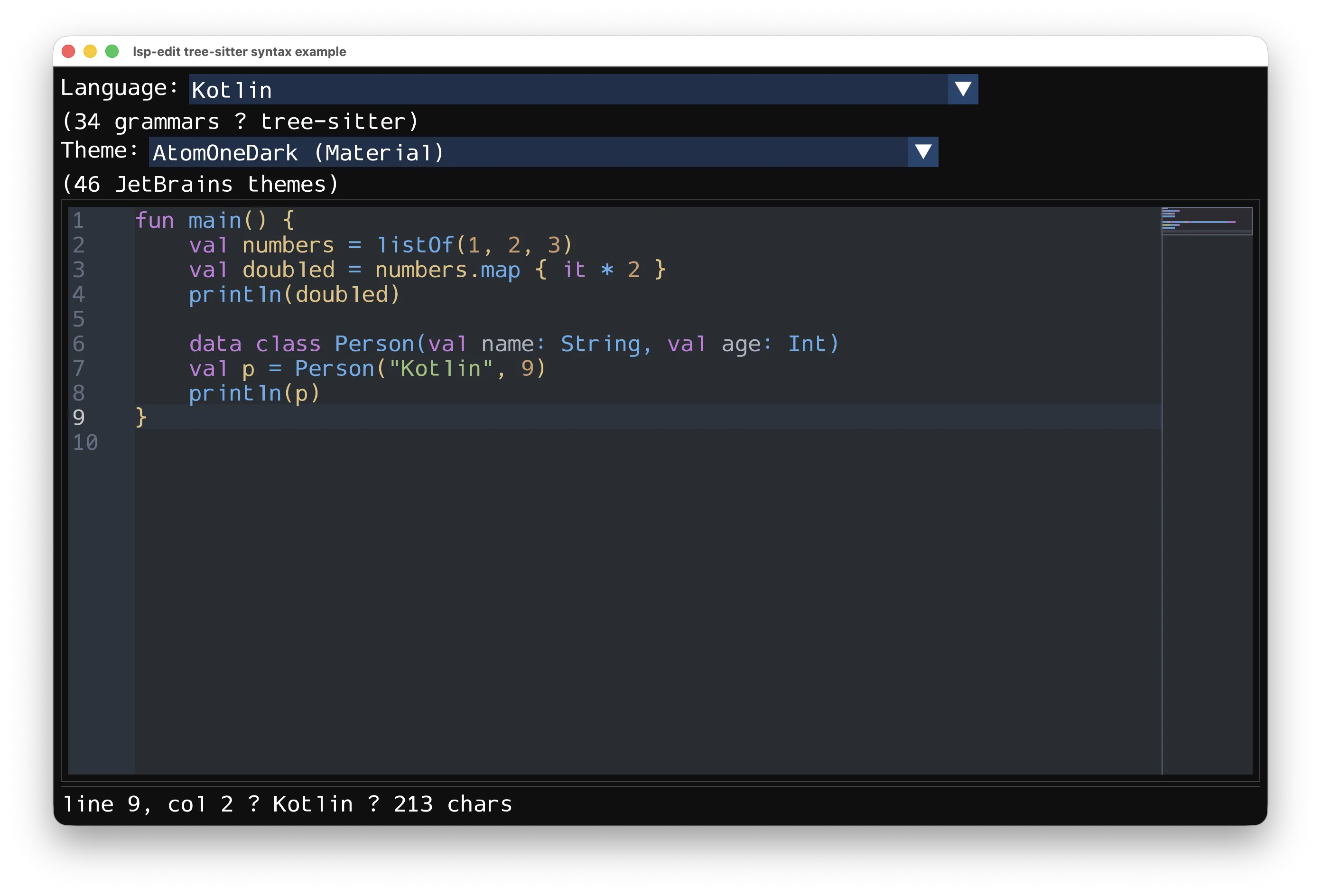
A language-server-driven code editor widget for Kotlin Multiplatform, rendered with Dear ImGui via imgui-kmp and wired to language servers through lsp-kmp.
The widget is a self-contained Editor that you render inside any ImGui
window; an optional LspEditor layer binds it to an LSP server
(didOpen/didChange, diagnostics, hover, completion, go-to-definition,
semantic tokens, folding, inlay hints, code lenses, signature help, rename,
references). A DiffView renders side-by-side diffs, and
DapSession drives a debug adapter (lsp-kmp's DebugClientLauncher is the
protocol end): the handshake, every breakpoint kind, stepping (reverse too),
stack/scopes/variables with editing, exception details, the debug console.
Published on Maven Central, so mavenCentral() is the only repository you
need:
// build.gradle.kts
kotlin {
    sourceSets {
        commonMain.dependencies {
            implementation("cn.enaium.imgui:lsp-edit:1.0.4")
            // lsp-edit's signatures are written in these types, and the
            // published POM keeps them at runtime scope — declare them too,
            // or calls like editor.render("##e", ImVec2(-1f, -1f)) do not
            // compile.
            implementation("cn.enaium.imgui:imgui-kmp:1.93.0.1")   // ImVec2, ImGui, Icon…
            implementation("cn.enaium:lsp-kmp:1.0.1")            // LspClient, DapSession…
        }
    }
}
Through a version catalog:
# gradle/libs.versions.toml
[versions]
lsp-edit = "1.0.4"
imgui-kmp = "1.93.0.1"
lsp-kmp = "1.0.1"

[libraries]
lsp-edit = { module = "cn.enaium.imgui:lsp-edit", version.ref = "lsp-edit" }
imgui-kmp = { module = "cn.enaium.imgui:imgui-kmp", version.ref = "imgui-kmp" }
lsp-kmp = { module = "cn.enaium:lsp-kmp", version.ref = "lsp-kmp" }
The rest arrives with it (the published POM pins these; all are runtime scope, so they are on the classpath at run time):
| Dependency | Version | What it brings |
|---|---|---|
imgui-kmp |
1.93.0.1 | the ImGui bindings the widget renders through |
lsp-kmp |
1.0.1 | protocol models, transports, the DAP client |
ktreesitter |
0.25.1 | the tree-sitter core (grammars are yours to add) |
xicons-imgui-core / xicons-imgui-intellij |
1.0.3 | the icon set (completion kinds, breakpoints) |
kotlinx-coroutines-core / kotlinx-serialization-json |
1.11.0 |
The POM also excludes xicons-imgui-intellij-g, which its own metadata
references but which was never published — consumers do not have to repeat
that exclusion.
Targets: JVM, Android, macOS (x64, arm64), iOS (x64, arm64, simulator), tvOS (arm64, simulator), watchOS (arm64, simulator, device), Linux (x64, arm64) and Windows (mingwX64).
Two constraints worth knowing before you pick targets:
TreeSitterHighlighterandHighlightQueriesexist only wherektreesitteris published — JVM, Android, macOS, Linux, Windows and iOS arm64/simulator.iosX64, tvOS and watchOS get the rest of the library without them.- Android consumers need
compileSdk = 37: imgui-kmp's AAR is compiled against API 37.
- ImGui-native rendering: syntax highlighting, line numbers with a solid gutter background, fold markers, minimap, selection, undo/redo, find, breakpoints, inlay hints, code lenses.
- Built-in right-click context menu (Cut / Copy / Paste / Select All /
Undo / Redo) with an
onContextMenuhook so hosts append LSP actions (Go to Definition, Find References, Rename…). - Shift+click and Shift+arrow selection from the current anchor; drag selection auto-scrolls vertically and horizontally at the viewport edges.
- Per-editor theme palettes (
palette, 25PaletteIndexslots), including the 46 JetBrains IntelliJ palettes inJetBrainsThemes. - Breakpoints in the gutter: a dedicated column left of the line numbers
(markers never land on a digit), toggled by clicking it or F9, drawn with
the IntelliJ breakpoint icons — plain, verified, rejected, disabled and
logpoint states, plus a "?" badge for conditioned ones
(
setBreakpointMarkers/EditorBreakpoint;onBreakpointsChangetells the host). - Editor fonts (
EditorFontSettings+installEditorFonts): a main face, a fallback TTF merged into it so glyphs the main font lacks (CJK, symbols) render instead of tofu, and an optional smaller face for inlay hints and inline code chips — all scaled by the framebuffer density. Call it before the atlas is built, then handEditorFonts.maintoEditor.fontandEditorFonts.smalltoEditor.inlayHintFont/MarkdownCode.codeFont. - Scroll-follow that never fights manual scrolling (keyboard/edits follow the cursor, wheel/scrollbar drags are left alone); opening a document never auto-scrolls.
- Built-in find/replace bar (Cmd/Ctrl+F, Cmd/Ctrl+R for the replace row):
Aa/ab/.*toggles, live match counter, Enter / Shift+Enter navigation, per-match and replace-all (one undo step each), regex$nexpansion, Esc to close. The bar owns the keyboard while focused. - Range background highlights:
EditorHighlight(line, start, end, fill, border)+Editor.highlightsdraws translucent fills with an optional border under the glyphs — they scroll with the text, clip to the text area (never the gutter or minimap) and are what the find bar uses. - In-place rename (
startRename/cancelRename/onRenameCommit): the symbol becomes the selection and is edited directly, arrows/Home/End move inside the name, every other occurrence follows live, Enter commits (the host performs the LSP rename), Esc restores everything. - Diagnostic tooltips render as regular windows (like the documentation hover): the pointer can move onto them and they can be resized.
- Callbacks for text edits (
onTextChange), cursor moves, hover, token providers, code-lens clicks and breakpoints so hosts can plug in LSP data. Hosts that implement some features themselves can chain instead of being replaced:onTextChange,onHover,onHoverEnd,onCodeLensClickandkeysReservedByOverlayall call the previous handler first. lastChangeWasHistorymarks undo/redo notifications, so hosts can skip typing-only reactions (a completion popup must not open mid-undo).queueTextInput/inputTextfor host text-input routing, plusisFocusedStrict(keyboard focus only, excludes hover) for platform IME management.
- Renders fenced `
langblocks as read-only, syntax-highlighted code (theme palette, no line numbers, no editing, no scrolling) — the imgui-kmp Markdown extension has no code hook, so lsp-edit splits the input at fences and draws the code blocks itself. `inline code`renders as small bordered chips with a smaller font.
- 46 editor palettes (29 standard + 17 Material themes from FlatLaf's
IntelliJ Themes Pack), extracted from each theme's IntelliJ color scheme
XML + FlatLaf UI colors, switchable at runtime via
editor.palette.
- Lifecycle:
initialize/notifyInitialized/shutdown/exit, document sync (didOpen/didChange/didClose), server notifications (publishDiagnostics,showMessage,logMessage). - Requests: hover, completion (+ resolve), definition, references, prepareRename / rename, signatureHelp, documentSymbols (hierarchical + flat), codeLens + resolve, workspaceSymbols, semanticTokens/full, inlayHint, foldingRange, formatting, typeDefinition, implementation, declaration, documentLinks, selectionRange, pull diagnostics, codeAction + resolve, executeCommand.
- Server-initiated requests are answered:
workspace/applyEdit(handlers stack viaaddApplyEditHandler, the first that returns true wins),workspace/configuration(null per requested section) andwindow/workDoneProgress/create. Without the configuration answer IntelliJ-based servers refuse to serve features such as inlay hints. - Bypasses lsp-kmp's broken
DocumentSymbolResultarray serializer by decoding the raw JSON element.
- Document lifecycle and incremental
didChangesync. publishDiagnostics→ gutter markers.- Hover documentation as a resizable window offset to the lower right of the
pointer (markdown, with fenced code blocks via
MarkdownCode): it stays open while the pointer is on it and closes after a short grace period once the pointer leaves both the code and the window. - Completion popup (detail + description) whose rows carry an IntelliJ node
icon per LSP
CompletionItemKind(CompletionIcons, from thexicons-imgui-intellijset); kinds IntelliJ has no distinct icon for render unadorned. Signature-help popup with the active parameter highlighted. - Code actions (Alt+Enter):
requestCodeActions()lists quick fixes and refactors in a caret-anchored, borderless, resizable popup (renderCodeActionPopup(), Up/Down + Enter, Esc or click-outside closes). An action's edit is applied directly; a server command is handed toonExecuteCommand, whose edits then arrive asworkspace/applyEdit. features: Set<LspFeature>selects what an instance drives (DIAGNOSTICS,COMPLETION,HOVER,CODE_ACTIONS,SEMANTIC_TOKENS,INLAY_HINTS,CODE_LENS,DOCUMENT_SYNC). A host that still implements some capabilities itself enables only the rest while it migrates — the editor then leaves the client's notification slots and the editor'stokenProvideruntouched instead of replacing the host's.- Go-to-definition / type-definition / implementation, code-lens fetch/resolve/click dispatch, rename and references host hooks.
- Full-document semantic tokens, folding ranges, inlay hints — refreshed after edits with debounce and stale-response protection.
TreeSitterHighlighter+HighlightQueries(per-language queries from zed) live in thetreesitterMainsource set (JVM, macOS, Linux, Windows, iOS, Android); the 34 grammar bindings are supplied by the host viatree-sitter-languages-kmp(seeexamples:syntax).
| Module | Description |
|---|---|
lsp-edit |
The library: Editor, LspEditor, LspClient, MarkdownCode, JetBrainsThemes, TreeSitterHighlighter, DiffView, DapSession, transports. |
examples:common |
Shared example host (SdlRendererApp, sample servers). |
examples:editor |
ImGui window hosting LspEditor against an in-process demo server (code lens, indent-guide toggle, debug panel). |
examples:diff |
Side-by-side DiffView of two Kotlin samples. |
examples:kotlinlsp |
Real-LSP example: connects to kotlin-lsp over stdio. |
examples:syntax |
Tree-sitter syntax showcase: 34 grammars + JetBrains theme switcher. |
./gradlew build                       # compile all targets
./gradlew :lsp-edit:jvmTest           # run the JVM test suite
./gradlew :examples:syntax:jvmTest    # 34-language tree-sitter highlight tests
Targets are listed under Dependency.
JVM (macOS adds -XstartOnFirstThread automatically):
./gradlew :examples:editor:jvmRun
./gradlew :examples:diff:jvmRun
./gradlew :examples:syntax:jvmRun
Real Kotlin LSP (requires kotlin-lsp on PATH; --stdio is mandatory —
kotlin-language-server defaults to socket mode):
./gradlew :examples:kotlinlsp:jvmRun --args="--file /path/to/File.kt"Native targets read IMGUI_KMP_FRAMES=N (or --frames N on the JVM) to exit
after N frames for headless CI. The JVM mains of examples:editor and
examples:syntax also take --font <path> for the main editor font (the
built-in font when omitted); either way they merge a system CJK font found on
the host as the fallback. Every example with native targets (editor,
diff, syntax) links an executable per platform:
./gradlew :examples:syntax:linkDebugExecutableMacosArm64   # also linuxX64,
                                                           # linuxArm64, mingwX64
IMGUI_KMP_FRAMES=3 ./examples/syntax/build/bin/macosArm64/debugExecutable/syntax.kexe
examples:kotlinlsp is JVM-only by design: it launches the external
kotlin-lsp process and talks to it over its stdio streams.
// A plain editor widget inside any ImGui window.
val editor = Editor(initialText = code, language = Language.kotlin)
editor.render("##editor", ImVec2(-1f, -1f))

// Bind it to a language server over any MessageTransport.
val lspEditor = LspEditor(editor, client, uri = "file:///Test.kt", languageId = "kotlin")
lspEditor.start(processId = pid)          // initialize + didOpen
lspEditor.drain()                         // call every frame
lspEditor.editor.inputText(text)          // route host text input to the editor
Markdown with fenced code blocks (e.g. LSP hover content):
MarkdownCode.render(markdownConfig, hoverText, language = editor.language, palette = editor.palette)Switch editor themes:
editor.palette = JetBrainsThemes.all[index].secondTree-sitter highlighting (host supplies the grammar bindings):
val highlighter = TreeSitterHighlighter(spec.language(), spec.query)
highlighter.setText(code)
editor.tokenProvider = { line -> highlighter.spansForLine(line) }
See the examples/ modules for complete wiring, including how text input is
routed from the host event loop.
MIT — see LICENSE.