Repository navigation
Releases: Oxensepp/fomalhaut
Release list
Fomalhaut 1.2.0 for foobar2000 and Winamp

▶ Video: Fomalhaut 1.2 presentation on YouTube
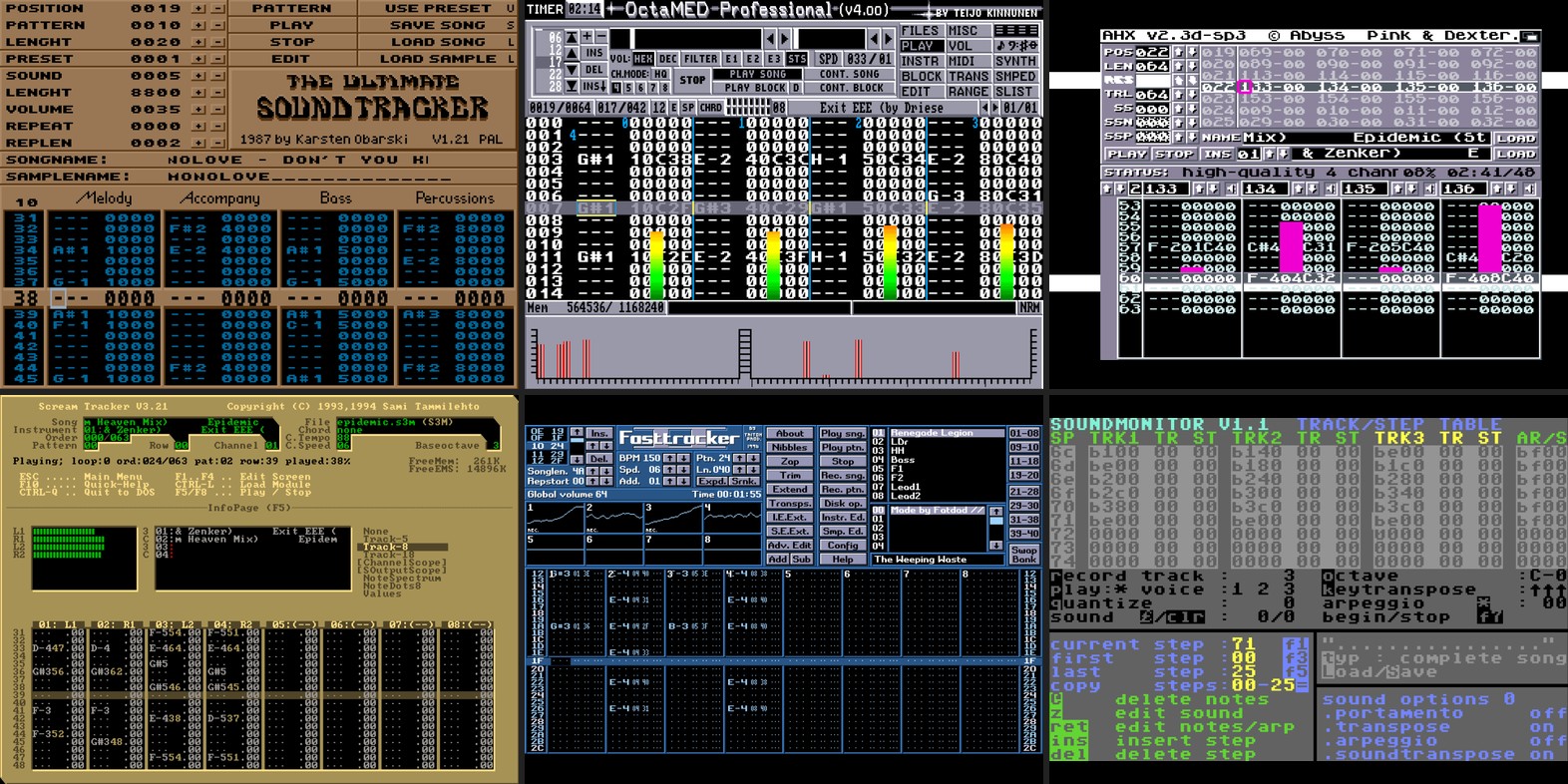
What's new
- New mode: Tracker – brings the UI of 18 classic music trackers from the Amiga, DOS, Windows, C64 and CPC (from Ultimate Soundtracker to Arkos Tracker 3) to life, playing along with your music: patterns, VU meters, scopes and song titles
- Press P to switch colour schemes and D to change the view. Adjust tempo and order under Preferences → Mode options
- New mode: VSG+ DOS – Neven Pintaric's VSG 1.0 VGA, expanded to 20 effects (10 brand new) and 16 palettes (15 brand new)
- New mode: Credits – rolls the credits for all modes, with each section running its respective mode in the background
- New: Control bar – hover the mouse at the top of the panel for quick access to mode, previous / next, lock, palette, presets, CRT filter, fullscreen, and preferences (plus flame, wave, display, etc. in the Cthugha modes)
- New: Screenshot in the right-click menu and control bar – grabs a clean PNG in the exact panel size without menus or bars; saves numbered files to your last folder, or via "Save screenshot as..."
- Palettes: pick directly from the list in the right-click menu or control bar; Shift+P steps back in any mode; nine colour scales for Atari Video Music
- Presets: set a custom share (0–100 %) and list order for transitions; export and import as plain text; double-click a preset in the preferences to preview it; up to 512 presets
- Reorganised preferences: neatly split into Fomalhaut, Modes, Mode options, Atari Video Music, and Presets, plus a tidier right-click menu
- New "Click changes effect" option; clicking an inactive panel now just focuses it first; Backspace = previous effect, N = effect names
- Sharper, smoother image scaling across all panel sizes
- If an effect hiccups, it no longer halts the visualisation – Fomalhaut simply restarts the mode
- "Lock effects" is now remembered per panel (layout; Winamp / WACUP: INI) and stays active across restarts
- Winamp / WACUP: now caught up with the foobar2000 version, including all features above
- Fixed: the visualisation no longer stalls in WACUP while viewing the key help (F1)
- Fixed: pausing no longer leaves Tracker patterns scrolling (Winamp / WACUP) or jittering between two rows – they now freeze cleanly on the exact row where you paused
- R.I.P. Patrick Stewart
Downloads
| Package | For | SHA-256 |
|---|---|---|
foo_fomalhaut-1.2.0.fb2k-component |
foobar2000 2.x (x64 and x86, DUI and Columns UI) | a2d39537da53c3489ca207007760cb05fcca6e183716ca9267d8b39e32d0fae1 |
vis_fomalhaut-1.2.0.zip |
Winamp 5.x and WACUP (32-bit) | 1549c17625f03a3f450ba884f810b2b3e34f906aa5edd18b341d9fc66deba87c |
foobar2000: double-click the package or Preferences → Components → Install…
Winamp / WACUP: copy vis_fomalhaut.dll into the Plugins folder, then Preferences → Plug-ins → Visualisation → Fomalhaut; portable WACUP: allow third-party plug-ins first under Preferences → Advanced → Portable Mode. Details: README.txt in the ZIP.
Fomalhaut 1.1.0 for foobar2000 and Winamp
- New mode: Atari Video Music C240 (1977) – a simulation of the device's circuit: diamonds, holes and rings in
the colours of the music, shown on a TV picture- Move the mouse to the bottom of the picture: the front panel slides in – press its buttons and turn its knobs as
on the device - The same controls are in the right-click menu and on the new preferences page "Atari Video Music"
- Move the mouse to the bottom of the picture: the front panel slides in – press its buttons and turn its knobs as
- New: CRT filter for every mode – RGB monitor or TV, set per mode in the right-click menu ("CRT filter (this
mode)") or under Preferences → Fomalhaut → Modes - The preferences page "Effect changes" is now called "Modes" and also holds the CRT filter
- Smoother drawing in large panels and in fullscreen
- Fixed: a help text on the effect changes page was cut off
SHA-256: 83db89db0ed432df709a7f2285370d112ad1ab1584c2a5b9b5a56e7bd802cb86
VirusTotal: https://www.virustotal.com/gui/file/83db89db0ed432df709a7f2285370d112ad1ab1584c2a5b9b5a56e7bd802cb86
Also for Winamp and WACUP
vis_fomalhaut-1.1.0.zip – the same modes as a visualisation plug-in for Winamp 5.x and WACUP (32-bit):
- Copy
vis_fomalhaut.dllinto the Plugins folder, then Preferences → Plug-ins → Visualisation → Fomalhaut
(mode under Plug-in module) - Portable WACUP: allow third-party plug-ins first under Preferences → Advanced → Portable Mode
- Window in the skin like MilkDrop, fullscreen, right-click menu, settings dialog (Configure)
- Installation and notes:
README.txtin the ZIP
SHA-256 (ZIP): 66654193b35c2ec8dfb29d8e8a0a3d9c4ad3cac2069a0f398873c171417b362e
VirusTotal (ZIP): https://www.virustotal.com/gui/file/66654193b35c2ec8dfb29d8e8a0a3d9c4ad3cac2069a0f398873c171417b362e
Fomalhaut 1.0.0
Fomalhaut for foobar2000 2.x – retro music visualisations inspired by Cthugha (Default UI and Columns UI, 64 and 32 bit, Windows 10/11).
Install: download foo_fomalhaut-1.0.0.fb2k-component below, double-click it (or Preferences → Components → Install…) and restart foobar2000. Then add Fomalhaut to your layout and right-click it to choose a mode.
First release
- Cthugha 5.3 DOS (320 × 200) with all extras: palettes, pictures, translation tables
- Cthugha98 (640 × 480) with its particle scenes and the optional 3dfx 3D view
- Cthugha-L (Linux), adapts to the panel size, with its 3D displays
- Cthugha-4-Winamp (640 × 480): beat-driven effects, 3D title intro, song title text
- Mix: all modes in turn, with a short fade
- Effect changes per mode: as in the original, after a number of beats, every few seconds, and optionally on each new song
- Presets, the original Cthugha keys, song title overlay in the VGA font, fullscreen on one or more monitors
SHA-256: 83b321b15c39d932e2c1b24ea23f34ce86a4d5fe6d1c06fdc25d9a793c9a059f · VirusTotal