





A document-parsing benchmark with 16,288 tests on 2,937 pages. See Hugging Face.
| parser | weights | parameters | headline | USD / 1,000 pages | text | tables | layout | refusals |
|---|---|---|---|---|---|---|---|---|
| Datalab accurate | closed | 94.1 | $7.50 | 92.0 | 94.2 | 96.0 | — | |
| Gemini 3.8 Flash * | closed | 92.9 | ≈$37.08 | 91.3 | 95.2 | 92.2 | 8 | |
| Datalab balanced | closed | 92.6 | $3.00 | 90.1 | 91.6 | 96.2 | — | |
| GPT-6.1 Sol | closed | 91.5 | $30.95 | 89.8 | 95.6 | 89.1 | 17 | |
| Reducto | closed | 90.8 | $10.00 | 85.4 | 91.2 | 95.8 | — | |
| LlamaParse | closed | 90.4 | ≈$56.25 | 88.2 | 92.6 | 90.4 | — | |
| chandra-ocr-2 (Datalab) | open | 4.5B | 90.1 | — | 87.4 | 87.4 | 95.4 | — |
| Claude Opus 5.5 * | closed | 90.0 | $68.45 | 93.9 | 93.4 | 82.6 | 40 | |
| Mistral OCR | closed | 89.5 | $4.00 | 82.8 | 91.9 | 93.8 | — | |
| Claude Sonnet 5.5 * | closed | 88.7 | ≈$34.30 | 93.1 | 95.4 | 77.5 | 7 | |
| dots.mocr | open | 3.0B | 87.9 | — | 82.5 | 88.6 | 92.5 | — |
| GPT-5.6 Sol | closed | 87.8 | ≈$94.49 | 85.4 | 91.6 | 86.5 | 17 | |
| MinerU2.5-Pro | open | 1.2B | 87.1 | — | 77.4 | 92.1 | 91.7 | — |
| Infinity-Parser2-Pro | open | 35.1B (MoE) | 87.0 | — | 83.3 | 84.1 | 93.5 | — |
| Surya OCR 2.5 (Datalab) | open | 0.69B | 85.9 | — | 83.8 | 78.3 | 95.7 | — |
| OXR-1.0 | open | 1.4B | 85.3 | — | 76.4 | 88.2 | 91.4 | — |
| Extend | closed | 83.3 | ≈$33.75 | 64.1 | 92.5 | 93.4 | — | |
| MiniCPM-OCR-1.0 | open | 1.3B | 83.2 | — | 72.8 | 89.1 | 87.6 | — |
| Surya OCR 2 (Datalab) | open | 0.67B | 83.1 | — | 80.6 | 74.3 | 94.3 | — |
| Azure | closed | 83.0 | $5.00 | 74.6 | 81.7 | 92.8 | — | |
| LightOnOCR-3-4B | open | 4.5B | 82.9 | — | 83.9 | 70.8 | 94.0 | — |
| LightOnOCR-3-0.8B | open | 0.85B | 81.6 | — | 81.1 | 72.1 | 91.7 | — |
| GLM-OCR | open | 1.3B | 81.5 | — | 71.0 | 84.2 | 89.3 | — |
| Unlimited-OCR 2 | open | 3.3B | 81.2 | — | 72.4 | 79.7 | 91.6 | — |
| Nemotron 3.5 Parse | open | 0.63B | 80.0 | — | 72.4 | 77.3 | 90.2 | — |
| Unlimited-OCR | open | 3.3B | 79.3 | — | 70.2 | 76.5 | 91.1 | — |
| PaddleOCR-VL-1.6 | open | 0.96B | 78.7 | — | 61.7 | 83.7 | 90.7 | — |
| Infinity-Parser2-Flash | open | 2.2B | 78.4 | — | 78.4 | 66.5 | 90.4 | — |
| DeepSeek-OCR-2 | open | 3.4B | 75.2 | — | 64.2 | 70.0 | 91.4 | — |
| Indra OCR (Datalab) | open | about 12M | 69.5 | — | 60.3 | 58.1 | 90.1 | — |
| HunyuanOCR-1.5 | open | 1.0B | 64.6 | — | 50.5 | 61.9 | 81.4 | — |
| olmOCR-2 | open | 8.3B | none | — | 71.3 | 56.6 | unsupported | — |
| Nanonets-OCR2-3B | open | 3.8B | none | — | 68.2 | 62.6 | unsupported | — |
| Tesseract | open | n/a | none | — | 17.6 | 0.0 | unsupported | — |
* Used in creating and verifying at least some tests.
This repository contains a way to benchmark document-parsing systems using our unit-test scorer and dataset as well as your own. Concretely, this repository holds:
- the scorer, which works on its own: a page's output and its tests as input, a verdict per test as output;
- the benchmark: run over our dataset on Hugging Face, or your own; and
- the systems: different registered systems that you can easily evaluate, including open models with a folder to serve each on a GPU.
Contents:
- Results: scores, costs and refusal counts;
- How scoring works: tests, families, the headline and tags;
- Install: the scorer alone, or with the adapters and the dataset;
- Run the benchmark: one system on the dataset, from a config;
- Grade: a run again, or predictions of your own;
- Score on your own: the scorer on its own, in code or from the command line;
- Predict one page: one page through one system;
- Results details: run notes, latency and price charts;
- License; and
- Citation.
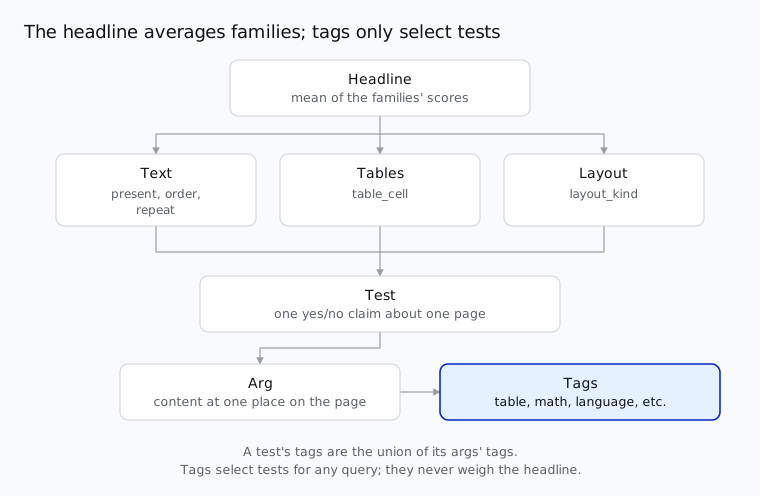
A test is a yes/no question about one page. Each test type belongs to one of three families:
| test type | checks | family |
|---|---|---|
present |
this text, number or equation appears | text |
order |
text A comes before text B | text |
repeat |
this line appears exactly N times | text |
table_cell |
this cell sits under these headings and beside these neighbors | tables |
layout_kind |
the block holding this line is a heading, text or table | layout |
A family's score is the share of its tests that pass, and the headline is the mean of the three family scores.
Each test is tagged by what it checks:
- structure:
table,math,formandmulti_column; - rendering:
handwriting,tiny,rotatedanddegraded; - role:
heading,caption,footnote,list,code,figureandheader_footer; - script: ISO 15924 codes (
Latn,Hani,Deva, ...); and - language: ISO 639-3 codes (
eng,fra,tha, ...).
Tags never decide whether a test passes, or the headline. They are only for slicing the results, such as the score
on handwriting alone. The full design is docs/design.md.
uv pip install omni-parse-bench                 # the scorer, and grading a dataset folder on disk
uv pip install 'omni-parse-bench[harness]'      # + the adapters, to get predictions
uv pip install 'omni-parse-bench[benchmark]' # + the Hugging Face client, to download our datasetA run is one system on one dataset. It works in three stages:
- Plan: check the config, the system's keys and the dataset's files before any call;
- Predict: send each page to the system and save each answer in the run's folder; and
- Grade: score the saved answers. Grading calls no system, so it can be done again for free.
A run is one config: a YAML file with every key written out. opb init writes one for a registered system, every
option at its default, and on our dataset:
opb init datalab > datalab.yamldataset: hf://datasets/datalab-to/omni_parse_bench # a folder, or a Hugging Face dataset
manifest: manifest.parquet # which of its pages, with which files
scorers:
unit_tests: {}
rows:
sample: 0
limit: 0
only: null
timeout: 900.0 # seconds
workers: 0 # pages in flight at once; 0 for the system's default
system:
datalab:
mode: accurate
...opb systems lists every system you can run; opb systems <name> shows its options and the key it needs.
--set path=value changes one value the file has, read as YAML, and refuses a path it hasn't. This runs Datalab
on 5 pages:
export DATALAB_API_KEY=...
opb run --config datalab.yaml --set rows.sample=5 --out runs/
opb run shows the plan and asks before calling any system.
Each open model has a folder, omni_parse_bench/harness/providers/serve/<model>/, that serves it on any GPU host:
docker build -t opb-chandra-ocr omni_parse_bench/harness/providers/serve/chandra-ocr
docker run --gpus all -p 8001:8001 opb-chandra-ocr
opb init chandra-ocr > chandra.yaml
opb run --config chandra.yaml --set system.chandra-ocr.base_url=http://<host>:8001
The system's served option names the weights and their revision. Before any call, opb asks the server what it
serves, and refuses a run whose server serves something else.
docs/providers.md
has more information.
runs/datalab-20261026-185915-9c9e/
  config.yaml                         # resolved config; point to this to rerun
  settings.json                       # the question it answers and the launch; resume checks against it
  server.json                         # for a model you serve: what its server said it serves
  records/<id>.json                   # response from the system in full (cost, raw response)
  predictions/<id>.json               # prediction portion of the response
  unit_tests/summary.json             # summary of scores
  unit_tests/scores.jsonl             # scores (line-per-page)
  unit_tests/details/<id>.jsonl       # detailed info (verdict per test) per page
docs/API.md has more information,
including how to run on your own dataset.
You can resume a run by giving a path to its folder.
opb resume runs/<run>                                         # continue where it stopped
opb resume runs/<run> --retry-failed                          # also ask again for timeouts, etc.
opb resume runs/<run> --retry-failed --set timeout=1800 # increase timeoutopb run grades its run when it finishes. To grade a run again, or a folder of your own predictions:
opb grade runs/datalab-20261021-160012-3f9a        # a run knows its own dataset
opb grade mine/ --dataset my-dataset/              # your predictions on your own dataset
A summary looks like this:
{
  "scorer": "unit_tests",
  "run": "datalab-20261021-160012-3f9a",
  "rows": 5,
  "failed": {"system": 1, "unusable": 0, "no_answer": 0, "not_scored": 0},
  "coverage": 0.8,
  "headline": 0.657,
  "headline_is": "score",
  "score": 0.657,
  "families": {
    "text": {"score": 0.72, "tests": 120, "documents": 5},
    "tables": {"score": 0.59, "tests": 40, "documents": 3},
    "layout": {"score": 0.66, "tests": 30, "documents": 5}
  }
}
A failed page counts with all its tests failed (UnitTests.score_failure), in the headline and in each family. failed
says why pages failed, and coverage is the share of pages scored.
The scorer works on its own, with no dataset and no network. Here is one page with three tests:
from omni_parse_bench import data
from omni_parse_bench.scorers import unit_tests

tests = unit_tests.tests.parse("example-p1", {"tests": [
    {
        "id": "t1",
        "test_type": "present",
        "output_type": "html",
        "derivation": "text_layer",
        "tags": ["Latn", "eng"],
        "args": {"content": {"text": "Quarterly revenue rose 12%", "max_diffs": 1}},
        "settings": {},
    },
    {
        "id": "t2",
        "test_type": "order",
        "output_type": "html",
        "derivation": "text_layer",
        "tags": ["Latn", "eng", "heading"],
        "args": {
            "before": {"text": "Summary", "max_diffs": 0},
            "after": {"text": "Outlook", "max_diffs": 0},
        },
        "settings": {},
    },
    {
        "id": "t3",
        "test_type": "table_cell",
        "output_type": "html",
        "derivation": "publisher_markup",
        "tags": ["table"],
        "args": {
            "cell": {"text": "4.2", "max_diffs": 0},
            "top_heading": {"text": "Q3", "max_diffs": 0},
        },
        "settings": {},
    },
]})

pred = {
    "html": (
        "<h2>Summary</h2>"
        "<p>Quarterly revenue rose 12% on the year.</p>"
        "<table>"
        "<tr><th>Q2</th><th>Q3</th></tr>"
        "<tr><td>3.9</td><td>4.1</td></tr>"
        "</table>"
        "<h2>Outlook</h2>"
    ),
}
verdicts = unit_tests.score(pred, tests)>>> verdicts
[Verdict(id='t1', result='pass', why=''),
Verdict(id='t2', result='pass', why=''),
Verdict(id='t3', result='fail', why="no cell matching '4.2' in any table")]
>>> page = data.Page("example-p1", "example", "example", "pages/example-p1.pdf", "gold/example-p1.json", ("html",))
>>> lines = unit_tests.lines(verdicts, tests, page)
>>> unit_tests.summarize(lines)
{'score': 0.5, 'families': {'text': {'score': 1.0, 'tests': 2, 'documents': 1},
'tables': {'score': 0.0, 'tests': 1, 'documents': 1}}}
>>> unit_tests.summarize([x for x in lines if "table" in x["tags"]]) # one tag: the same summary on a slice
{'score': 0.0, 'families': {'tables': {'score': 0.0, 'tests': 1, 'documents': 1}}}A verdict is pass or fail, with why saying what went wrong.
The same from the command line, which prints the verdicts:
opb score --pred outputs.json --gold gold/<page_id>.jsonWith [harness] installed, each system is an adapter class. harness.system makes one from a system name and its
options and harness.predict sends one page under the same rules a run uses (one time budget, retries, failures
recorded) and returns its record:
from pathlib import Path

from omni_parse_bench import harness
from omni_parse_bench.scorers import unit_tests

datalab = harness.system("datalab", {"mode": "accurate"})
record = harness.predict(datalab, harness.Input(Path("pages/<page_id>.pdf"), frozenset({"html", "blocks"})))
record["output"]    # {"pages": [{"html": "...", "blocks": [...]}]}
record["raw"]       # the answer as the system gave it
record["cost"]      # what it cost, its wall time and attempts

unit_tests.score(record["output"]["pages"][0], unit_tests.tests.read("gold/<page_id>.json"))   # one page's outputs
opb predict --system datalab --page pages/<page_id>.pdf --options '{"mode": "accurate"}'
Note: Opus 5.5 and GPT-6.1 Sol use the full-page recorded wall time: HTML plus layout when requested, including failed pages and retries, with 32 workers per model, while the other points retain the earlier median of successful, unretried HTML calls only. These timing definitions differ and are not directly comparable.

Tests on a page the system refused or failed to answer count as failed. Not English is a test with a language tag other than English.
| parser | handwriting | math | table | form | multi-column | tiny text | rotated | degraded | not English |
|---|---|---|---|---|---|---|---|---|---|
| Datalab accurate | 76.7 | 98.0 | 95.6 | 84.3 | 94.9 | 90.5 | 95.1 | 89.7 | 83.0 |
| Gemini 3.8 Flash * | 79.4 | 98.3 | 93.8 | 85.0 | 92.3 | 88.5 | 92.5 | 85.4 | 83.8 |
| Datalab balanced | 65.7 | 97.0 | 94.2 | 78.5 | 92.7 | 90.8 | 88.1 | 87.4 | 77.1 |
| GPT-6.1 Sol | 75.0 | 96.3 | 93.2 | 82.6 | 91.0 | 87.0 | 90.6 | 86.5 | 80.7 |
| Reducto | 67.3 | 97.9 | 92.7 | 79.8 | 91.3 | 88.6 | 88.8 | 85.8 | 71.3 |
| LlamaParse | 64.2 | 86.7 | 93.7 | 79.1 | 91.4 | 86.2 | 92.6 | 77.1 | 76.7 |
| chandra-ocr-2 (Datalab) | 66.8 | 96.1 | 90.7 | 74.6 | 90.4 | 89.1 | 82.2 | 85.9 | 74.6 |
| Claude Opus 5.5 * | 75.6 | 95.9 | 93.8 | 81.9 | 89.4 | 91.4 | 90.1 | 87.3 | 81.5 |
| Mistral OCR | 69.0 | 95.6 | 91.5 | 76.7 | 89.6 | 81.2 | 89.4 | 78.6 | 77.0 |
| Claude Sonnet 5.5 * | 69.6 | 93.9 | 92.0 | 77.7 | 86.5 | 90.2 | 93.0 | 87.0 | 78.4 |
| dots.mocr | 58.9 | 96.1 | 89.3 | 68.5 | 86.4 | 81.1 | 83.8 | 71.7 | 74.4 |
| GPT-5.6 Sol | 67.6 | 92.4 | 91.6 | 79.2 | 87.4 | 81.1 | 77.9 | 87.0 | 75.2 |
| MinerU2.5-Pro | 52.0 | 88.0 | 91.9 | 75.9 | 87.5 | 85.1 | 82.3 | 77.6 | 60.4 |
| Infinity-Parser2-Pro | 65.2 | 88.5 | 88.2 | 72.6 | 88.8 | 84.1 | 71.7 | 87.0 | 66.0 |
| Surya OCR 2.5 (Datalab) | 58.4 | 97.0 | 88.0 | 71.6 | 85.4 | 81.7 | 74.7 | 75.4 | 72.0 |
| OXR-1.0 | 56.9 | 90.2 | 86.9 | 65.0 | 86.8 | 73.9 | 69.5 | 78.1 | 51.5 |
| Extend | 77.0 | 76.6 | 94.7 | 79.9 | 88.3 | 88.2 | 90.4 | 84.8 | 74.2 |
| MiniCPM-OCR-1.0 | 52.8 | 94.0 | 87.8 | 68.9 | 80.7 | 77.6 | 72.5 | 73.0 | 52.6 |
| Surya OCR 2 (Datalab) | 55.2 | 94.7 | 83.7 | 66.0 | 82.0 | 74.7 | 59.9 | 72.6 | 71.4 |
| Azure | 60.1 | 92.6 | 86.1 | 73.0 | 83.8 | 85.5 | 86.9 | 65.8 | 65.8 |
| LightOnOCR-3-4B | 65.4 | 96.4 | 85.5 | 75.2 | 83.0 | 79.5 | 75.7 | 87.8 | 64.8 |
| LightOnOCR-3-0.8B | 57.1 | 87.1 | 85.2 | 73.0 | 81.6 | 78.4 | 77.1 | 76.8 | 60.2 |
| GLM-OCR | 54.1 | 85.8 | 86.4 | 67.0 | 84.2 | 71.7 | 72.7 | 76.8 | 48.2 |
| Unlimited-OCR 2 | 47.7 | 85.1 | 83.5 | 65.2 | 80.5 | 69.6 | 51.9 | 70.6 | 54.9 |
| Nemotron 3.5 Parse | 51.2 | 92.1 | 83.0 | 67.2 | 82.1 | 72.8 | 61.8 | 72.3 | 61.6 |
| Unlimited-OCR | 43.9 | 95.4 | 79.6 | 64.0 | 79.3 | 67.0 | 36.6 | 65.7 | 51.8 |
| PaddleOCR-VL-1.6 | 52.3 | 85.4 | 84.8 | 63.8 | 79.2 | 72.2 | 77.7 | 68.9 | 52.9 |
| Infinity-Parser2-Flash | 58.1 | 96.9 | 77.3 | 66.5 | 81.7 | 73.3 | 56.8 | 78.7 | 54.5 |
| DeepSeek-OCR-2 | 43.6 | 91.4 | 75.3 | 56.0 | 77.4 | 62.1 | 36.5 | 60.8 | 52.1 |
| Indra OCR (Datalab) | 31.0 | 59.7 | 75.1 | 52.4 | 69.6 | 69.3 | 68.8 | 46.2 | 56.5 |
| HunyuanOCR-1.5 | 42.1 | 53.0 | 70.6 | 53.2 | 72.1 | 54.8 | 49.2 | 65.6 | 53.0 |
| olmOCR-2 | 38.5 | 79.7 | 64.7 | 55.6 | 66.2 | 55.0 | 63.6 | 70.4 | 39.0 |
| Nanonets-OCR2-3B | 41.3 | 88.2 | 68.2 | 61.9 | 64.7 | 44.1 | 35.7 | 69.3 | 43.6 |
| Tesseract | 0.8 | 0.8 | 12.7 | 14.4 | 16.0 | 25.8 | 6.1 | 2.7 | 12.3 |
The code is Apache 2.0: see LICENSE, and
NOTICE for the third-party code it includes
(KaTeX, MIT; a rewrite of olmOCR-bench's table parser, Apache 2.0).
The data's licenses are per source. Each source of the pages, its license and the credit it requires are in
licenses/, one file per source. The tests
are CC BY 4.0, except those converted from olmOCR-bench (ODC-BY 1.0) and fr-bench-pdf2md (MIT), and those quoting
Wikipedia on three handwriting pages (CC BY-SA 4.0).
@misc{omniparsebench2026,
  title        = {Omni Parse Bench: A Document-Parsing Benchmark},
  author       = {{Datalab}},
  year         = {2026},
  howpublished = {\url{https://github.com/datalab-to/omni_parse_bench}},
}
Please also cite the upstream datasets whose pages or tests this benchmark uses; they are listed in
licenses/.