
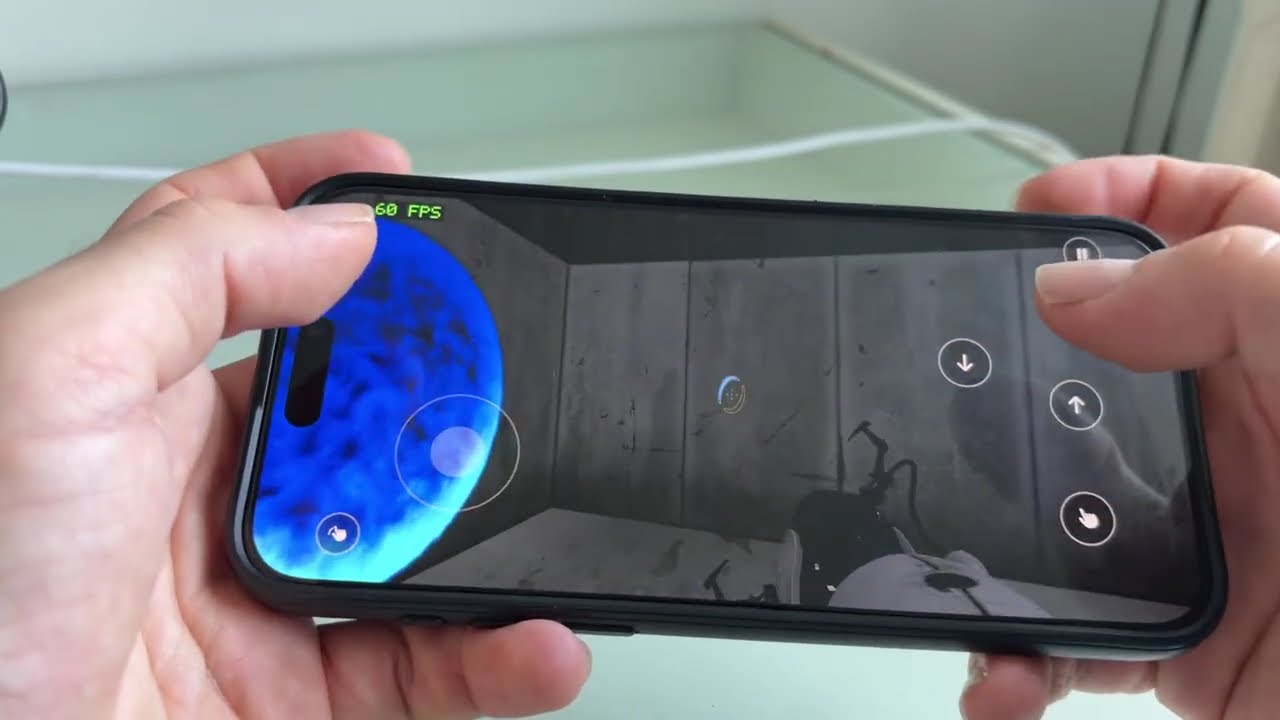
Video: Portal 2 running natively on an iPhone 15 Pro Max.


This project turns the Linux version of Portal 2 into a native ARM64 app for macOS and iPhone. The game's x86 machine code is translated into C and compiled: no emulator, no Wine, no Rosetta. A small runtime provides what the Linux binaries expect (libc, threads, SDL2, graphics, Steam).
- Mac: fully playable, 235–280 fps on an M3 Pro (1280×720 to 1512×982).
- iPhone: fully playable on an iPhone 15 Pro Max at a steady 60 fps, with touch controls and portals fired by tapping the back of the phone.
You must own Portal 2. This repository has no game files and no Valve code: everything is generated on your machine from your own copy. The app and the generated code contain Valve's game, so keep them for yourself and don't share them.
Unofficial fan project, not affiliated with or endorsed by Valve. Portal, Portal 2, Steam and Source are trademarks of Valve Corporation. Provided as is, without warranty.
- An Apple silicon Mac with Python 3, Homebrew and the
Xcode command line tools (
xcode-select --install), thenbrew install sdl2 freetype fontconfig. - Portal 2 on Steam:
- the game folder (the one with
portal2/,platform/andbin/); the Windows version works; - the Linux binaries: open the Steam console (
open steam://open/console) and typedownload_depot 620 661(about 90 MB).
- the game folder (the one with
- Optional but recommended: Rust, for the faster Metal renderer.
- For iPhone: Xcode with your Apple ID (a free account works),
brew install xcodegen cmake ninja, the iPhone connected by cable with Developer Mode on, and about 12 GB free on it. Tested on an iPhone 15 Pro Max only.
git clone https://github.com/kanapitsas/portal2-recomp.git
cd portal2-recomp
./setup.sh "/path/to/Portal 2" "/path/to/depot_661"          # Mac
./setup.sh --ios "/path/to/Portal 2" "/path/to/depot_661"    # Mac and iPhone
Without paths, setup.sh looks where Steam usually puts them. It builds the
game (about 10 minutes the first time) and creates
~/Applications/Portal 2 Natif.app. Re-running it is safe and quick.
The app contains its own executable and libraries; the game files stay where
Steam put them. After a rebuild or a change to config/local.json, run
python3 tools/make_app.py to update the app.
iPhone: first create an Apple Development certificate (Xcode > Settings >
Accounts > Manage Certificates > + > Apple Development). setup.sh --ios
then builds, signs and installs the app and copies the game data (about
11.5 GB, once; tools/ios_device.sh data copies it again after a reinstall).
On the phone, trust your account in Settings > General > VPN & Device
Management. With a free account, re-run ./setup.sh --ios every 7 days.
More in docs/ios.md.
On Mac, open Steam with the account that owns Portal 2, then open Portal 2 Natif (it starts Steam if needed).
On iPhone: left stick to move, right half of the screen to look, buttons to jump, crouch, use and pause, and a tap on the back of the phone (left or right) to fire a portal. Everything is tunable in Settings > Portal 2. The iPhone version has no Steam, but it can join a Mac in LAN co-op.
Co-op works over the local network: a Mac hosts, and another Mac or an iPhone joins by IP address (how). Co-op through Steam invites or over the internet is not tested.
The game renders with Metal when libd3d9metal is available, and with
OpenGL otherwise. Metal measured about +50 % fps on a Mac and +20–25 % on
an iPhone, and fixes the too-dark image of OpenGL on iPhone.
- If Rust is installed,
setup.shfetches and buildslibd3d9metal(about a minute) from a pinned commit of mtld3d's native host branch. Without Rust, or if that build fails, it says so and the game uses OpenGL.P2_NO_METAL=1 ./setup.shskips it. - The end of
setup.shtells which renderer the Mac app uses. The iPhone library is built separately and can still fall back to OpenGL. P2_RENDERER=openglforces OpenGL; on iPhone, use Settings > Portal 2 > Rendu.- F3 on Mac shows the renderer and the frame rate; on iPhone, the counter in the top-left corner does.
Details: docs/d3d9-bridge.md.
./uninstall.shIt asks before moving the app and its log to the Trash, and asks again for the saves. It never touches the Steam game files or the Linux binaries.
- Language, LAN co-op and manual build
- iOS port, controls and settings
- Metal renderer
- Steam bridge, fast memory mode, OpenGL audit, lifter coverage
- STATUS.md: the development log, with every measurement
Tests: GitHub Actions runs the Python tests and the runtime checks (also under UBSan). It cannot build the full game, whose files are not in the repository.
Limits: built and tested against one release of the Linux binaries (depot 661, manifest 8940703274703023246); another release needs new indirect call roots. iOS has no Steam features (achievements, invites, cloud saves); co-op there is LAN only. A free Apple account allows 3 sideloaded apps and 7-day profiles.
- mtld3d (zlib) by Alexander Theissen, the Direct3D 9 on Metal behind the Metal renderer; its Wine-free build is discussed in athei/mtld3d#1193.
- gl4es (MIT) by ptitSeb, patched for iOS.
- SDL2 (zlib), FreeType (FTL).
- Steamworks.NET (MIT), whose interface metadata generates the Steam bridge.
- Touch controls inspired by MacNativeGames (MIT).
Built in October 2026 by Raphaël Kanapitsas, with AI coding agents (Anthropic's Claude Code and OpenAI's Codex) writing most of the code under his direction. The history and STATUS.md show the whole process.
Copyright (C) 2026 Raphaël Kanapitsas and contributors.
GNU GPL v3.0. It does not cover Portal 2 or any Valve material.