Repository navigation
Releases: Aaron-CNSD/GlassDeck
Release list
Glass Deck 1.7.0 — ⌘K command palette

One field for everything
- ⌘K opens a command palette. Every switch, every tool action and every tab in a single list: type three letters, press return, done. The header carries a small
⌘Kchip so the shortcut is discoverable instead of folklore. - The search is boring on purpose. Exact title beats prefix, prefix beats word prefix, word prefix beats substring, a keyword hit beats a loose subsequence, and ties break on the shorter title. There is no machine learning in a search box with thirty entries.
- English words find Chinese controls. Each switch carries its own id plus the words people actually reach for —
dark,theme,mute,trash,screenshot,clipboard— so a panel in 简体中文 still answers todark. The right-hand note counts as searchable text too: typing 动作 lists every action, 开关 lists every switch. - ↑↓ moves, ↩ runs, esc closes, clicking works. An empty query lists everything, so the palette doubles as a menu for people who have not memorised the deck yet. No results says so in words rather than sitting blank.
- Switch rows show live state ("开关 · 已开启"). The palette does not shell out to
defaults/osascriptwhile it opens: it reads the cache that the background refresh already filled, so summoning it is instant even on a cold panel. - The action list is the Tools tab flattened, not a second implementation — same
SystemControllerandDevToolscalls, same localised titles, same status strip when a permission is missing. - ⌘1…⌘7 jump straight to a tab, for the keyboard-only crowd.
Small print
- Nine new interface strings, translated into all five languages (en, zh-Hans, zh-Hant, ja, ko).
- The palette is one local
NSEventmonitor while the window is key; no global hot key, no event taps, no Accessibility permission.
Compatibility and packages
- macOS 14 or newer, universal binary (arm64 + x86_64), ad hoc signed, not notarized.
- DMG installer, ZIP app bundle and a SHA256 checksum file.
- The Xcode build embeds the WidgetKit extension;
build-app.sh(SwiftPM) still ships the app without the widget.
Validation
- Offscreen layout harness renders the deck at 380 × 780 pt in four palette states — empty query,
dark,动作, and a query with no matches — checking six full rows, no clipped text, an opaque footer that hides the scrolling row underneath, and the empty-state message centred. - Ranking exercised against live titles and aliases:
dark→ 深色模式,mute/静音→ 静音,trash→ 清空废纸篓,clip→ 清空剪贴板,剪贴板→ tab + OCR + clear,tab→ all seven tabs,3→ 窗口. - Universal release build with the WidgetKit extension,
codesign --verify --deep --strict, and a launch-and-quit smoke test of the signed bundle. npm testfor the web assets.
Glass Deck 1.6.2 · Monitor, with a history
Glass Deck 1.6.2
Monitor, with a history
- CPU, memory and network each gain a 60-sample history curve, drawn once per second and right-aligned so the newest sample is always at the right edge.
- The network curve auto-scales against a decaying peak, so one large download does not flatten the following minutes into a straight line at zero.
- Idle machines draw a low, honest line instead of an amplified seismograph: the vertical scale has a fixed floor.
- The tab scrolls, so content can no longer squeeze the cards or clip the last row.
Top processes
- Top four processes by CPU are listed under the graphs, with resident memory and a percentage that turns orange past 50 %.
- The × button asks a GUI app to quit normally (it gets to save) and sends
SIGTERMto anything without a bundle. A refusal — a process owned by another user, or one that ignores the signal — reports in the status strip instead of pretending to work. - Sampling runs
pson a utility queue every three seconds, and only while the Monitor tab is open. No Accessibility permission, no event taps, no private APIs.
Rolled up from the 1.6.1 work (not shipped on its own)
- Clipboard shelf: the last 60 text clips, pinning, click-to-copy, all stored locally at
~/Library/Application Support/GlassDeck/clipboard.json. Items a password manager flags as confidential are never recorded. - Icon-only tab bar with tooltips; seven labelled segments did not fit a 380 pt panel.
Compatibility and packages
- macOS 14 or newer, universal binary (arm64 + x86_64), ad hoc signed, not notarized.
- DMG installer, ZIP app bundle and a SHA256 checksum file.
- The Xcode build embeds the WidgetKit extension;
build-app.sh(SwiftPM) still ships the app without the widget.
Validation
- Offscreen layout harness renders the Monitor tab in a 380 × 780 pt panel after a full minute of real sampling: three curves, four process rows, nothing clipped and no gap in the header.
psparsing is a pure function and was exercised against live output, including paths containing spaces and/Applications/Foo.app/Contents/MacOS/Foo-style commands.- Universal release build with the WidgetKit extension, signature verification,
npm testfor the web assets. - Quit was exercised on a real GUI app: the row disappears after the process exits and the list re-reads.
Glass Deck 1.6.0 · Built in offline workspace
Glass Deck 1.6.0
Built in workspace
- Switch between the existing system controls and the new Workspace in the same Mac application window.
- Open Workspace from the menu bar's right-click menu.
- Focus timer, task list, notes, length/temperature conversion, text statistics and JSON formatting are included in the app bundle and work without a network connection.
- Import backups using a native file picker; export JSON backups and TXT notes using native Save dialogs.
- Native copy uses the macOS clipboard after the user's Copy action.
- Workspace and browser data are stored separately. Use backup export/import to transfer records. The workspace UI currently uses Simplified Chinese; native system controls keep the existing five languages.
Compatibility and packages
- macOS 14 or newer.
- Universal binary: Apple Silicon arm64 and Intel x86_64. Built and interactively tested on Apple Silicon; Intel and macOS 14 hardware were not available for runtime testing.
- DMG installer and ZIP app bundle.
- Ad hoc signed; not Apple notarized.
- The existing SwiftPM build does not bundle the optional WidgetKit extension. Build the Xcode project for a signed widget extension.
- Windows, Linux, iOS and iPadOS users can continue using https://aarongame.com/app/ in a modern browser. These assets are Mac apps, not native builds for the other platforms.
Validation
- 11 Node tests cover timer recovery, backup validation, conversions, asset scope, deployment routes and native resource bundling.
- Universal release build and code-signature verification.
- Interactive checks cover system/workspace switching, notes retained across app launches, and TXT export contents through the macOS Save panel.
- Device sleep/app exit does not provide a background alarm guarantee. User records stay on this device and do not sync automatically.
Glass Deck v1.5.1
Install
brew tap Aaron-CNSD/tap
brew trust Aaron-CNSD/tap
brew install --cask glassdeck
Or download the DMG — it opens with a window you can drag straight into Applications.
First launch may say "damaged": the build is ad-hoc signed, not notarised. Clear it once:
xattr -dr com.apple.quarantine "/Applications/GlassDeck.app"v1.5.1 — runs on Intel now
The 1.5.0 DMG was arm64-only. Anyone on an Intel Mac would have double-clicked it and got nothing. The release is now a single universal binary (arm64 + x86_64), built with one swift build --arch arm64 --arch x86_64.
It also had no icon. The bundle copied AppIcon.appiconset but never declared CFBundleIconFile, so Finder, About and the login-items list all drew a blank document. Now there's a real AppIcon.icns inside the bundle.
The DMG is drag-to-install — an /Applications symlink sits next to the app.
Nothing else changed. If you already run 1.5.0 on Apple Silicon, there is no functional reason to update.
Requires macOS 14 or later, Apple Silicon or Intel. Liquid Glass (NSGlassEffectView) activates on macOS 26; on 14–15 the panel falls back to frosted NSVisualEffectView.
If it earns a place in your menu bar, a ⭐ on the repo helps other people find it.
Glass Deck v1.5.0
Install
brew tap Aaron-CNSD/tap
brew trust Aaron-CNSD/tap
brew install --cask glassdeck
Or download the DMG, drag GlassDeck.app into Applications, and clear the quarantine flag once:
xattr -dr com.apple.quarantine "/Applications/GlassDeck.app"The build is ad-hoc signed, not notarised — macOS would otherwise call it "damaged". Homebrew users skip this step.
What's new
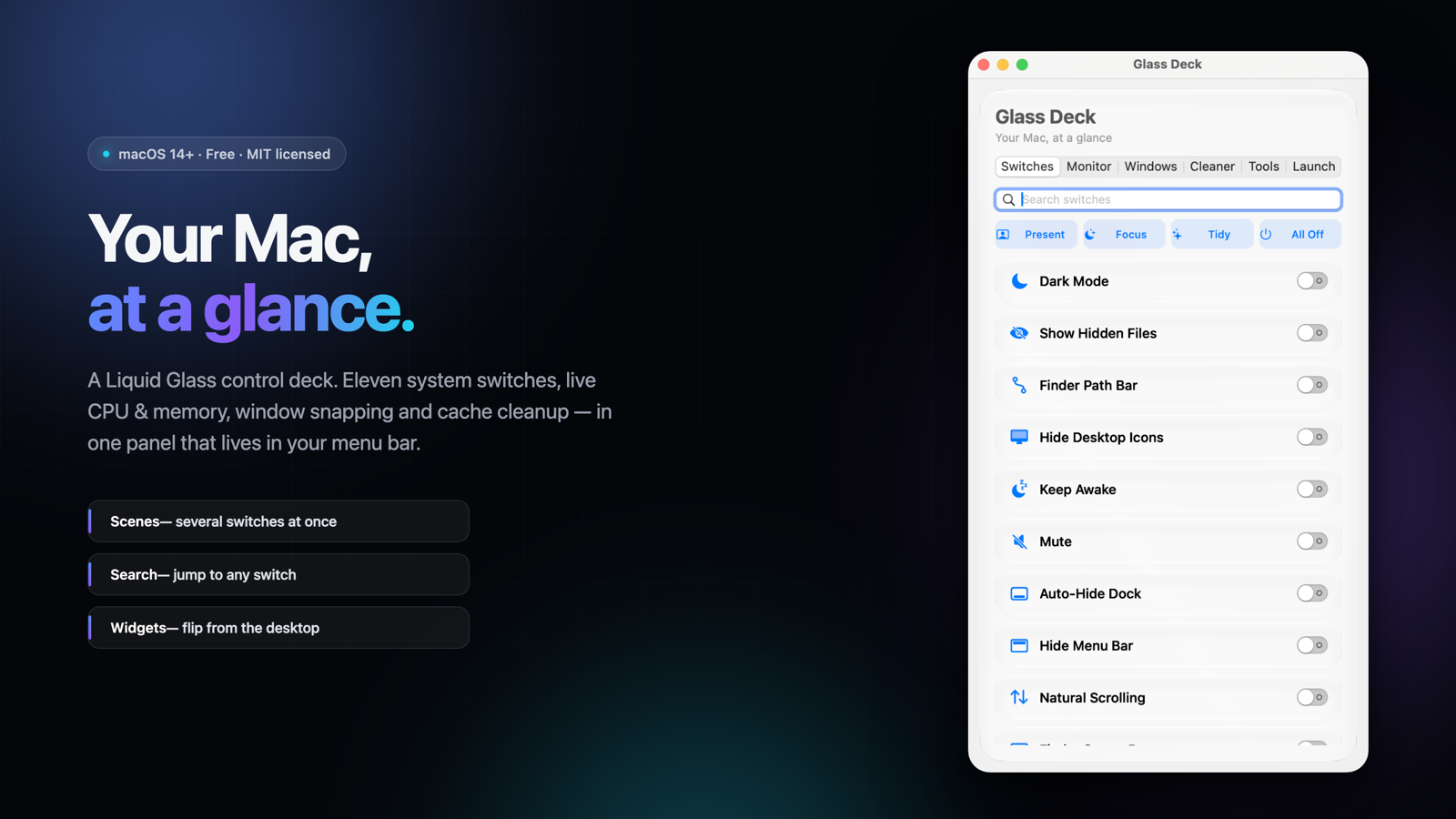
Scenes — one click for the whole job. A scene flips several switches at once, from the panel or straight from the menu bar:
| Scene | What it flips |
|---|---|
| 🎬 Present | hide desktop icons · auto-hide Dock · hide menu bar |
| 🌙 Focus | mute · hide desktop icons |
| ✨ Tidy | hidden files, path bar, status bar and file extensions off |
| ⏻ All Off | every switch in the deck, off |
Switch search — an inline field above the capsule list. A dozen toggles was finally too many to scroll.
Two more switches — Show Status Bar and Show All Extensions, so the deck is 11 switches, not 9.
Fixed — CFBundleShortVersionString was stuck at 1.0.0 in the SwiftPM bundle; build-app.sh now builds with --disable-sandbox so SwiftPM works inside a sandboxed shell.
Requires macOS 14 or later. Liquid Glass (NSGlassEffectView) activates on macOS 26; on 14–15 the panel falls back to frosted NSVisualEffectView.
If it earns a place in your menu bar, a ⭐ on the repo helps other people find it.
Glass Deck v1.4.0
Glass Deck 1.4.0 —— 每个开关都真的生效了
上一版不少开关点了像没反应。这次不是加功能掩饰问题,而是把「为什么没反应」查清并修掉,
同时补上一块能自己告诉你哪里缺权限的自检面板。
⚠️ 第一次打开提示「已损坏」?包是好的
本包是个人临时签名、未做 Apple 公证,浏览器下载后会被 Gatekeeper 隔离,
新版 macOS 统一显示为「已损坏」。一次性解决:
xattr -cr "/Applications/Glass Deck.app"把应用拖进「应用程序」后,在「终端」执行这一行(需输入开机密码),之后双击即可。
图形界面方式:双击 → 点「完成」→ 系统设置 → 隐私与安全性 → 底部「仍要打开」。
DMG 内已附 安装说明.txt。
修了什么(都是实测确认的根因)
1. 深色模式 / 清空废纸篓点了没反应
应用缺少 NSAppleEventsUsageDescription,Apple 事件被系统静默拒绝。
我用 AEDeterminePermissionToAutomateTarget 实测,Finder 返回 -1744(尚未授权)。
现在补上权限声明,首次操作会正常弹窗询问。
2. 大部分开关「点一下就弹回去」
旧代码在 0.15 秒后回读状态,而访达/程序坞重启要一两秒,于是开关先弹回原位。
改为最长 ~2.5 秒轮询校验,只有确实失败才回退。
3.「隐藏菜单栏」永远不会有任何效果
原来写的是 AppleMenuBarVisibleInFullscreen,还写进了访达的偏好域。
改为 _HIHideMenuBar(NSGlobalDomain)+ 重载 SystemUIServer,真正生效。
4. 截图 / 录屏把界面卡死
waitUntilExit() 跑在主线程,面板直接冻住,也没有任何提示。
现在放到后台执行,并先检查「屏幕录制」权限。
5. 成功和失败都没有反馈
新增非阻塞状态条:成功显示「已完成:重启访达」,失败给出原因和「打开设置」按钮。
6. 最上面 4 个开关看不见
NSStackView 直接当滚动视图内容时坐标未翻转,导致列表从底部开始显示,
深色模式、显示隐藏文件、访达路径栏、隐藏桌面图标被藏到可见区上方。
7. 简中界面启动即崩溃
简体中文词典有重复键,运行时 Dictionary literal contains duplicate keys 直接 SIGTRAP。
新增:权限自检
「工具」标签第一项。逐项真实探测,不是静态文案:
| 检测项 | 方法 |
|---|---|
| 系统命令 | defaults / killall / osascript / screencapture 是否可执行 |
| 访达、程序坞、全局偏好写入 | 写入探针键 → 读回比对 → 删除 |
| 控制「系统事件」(深色模式) | AEDeterminePermissionToAutomateTarget |
| 控制「访达」(清空废纸篓) | 同上 |
| 屏幕录制(截图/录屏) | CGPreflightScreenCaptureAccess |
| 界面设置应用工具 | activateSettings 是否存在 |
橙/红两行就是某个功能失效的原因,右侧按钮直接跳到对应的隐私设置面板。
校验
- 大小 1,881,000 B 级(UDZO 压缩)
- md5
19aadf7500957e955a82bcb0178f23b8 codesign -v→ valid on disk
Glass Deck v1.3.3
What's new in v1.3.3
🪟 Compact panel
A smaller, simpler face for the menu bar: 300x250, four switches, no tabs. Right-click the menu bar icon → Compact Panel to swap between the full deck and this one. Same glass, a quarter of the surface area.
🎛️ More switches
- Finder status bar
- Show file extensions
- (plus everything from before: dark mode, hidden files, path bar, desktop icons, keep awake, mute, auto-hide dock, menu bar, natural scrolling)
🧰 More tools
- Flush DNS cache
- Restart Finder
- Copy local IP
- Lock screen
💧 Deeper glass
Hover highlights are now a diagonal gradient sheen instead of a flat wash, and the deck itself carries a slow ambient light sweep. Both subtle on purpose — the goal is "this thing is made of glass", not "this thing is doing a light show".
🔧 Fixes
- The version string was silently missing from the built app because Xcode was generating its own Info.plist over the real one. Now it actually says 1.3.3.
- The app icon is finally inside the bundle (it was declared but never shipped).
- Popover view is pre-loaded, so opening it no longer hitches.
⚠️ Known limitation
The bundled widget extension still needs an Apple Development certificate to appear in the widget gallery — this build is ad-hoc signed.
Install
Drag Glass Deck.app into Applications. On first launch, right-click → Open to bypass Gatekeeper (ad-hoc signed, un-notarized build).
Links
- Website: https://aarongame.com
- Source: https://github.com/Aaron-CNSD/GlassDeck
Glass Deck v1.3.2
What's new in v1.3.2
🧩 WidgetKit extension (experimental)
Desktop widgets in three sizes — small, medium and large — at a glance, showing nine system switches. Tap a switch straight from your desktop.
🏗️ Shared framework
The switch model now lives in a Shared framework used by both the app and the widget, so the two can never drift apart.
🌐 New website
aarongame.com rebuilt as a product page, with structured data so search engines show it as Glass Deck instead of the domain's older content.
⚠️ Known limitation worth reading
macOS only registers widget extensions signed with a real Apple Development certificate. This build is ad-hoc signed (no paid developer account), so the widget may not show up in the widget gallery. The extension is inside the bundle at Contents/PlugIns/GlassDeckWidget.appex and works once re-signed.
Also note: a sandboxed widget cannot flip system settings on its own — tapping a switch opens the app and hands the request over.
Install
Drag Glass Deck.app into Applications. On first launch, right-click → Open to bypass Gatekeeper (ad-hoc signed, un-notarized build).
Links
- Website: https://aarongame.com
- Source: https://github.com/Aaron-CNSD/GlassDeck
Glass Deck v1.3.1
What's new in v1.3.1
🐛 Critical fixes
- Fixed a crash when switching language while the panel was open
- Fixed switches being unclickable due to a hover overlay intercepting clicks
- Removed unstable layer-transform animations
🌍 Manual language switcher
Switch between 5 languages (English, 简体中文, 繁體中文, 日本語, 한국어) from the
menu bar — right-click → Language. The change applies after a quick relaunch.
⚡ Smoother, lag-free toggles
System commands now run off the UI thread, so flipping switches feels instant.
🔷 More liquid glass
Hover highlights and smooth tab transitions across the whole deck.
🧰 New tools
- Empty Trash
- Empty Clipboard
- Start Screen Saver
Install
Drag Glass Deck.app into Applications. On first launch, right-click → Open to
bypass Gatekeeper (ad-hoc signed, un-notarized build).
Links
Glass Deck v1.3.0
What's new in v1.3.0
🌍 Manual language switcher
Switch between 5 languages on the fly from the menu bar — right-click → Language.
No restart needed. Choose English, 简体中文, 繁體中文, 日本語 or 한국어, or follow your system.
⚡ Silky-smooth, lag-free toggles
Eliminated the click lag. System commands now run off the UI thread, so flipping
switches feels instant — no more stutter when toggling Finder or Dock settings.
🔷 More liquid glass
- Hover highlight + press animation on every switch capsule
- Smooth fade transitions when switching tabs
- Glass-prism menu bar icon, matching the app icon
🧰 New tools
- Empty Trash
- Empty Clipboard
- Start Screen Saver
Install
Drag Glass Deck.app into Applications. On first launch, right-click → Open to
bypass Gatekeeper (this is an ad-hoc signed, un-notarized build).