Repository navigation
not attempted #2369

Replies: 1 comment

|
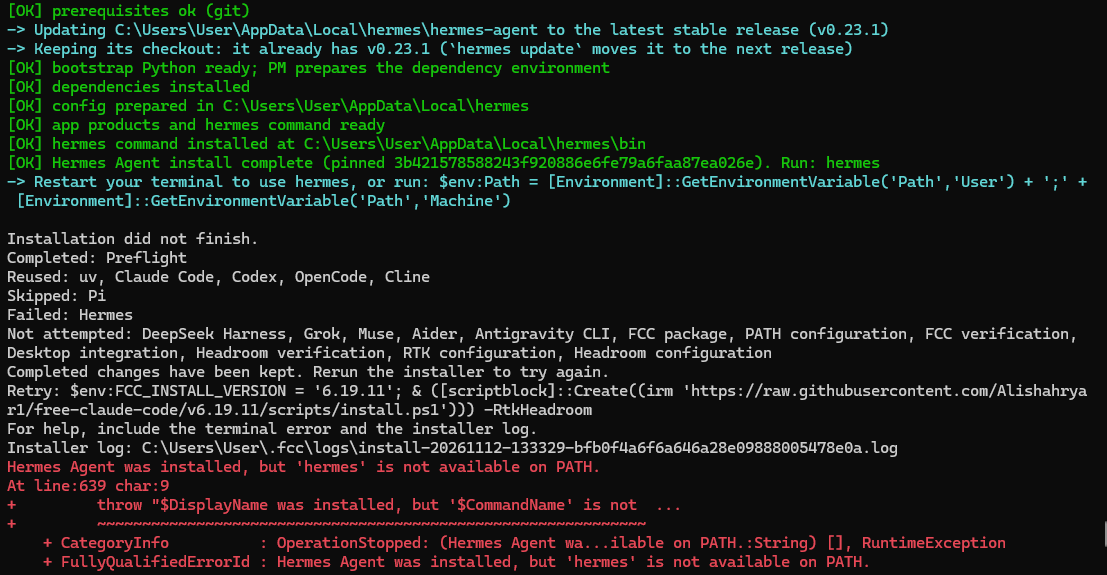
I found the cause in the FCC installer source. Hermes was installed successfully – the failure is in FCC's post-installation PATH check. In FCC v6.19.11, $env:LOCALAPPDATA\hermes\hermes-agent\binHowever, your log shows that the Hermes installer actually placed its command in: $env:LOCALAPPDATA\hermes\binThis matches the [official Hermes Windows documentation](https://hermes-agent.nousresearch.com/docs/user-guide/windows-native). Why the installer fails FCC runs the Hermes installer in a separate PowerShell process. Hermes updates the User PATH, but that change is not automatically reflected in FCC's already-running parent process. After installation, FCC calls Workaround Open a new PowerShell window and run: hermes --versionIf that works, simply rerun the FCC installer using the retry command from your log. Hermes should be detected as already installed. Alternatively, to make Hermes available immediately in the current PowerShell session: $bin = Join-Path $env:LOCALAPPDATA 'hermes\bin'
$env:Path = "$bin;$env:Path"
Get-Command hermes -CommandType Application
hermes --versionThen rerun the FCC installer. If the command is still missing, verify that Suggested fix for FCC In Add-PathEntry (Join-Path $env:LOCALAPPDATA "hermes\bin")Keeping the existing path as a fallback would preserve compatibility with older Hermes installations. This is an FCC installer PATH-handling issue, not a failure to install Hermes itself. No need to delete or reinstall the Hermes environment if the executable is already present. |


Uh oh!
There was an error while loading. Please reload this page.
install-20261112-133329-bfb0f4a6f6a646a28e09888005478e0a.log
All reactions