Repository navigation
how can i get rtk and headroom #2372

Replies: 1 comment 1 reply

|
Hi @avydesigns, You can still install RTK and Headroom afterward. You don't need to remove your existing Free Claude Code installation. 🧰 The installer has a On Linux or macOS, download the official installer and run it with that option: curl -fsSL https://raw.githubusercontent.com/Alishahryar1/free-claude-code/main/scripts/install.sh -o install-fcc.sh
sh install-fcc.sh --rtk-headroomThe first command downloads the installer so you can review it. The second runs it with RTK and Headroom enabled. On Windows PowerShell, you can use: Invoke-WebRequest https://raw.githubusercontent.com/Alishahryar1/free-claude-code/main/scripts/install.ps1 -OutFile install-fcc.ps1
.\install-fcc.ps1 -RtkHeadroomChoose the coding agents you want to configure when prompted. The installer also checks or updates Free Claude Code, so review the installation steps before continuing. After installation, you can check whether both tools are available: rtk --version
headroom --versionIf those commands return version information, the tools are available in your terminal. Here's the installer source if you want to check it: Hope that clears it up. 🚀 |

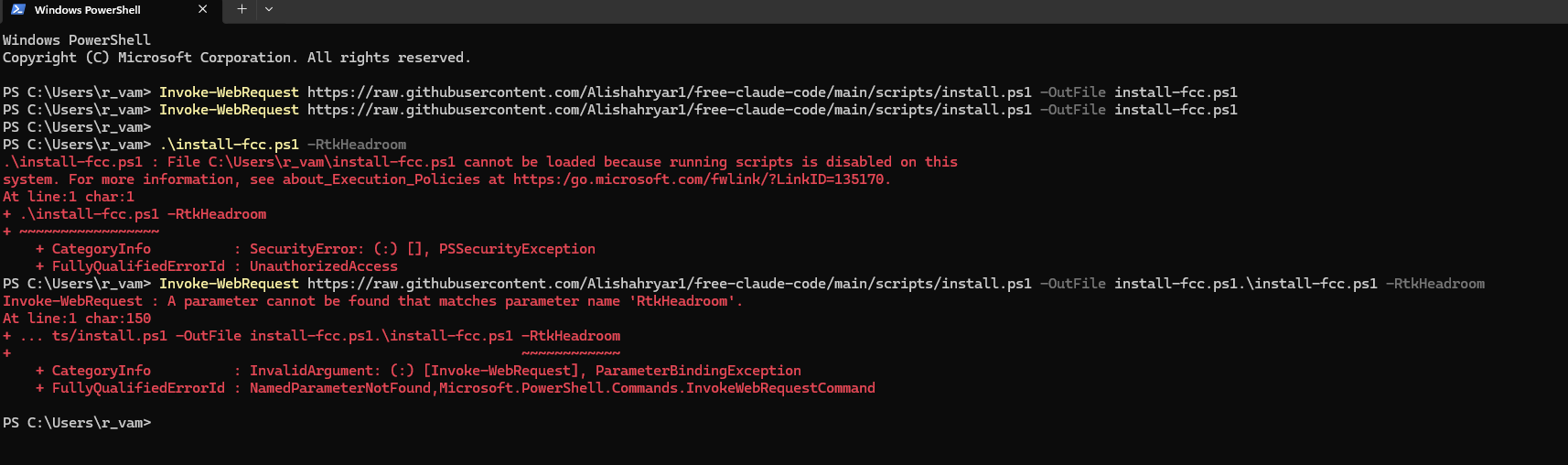
im pretty new to this powershell and terminal things what am i doing wrong? |


Uh oh!
There was an error while loading. Please reload this page.
I didnt install it when i was updating im just wondering how i can get it after the install!
All reactions