Repository navigation
Home
MyFox tweaks are my styles and settings for the Firefox interface. They are installed and updated by MyFox, or by hand: see the README.
Below is what exactly they change in Firefox.
Mozilla's designers (or whoever does this over there) have been experimenting with the browser's interface for a long time, and in my view it gets worse the further they go. I may be wrong, but it feels like these people don't use their own product. They probably sit in Chrome, having never known another browser. But that's just my guess.
Stretching mobile interfaces over the desktop is a general trend, which of course excuses nobody. But Mozilla seems to have decided to prove that it isn't like the others, even at the cost of usability.
Nova proves it. When I first saw it, it felt like a mobile interface for people with fingers as thick as a sausage. And everything is round. They should have made the window round too, and explained it by the browser now running on the round screen of a smartwatch. Never mind that I move a pointer across the screen rather than poke it with a sausage. What if someone does poke? What if nobody made it for them? We respect minorities' rights, so our interfaces are friendly to sausage pokers! Diversity, damn it!
I want to keep my habits and use the screen space wisely. What's the point of a 27" monitor if it fits as much as a 15" one did twenty years ago? That's one of the reasons I do what I do.
The changes below are shown in "before" and "after" pairs of screenshots: the original Firefox and Firefox with MyFox tweaks.
The overall look:
Light theme:

Dark theme:

- Dense rows and spacing, 12px text in menus, tooltips, the sidebar and the browser's pages. In the original Firefox a tab is 44px high, the navigation bar's buttons are 40px, the text of menus and tooltips is about 15px.
- One small corner radius, 5px, for everything: menus, cards, buttons, fields, the address bar, the find bar, the new tab page, the window buttons. Not a new reading of the *nix idea that "everything is a circle": in the original Firefox tabs, the address bar and buttons are rounded by 24px.
- The violet accent is replaced with blue. For many years Mozilla trained a reflex: violet means private browsing. And now this. Not right.
- Keyboard focus is the same everywhere: a thin border in the accent color. In the original Firefox it's a thick ring, turquoise with a theme.
- Every "✕" close button is round: here, I think, round is in place.
Two themes, MyFox Dark and MyFox Light, based on the Google Chrome Dark and Google Chrome Light themes by Stylefox on addons.mozilla.org. The light one is a warm light gray.
The look of tabs, buttons, fields, switches and checkboxes is made for the colors of these themes and works only with them. With another theme those look as in the original Firefox; everything else works with any theme.
The theme is switched on about:myfox, "Settings" → "Appearance". The websites' light or dark appearance switches along with it.
| Light theme | Dark theme |
|---|---|
 |
 |
- In the original Firefox tabs are pills, apart from the navigation bar. In MyFox tweaks the selected tab joins the navigation bar with concave curves ("ears") at its sides: a tab should look like a tab, not a pill. Or rename the interface element to a pill.
- Background tabs are stacked toward the selected one and fade into its color. A tab under the pointer rises above its neighbors.
- A tab is 30px high instead of 44px, its font 11px instead of 15px. The title is centered, not pinned to the start.
- The close button shows only on hover. In the original Firefox it shows on every tab, and with many tabs only on the selected one.
- When a tab plays sound, its sound button sits next to the site icon and is always visible. In the original Firefox it replaces the site icon on hover.
- A pinned tab has a pin in its icon's corner. Unpinning a tab is one click on the pin; in the original Firefox it's at least two actions: a right click and a menu item. The pin shows on hover. When vertical tabs are collapsed to icons it always shows, so pinned tabs are easy to tell from the others.
- The "New tab" button is a small 22px circle instead of 32px.
Light theme:

Dark theme:

In the original Firefox a container tab is marked with a straight line in the container's color. It doesn't follow the tab's rounded corners, and between vertical tabs it looks like a separator. In MyFox tweaks a horizontal tab's line in the container color runs along its top and bends round its corners, a vertical one is tinted with a gradient from its outer edge. When a container tab is selected, the window takes a faint tint of its color: you can see which container the page is in.
Horizontal tabs:
Light theme:

Dark theme:

Vertical tabs:
| Light theme | Dark theme |
|---|---|
 |
 |
In the original Firefox a group is a line in the group's color under its tabs. In MyFox tweaks a group is a backing in its color, rounded like a tab, with a label carrying its name at the start; the group's tabs are tinted with its color. A collapsed group shows the number of its tabs on the label. Hovering the label recolors the whole group.
Light theme:

Dark theme:

When vertical tabs are turned on, the original Firefox repaints the whole window in the dark frame color. In MyFox tweaks the window keeps its colors, and the tabs work as horizontal ones do, only turned: each spans the column's width, the selected one flows into the page with "ears" above and below, background ones are stacked toward the selected one.
- With the sidebar expanded, the original Firefox draws pinned tabs as a grid of tiles. In MyFox tweaks they are a row of tabs: the selected one a full tab with its title by the page, the others icons before it.
- With the sidebar collapsed to icons, pinned tabs are ordinary rows, not tiles.
- With the sidebar expanded, a group is a tree in its color: branches lead from the label with its name to the tabs. In the original Firefox it's a line beside the group's tabs.
- The "New tab" row is just an icon, without a label.
| Light theme | Dark theme |
|---|---|
 |
 |
The sidebar collapsed to icons:
| Light theme | Dark theme |
|---|---|
 |
 |
In the original Firefox the pages have their own margins and frames, and the pair of tabs is outlined with a rounded frame. In MyFox tweaks the two pages are two separate cards with a narrow gap, the active one with a thin accent frame. The pair of tabs is one tab with a thin divider, the selected half's title in bold. If the pair's tabs are in different containers, the window above each page is tinted in its container's color.
Light theme:
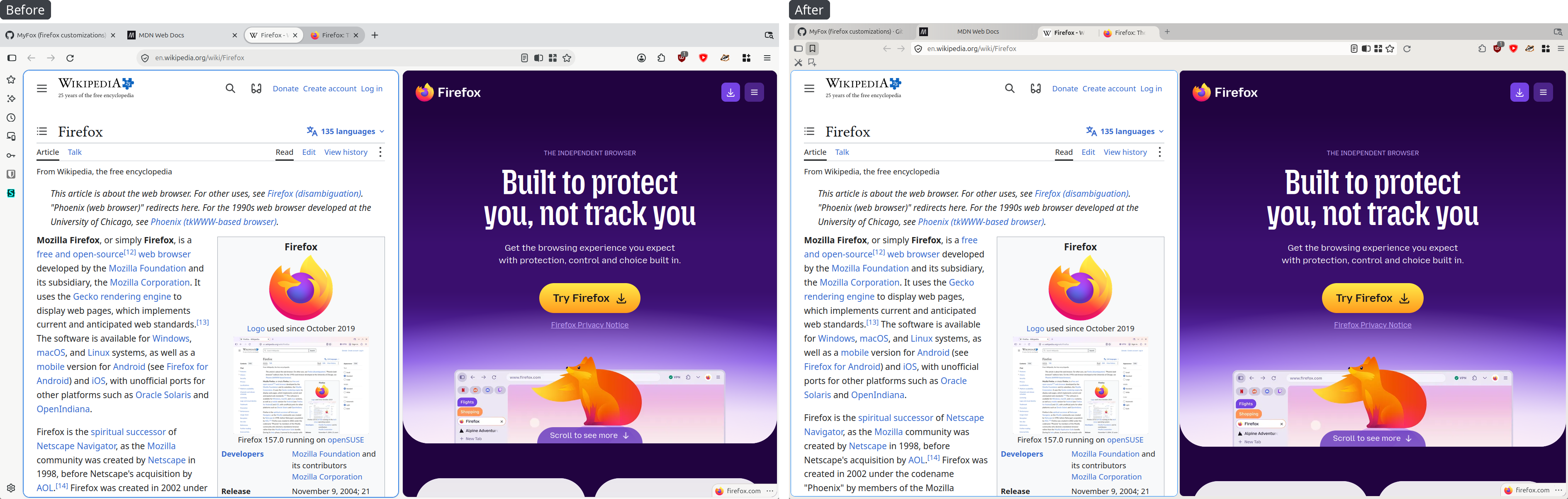
Dark theme:
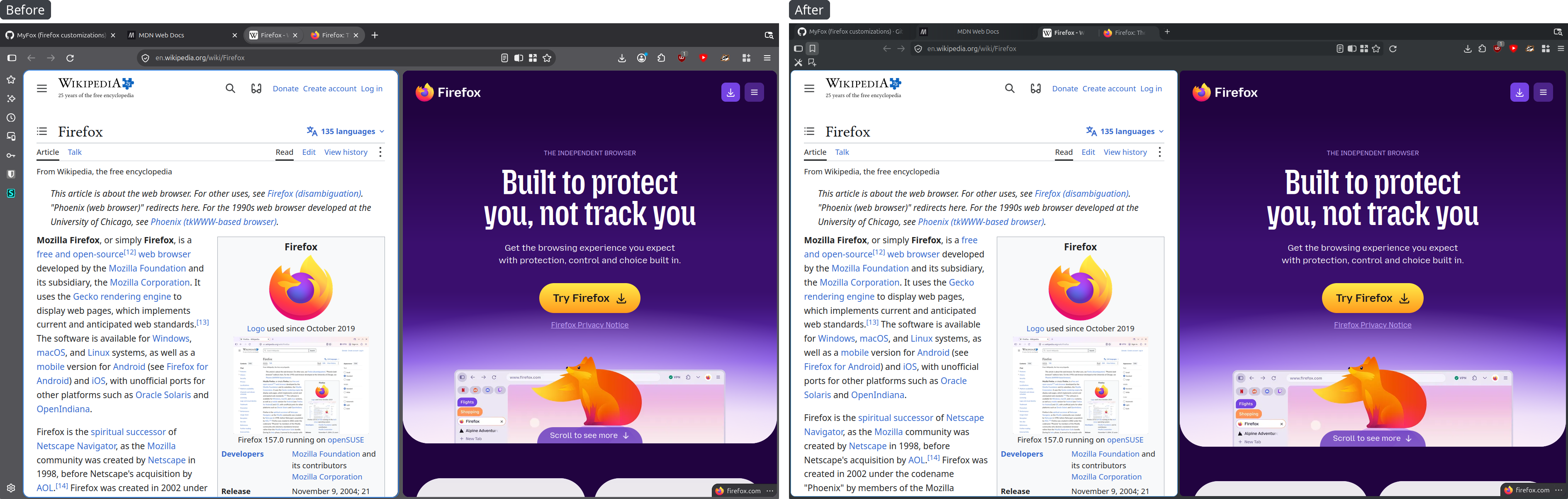
- The page and the sidebar are cards rounded at every corner, a little in from the window's frame. In the original Firefox only their top corner is rounded, and they're pressed against the window's edges.
- The navigation bar's buttons are 24px instead of 36–40px.
- The navigation bar has a button that shows and hides the bookmarks toolbar. The original Firefox has no such button.
- Tooltips (of buttons, bookmarks, the sidebar and the browser's pages) are in the theme's colors, with a quiet frame, 12px text. In the original Firefox on GTK the system draws them: system colors, a bright frame, text of about 15px.
- The tab preview has small margins and a clear shadow. In the original Firefox it has big margins and a faint shadow that barely sets it apart from the page.
In the original Firefox the sidebar is a set of odds and ends: each section has its own margins, heading height and row look. In MyFox tweaks I tried to bring them to one style.
- Margins of 4px instead of 12px, history rows 24px instead of 28px, row highlights without pills.
- History looks like the bookmarks tree: rows nested under their date. In the original Firefox the dates are big card headings.
- The bookmarks tree has no yellow dotted frame round the current row. That's GTK's system frame, weird and legacy.
- Every section's heading and search are at the same height and don't jump when switching sections.
- Passwords in the same style as bookmarks and history. In the original Firefox passwords have their own near-black background and big cards. More in Passwords.
Bookmarks, history, tabs from other devices and passwords:
| Light theme | Dark theme |
|---|---|
 |
 |
 |
 |
 |
 |
 |
 |
- Downloads. As in Opera Presto, which had Downloads in its sidebar. The list of downloads with a heading, a search and a "Clear downloads" button. Tab and Shift+Tab step from one download to the next. "Show all downloads" in the downloads panel opens the sidebar, not the Library. The Library window is alien to everything else. Mozilla has supposedly abandoned XUL and rolls out one redesign after another: Photon, Proton, now Nova (apparently because of a fatal flaw in the previous ones). Yet the Library, like Page Info, has stayed a separate XUL window, straight from 2007. It goes against the whole concept.
- Extensions. The list of extensions, each with a switch and a "..." menu with "Options", "Manage" and "Remove". The search filters the list, Enter searches addons.mozilla.org. The "Manage extensions" button at the bottom opens about:addons. The extensions can also be opened in the sidebar from the extensions (puzzle) panel: a button next to "Manage extensions". In the original Firefox the list of extensions exists only in the about:addons tab and the extensions panel.
- Firefox Translations. Based on the about:translations page. In the original Firefox the built-in translator opens only in a tab.
All the new panels, like the original ones, are turned on and off with checkboxes in the sidebar's customize panel and are in the View → Sidebar menu. That menu's items are radio items: one panel is open at a time. In the original Firefox they're checkboxes, as if several could be ticked.
| Light theme | Dark theme |
|---|---|
 |
 |
| Light theme | Dark theme |
|---|---|
 |
 |
In the original Firefox the sidebar's buttons stand in a column beside it. In MyFox tweaks they can be put in a row above it, as in Opera Presto. It's turned on with the "Tools bar above the sidebar" checkbox in the sidebar's customize panel; in a new profile it's on.
Beside or in a row, with horizontal or vertical tabs, the sidebar's first button stands right under the first buttons of the navigation bar and the bookmarks toolbar, and the buttons don't jump when switching.
On the left the buttons beside the sidebar, on the right in a row above it.
| Light theme | Dark theme |
|---|---|
 |
 |
In the original Firefox passwords live in two places, apparently made by different teams in different years: in the sidebar (the new one) and on the about:logins page (the old one). Even their searches are separate: the same query can find different things in the panel and on the page. Both have huge cards and lots of air: on a 27" 2K monitor the sidebar fits four passwords.
about:logins and the passwords in the sidebar:
Light theme:

Dark theme:

Note
In Firefox's code the passwords sidebar is called megalist-alpha. Judging by the name, it isn't the final version yet and may be reworked. Before rebuilding a password card, MyFox tweaks checks that every part of Firefox it needs is there. If a new Firefox changes something, the card stays the original one: with giant plates (unless they fix that), but whole and working, with no half-done layout and no dead buttons.
- A password card is a small form: short labels "Site", "User", "Password" in a column, aligned on their colons, the values beside them, rows close together. In the original Firefox each value has a label in small capitals above it, the site has an icon and is a link, and at the bottom is a full-width "Edit" button.
- Rows aren't buttons. In the original Firefox a click on a row copies the username or the password, and a click on the site opens it, though nothing shows that. In MyFox tweaks each row has its own buttons, shown while the pointer is on the row: "open" and "copy" for the site (the full address), "copy" for the username, "show" and "copy" for the password. After a copy the button shows a check mark and "Copied" for two seconds. The card and the row under the pointer are lit.
- "Edit" is a pencil in the card's top left corner, shown on hover.
A card, the pointer on the username row:
| Light theme | Dark theme |
|---|---|
 |
 |
- Alerts (a breached site, a vulnerable password, no username): the label of the row with the problem is highlighted, a breach in red, the rest in orange, and the "View alert" bar is a row of the card with a quiet tint. In the original Firefox it's a dark orange block across the card with big bold text. The alerts themselves, opened with the arrow, have no bright blocks either.
Alerts:
| Light theme | Dark theme |
|---|---|
 |
 |
Opened alerts:
| Light theme | Dark theme |
|---|---|
 |
 |
- While something is searched for, the line under All / Alerts says how many were found. The original Firefox doesn't show that anywhere.
- The "..." menu has "Remove found passwords": it removes what the search found, after a confirmation.
- "Select several" in the "..." menu: the cards get checkboxes, and a bar at the top says "Selected: N" with "Select all", "Clear selection" and "Remove". In the original Firefox passwords are removed one at a time or all at once.
Selecting several passwords (MyFox tweaks only):
| Light theme | Dark theme |
|---|---|
 |
 |
- The page in the settings' colors: the list is a card on a gray background, the login sits on the page itself.
- The login is a form, as in the sidebar: labels in a column before the values.
- The list is denser, logins with alerts are highlighted: a breach in red, a vulnerable password and a login without a username in orange.
- Fields, the hint by the address field and the "..." menu are as everywhere in MyFox tweaks.
The original Firefox draws context menus and bookmarks menus in system colors, and the selected item in the system accent, with a rounded highlight and margins at the edges. In MyFox tweaks menus are in the theme's colors, the selected item lit with a quiet fill, items run edge to edge, square and with smaller margins.
- A row of several buttons (an extension and its "...", a download and its folder) lights up as a whole, not each button separately.
- In the downloads panel downloads are rows, not cards with gaps.
- The form fields' autocomplete menu looks the same. In the original Firefox its items are rounded, and the selected one is outlined in the accent.
- The gear menu on about:addons and other drop-downs have the context menu's text size and density. In the original Firefox they have 14px text and big margins.
- In the main menu the separator under the profile is a plain line, not a rainbow.
- The panel where Firefox offers to translate a page is denser: in the original Firefox it has 16px margins and big language lists.
- Menus cast a clear shadow on every side. In the original Firefox the shadow is barely visible, and a menu opened from a panel (the translation offer's settings, for one) merges into it.
The tab context menu:
| Light theme | Dark theme |
|---|---|
 |
 |
The downloads panel:
Light theme:

Dark theme:

The extensions panel:
Light theme:

Dark theme:

The main menu:
| Light theme | Dark theme |
|---|---|
 |
 |
The original Firefox opens the address bar's dropdown as a floating rounded card with a glow, wider than the bar and covering the input field. In MyFox tweaks the dropdown hangs under the bar, exactly its width, as an ordinary autocomplete list, with a soft shadow.
- Suggestions span the dropdown's width. In the original Firefox they have side margins and a pill highlight.
- The search engine button at the start of the address bar is a small plate, like the "Firefox" badge. In the original Firefox it's a gray pill.
- The address bar itself is thinner.
Light theme:

Dark theme:

MyFox themes only.
- Buttons have no outline and a quiet fill. In the original Firefox the default button is outlined in the accent.
- Buttons, fields and drop-downs are 26px high, in the original Firefox 32px. Fields have a thin quiet frame; in the original Firefox a focused field glows.
- Switches are 24×12 and flat: gray when off, the accent when on. In the original Firefox they're 32×16 pills in a frame.
- Checkboxes and radio buttons are 12×12, drawn like the switches, in the window's panels and in menu items too. In the original Firefox they're 16×16, and in menus and panels the system draws them: in menus a big framed square.
- Drop-downs in the window's panels (page translation, HTTPS-Only mode, the camera, microphone and screen prompts) have no outline, as on Firefox's pages.
The toolbar's menu:
| Light theme | Dark theme |
|---|---|
 |
 |
In the original Firefox the browser's pages have a 15px base font, menus and cards are pills, lots of air. In MyFox tweaks:
- the font is 12px;
- in the settings the menu on the left is dense rows without rounding, 13px text; in the original Firefox they're pills 42px high (an item on two lines is 61px), 15px text. Cards are closer together;
- on about:addons the add-on cards are denser, names and descriptions smaller (in the original Firefox 16px and 14px);
- the settings, about:addons, about:logins and about:myfox are in the MyFox themes' grays, not in violet shades;
- in the settings boxes have no frames: a row on its own is a filled plate, a group one plate; the file types table looks like a table; the search engine and website language lists are dense plates 2px apart;
- the pages' drop-downs look like menus;
- keyboard focus shows everywhere: inside round close buttons, and the selected item of the settings' menu has a double ring;
- about:addons lines up with the settings: the search, the heading and the start of the page at the same height, and in a narrow window its menu of icons stands as close to the page;
- about:processes is denser, about:logins is in Passwords;
- on the new tab page the search is a field, not a pill.
Light theme:

Dark theme:

Since these XUL windows haven't gone anywhere, MyFox tweaks at least brings them to the look of the rest of the interface. In the original Firefox they have system colors that don't depend on the browser's theme: with a light theme the window can come out dark, and the other way round. And the Library's strip with the "Organize" and "Views" buttons has the window title's colors from the GTK theme.
- The windows are light or dark with the browser's theme.
- With MyFox themes they're in the theme's colors. In the Library the folder tree has the sidebar's color, the bookmarks list the field's. In Page Info the sections at the top look like tabs.
- Fields, buttons and lists are as in the rest of the interface: no frames, 5px rounding, 26px high. In the original Firefox fields have a 12px radius and a bright frame, and the system draws the buttons.
- Trees have no dotted frame round the current row, and the selected row is lit with a quiet fill, not the system accent.
The Library:
Light theme:

Dark theme:

Page Info:
Light theme:

Dark theme:

The page about MyFox tweaks. It opens from the "Help" → "About MyFox tweaks" menu. It has the version, the changelog, links and MyFox tweaks' settings.
| Light theme | Dark theme |
|---|---|
 |
 |
The "Updates" section shows which versions of MyFox tweaks and MyFox are installed and which are out, and what changed in the newer ones. With MyFox 1.2.4 or newer the "Check for updates" button asks MyFox what's new for the tweaks, the themes, the bookmarklets and MyFox itself, and the page shows the last answer on every visit without going online. The "Install updates" button installs them, and then the page offers to restart Firefox.
| Light theme | Dark theme |
|---|---|
 |
 |
The "Profiles" section shows MyFox's profiles: which one is the default, when each was last used and where it was imported from. A profile can be launched in a window of its own, get the tweaks put in or be made the default. With MyFox 1.4.0 or newer "New profile" makes one right from here, with a name and opened at once if wanted, and the profiles MyFox made can be renamed and deleted without closing Firefox. "Import from another Firefox" shows the profiles of other Firefox installs: any of them can be copied or moved into a new MyFox profile, and the copy gets the MyFox theme, light or dark like the original profile's.
| Light theme | Dark theme |
|---|---|
 |
 |
When Firefox with MyFox tweaks starts in a profile for the first time, the tweaks change a few Firefox settings in that profile. This happens only on the first run: if you later change one of these settings back in Firefox's settings or in about:config, the tweaks leave it alone.
- Firefox's AI features are turned off: the chatbot in the sidebar, key points in link previews, smart tab groups, image descriptions in PDFs. Page translation stays on: Firefox translates right on the computer, the page's text isn't sent anywhere.
- Sending technical and usage data to Mozilla, taking part in studies and personalized extension recommendations are turned off.
- On the new tab page recommended stories and sponsored shortcuts and content are turned off.
- DNS over HTTPS through Cloudflare is on, in the "Increased protection" mode: when it fails, Firefox falls back to the ordinary DNS. It is turned off in Firefox's settings: "Privacy & Security" → "DNS over HTTPS". When installing through MyFox it can be left off: the "DNS over HTTPS" checkbox or the
--no-dohflag. - Firefox's built-in VPN and its toolbar button are off, unless you turned the VPN on yourself: Mozilla switches it on remotely, so a profile imported from a regular Firefox may have it on.
- Sponsored suggestions in the address bar (Firefox Suggest; Mozilla shows them only in some countries) are off.
- The compact density is on.
- An image's context menu has "View Image Info": Page Info on its Media tab, for that image. In the original Firefox this item is hidden.
- On the navigation bar Back and Forward stand before the address bar, Reload after it, and there's no Home button.
- The bookmarks toolbar is always shown. In the original Firefox it shows only on a new tab.
- Two bookmarks are added to the bookmarks toolbar, as icons without labels: "Advanced settings" (about:config) and "Add bookmarklets".
- Firefox's first-run wizard isn't shown.
Besides, the tweaks remove the import bookmarks button and the Firefox account button from the toolbar.