Repository navigation
Releases: DHeaven77/SkTestLab
Release list
SkTestLab 1.0.0 — Windows x64

Downloads
- For skUnity / extension + example:
sktestlab-1.0.0-skunity.zip - Extension only:
sktestlab-win32-x64-1.0.0.vsix - Publishing assets:
sktestlab-1.0.0-skunity-kit.zip - The separate
download.zipis the full developer bundle.
SkTestLab
Write Skript. Run real tests. Ship with confidence.
A testing workbench for Skript developers, right inside VS Code. Catch source issues, check your code offline, and run real Paper/Skript assertions. Bring your results together in a dashboard designed for everyday development.
Free · MIT open source · Local execution · No account or telemetry required







Download 1.0.0 · Getting started · Support
Why SkTestLab?
A successful reload is a useful start. Repeatable tests help you check the behavior behind your scripts: reward calculations, boundary values, expected failures, and the functions you change most often.
Keep .sk files and .sktest.json tests together in your project. Run a check from VS Code's native Test Explorer, inspect the evidence, and rerun failures while you work.
A real function. An explicit expectation.
From the included Reward Lab example, reward.sk:
function labReward(tasks: number, multiplier: number) :: number:
    if {_tasks} < 0:
        return 0
    if {_multiplier} < 0:
        return 0
    set {_coins} to floor({_tasks} * 10 * {_multiplier})
    if {_coins} > 1000:
        return 1000
    return {_coins}
Save this runtime test beside it as reward-check.sktest.json:
{
  "schemaVersion": 1,
  "id": "reward-check",
  "name": "Five completed tasks earn 50 coins",
  "mode": "runtime",
  "targets": ["reward.sk"],
  "timeoutMs": 300000,
  "actions": ["set {_reward} to labReward(5, 1)"],
  "assertions": [
    { "condition": "{_reward} is 50", "message": "Expected 50 coins" }
  ]
}
Configure Runtime, then run it from Test Explorer. Keep .sk and .sktest.json files together in version control, so the behavior you expect travels with your script.
Features
🔎 Diagnostics while you write
- Twelve configurable diagnostic rules with confidence labels.
- Targeted Quick Fixes and cross-file declaration warnings.
- Analyze a file or workspace from the Command Palette.
- Works alongside your existing syntax-highlighting extension.
⚡ Offline checks
- Assert diagnostics, declared symbols, source text, and structure.
- Run without Minecraft, server JARs, or Java.
- Versioned
.sktest.jsondefinitions, JSON Schema, and snippets. - Generate starting expectations from declarations and review them before use.
🧪 Real Paper/Skript execution
- Select your compatible Paper/Skript JARs and Java executable.
- Invoke project functions and evaluate Skript conditions in console context.
- Disposable server environments, loopback networking, and owned-directory cleanup.
- Observed runtime versions and console evidence retained with results.
▶️ Native VS Code workflow
- Discover and organize tests in Test Explorer.
- Run selections, related-file tests, or an entire suite.
- Rerun failures, cancel execution, and inspect assertion differences.
- Project setup, test generation, analysis, and runtime validation commands.
📊 Results, history, and reports
- Searchable results, filters, sorting, and expandable assertion evidence.
- Source links, console excerpts, workspace history, and runtime readiness checks.
- Trends for comparable test selections and slowest-test insights.
- Export JSON, HTML, or JUnit reports; use the offline CLI for scripted checks.
🎨 Your dashboard, your style
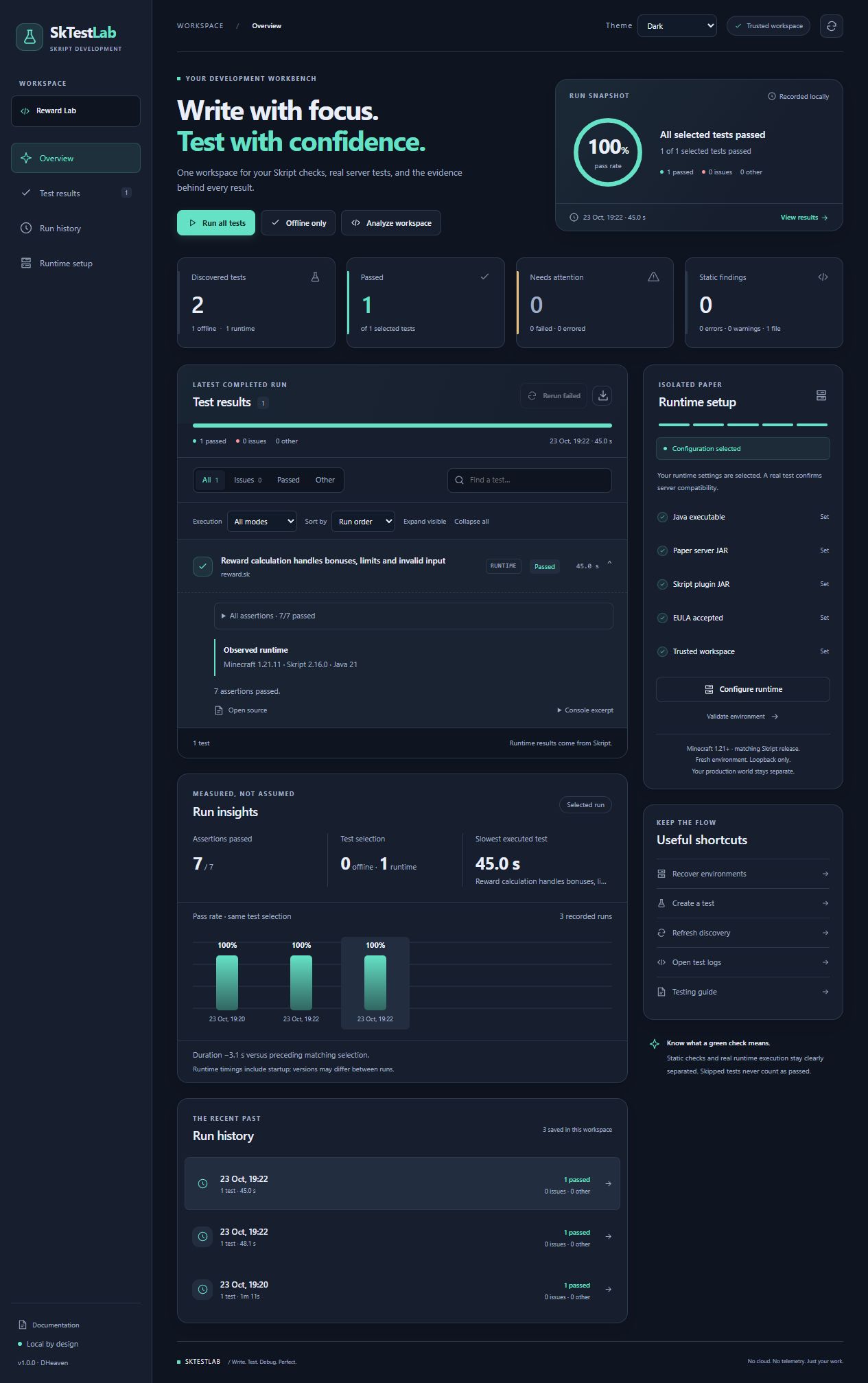
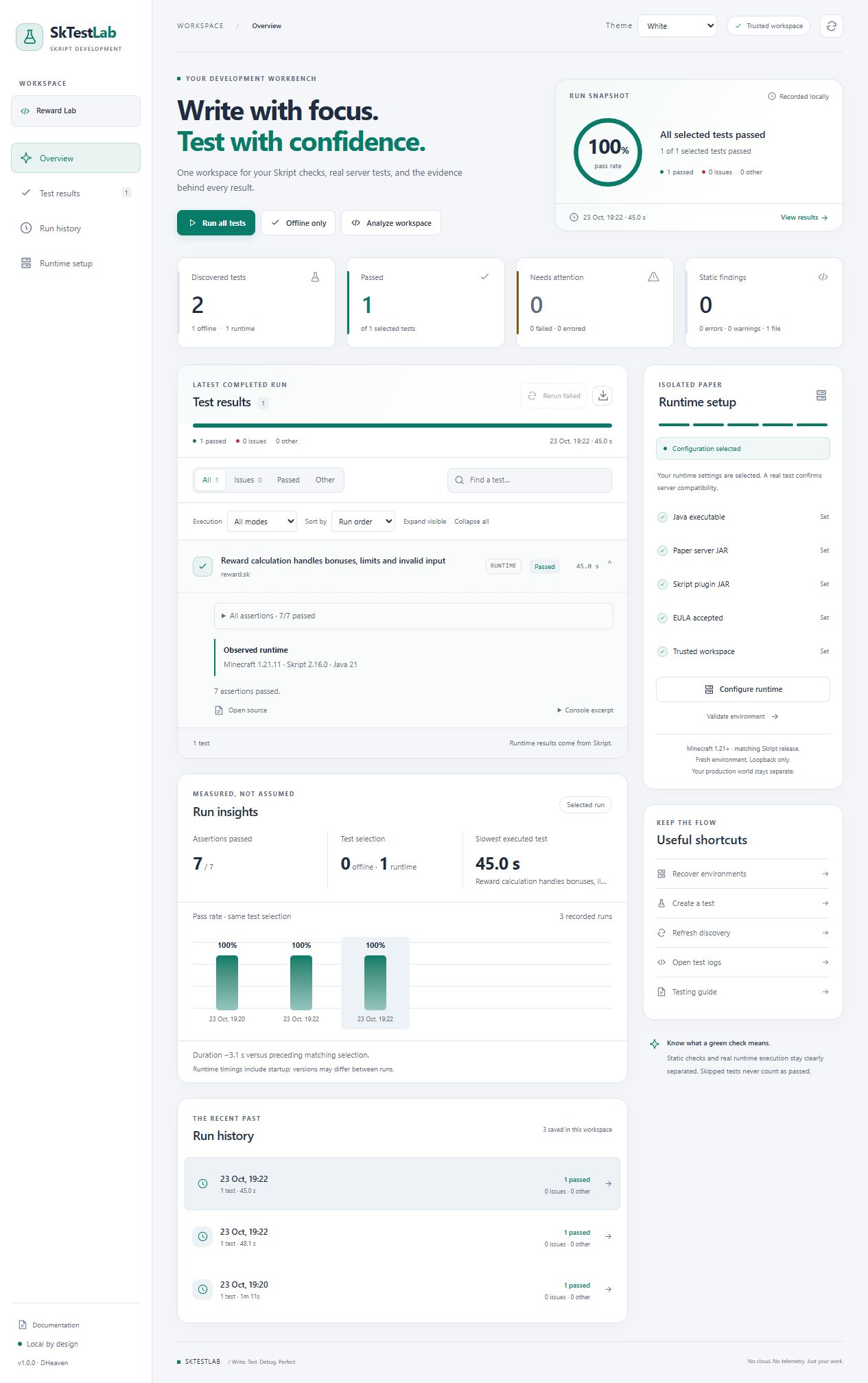
Choose White, Dark, or Follow VS Code. Your appearance choice is remembered.
Search, filter, and sort results; expand assertion details; inspect runtime readiness; and follow trends for comparable test selections. Passing, failing, skipped, cancelled, and errored outcomes stay distinct, so incomplete runs do not become a misleading green result.
🎁 Included example: Reward Lab
Start with a small reward calculator written in ordinary Skript. Its tests check normal rewards, invalid inputs, rounding, and the reward cap, with seven real runtime assertions and an offline source check.
No addons or automated players are needed for the example.
The download contains the SkTestLab extension and the Reward Lab example.
Installation
- Download the extension and example ZIP and extract it.
- In VS Code, open Extensions → … → Install from VSIX and select the included extension.
- Extract
reward-lab.zipand open itsreward-labfolder in VS Code. - Run the example's offline test from Test Explorer, then use SkTestLab: Open Dashboard to inspect the result.
- For real server tests, run SkTestLab: Configure Runtime, select your local Java and compatible Paper/Skript JARs, accept the Minecraft EULA, and run the runtime example.
Requirements
| Component | Requirement |
|---|---|
| Editor | VS Code 1.96 or newer |
| Desktop | Windows x64 |
| Offline checks | No Minecraft server or Java required |
| Runtime server | Compatible Paper for Minecraft 1.21+ |
| Skript | Verified minor lines 2.9–2.17; choose a release compatible with your Paper version |
| Java | Java 21.0.12 used for recorded pairings; follow the requirements of your selected Paper release |
| Runtime setup | Trusted workspace, local Java and JARs, Minecraft EULA acceptance |
Server and plugin JARs are obtained separately.
Testing and compatibility
Ten exact Paper/Skript combinations passed seven Reward Lab assertions each, using Paper 1.21, 1.21.4, or 1.21.11 and Java 21.0.12. The badges summarize this scope; they do not certify every patch pairing. Newer servers may need a different Java version. Other combinations and addons need local verification. Linux, macOS, and Windows ARM64 are not certified for this release.
Release verification also includes 166 unit tests, extension-host and distribution checks, and real runtime checks for failing assertions, parser errors, warning-only scripts, cancellation, and cleanup. See the verification record for the scope and recorded evidence.
View the exact tested pairings
Useful commands
Open the Command Palette and search for SkTestLab:
- Initialize Project and Create Test to get started.
- Analyze Current File or Analyze Workspace for diagnostics.
- Run All Tests, Run Failed Tests, and Stop Tests for execution.
- Configure Runtime and Validate Runtime Environment for server setup.
- Open Dashboard, Open Test Logs, and Export Test Report for results.
Documentation
| Topic | Guides |
|---|---|
| First project | Getting started · Installation ... |
SkTestLab 0.5.0 — Windows beta
SkTestLab 0.5.0 — Windows beta
A pre-1.0 Windows x64 candidate for independent testing. Free and open source under MIT.
What's new
- Redesigned White and Dark dashboards, with Follow VS Code still available.
- A measured run snapshot, results before analytics, clearer runtime readiness, and more readable controls and narrow layouts.
- Incomplete or skipped execution is kept distinct from a fully passing selection.
Install and test
Download sktestlab-0.5.0-download.zip, extract it, and follow INSTALL.md. The bundle contains the Windows x64 VSIX, corresponding source ZIP, portable Reward Lab example, MIT license, checksums, and BETA-TESTING.md.
Requires VS Code 1.96 or later on Windows x64. Offline checks are available without Minecraft. Runtime tests require your own compatible Paper/Skript JARs, Java, and explicit Minecraft EULA acceptance. No server/plugin JARs or accepted EULA settings are included.
The compatibility target is Minecraft 1.21+ with an upstream-compatible Skript release. Recorded real-server verification covers Paper 1.21/Skript 2.9.0 and Paper 1.21.11/Skript 2.14.0 and 2.16.0. Other pairings and addons require local verification. Linux/macOS are not certified release platforms.
Verification
159 unit tests, seven native VS Code checks, type/lint/format checks, Windows installation/upgrade/uninstall acceptance, and the clean-source rebuild passed locally. Both JavaScript bundles and source maps reproduced byte-for-byte. The nested archive audit checked 193 entries with no findings for its implemented patterns; this is not a guarantee of detecting every possible sensitive value. The unchanged Minecraft provider's prior real-server matrix was not repeated for this UI update.
Source commit: 2248f1e15fb83bc55293ff864dc0974b31bd82c3.
Download ZIP SHA-256: d7486fc01e3249fa03496cb5c9ce0f5e023989832801eb7df5a4cdc7f0b2f86a.
This is not the final 1.0.0 release. Independent beta feedback and final human setup/report-saving walkthroughs remain open. Report reproducible issues using the beta feedback template at https://github.com/Alexpetkanov13/SkTestLab/issues. Remove private paths, logs and credentials before posting.