Repository navigation
Releases: FelixJiashengFu/dsh-recent-deliverables
Release list
v1.7.0 · 自动分类与胶囊编辑

自动识别,也保留你的编辑能力
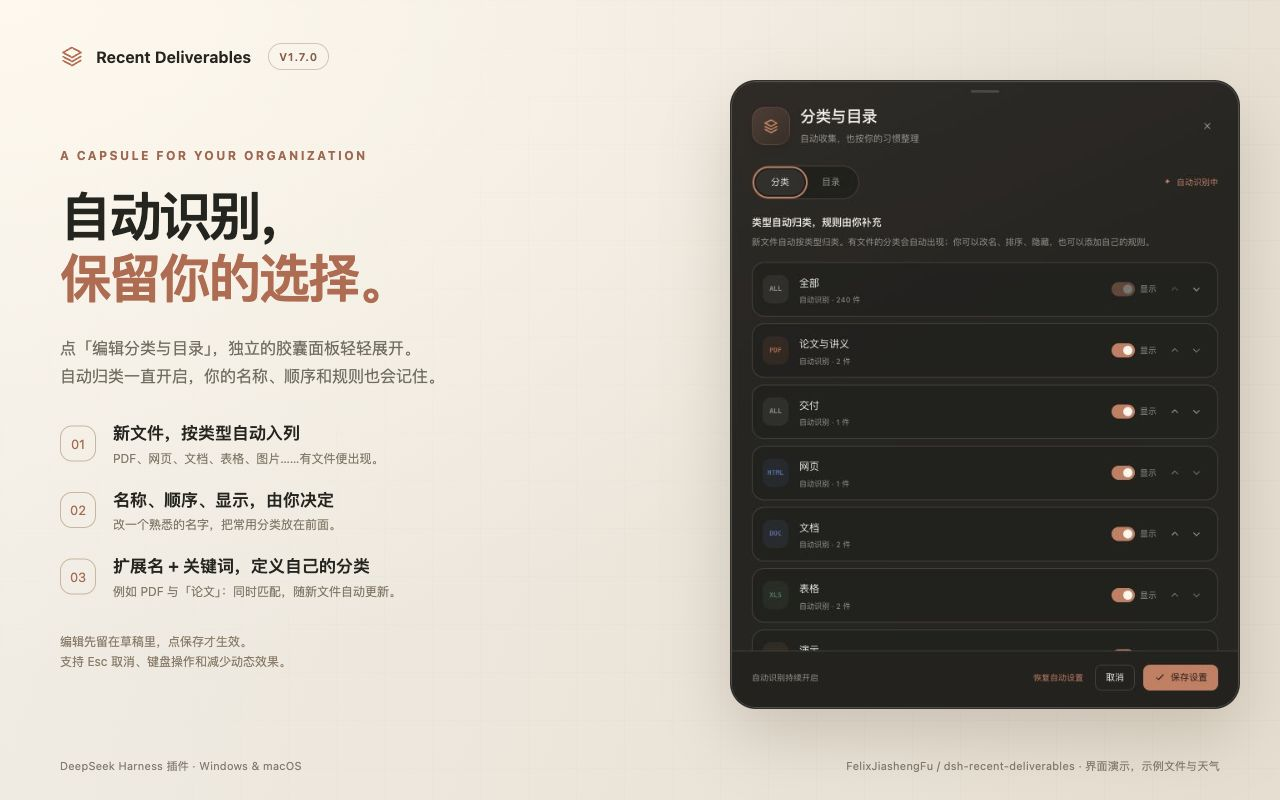
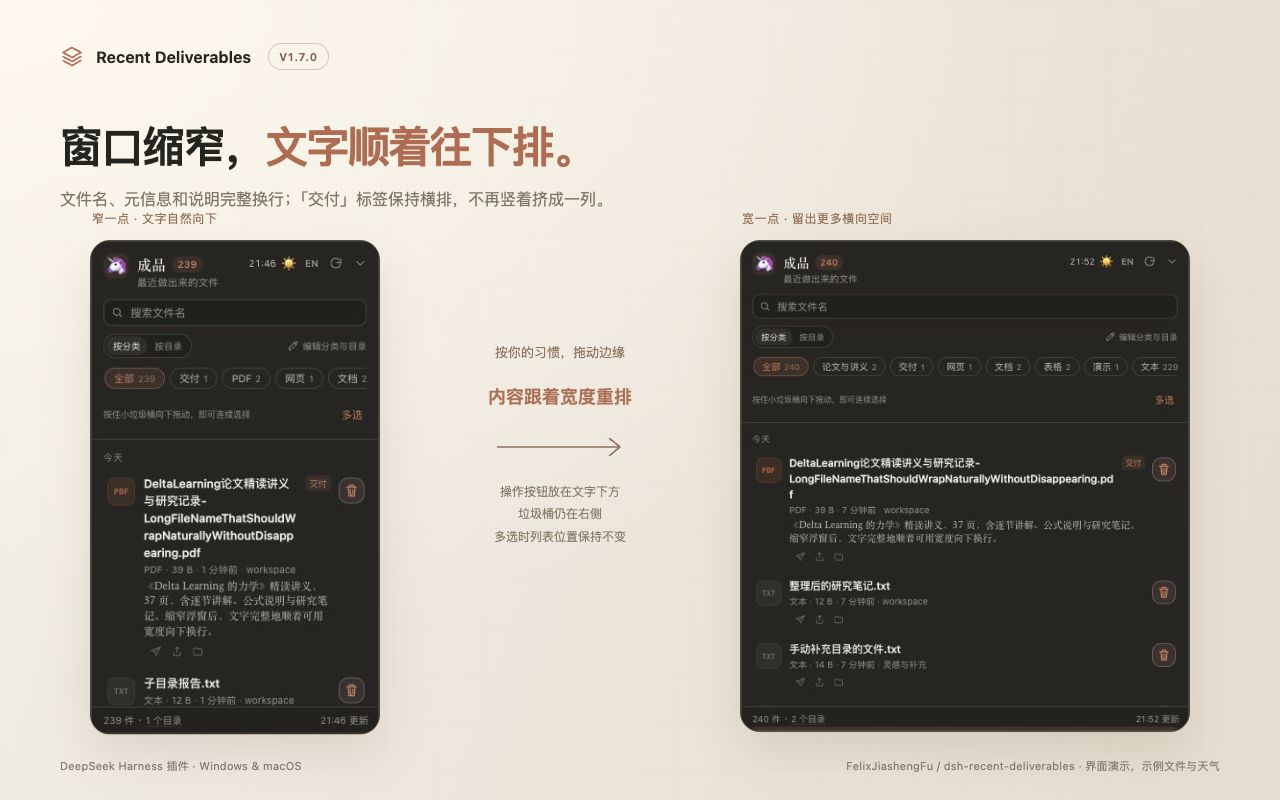
- 文字自然换行:缩窄浮窗时,长文件名、元信息与说明会完整向下排;“交付”标签保持横排。转发、打开和定位按钮移到文字下方,右侧保留小垃圾桶。
- 自动分类 + 手动规则:按类型自动归类,同时支持分类改名、排序、隐藏,以及扩展名和文件名关键词规则。
- 自动目录 + 手动调整:发现 DSH 工作区、默认工作目录和会话目录;支持改显示名称、排序、暂停收集和补充目录。原文件与目录保持原样。
- 胶囊式编辑面板:柔和展开动画、背景模糊、圆角卡片,编辑先留在草稿里,点保存才生效。支持取消、Esc、焦点循环、减少动态效果和窄窗口。
- 保留右侧一排时钟天气、四边四角缩放、原位多选、爱心泡泡与直接改名。
安装
下载下方 dsh-recent-deliverables-1.7.0.tgz,按 安装说明 安装。升级后完全退出,再重新打开 DSH。
npm 注册表目前仍是 1.1.1,新版 npm 发布等待维护者完成 Windows Hello 验证;现在可以直接使用这个 GitHub 安装包。回到 Windows 后的发布步骤随附件提供。
验证
81 项具名检查通过(22 客户端、15 逻辑、4 文件操作、4 整理存储、31 路由、5 天气)。Node 18.17.0 最低版本、Windows/macOS/Linux CI 和干净安装包导入通过。
实际浏览器验证:300 像素面板下全文换行与横排标签、加宽后重排、多选前后位置/行高一致、分类改名/排序/隐藏/规则、目录添加/改名/筛选、保存后刷新恢复、取消不保存、320×640 编辑界面、中英文、真实临时文件改名及外部点击收起。Windows DSH 桌面界面仍待实机验证。
v1.6.0 · 右侧时钟天气与自由缩放
右侧一排时钟天气,浮窗大小随手调
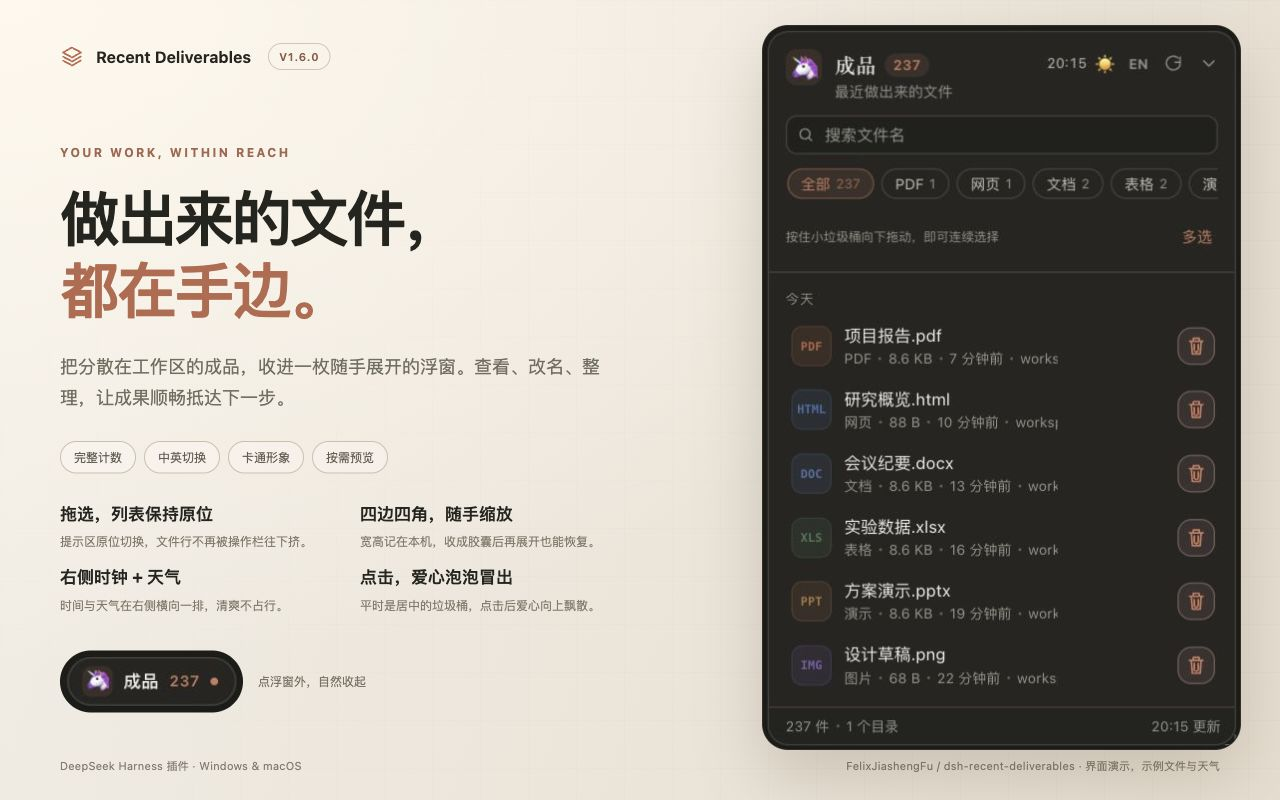
- 时间和天气移到右侧,同一排显示。 与 EN / 刷新 / 收起按钮排在标题栏右边,不再放在左侧副标题下面;中文和英文标题都不会与它们重叠。
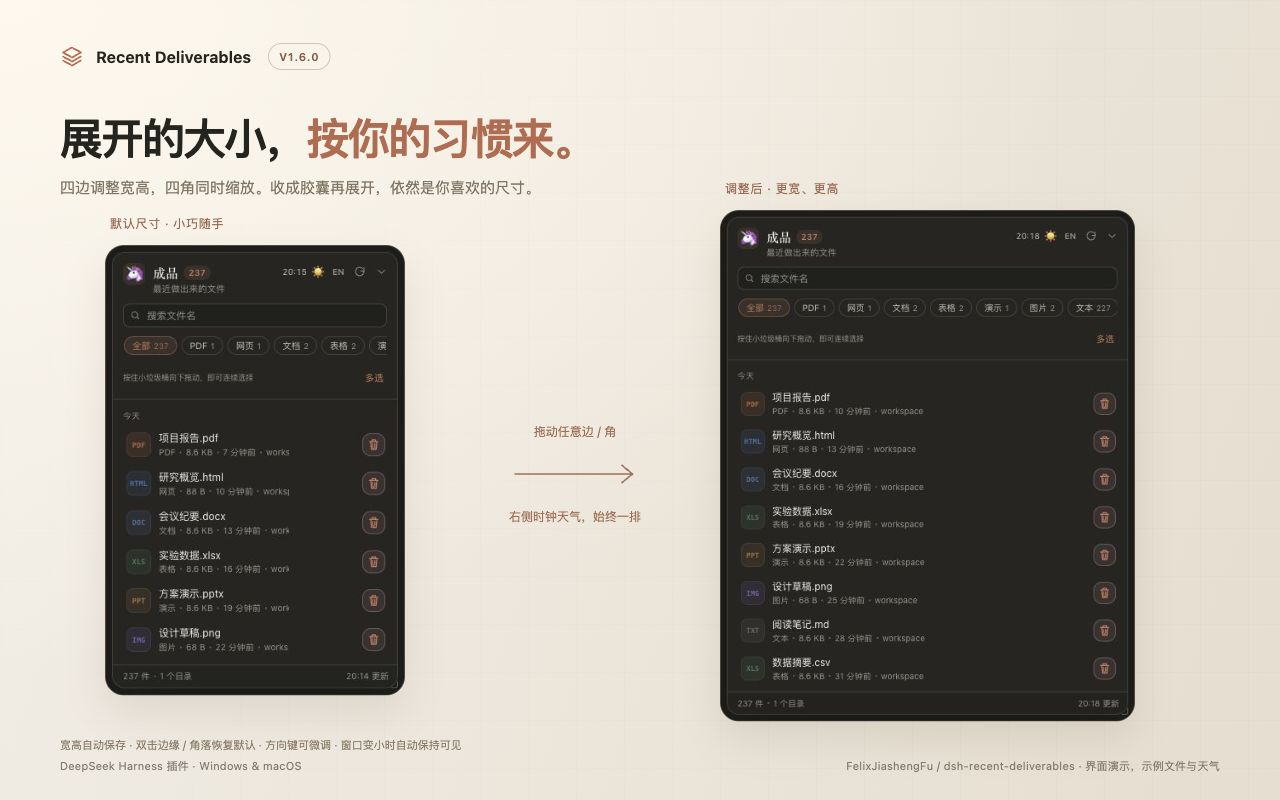
- 四边、四角都可以拖动缩放。 上下调高度,左右调宽度,四角同时调整;拖动一边时,对边保持固定。
- 记住喜欢的宽高。 刷新、重新打开页面、收成胶囊再展开都会恢复;胶囊本身仍保持小巧。窗口变小时临时适配,窗口恢复后继续使用保存的尺寸。
- 随时恢复默认大小。 双击任意边缘或角落,或点左上角头像 → 外观与语言 → 浮窗大小 → 恢复默认大小。
- 缩放手柄支持方向键微调,Shift 加大步长,Home 恢复默认;指针缩放时可按 Esc 取消。原有标题栏拖动、多选不跳动、重命名、爱心泡泡和时间天气开关继续可用。
下载下方 dsh-recent-deliverables-1.6.0.tgz,按 Windows / Mac 安装说明 安装,然后完全退出并重新打开 DSH。GitHub 包已提供,npm 尚待维护者完成认证同步。
验证:70 项具名检查通过;Windows / macOS / Linux CI、最低 Node.js 18.17.0 和干净安装检查通过。Mac 浏览器实测全部八个手柄、对边固定、刷新和胶囊恢复尺寸、320×640 窄视口适配后恢复偏好尺寸、键盘微调、双击 / Home / 设置按钮复位,以及中英文右侧时间天气和原位多选。Windows 桌面界面仍待实机验证。
天气和时钟功能与上版相同:时钟跟随浏览器所在电脑时区;可选天气按 DSH 所在电脑公网 IP 估算城市,VPN 或远程宿主可能影响识别。图片使用示例文件与天气。
SHA-256 (dsh-recent-deliverables-1.6.0.tgz): 63a07572ebe96b81a2e9b72d34cc1c0cd55e9e162d188dc7993d1e1f5da7dc97
English: v1.6 places the clock and weather in one horizontal row on the right. Resize the expanded panel from every edge and corner, with opposite edges anchored. Preferred dimensions persist across reloads and capsule toggles, adapt to smaller viewports without losing the saved preference, and can be reset by double-clicking a handle or in Appearance & language. Keyboard controls are included. Fully restart DSH after upgrading.
v1.5.0 · 流畅拖选、时钟天气与爱心泡泡
这一版重点是拖选时保持连贯,以及展开浮窗后随手看看当地时间和天气。
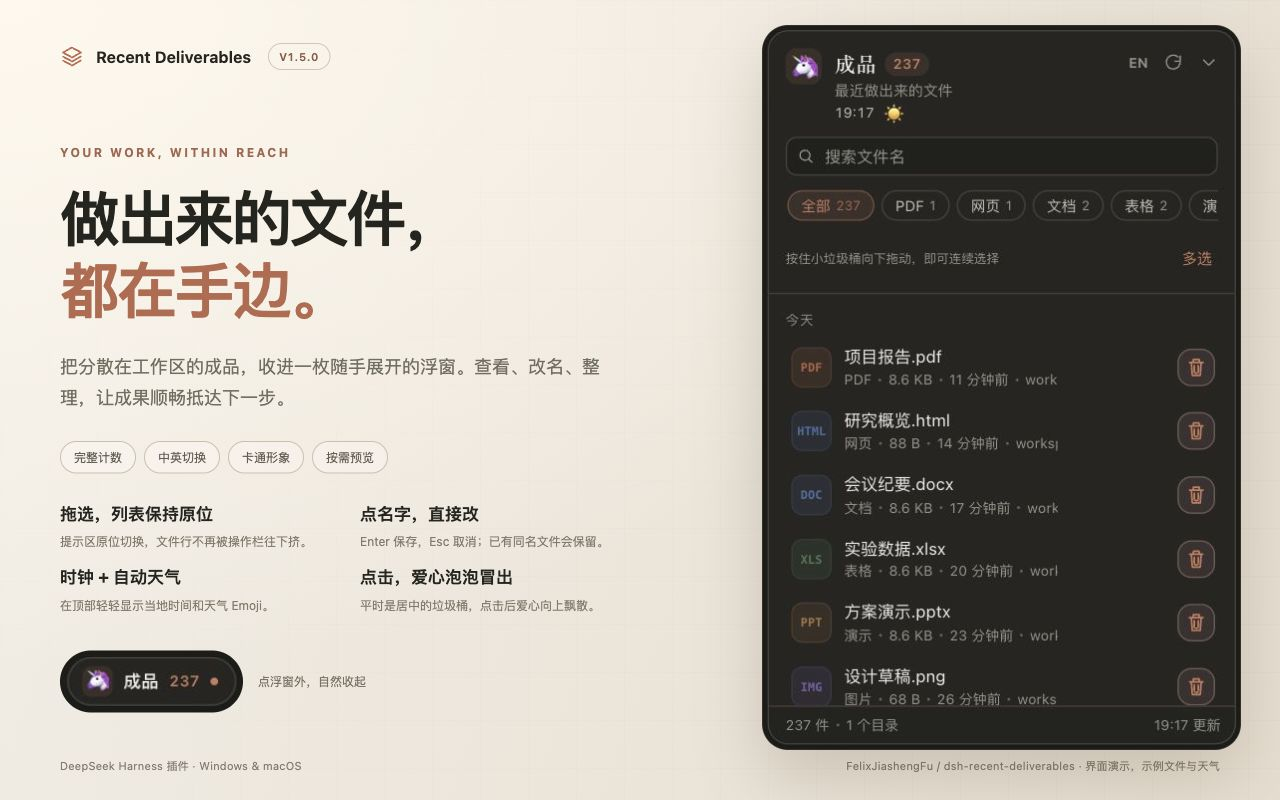
- 批量选择不再把列表往下挤。 操作栏在原提示区域切换,复选框占用原文件图标位置;文件行高和文字宽度保持一致。按住垃圾桶向下拖、全选、取消选择都保留原位。
- 点击后才冒出爱心泡泡。 平时只显示居中的小垃圾桶;点击后冒出 7 颗圆润的小爱心,向上飘散,文件行移走后仍能继续播放。支持系统“减少动态效果”。
- 当前所在地时间。 外观与语言里新增独立时钟开关,跟随浏览器所在电脑时区,每分钟更新,离线可用,不会每分钟重画文件行。
- 自动天气。 独立开关,按网络 IP 自动估算城市,显示晴、雨、雪、雾、雷雨和夜晚对应的 Emoji。设置中可看识别城市,悬停可看温度;无需手填城市。
- 文件时间仍独立控制。 可以隐藏文件修改时间,同时保留顶部时钟与天气。中英文、头像、重命名、完整计数等继续可用。
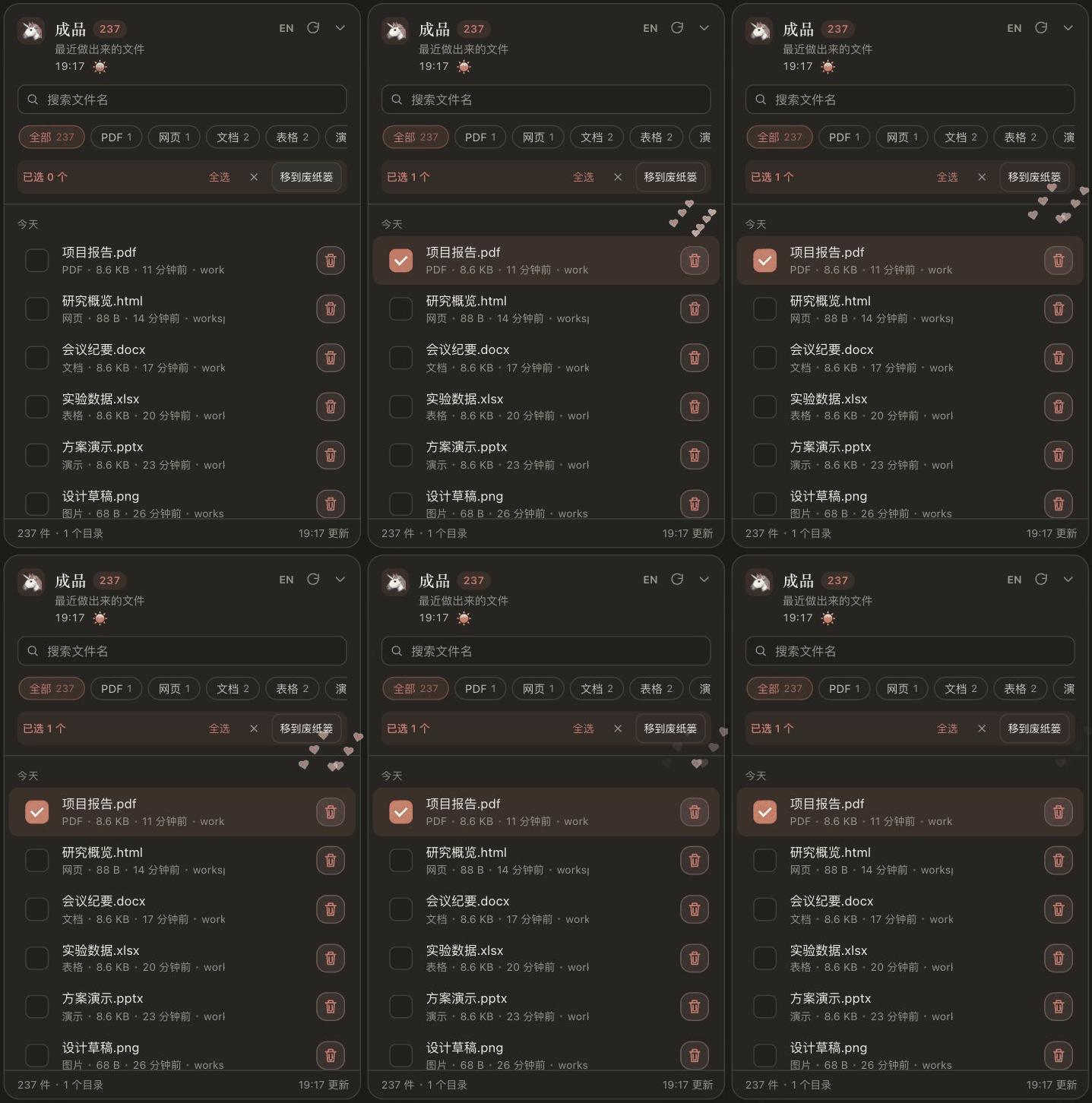
时钟和天气默认关闭:重开 DSH 后,点浮窗左上角头像 → 外观与语言 → 显示时钟 / 显示天气。设置保存在本机。
天气由 ipapi.co 估算运行 DSH 的电脑所在城市,再用取整到 0.1 度的近似坐标向 Open-Meteo 查询;不读取精确设备定位,不发送文件或会话数据。VPN 或远程宿主可能影响识别城市。天气约每 20 分钟更新,合并并发请求并缓存;失败时显示不可用或明确标注旧数据,不把未知天气当作晴天。数据来源与服务条款见 README。
下载下方 dsh-recent-deliverables-1.5.0.tgz,按 Windows / Mac 安装说明 安装,然后完全退出并重新打开 DSH。GitHub 包已提供,npm 尚待维护者完成认证同步。
验证:67 项具名检查通过,Windows / macOS / Linux CI 及 Node.js 18.17.0 最低版本检查通过;干净安装能注册全部 7 条宿主接口。Mac 浏览器中量测中英文选择前后行位置、行高和文字宽度不变;验证了时钟天气设置持久化、全选、批量移动、动画在删除后保留和外部点击收起。实际天气服务联网查询通过;界面宣传使用示例天气,不代表实时气象。
SHA-256 (dsh-recent-deliverables-1.5.0.tgz): e43d1f2a6b3e7880924529b30091ae245e2096d62aad22c1d4a8ea5f74734e95
English: v1.5 keeps batch selection controls in place, preserving row geometry, and centers the trash icon with heart bubbles appearing only after clicks. Independent local-clock and optional automatic-weather switches join file-time preferences. Weather uses approximate host-IP city detection, caches requests for 20 minutes and clearly handles failures/stale data. Clock and weather default off; enable them in Appearance & language. Fully restart DSH after installing.
v1.4.0 · 拖选整理与直接改名
做出来的文件,都在手边。1.4.0 让成品整理更顺手:拖选多份文件统一收走、直接点击文件名改名,时间与外观也能按自己的习惯调整。
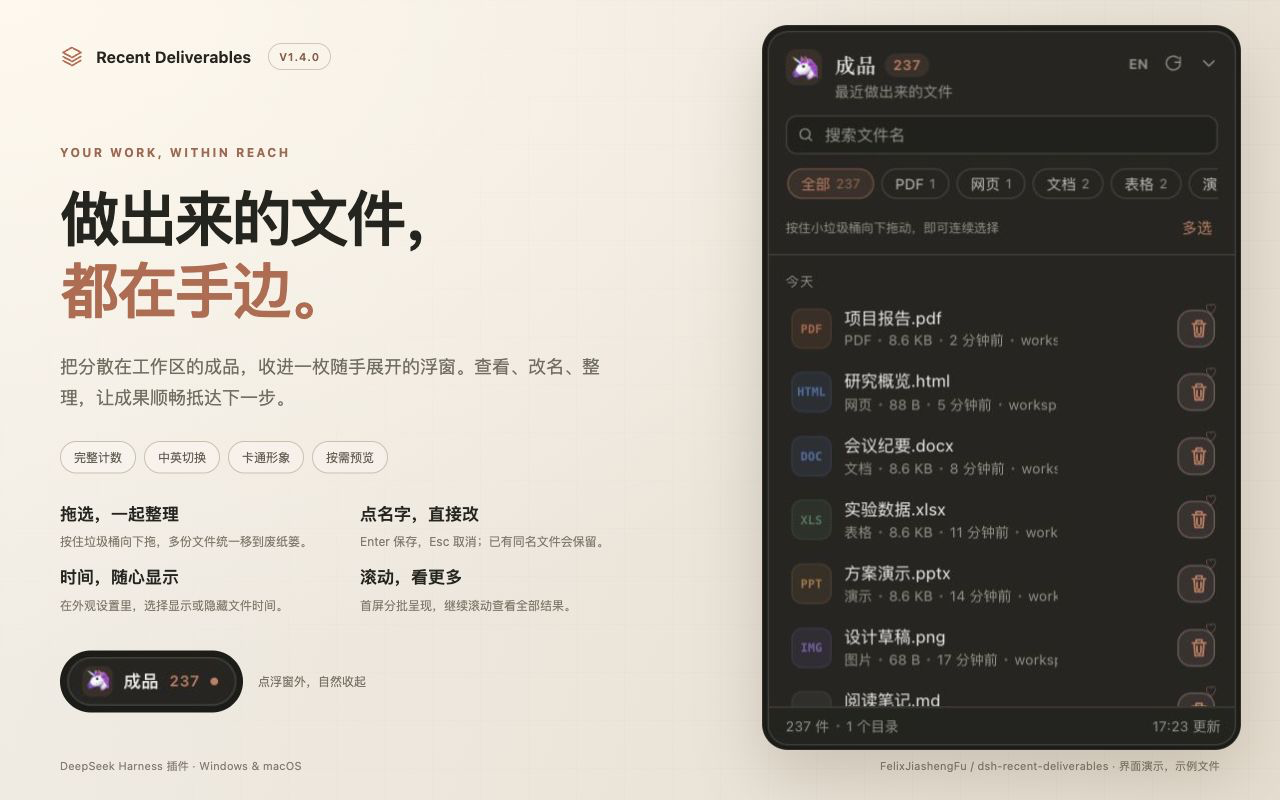
- 小垃圾桶 + 一颗爱心:图案居中、左右对称,只保留右上角爱心。
- 按住向下拖,多选一起整理:支持边缘自动滚动、复选框、全选当前筛选结果;松手后显示数量,再统一移到废纸篓。单击仍可处理一份文件。
- 直接重命名:文件名轻触 / 悬停变为半透明;点开编辑,Enter / 失焦保存,Esc 取消。同名会提示,不覆盖原文件。
- 显示 / 不显示时间:外观与语言设置新增时间开关,刷新后保留;中英切换、卡通头像与外部点击收起继续可用。
- 筛选条更干净:隐藏会遮住按钮的横向滚动条,保留左右滚动和键盘访问。
- 后台列表修复:避免交付记录刚收集完时误报列表完成却返回空结果。
文件管理方面,删除会进入 Windows 回收站 / macOS 废纸篓,方便恢复;清空系统废纸篓 / 回收站后才释放磁盘空间。界面方面,首批最多渲染 100 行,滚动时追加;完整统计总数、按需读取预览内容,收起后降低刷新频率。持续滚动会保留已加载行,未做跨平台 RAM 基准测试,不承诺固定内存节省比例。
更多功能图已放入 项目首页:拖选整理、改名与外观、文件与渲染管理。配图均为真实插件界面与示例文件。


安装:下载下方 dsh-recent-deliverables-1.4.0.tgz,按 Windows / Mac 安装说明 安装,然后完全退出并重新打开 DSH。GitHub 包已提供;npm 尚待维护者完成认证同步。
验证:60 项具名检查通过,覆盖批量部分成功、真实临时文件重命名、重名保护、符号链接、回滚、旧响应与后台收集竞态。Windows / macOS / Linux CI 全部通过;Node.js 18.17.0 最低版本检查、打包安装检查和依赖审计通过。实际 DSH / 浏览器交互在 Mac 验证;Windows 桌面界面仍待实机验证。
SHA-256 (dsh-recent-deliverables-1.4.0.tgz): ee94f4408c804c5cb0ac95f4db93963f7998516597d9255fbad2a4547efbdcc5
English: v1.4 adds drag-select batch cleanup, safe inline renaming, optional file times, a symmetric little bin with one heart, a clean filter strip, and a declaration-fold race fix. Complete counts, progressive rows, Chinese/English, local cartoon avatars and outside-click collapse are included. Core CI passes on Windows, macOS and Linux; real UI verification was performed on macOS. Install the attached package and fully restart DSH.
v1.3.0 — Complete counts and one-click recoverable trash
Shows the full current file count and adds one-click recoverable deletion.
- Default list, scan-entry, visible-session and session-age limits are now unlimited. The badge reflects all currently collected files. Long lists append as you scroll instead of ending at 40 or 200.
- Every row has an always-visible, symmetric smiling basket. One click moves only that displayed file to OS trash and updates the row and count immediately.
- File-specific tickets and identity checks reject unlisted paths, directories, stale replacements and duplicate requests. Symlinks are trashed without deleting their targets; no permanent-delete fallback exists.
- In-flight lists cannot resurrect deleted rows. Restored files can reappear on refresh.
Validation: 44 named checks passed (13 client, 15 logic, 16 route cases), also on Node 18.17.0. npm audit reported zero vulnerabilities. A clean tarball installation/import passed. A native macOS test moved a new temporary text file to Trash, restored it and cleaned it up. Browser tests used 237 temporary files: 237→236 after deletion, 236→237 after restore, and all 237 rows became accessible by scrolling.
The attached package is ready for installation. npm publication remains pending maintainer authentication.
v1.2.0 — Auto-collapse, language switch and custom characters
Adds automatic capsule collapse and a personalized bilingual panel.
- Click outside the floating panel to collapse it, including external embedded views. Outside buttons still receive their clicks; owned previews and settings stay interactive.
- Switch between Chinese, English and the DSH language. The choice is local to this panel and persists across reloads.
- Click the top-left icon to choose a cartoon emoji, enter custom emoji/text, or select a local PNG/JPG/WebP/GIF image up to 2 MB. The character appears in both the expanded header and the capsule.
- Preserve existing filters, position and the 1.1.2 path/list fixes. Images remain browser-local.
Validation: 32 named checks passed (12 client, 14 list/logic, 6 file-route cases). Browser checks covered outside clicks, outside/owned iframes, Chinese/English and avatar persistence, custom emoji, real image decoding, and invalid images.
The attached tarball is ready for installation. npm publication remains pending maintainer authentication; this GitHub release does not confirm npm availability.
v1.1.2 — File access and deliverable list fixes
Fixes file access and list completeness in Recent Deliverables.
- Resolve real paths before authorizing file previews and desktop opening; reject traversal and workspace-external symlinks discovered by scanning.
- Preserve access to explicitly presented deliverables outside the workspace without trusting changed symlink targets from the last list.
- Fill unused list capacity with remaining declared deliverables. A list containing only 20 declarations now displays all 20 instead of stopping at 12.
- Add route and list regression tests, GitHub CI, and a publish-time test gate.
Validation: 27 checks passed locally (7 client, 14 logic, 6 route cases); the suite also passed on Node 18.17.0. The attached npm tarball installs and imports in a clean directory.
The attached tarball is ready for use. npm publication is pending maintainer authentication; this GitHub release does not confirm npm availability.
v1.1.1 — unscoped npm package
The npm package and DSH plugin ID are now dsh-recent-deliverables, so it can be found by entering that exact name in the DSH plugin installer.
Install: npm install dsh-recent-deliverables
This supersedes the previously published @jiashengfu/dsh-recent-deliverables package.
v1.1.0
Initial public release of Recent Deliverables for DeepSeek Harness.
- Floating panel for recent files and declared deliverables, with search, filters, preview, open, and reveal actions.
- Optional forwarding to a connected IM assistant.
- Node.js runtime dependencies: none.
npm package: @jiashengfu/dsh-recent-deliverables.