Repository navigation
Releases: FurkanAnc/totk-launcher
Release list
TotK Launcher v1.2.0

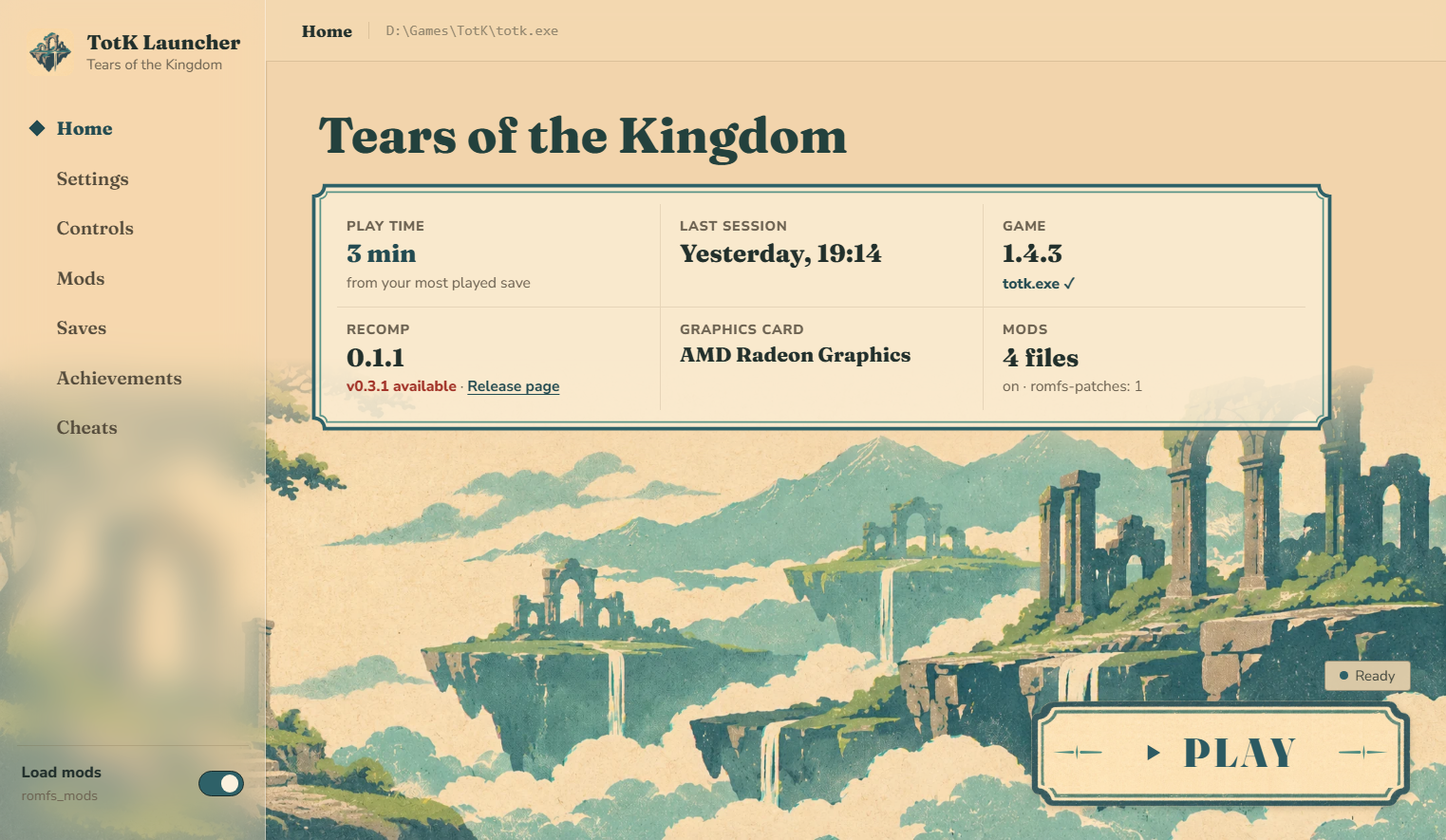
New look
- Light and Night themes. Light (the default) is paper coloured with the stone greys and teal of the game; Night is
the earlier dark look with gold. Settings > Launcher > Theme. - Artwork made for the launcher: floating ruins in a screen-print style across the window (a day and a night
picture), a printed PLAY plate and a new app icon that stays readable at small sizes. The launcher uses no logo or
picture from the game. - Home shows the installed version, graphics card and mods in one line, and the frame rate of your last
session (average and 1% low) from the game's own log. PLAY sits in the bottom right corner. - The sidebar is frosted glass over the picture; pages use headings and thin rules instead of boxes, and fewer icons.
- The window, its title bar and the first-start screen ("Find your game") follow the theme.
Install
- Download TotK Launcher.exe below (Windows 10/11, the Tears of the Kingdom PC recomp installed).
- Put it next to
totk.exeand start it, or start it from anywhere and selecttotk.exewhen asked. - Press PLAY.
If you already use the launcher, replace the old TotK Launcher.exe; your settings, bindings and backups stay.
Türkçe: Yeni görünüm: açık (varsayılan) ve gece teması, launcher için yapılmış görseller ve yeni ikon. Ana sayfada
sürüm, ekran kartı ve son oturumun FPS ölçümü var; OYNA sağ alt köşede. Oyundan hiçbir logo ya da görsel kullanılmıyor.
TotK Launcher v1.1.2
New
- Ultrawide and 16:10 resolutions. Settings > Display > Window size and Game resolution now also offer
1920x1200, 2560x1080, 3440x1440 and 5120x1440 (#2). If the game looks stretched or shows black bars at
21:9 or 32:9, please open an issue with a screenshot.
Install
- Download TotK Launcher.exe below (Windows 10/11, the Tears of the Kingdom PC recomp installed).
- Put it next to
totk.exeand start it, or start it from anywhere and selecttotk.exewhen asked. - Press PLAY. The game starts without its console window.
If you already use the launcher, replace the old TotK Launcher.exe; your settings and backups stay.
Türkçe: Ayarlar > Görüntü'ye ultrawide ve 16:10 çözünürlükler eklendi: 1920x1200, 2560x1080, 3440x1440 ve
5120x1440.
TotK Launcher v1.1.1
Fixes
- "Select totk.exe…" did nothing. When the launcher is started outside the game folder (or from Settings > Game
folder > Change…), the file dialog now opens. If you were stuck on the "Find your game" screen, this is the fix. - Errors are now shown on the page instead of a button that seems to do nothing.
Install
- Download TotK Launcher.exe below (Windows 10/11, the Tears of the Kingdom PC recomp installed).
- Put it next to
totk.exeand start it, or start it from anywhere and selecttotk.exewhen asked. - Press PLAY. The game starts without its console window.
Türkçe: Oyun klasörü dışından açıldığında "Select totk.exe…" düğmesinin hiçbir şey yapmaması düzeltildi; hatalar
artık ekranda gösteriliyor.
TotK Launcher v1.1.0
What's new
- New interface: a dark night-sky theme with gold accents, animated header, achievement popups.
- One exe, no Python needed: download
TotK Launcher.exeand start it. - Finds your game: put it next to
totk.exe, or start it from anywhere and selecttotk.exeonce; Settings >
Game folder changes it later. - Rebinding takes mouse buttons 4 and 5 too, with a live preview of the in-game button prompts.
- The recent log on Home folds away; new app icon.
Install
- Download TotK Launcher.exe below (Windows 10/11, the Tears of the Kingdom PC recomp installed).
- Put it next to
totk.exeand start it, or start it from anywhere and selecttotk.exewhen asked. - Press PLAY.
Windows SmartScreen may warn the first time since the exe is not signed: "More info" > "Run anyway".
Türkçe: Yeni arayüz, Python gerektirmeyen tek exe ve oyun klasörü seçme. TotK Launcher.exe'yi indirip
totk.exe'nin yanına koyun ya da herhangi bir yerden açıp totk.exe'yi seçin. Arayüz dili Settings > Interface
language'dan Türkçe yapılabilir.
TotK Launcher v1.0.0
First release of the TotK Launcher for the Tears of the Kingdom PC recomp. English by default, Turkish in Settings.
Features
- Settings: frame rate, display, language and sound options written to
totk.ini(comments kept, backed up first). - Controls: rebind keyboard, mouse and controller buttons; controller layout; mouse camera sensitivity.
- Button prompts: in-game icons that show your keyboard and mouse keys, the action prompt included. Also the
original Switch icons, or the icons of a font mod inromfs_mods. - Achievements: 55 achievements (story, exploration, collection, combat, hero) read from your saves, with a
popup when one unlocks. - Saves: automatic backup before every launch, manual backups, restore.
- Cheats: rupees, hearts, stamina wheels and Zonai battery cells.
No game files are included: everything the button prompts need is read from your own RomFS.
Install
- Install Python 3.10+ (tick "Add Python to PATH").
- Download
TotK-Launcher-v1.0.0.zipbelow and copy the contents of itsTotK-Launcherfolder into your game
folder, next tototk.exe. - Run
pip install -r launcher\requirements.txtonce. - Start
TotK Launcher.cmd.
Türkçe: Tears of the Kingdom PC recomp için launcher'ın ilk sürümü. Ayarlar, tuş atama, klavye/fare tuş
simgeleri (aksiyon simgesi dahil), 55 başarım, kayıt yedekleme ve hileler. Arayüz dili Settings > Interface language'dan
Türkçe yapılabilir. Kurulum: Python 3.10+ kurun, zip'teki TotK-Launcher klasörünün içeriğini totk.exe'nin yanına
kopyalayın, bir kez pip install -r launcher\requirements.txt çalıştırın ve TotK Launcher.cmd ile başlatın.