Repository navigation
Releases: HellzYeahh/earshot
Release list
Earshot 0.9

Earshot 0.9: a Sleep tab
0.9 adds a fifth tab for falling asleep with your headset on: a sleep timer with real nature recordings or your own sounds, noise cancelling switched off for the night, and wake-up alarms in the earbuds, on the phone or both. It works with any headset. The rest of the 0.9 plan (making every screen feel like one app) follows in 0.9.x updates.
Installs over any earlier version; your settings and automations are kept.
New
- Sleep tab, for any headset:
- Sleep timer from 15 minutes to 6 hours. A line above it says exactly when the sounds stop and what happens to the headset: the sounds stop, or the headset disconnects (Android 17, linked headset) or switches off where Earshot's driver can do that. Sounds fade in and slowly fade out.
- Sounds: real field recordings of rain, heavy rain, ocean, a stream, wind and a fire, released into the public domain by their recordists on radio aporee ::: maps and credited in About. Fan, white, pink and brown noise are made on the phone. Mix up to three, save your mixes, or play them in one ear only for side sleepers.
- Your own sounds: pick any audio file. Earshot keeps a private copy, levels it and turns up to 90 seconds of it into a smooth loop.
- Noise cancelling off for the night: from the start, after 30 minutes or an hour, or when the timer ends. It comes back on in the morning.
- Night extras: lock the touch controls, mute voice prompts, Do Not Disturb, a media volume cap, and pausing a podcast or music app at the end. Everything the night changed is put back in the morning.
- Wake-up alarms in the earbuds, on the phone or both, with repeat days, a gentle wake-up window, fade-in, snooze and real birdsong. An earbud alarm always moves to the phone when the earbuds are gone or nobody stops it within 60 seconds. Alarms still ring if the phone restarts in the night, even before it is unlocked.
- If the headset disconnects in the night, the sounds stop instead of playing from the phone speaker.
- "Start sleep" is also in the launcher's long-press menu.
- The What's New sheet is back, with the highlights of 0.9 and of 0.8 (which shipped without one).
New permissions
- Media playback foreground service, so the sounds keep playing with the screen off.
- Exact alarms ("Alarms & reminders"), asked for on the Sleep tab.
- The full-screen alarm over the lock screen and vibration; Do Not Disturb access only if you turn that option on.
Still no internet permission.
Full list: CHANGELOG.md · Sleep tab design: docs/sleep-mode.md
Download
earshot-0.9.0.apk: one universal APK for every phone CPU. Signed with a development key, so Android shows the usual "unknown developer" warning for a sideloaded app. It is bigger than 0.8 (about 12 MB) because of the bundled sleep recordings.- SHA-256:
0e7baecac90b8f7f80bf97bc72e98eb8e95d5d29b9709a63db16004784052e43
Requirements
- Android 9 or newer. Disconnecting the headset when the timer ends needs Android 17 and a headset linked in Tools → Controls → Universal remote.
- Close the maker's app while Earshot controls that headset: only one app can hold its control channel.
Known limitations
- The Sleep tab has been tried on a Galaxy Z Fold7 (Android 17); other phones and more headsets still need testing.
- Switching the headset off, locking its touch controls and muting its prompts depend on what each headset's driver can do. The Sleep tab says on each row when a headset can't.
- The Soundcore Sleep A30's own built-in sleep timer and alarm aren't used yet.
- 0.8's limitations still apply: the experimental drivers (JBL, Sennheiser, Sony, most Soundcore and Skullcandy models) haven't met real hardware yet.
Own one of these? Please report back
Only the Bose QC Ultra Headphones (2nd Gen) and a Soundcore Sleep A30 are tested on our hardware. If you have another headset, open Tools → Lab → Copy connection report and paste it into a new issue with a few words on what works. The report holds your phone model, the headset's name, Bluetooth address and firmware, and the recent connection log; read it over before posting.
Earshot 0.8
Earshot 0.8: JBL, Find my earbuds and a Bluetooth history
0.8 adds the first driver on Bluetooth LE (JBL), a way to find a lost earbud, a history of what your headsets did, and codec switching without Shizuku on linked headsets. Underneath, every driver now runs on one shared base, and saved automations remember a listening mode by what it does instead of a slot number.
Installs over any earlier version; your settings and automations are kept (and converted, see below).
New
- JBL (Experimental). JBL's 2021–24 models (Wave / Vibe / Tune Buds 2 and Flex 2, Tune Flex / Beam / Buds, Live Pro 2, Live 660 / 770NC, Tour One M2, Tour Pro 2 and more) over JBL's own protocol on Bluetooth LE: Noise cancelling / Ambient Aware / TalkThru / Off, the noise-cancelling level where the headset reports it, JBL's EQ presets, voice prompts and battery for each earbud and the case. JBL's 2025+ models and its Airoha-based models are recognised and told apart; they stay generic for now. Demo mode has a virtual Wave Buds 2.
- Find my earbuds (Tools → Find my earbuds). A chirp in the earbud you pick (left, right or both), starting quiet and getting louder, only ever on that headset's own audio output. The screen shows when the headset was last connected. Works with any headset.
- Bluetooth history (Tools → Lab → Bluetooth history): connects and disconnects with Android 17's reasons, pairing changes, a lost pairing key, link encryption and the codec in use, for every headset, kept on the phone only.
- Codec switching without Shizuku for a headset linked in the universal remote (Android 13+, experimental): Android accepts the link in place of the privileged permission. Tested on a Galaxy Z Fold7.
- Linked headsets bring Earshot back by themselves. A headset linked in Tools → Controls → Universal remote starts Earshot when it connects, even when the app was closed (reliable on Android 16+, best effort on 12–15).
Changed
- Listening modes are saved by what they do. Automations, the Quick Settings tile and the widget remember "noise cancelling", "aware", "off" or a named custom mode, and find it on whichever headset is connected. Your 0.75 rules and tile choice are converted a few seconds after the first headset shows its modes and do the same as before on it. A rule for a mode the connected headset doesn't have now says so instead of running whatever sits in that slot.
- With nothing chosen, the tile and widget cycle the headset's own first three modes (still Quiet, Aware, Immersion on a QC Ultra).
- Every driver runs on one shared connection base; Bose behaviour is unchanged (checked by its end-to-end tests and a test of the old repository).
Fixed
- A Bose Immersion rule no longer switches the noise control off on a Skullcandy Crusher, Sennheiser or Sony headset, and a Bose Aware rule no longer turns the Sleep A30's noise cancelling off.
- A saved rule this version can't read no longer empties the whole list.
- Sony and Sennheiser: commands no longer report "not connected" on a live connection; a Sony refresh on a dropped link no longer shows old values as fresh.
- Sennheiser: a model Earshot can't drive now says why instead of "Could not connect", and isn't retried.
- A headset update that arrived while the Lab console was busy could later overwrite a newer value.
Safety
Every driver connects only through its maker's own service and writes through an allow-list. For JBL: factory reset, power off and firmware transfer are never sent, the model is checked by the product ID the headset reports before anything else is sent, and when another pair of the same model is nearby Earshot controls only the one that names your paired headset. Still no internet permission.
Full list: CHANGELOG.md · Per-model details: docs/supported-headsets.md
Own one of these? Please report back
Only the Bose QC Ultra Headphones (2nd Gen) and a Soundcore Sleep A30 are tested on our hardware. If you have a JBL, Sennheiser, Sony, Soundcore or Skullcandy headset (or another Bose model):
- Install 0.8 and close the maker's app.
- Open Tools → Lab → Copy connection report (a Deep scan helps too).
- Paste it into a new issue with a few words on what works.
The report holds your phone model, the headset's name, Bluetooth address and firmware, and the recent connection log. No account, location or contact data. Read it over before posting.
Download
earshot-0.8.0.apk: one universal APK for every phone CPU (its only native code is two small AndroidX helper libraries). Signed with a development key, so Android shows the usual "unknown developer" warning for a sideloaded app.- SHA-256:
ee27382e2bf550583d2d75ee812e760537aa9460b55820692258e6ab147f188f
Requirements
- Android 9 or newer. The universal remote needs Android 13 (rename), 16 (forget) or 17 (connect / disconnect); codec switching through a linked headset needs Android 13.
- Close the maker's app while Earshot controls that headset: only one app can hold its control channel.
- JBL needs "Nearby devices" (Bluetooth scanning) to find the earbuds' control connection.
- Optional: Shizuku for codec switching on headsets that aren't linked.
Known limitations
- The experimental drivers, JBL included, can be wrong on some firmware; they read the state before writing and check the result where they can. JBL has not been tried on real JBL headphones yet.
- The automation conversion and the new connection base were checked by tests, not yet by a full pass on the QC Ultra 2 for this release.
- Firmware updates stay with the maker's app.
- JBL's 2025+ and Airoha-based models, AirPods listening modes, the 2024 QC Earbuds and the QC35 are not supported yet.
Earshot 0.75
Earshot 0.75: one app for any Bluetooth headset
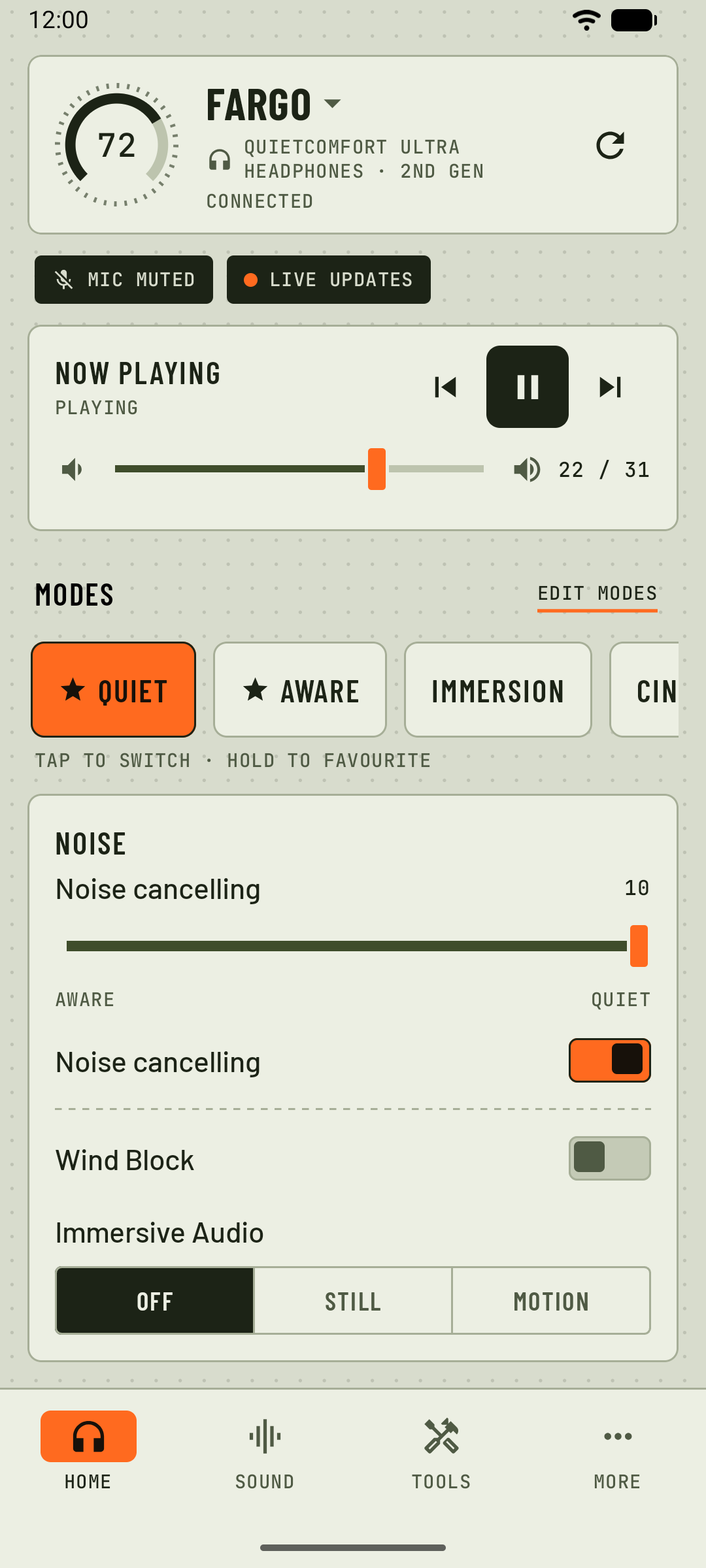
Earshot is no longer a Bose-only app. Every Bluetooth headset now gets the features that work through Android itself, plus a universal remote and a new look. Sennheiser, Sony, Soundcore and Skullcandy Method get their own experimental drivers. Bose keeps its full control. 0.6 was never released; its work ships here.
Installs over any earlier version; your settings are kept.
Any headset
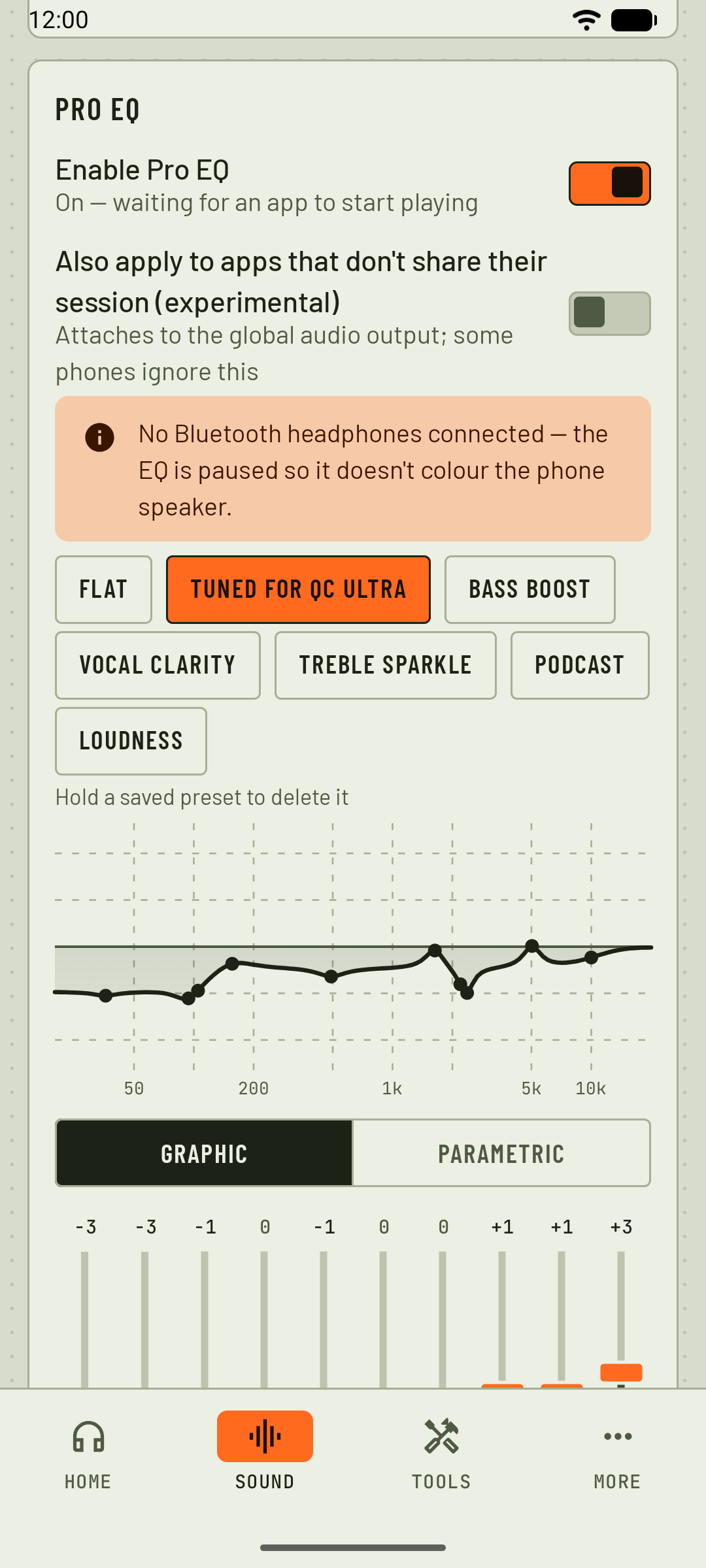
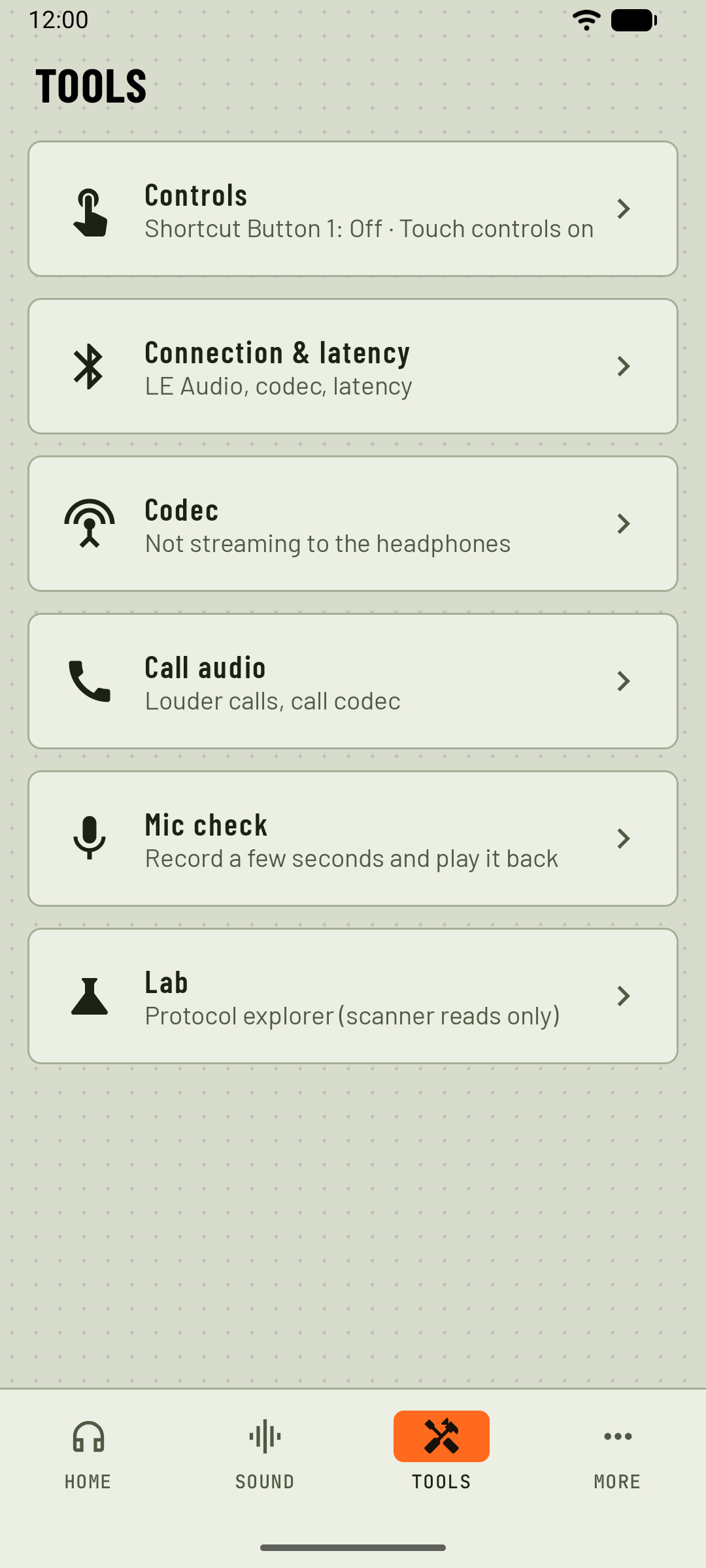
- Shown as itself. A headset Earshot has no driver for appears under its own name, with battery, Pro EQ (a preset remembered per headset), the codec readout (no Shizuku needed), call boost, mic check, Controls and automations. Earshot sends it nothing. Before, unknown headsets were treated as Bose.
- Universal remote (Tools → Controls): link a headset once, then connect or disconnect it (Android 17), rename it on this phone (Android 13+) and forget it (Android 16), whatever the brand.
- Battery straight away on headsets that speak Bluetooth LE, without Shizuku. AirPods and Beats show left, right and case battery from their adverts.
- The connected headset is the one shown at launch; car kits, speakers and watches stay out of the lists.
- Lab scans every supported headset, read-only: only each driver's documented reads are sent.
New drivers (experimental)
Built from protocol research and tested against virtual headsets, not yet on real hardware.
- Sennheiser: MOMENTUM 4 / 5, ACCENTUM, ACCENTUM Plus and TW, MOMENTUM True Wireless 3 / 4, MOMENTUM Sport. Noise cancelling / transparency / off, the noise ↔ transparency slider, adaptive, anti-wind, battery, EQ, auto-pause, sidetone, auto-off and more.
- Sony: WH-1000XM5 / XM6, WF-1000XM4 / XM5 / XM6, LinkBuds, ULT WEAR, WH-CH720N, WF-C510 / C700N / C710N. Noise cancelling / ambient sound / off, ambient level and focus on voice, battery, the headphones' EQ, auto-off, speak-to-chat, DSEE and the settings the headset announces.
- Soundcore: 35 models recognised (battery, firmware and the sound mode where known); 12 can change mode, noise level, wind reduction and more. The Sleep A30 is tested on one pair.
- Skullcandy Method 360 / 540 ANC on the Crusher 1080's connection: quiet / aware / off, noise level, sidetone, battery.
New look
- Field theme as the default (olive, sand and ink with a safety-orange indicator); System colours stay an option.
- New app icon, "Strike".
- Wording is brand-neutral throughout the app.
Fixed
- Call boost reaches the headset. It used to fire before the Bluetooth call audio was up and raise the earpiece instead.
- A Bluetooth socket the phone won't let go of no longer stalls the connection search (#1).
- No stray frames on Apple's accessory channel for a headset forced to "Bose" (a stray frame there has switched a Sennheiser off).
- Connection reports no longer show scrambled class names.
Safety
Every driver connects only through its maker's own service ID and writes through an allow-list: firmware updates, factory resets, unpairing and power-off are never sent. Still no internet permission.
Full list: CHANGELOG.md · Per-model details: docs/supported-headsets.md
Own one of these? Please report back
Only the Bose QC Ultra Headphones (2nd Gen) and a Soundcore Sleep A30 are tested on our hardware. If you have a Sennheiser, Sony, Soundcore or Skullcandy headset (or another Bose model):
- Install 0.75 and close the maker's app.
- Open Tools → Lab → Copy connection report (a Deep scan helps too).
- Paste it into a new issue with a few words on what works.
The report holds your phone model, the headset's name, Bluetooth address and firmware, and the recent connection log. No account, location or contact data. Read it over before posting.
Download
earshot-0.75.0.apk: universal APK, no native code. Signed with a development key, so Android shows the usual "unknown developer" warning for a sideloaded app.
Requirements
- Android 9 or newer. The universal remote needs Android 13 (rename), 16 (forget) or 17 (connect / disconnect).
- Close the maker's app while Earshot controls that headset: only one app can hold its control channel.
- Optional: Shizuku for codec switching.
Known limitations
- The experimental drivers can be wrong on some firmware; they read the state before writing and check the result where they can.
- Firmware updates stay with the maker's app.
- The call-boost fix is covered by tests but not yet confirmed on a real call.
- JBL, AirPods listening modes, the 2024 QC Earbuds and the QC35 are not supported yet.
Earshot 0.5.0
Earshot 0.5.0: Controls
Give your headset's press-and-hold a new job. Installs over any earlier version; your settings are kept.
Tools now opens with Controls. It remaps the shortcut gesture of any Bluetooth headset, finds out what each control on it does, and gathers the Bose headphone controls in one place.
New
- Controls (top of Tools): one dropdown, "Shortcut Button 1:", under the connected headset's name.
- Phone assistant (the default), Cycle EQ preset (announced in the headset), Voice memo (headset mic, saved to Recordings/Earshot) or Launch an app.
- On Bose headphones also their own Immersive Audio or Off.
- Works with any Bluetooth headset whose press-and-hold calls the phone's voice assistant. The choice is kept per headset.
- No setup screen: the first time you hold the button after picking an action, Android asks which app to open. Pick Earshot, then Always.
- Earshot only offers itself for the gesture while an action or Detect a button needs it, so nothing changes for anyone who keeps Phone assistant.
- Automatic Bose Shortcut button: Earshot sets the headphones' Shortcut button itself and puts it back on connect if it was changed. If you never pick anything on the Controls screen, only a button left on Spotify Tap is changed (to Voice assistant), because Spotify Tap does nothing while Earshot is connected.
- Detect a button: press each control on your headset and Earshot says what it does: the assistant gesture ("This is your shortcut: you can remap it"), play/pause, track and volume (these go straight to the music app; Android doesn't let apps remap them), Bose button events by their Bose names, and call controls during a call. Once found, you name the shortcut, for example "Power button, single press".
- One row per Bose button: earbuds that report a shortcut per bud get a row for each earbud.
- Call audio shows the call link: the headset's call volume and mic gain (0–15) and whether the phone's own echo cancelling and noise reduction run on top of the headphones'. Shown when the phone reports them.
Changed
- Touch controls, Voice prompts and Prompt language, Devices, Rename and Power off moved from More to the Controls screen. More keeps sidetone, auto play/pause, auto-answer, multipoint, auto-off, About these headphones and the App section.
Fixed
- Touch controls were inverted: turning the switch on turned the headphones' touch strip off, so volume swipes and the touch-and-hold Shortcut stopped working. If you used the switch in 0.4.0, it now shows the real state: turn it on once to get the touch strip back.
- A Bose button left on Spotify Tap did nothing while Earshot was connected. On connect it now gets what the default action needs. Immersive Audio and Off set in the Bose app are kept.
- The connection search no longer mistakes the headset's call channel for "the Bose app is holding the control channel".
Full list: CHANGELOG.md.
Download
earshot-0.5.0.apk: universal APK with no native code (arm64, arm, x86_64). It is signed with a development key, so Android shows the usual "unknown developer" warning for a sideloaded app.
Requirements
- Android 9.0 (API 28) or newer, any CPU. Controlling earbuds over LE Audio needs Android 10 or newer.
- Supported Bose headphones or earbuds (see the README) or a Crusher 1080 ANC, paired in Bluetooth settings.
- Close or disable the Bose or Skullcandy app while using Earshot. Only one app can hold the control connection.
- Microphone permission is asked only for the mic check and voice memos.
- No internet permission.
Known limitations
- The shortcut remapping works only for headsets whose press-and-hold asks the phone for its voice assistant. Play/pause, track and volume buttons can't be remapped by any app.
- Controls and Detect a button were developed against the QC Ultra Headphones (2nd Gen) and a simulator; other headsets and Bose models are best effort. Reports are welcome: Tools → Lab → Copy connection report and a new issue.
- Firmware updates stay with the Bose app. Earshot never writes to a firmware-update service.
Earshot 0.4.0
Earshot 0.4.0: it adapts to your Bose model
A big update for every Bose model. Installs over any earlier version; your settings are kept.
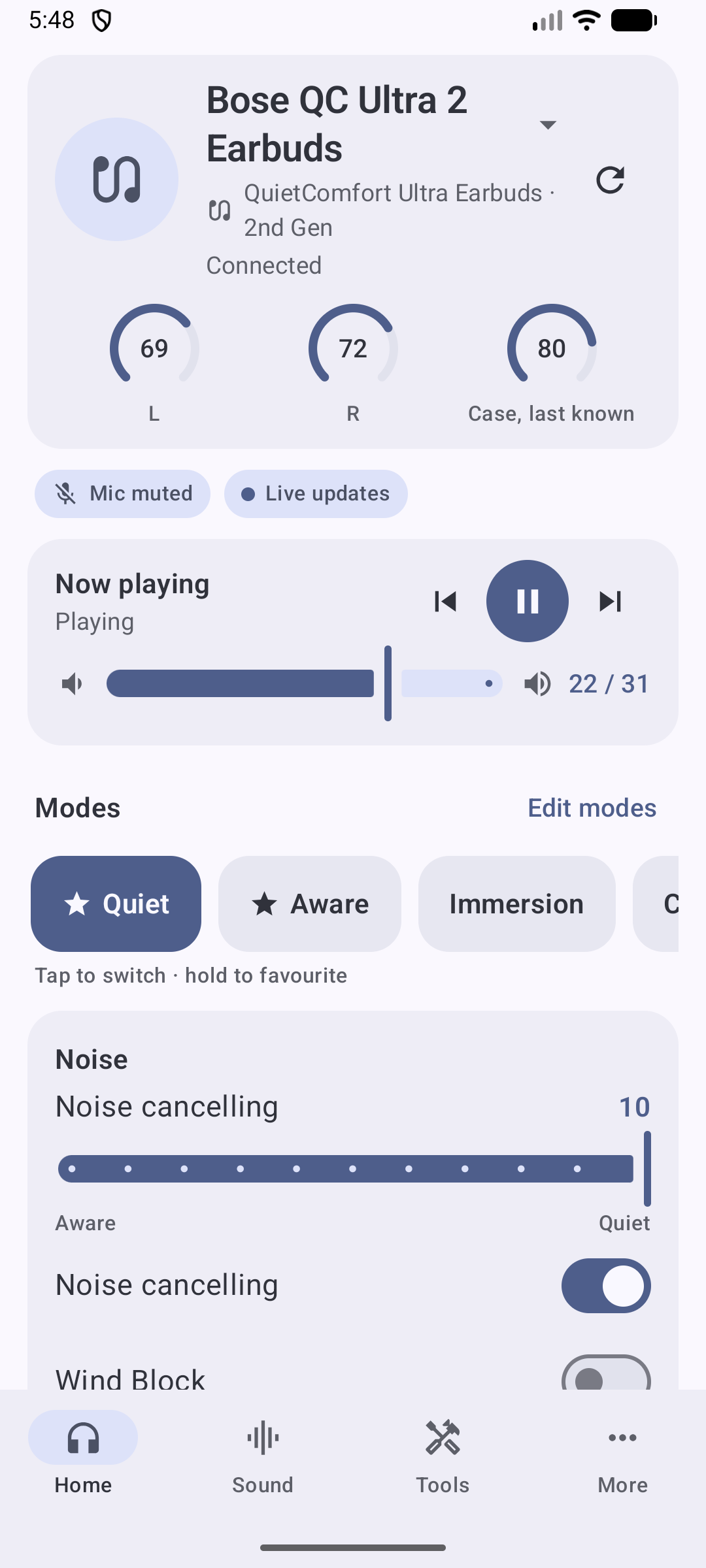
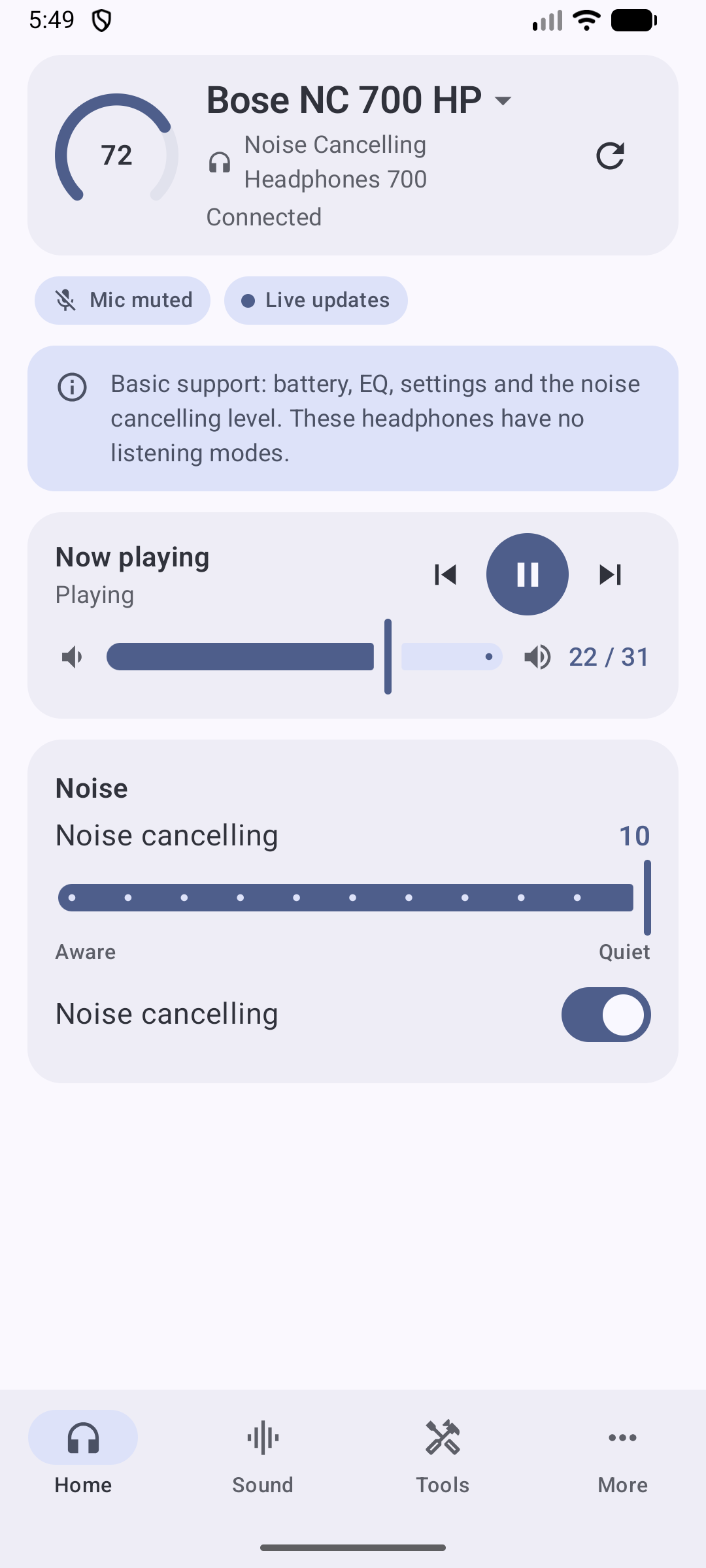
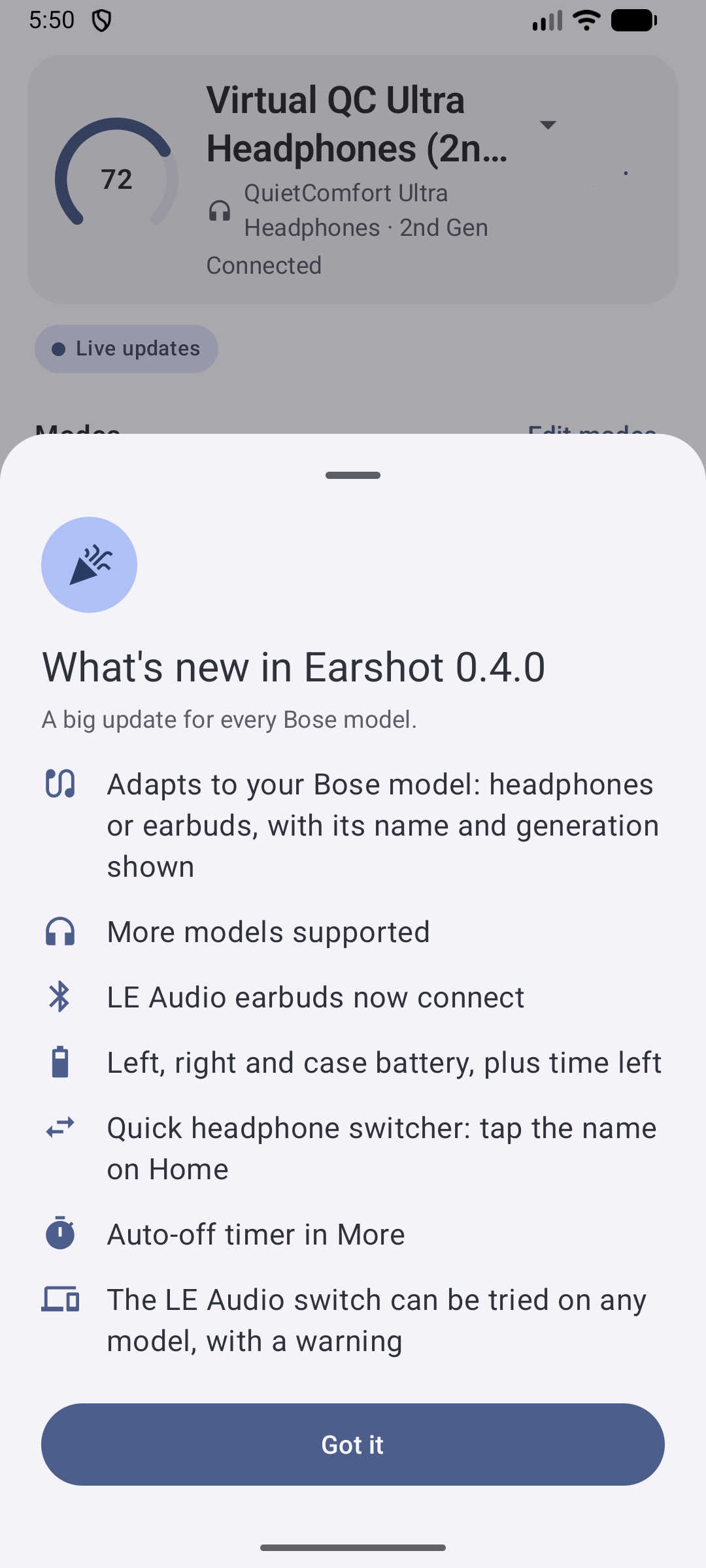
Like the official Bose app, Earshot now takes most of what it shows from the headphones themselves: how many built-in and custom modes they have, whether Wind Block, Immersive Audio and the noise-cancelling switch exist, the noise-level steps, the batteries, and which settings they answer. So each model gets its own Home screen, modes and settings, and the header tells you exactly which product and generation is connected.
New
- Model-aware screens.
- The header shows your name for the headphones, the model and generation (for example "QuietComfort Ultra Earbuds · 2nd Gen") and a headphones or earbuds icon.
- Settings your model doesn't have are hidden instead of greyed out.
- Built-in mode names come from the headphones: Quiet, Aware, Immersion, Cinema, Stereo.
- More models:
- New: QC Headphones (2nd Gen), QC Earbuds II, Ultra Open Earbuds (2nd Gen).
- Basic support (battery, EQ, settings, noise level): QC Earbuds (2020) and Noise Cancelling Headphones 700.
- The QuietComfort 35 / 35 II and the 2024 QuietComfort Earbuds are recognised and explained as unsupported, instead of hanging.
- Earbuds battery:
- Left, right and case on Home, in the widget and in the notification. The case shows its last known level.
- The low-battery alert watches the lower earbud.
- Listening time left, when the firmware gives an estimate.
- Quick switcher: tap the name on Home to switch between your paired Bose products.
- Auto-off timer in More (5, 20, 40 min, 1 h, 3 h, 24 h or never), on firmware that offers it.
- LE Audio switch on every model:
- It can be tried even on headphones that report no LE Audio support. A warning first lists why it may not work, including whether your phone supports LE Audio.
- After the restart, Earshot checks whether the change took and tells you.
- Cleaner disconnected screen: no stale controls. It offers Connect, Choose headphones, tips and a one-tap connection report.
- What's new sheet after updating.
- Demo mode can now emulate QC Ultra Earbuds, QC Earbuds II, QC Earbuds, QC45, NC 700, Ultra Open and QC35 II, so you can see how each model looks without the headphones.
Fixed
-
Earbuds on LE Audio never connected (user report on QC Ultra Earbuds: "the program waits for the headphones to be connected"). With LE Audio on, Android lists the earbuds a second time as "LE-Bose …", without a classic Bluetooth link. Earshot now:
- counts the LE Audio link as connected;
- shows the two entries as one product;
- controls the earbuds over an LE channel, the same way the Bose app does.
Switching LE Audio on no longer loses the headphones when the phone moves to LE Audio.
-
The notification no longer shows another model's mode names, or "ANC off" on headphones that can't switch it off.
-
Custom modes are read and written in the exact record length each model uses.
-
On narrow phones, the "Noise cancelling" switch no longer wraps letter by letter beside Wind Block.
Full list: CHANGELOG.md. Per-model details: docs/bose-models.md.
Own one of these? Please report back
Only the QC Ultra Headphones (2nd Gen) are tested on our own hardware. A user confirmed the QC Ultra Headphones (1st Gen) on 0.3.1. Everything else comes from the official app's behaviour, bosectl and a simulator. If you have QC Ultra Earbuds, QC Earbuds II, QC Earbuds (2020), an NC 700, QC Headphones (2nd Gen) or Ultra Open Earbuds:
- Try 0.4.0.
- Open Tools → Lab → Copy connection report.
- Paste it into a new issue, with a few words on what works and what doesn't.
The report holds your phone model, the headphones' Bluetooth name and address, the firmware version and the recent connection log. It holds no account, location or contact data. Read it over before posting.
Download
earshot-0.4.0.apk: universal APK with no native code (arm64, arm, x86_64). It is signed with a development key, so Android shows the usual "unknown developer" warning for a sideloaded app.
Requirements
- Android 9.0 (API 28) or newer, any CPU (arm64, arm or x86_64). Controlling earbuds over LE Audio needs Android 10 or newer.
- Supported Bose headphones or earbuds (see the README) or a Crusher 1080 ANC, paired in Bluetooth settings.
- Close or disable the Bose or Skullcandy app while using Earshot. Only one app can hold the control connection.
- Optional: Shizuku for codec switching and the absolute-volume option.
- No internet permission.
Known limitations
- The models above other than the QC Ultra Headphones (2nd Gen) are untested on our hardware. Some details are best guesses that Earshot checks while connecting: the control channel, the mode record format, and whether the noise level can be written.
- On the QC Earbuds (2020), saving custom modes is untested.
- An app can't add LE Audio to headphones whose firmware lacks it. That only comes with Bose firmware updates.
- Firmware updates stay with the Bose app. Earshot never writes to a firmware-update service.
Earshot 0.3.1
Earshot 0.3.1
Fixes for the QC Ultra Headphones (1st Gen) and other Bose models we don't own. Installs over 0.2.x and 0.3.0; your settings are kept.
Earshot is tested only on the QC Ultra Headphones (2nd Gen). Up to 0.3.0 it trusted fixed guesses about the other models: which Bluetooth channel to use, whether live noise control exists, and how custom modes are written. If one guess was wrong, the connection failed or kept dropping. Now Earshot checks each guess while it connects. A wrong guess costs one feature, not the connection.
Fixed
- QC Ultra Headphones (1st Gen) (reported "not working right" since 0.2.0):
- If the headphones turn out to have no live noise control, noise changes are saved into the custom mode you're using.
- Custom modes are written in the format the headphones actually send.
- Settings the firmware quietly ignores are skipped. They no longer end the connection.
- Control channel search. Every connect tries the remembered channel, then 2, 8 and 9, then the phone's own service lookup. The first one that answers is kept and remembered. If a remembered channel stops working, Earshot finds the new one. This fixes QC Headphones / QC SC units whose control channel is 9 instead of 8.
- A channel that sends data but isn't the control channel (a status beacon or a log stream on some headphones and phones) is no longer mistaken for it.
- Headphones that ignore requests for missing features no longer drop and reconnect over and over. The connection stays up, and those features are hidden.
- Headphones whose firmware doesn't offer listening modes to other apps now connect normally. The mode carousel and editor are hidden, noise cancelling is shown read-only when the headphones report it, and mode buttons say why they can't work.
- QC Ultra Earbuds (1st and 2nd Gen) now show under their own name, not as "QC Ultra Headphones (2nd Gen)".
- "Close the Bose app" still appears when another app holds the connection.
Full list: CHANGELOG.md.
Own a QC Ultra (1st Gen) or another untested model?
Please try 0.3.1. Whatever happens, open Tools, Lab, Copy connection report and paste it into a new issue, with a few words on what you saw (doesn't connect, connects but shows nothing, a control fails, keeps reconnecting). The report holds your phone model, the headphones' Bluetooth name and address, the firmware version and the recent connection log. It holds no account, location or contact data. Read it over before you post it.
Download
earshot-0.3.1.apk: universal APK (no native code; arm64, arm, x86_64). It's signed with a development key, so Android shows the usual "unknown developer" warning for a sideloaded app.
Requirements
- Android 9.0 (API 28) or newer, any CPU (arm64, arm or x86_64).
- Supported Bose headphones (see the README) or a Crusher 1080 ANC, paired in Bluetooth settings.
- Close or disable the Bose or Skullcandy app while you use Earshot. Only one app can hold the control channel.
- Optional: Shizuku for codec switching and the absolute-volume option.
- No internet permission.
Known limitations
- Only the QC Ultra Headphones (2nd Gen) were tested on our own hardware. The 1st Gen fixes come from other owners' reports and a simulator, not from a real unit.
- On headphones without listening modes, the read-only noise level may show reversed. Which way that value runs isn't confirmed yet.
- When the Bose app holds the connection, Earshot now tries every channel before it says so, which takes a few seconds longer.
- Firmware updates stay with the vendor app. Earshot never writes to a firmware-update service.
Earshot 0.3.0
Earshot 0.3.0
Experimental support for the Skullcandy Crusher 1080 ANC. Installs over 0.2.x; your settings are kept.
Please read: the Crusher support has not been run on real headphones yet. It was built from analysing the official Skullcandy app and is exercised by a virtual Crusher in the tests and in demo mode (Preferences, Demo mode, "Crusher 1080" or "Crusher (pairing)"). It may well need a fix or two on real hardware. If you own a Crusher 1080 ANC, trying it and sending the report below is the most useful thing you can do. The Bose models behave as in 0.2.0.
Why a separate stack
The Crusher is not a Bose BMAP device. It is an Airoha chip controlled with a protobuf protocol (Bragi BOS-RPC), and some firmware asks for a one-time pairing and an encrypted session. Earshot now has a second connection stack for it behind the same screens, so Home, the widget, the tile and automations work the same on either brand. Details and open questions: docs/crusher-1080.md.
What's new
- Crusher control: Quiet / Aware / Off with a gain slider, Immersive Audio (Still / Motion), sidetone, battery, and a Crusher bass card (on/off, intensity, high / medium / low feel).
- One-time pairing dialog for firmware that requires it: compare the passcode with the headphones. Keys stay on the phone; the identity key is wrapped by the Android Keystore. Forget secure pairing in App preferences starts over after a headphone reset.
- Headphone type setting (Automatic / Bose / Skullcandy Crusher) for headphones you renamed.
- Lab: Copy connection report (model, link variants tried, services the phone has seen, recent log) for bug reports. The read-only scan also covers the Crusher.
- Demo mode can emulate a Crusher, or a Crusher that asks for pairing.
- Fixes from a pre-release review: a saved headphone type wins everywhere, a lost link during optional reads no longer leaves a dead "Connected", sidetone reads back as written, a Keystore failure no longer aborts the connect, the pairing dialog shows on any tab, and the battery poll no longer greys out the controls.
Full list: CHANGELOG.md.
Have a Crusher 1080 ANC?
- Pair it in Android's Bluetooth settings and close the Skullcandy app.
- Open Earshot and pick the headphones (if you renamed them: App preferences, Headphone type, Skullcandy Crusher).
- Whatever happens, open Tools, Lab, Copy connection report and paste it into a new issue, along with what you saw. The report holds your phone model, the headphones' Bluetooth name and address, the firmware version and the recent connection log: no account, location or contact data. Read it over before posting.
Download
earshot-0.3.0.apk: universal APK (no native code; arm64, arm, x86_64). Signed with a development key, so Android shows the usual "unknown developer" warning for a sideloaded app.
Requirements
- Android 9.0 (API 28) or newer.
- Supported Bose headphones (see the README) or a Crusher 1080 ANC, paired in Bluetooth settings.
- Close or disable the Bose or Skullcandy app while using Earshot (only one app can hold the control channel).
- Optional: Shizuku for codec switching and the absolute-volume option.
- No internet permission.
Known limitations
- Crusher: unverified on hardware (above). No custom modes, favourites or headphone-side equaliser; Earshot's own Pro EQ works with any headphones.
- Bose: only the QC Ultra Headphones (2nd Gen) were tested on our own hardware; see the 0.2.0 notes for the rest.
- Firmware updates stay with the vendor app. Earshot never writes to a firmware-update service.
Earshot 0.2.0
Earshot 0.2.0
More Bose headphones. Earshot now reads which model is connected and adapts to it, instead of assuming a QC Ultra Headphones (2nd Gen). Installs over 0.1.x; your settings are kept.
Supported headphones
| Model | Status | Noise control |
|---|---|---|
| QC Ultra Headphones (2nd Gen) | Tested on our hardware | Live |
| QC Ultra Headphones (1st Gen) | Best guess, unverified | Live |
| QC Headphones (2nd Gen) | Best guess, unverified | Live |
| QC Headphones (1st Gen), QC SC | Layout verified by bosectl | Via the active custom mode |
| QC45, QC SE | Layout verified by bosectl | Via the active custom mode |
| Ultra Open Earbuds (1st and 2nd Gen) | Partial, unverified | None (open-ear) |
What's new
- Per-model connection: the control channel is picked per model (2 on the QC Ultra family, 8 on the QC45 / QC Headphones), with automatic fallback. The channel that works is remembered, so reconnects go straight to it. The connect check also sends the request the QC45 / QC SE need before they answer.
- Listening modes follow the model: built-in vs custom slots, number of slots and the mode record layout (the QC45 / QC Headphones use a shorter one).
- Noise control on the older headphones: the QC45 / QC SE / QC Headphones / QC SC have no live noise setting, so the slider and Wind Block update the custom mode you're using. On built-in Quiet / Aware the controls tell you to switch to a custom mode.
- Only the controls your model has: no ANC on/off or Immersive Audio on the older models, no noise controls on open-ear earbuds, no mode editing where the firmware doesn't support it. The model name is shown on the More screen.
- Faster refreshes: reads that can't succeed are skipped (features the model lacks, function blocks the headphones don't list, anything already refused on this connection), and the product id is read once per connection. On the older models that's about a dozen fewer requests per refresh.
- Texts no longer assume a QC Ultra (widget, notification, onboarding, About).
Full list: CHANGELOG.md.
Download
earshot-0.2.0.apk— universal APK (no native code; arm64, arm, x86_64). Signed with a development key, so Android shows the usual "unknown developer" warning for a sideloaded app.
Requirements
- Android 9.0 (API 28) or newer.
- One of the headphones above, paired in Bluetooth settings.
- Close or disable the Bose app while using Earshot (only one app can hold the control channel).
- Optional: Shizuku for codec switching and the absolute-volume option.
- No internet permission.
Known limitations
- Only the QC Ultra Headphones (2nd Gen) were tested on our own hardware. If you own one of the other models, please open an issue with what works and what doesn't (the Lab screen's deep scan helps most).
- The Ultra Open Earbuds (2nd Gen) aren't in any public protocol reference yet; Earshot recognises them by name and treats them like the 1st Gen.
- Everything from 0.1.1 still applies: no LDAC / aptX Adaptive, no microphone EQ, firmware updates stay with the Bose app.
MIT licensed. Not affiliated with Bose.
Earshot 0.1.1
Earshot 0.1.1
Same as 0.1.0 plus a safety guard: the app now refuses, on its single write path, any write to the firmware-update or authentication blocks and the factory-reset / ship-mode / reset / clear-device-list functions. Recommended over 0.1.0.
An account-free Android app for the Bose QuietComfort Ultra Headphones (2nd Gen) that replaces the Bose app for everyday control and adds what it lacks.
Download
earshot-0.1.1.apk— universal APK (no native code; arm64, arm, x86_64). Signed with a development key, so Android shows the usual "unknown developer" warning for a sideloaded app.
Requirements
- Android 9.0 (API 28) or newer; developed on Android 17 / One UI 9.
- Classic Bluetooth for control; LE Audio features need a phone with LE Audio support (Android 13+).
- Bose QC Ultra Headphones (2nd Gen) paired in Bluetooth settings; firmware 10.x tested.
- Close or disable the Bose app while using Earshot (only one app can hold the control channel).
- Optional: Shizuku (no root) for codec switching and the absolute-volume option.
- Permissions: Nearby devices, notifications; microphone only for the mic check; location only for Wi-Fi automations; usage access only for app automations. No internet permission.
What's in it
- Listening modes incl. 7 custom slots and favourites, noise-cancelling level, Wind Block, Immersive Audio, Self Voice, auto play/pause, auto-answer, voice prompts, multipoint and device switching, pairing mode, shortcut button, touch controls, power off.
- Live updates: the headphones push button presses, mode, noise, battery and volume changes instantly.
- Sound: the headphones' 3-band EQ plus a 10-band graphic / parametric Pro EQ with presets, AutoEq import and a measured "Tuned for QC Ultra" correction; volume boost with a limiter; per-app sound profiles.
- Connection & latency: LE Audio on/off, LE vs Classic per device, reported latency with low-latency tips and an experimental latency control.
- Codec panel: live codec, AAC ↔ SBC switching through Shizuku (no root).
- Call audio: automatic in-call volume boost, call-codec readout (CVSD / mSBC / LC3), optional absolute-volume off.
- Quick Settings tile, home-screen widget, persistent notification with mode buttons, automations (on connect, Wi-Fi network, foreground app, schedule), low-battery alert.
- Tools: mic check, read-only Lab protocol explorer with deep scan, demo mode with a built-in virtual QC Ultra.
Known limitations
- LDAC / aptX Adaptive cannot be added (no decoder in the headphones / not offered by Samsung phones).
- No microphone EQ: Android does not expose call audio to apps and the firmware has no mic setting; a wideband call codec (LE Audio) is what helps.
- Firmware updates stay with the Bose app on purpose.
- A few controls are marked experimental (latency write, Print console) and are untested beyond what the firmware echoes back.
Protocol documentation derived from the official app and verified on real hardware is in docs/. MIT licensed. Not affiliated with Bose.
Earshot 0.1.0
Earshot 0.1.0 — first public release
An account-free Android app for the Bose QuietComfort Ultra Headphones (2nd Gen) that replaces the Bose app for everyday control and adds what it lacks.
Download
earshot-0.1.0.apk— universal APK (no native code; arm64, arm, x86_64). Signed with a development key, so Android shows the usual "unknown developer" warning for a sideloaded app.
Requirements
- Android 9.0 (API 28) or newer; developed on Android 17 / One UI 9.
- Classic Bluetooth for control; LE Audio features need a phone with LE Audio support (Android 13+).
- Bose QC Ultra Headphones (2nd Gen) paired in Bluetooth settings; firmware 10.x tested.
- Close or disable the Bose app while using Earshot (only one app can hold the control channel).
- Optional: Shizuku (no root) for codec switching and the absolute-volume option.
- Permissions: Nearby devices, notifications; microphone only for the mic check; location only for Wi-Fi automations; usage access only for app automations. No internet permission.
What's in it
- Listening modes incl. 7 custom slots and favourites, noise-cancelling level, Wind Block, Immersive Audio, Self Voice, auto play/pause, auto-answer, voice prompts, multipoint and device switching, pairing mode, shortcut button, touch controls, power off.
- Live updates: the headphones push button presses, mode, noise, battery and volume changes instantly.
- Sound: the headphones' 3-band EQ plus a 10-band graphic / parametric Pro EQ with presets, AutoEq import and a measured "Tuned for QC Ultra" correction; volume boost with a limiter; per-app sound profiles.
- Connection & latency: LE Audio on/off, LE vs Classic per device, reported latency with low-latency tips and an experimental latency control.
- Codec panel: live codec, AAC ↔ SBC switching through Shizuku (no root).
- Call audio: automatic in-call volume boost, call-codec readout (CVSD / mSBC / LC3), optional absolute-volume off.
- Quick Settings tile, home-screen widget, persistent notification with mode buttons, automations (on connect, Wi-Fi network, foreground app, schedule), low-battery alert.
- Tools: mic check, read-only Lab protocol explorer with deep scan, demo mode with a built-in virtual QC Ultra.
Known limitations
- LDAC / aptX Adaptive cannot be added (no decoder in the headphones / not offered by Samsung phones).
- No microphone EQ: Android does not expose call audio to apps and the firmware has no mic setting; a wideband call codec (LE Audio) is what helps.
- Firmware updates stay with the Bose app on purpose.
- A few controls are marked experimental (latency write, Print console) and are untested beyond what the firmware echoes back.
Protocol documentation derived from the official app and verified on real hardware is in docs/. MIT licensed. Not affiliated with Bose.