Repository navigation

This release contains:
(all releases are built for x86_64 aka amd64 systems)
- Portable Windows .exe file
- Linux Portable Program
- Debian Package
Install Instructions
Linux (Portable Use)
- Download
rssreader.bin - Run it in a terminal. For example, if it was downloaded in
/home/john-doe/Downloads, run/home/john-doe/Downloads/rssreader.bin, or, alternatively,~/Downloads/rssreader.bin. If you are in the directory with the downloaded file, run./rssreader.bin. - Done
Linux (System-wide, Debian)
- Download
rssreader.deb. - If your distro includes double-click install, use that. Otherwise, open a terminal to the directory where you downloaded the file.
SKIP IF USING DOUBLE-CLICK INSTALL - Run
sudo dpkg -i rssreader.debto install the debian file. It will be installed to/usr/local/bin/rssreader, making it availiable system-wide. - To uninstall, run
sudo dpkg --remove rssreader.
Windows (Portable Use)
ℹ️ Information: An anti-virus may mark the exe file as a virus, due to the nature of one-file Pyinstaller compilation. The code is safe to run. You can make an exception for it, but instructions vary a lot, so I'm not putting instructions here.
- Download .exe file.
- Open terminal.
- Run .exe file from terminal
- Done
Windows (System-wide install)
ℹ️ Information: See Portable Use's information.
⚠️ Warning: This requires adding a directory to system PATH. Mistakes may mess the system up, so follow this step by step. An installer is not being made anymore, so this info willsoon be irrelevant.be needed for a while
- Download .exe file.
- Open File Explorer and make a new folder in the root of your drive (C:\ usually) called "CustomApps". (Skip this step if it already exists.)
- Cut the
rssreader.exefile from Downloads intoC:\CustomApps. Replace the old file if the option is shown.
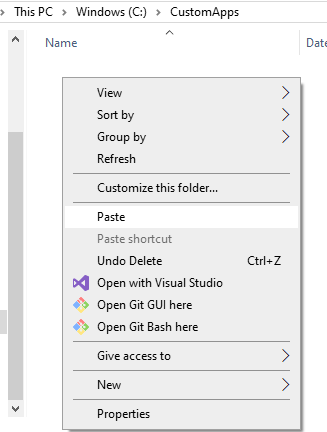
SKIP THE REST OF THE STEPS IF UPDATING OR YOU ALREADY DID THEM FOR ANOTHER APP - Now, lets modify PATH to let windows see the new directory.
- Open search and search for "System environment variables." Select the option.
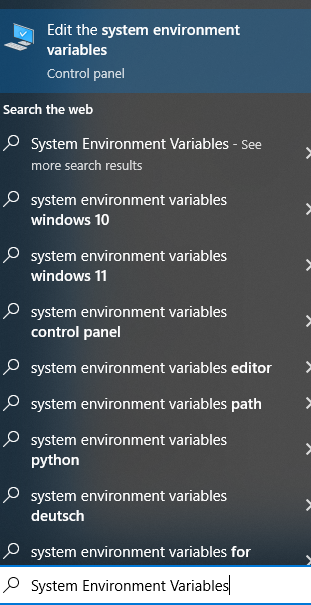
- Select the "Environment Variables" option that pops up.
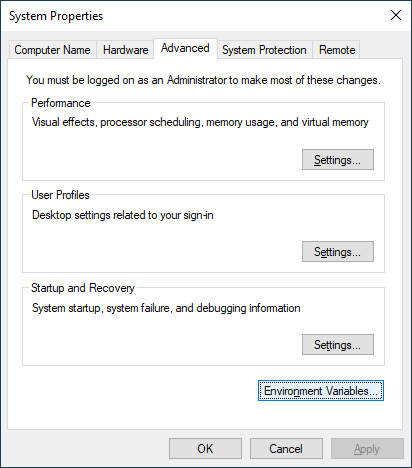
- Select
Path, found in the system section of the environment variable menu.

- Select
New

- Input
C:\CustomAppsinto the text box that appears.

- Click OK on the window that is modifying
Path. - Close out of the control panel (click ok on the 2 remaining windows).
- RSSReader should be installed system-wide. Test it by opening a terminal (CMD, Powershell) and running
rssreader. if all goes well, in a few moments, you should see the following output:
Making feed file now...
Made File.
Cleared monitored feeds since this is a new feed file
Command (help for commands):
Edited 9/10/2024 to add anti-virus info