Repository navigation
HTML Report
The HTML report is a single file containing its data, styles, and scripts. Open it locally in a browser; it needs no server or network connection.
Generate it with -html report.html when parsing logs, or use --capture, which creates coverage.html automatically. See Quick Start.
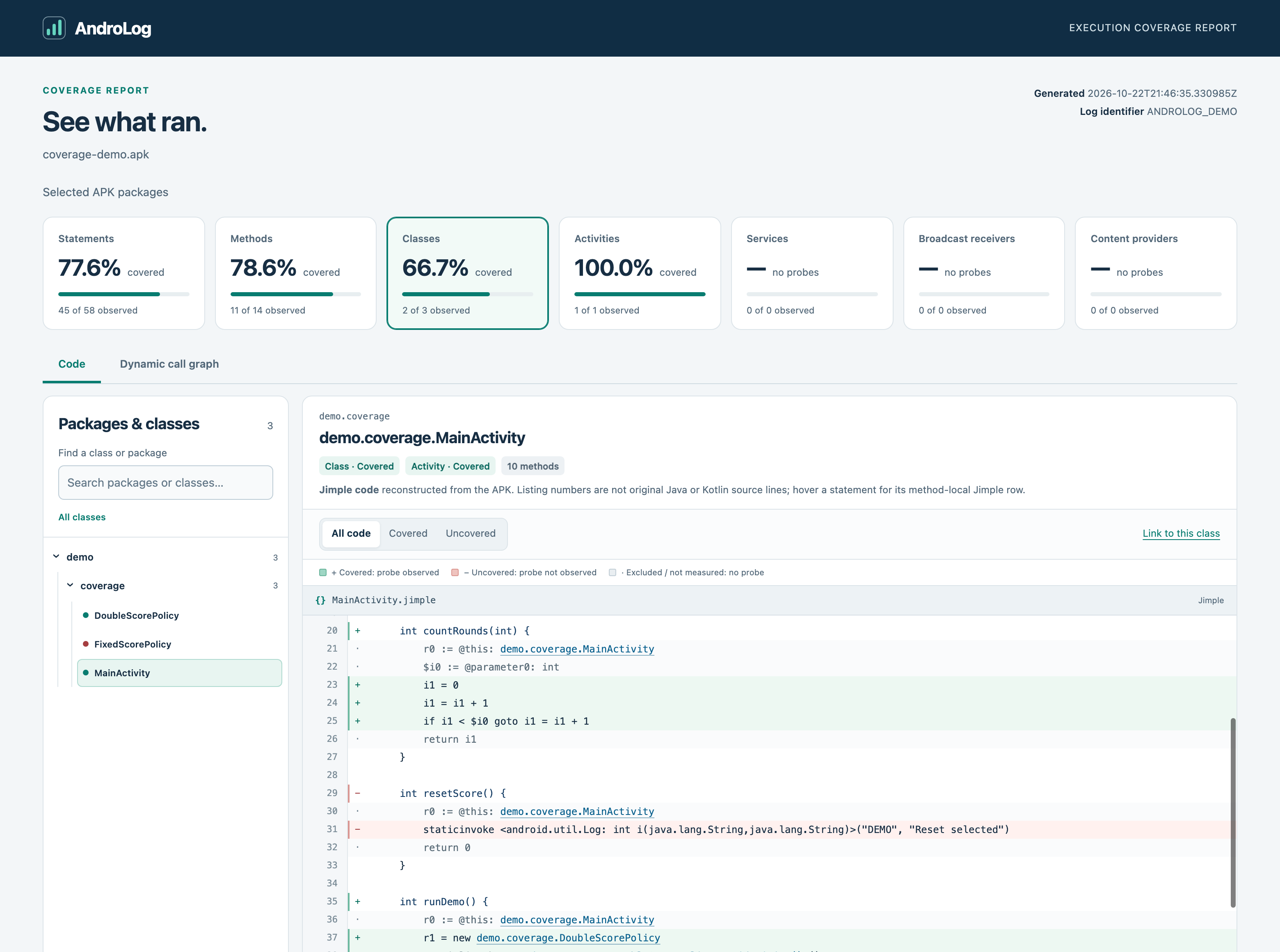
Expand packages in the left pane and select a class. Its methods appear together in one continuous listing with a single scrollbar. Use the code filters to show all code, covered statements, or statements not observed during the run.
The listing is Jimple, reconstructed from the APK. Method signatures identify parameter and return types. Listing numbers are for navigation, while statement tooltips show each statement's position within its method. They are not Java or Kotlin source lines.
Clickable class, field, method, and constructor references navigate to matching code available in the report. Following a reference switches to All code so the destination is visible. Browser Back and Forward follow this navigation history. Framework code without a body in the report cannot be opened.
The cards above the report are interactive:
| Selection | Effect |
|---|---|
| Activities, Services, Broadcast receivers, Content providers | Filter the class list to that component type |
| Methods | Filter classes with measured methods and expose an exact method selector |
| Statements | Filter classes with measured statements |
| Classes | Return to class browsing |
| Show all classes | Clear the category selection and search |
Search works inside the selected category. Unobserved components remain selectable, so you can inspect their code and identify what your tests did not record.
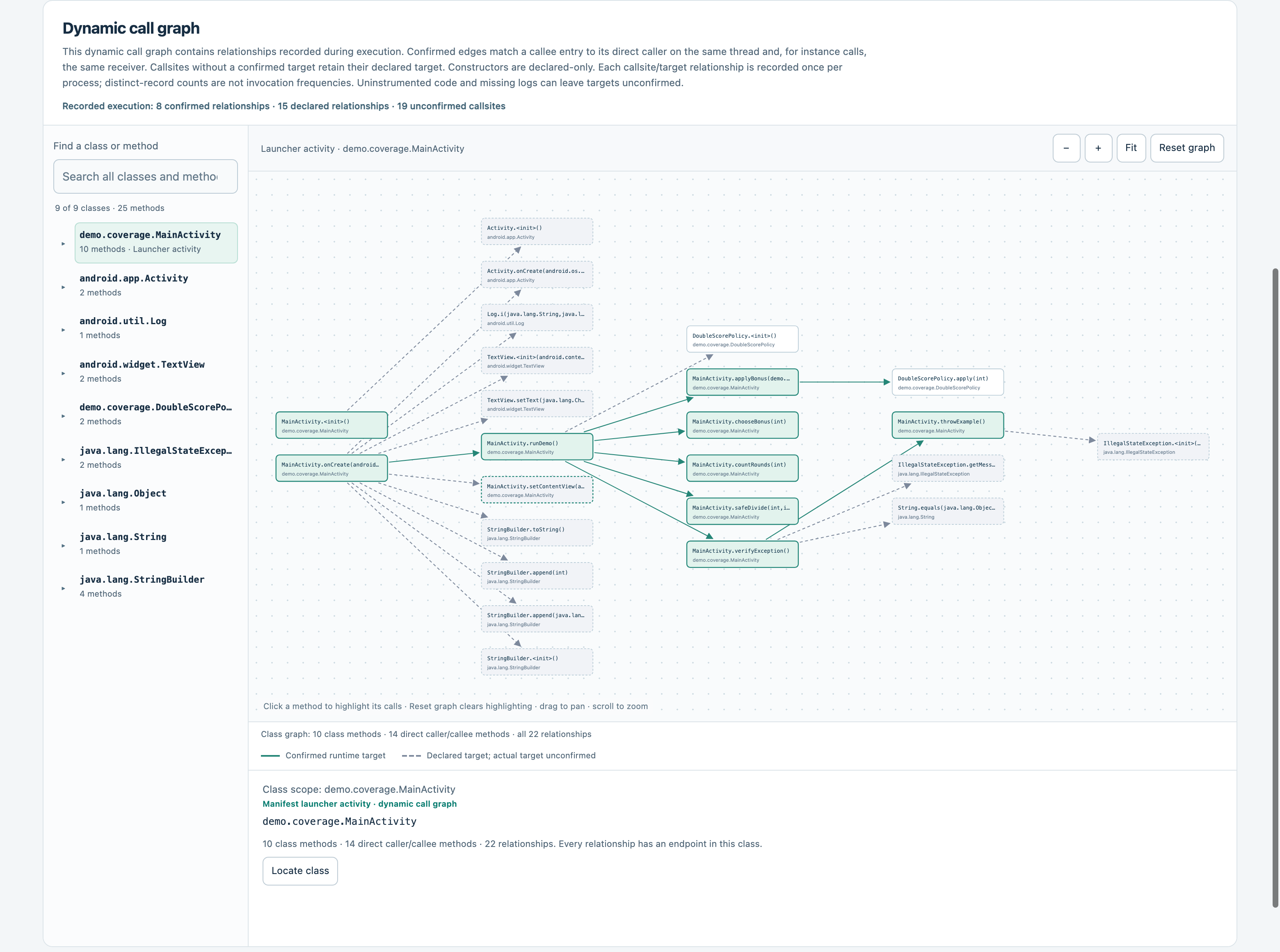
The graph initially selects a launcher activity identified from the manifest. A class graph contains recorded relationships incident to that class's methods, including caller and callee endpoints from other classes. It does not recursively expand into the entire application graph.
| Interaction | Result |
|---|---|
| Select a class in the left pane | Show that class's recorded incoming and outgoing relationships |
| Click a node | Highlight its incoming and outgoing edges; fade the other relationships |
| Reset graph | Clear the node highlighting within the current class graph |
| Fit | Fit the current graph to the canvas |
| Select an edge | Inspect declared signatures, invocation kinds, and callsite IDs |
| Open code | Jump to the selected method when its listing is available |
Highlighting leaves the other nodes and edges present and preserves positions, zoom, and pan. Reset does not switch to a whole-application graph. If no launcher has recorded relationships, choose a class manually.
Solid and dashed edges encode whether a method entry was confirmed. A dashed constructor or framework edge does not necessarily mean an ambiguous target. Read Dynamic Call Graph before interpreting these styles.
Share the generated HTML file itself. The recipient can open it offline without installing AndroLog. The file contains reconstructed application code and execution data, so choose a destination appropriate for that APK. JSON is more convenient for scripts; it does not contain the full code listing.
Both screenshots on this page are from an executed Android demo app. Your totals, packages, and graph will depend on the APK and captured run.