Repository navigation
AutoFill
Autofill service can fill out the views in other apps with credentials provided by KeePassDX.
You must select KeePass from autofilling in the Autofill service menu on your device.
-
A dialog box may ask you if you are sure to trust the app: KeePassDX is open source, so you just need to check the points that matter to you in the source code and validate if you agree.
-
For Xiaomi devices (with MIUI): Turn on "Show lock screen" permissions "Settings" → "Manage Apps" → "KeePassDX" → "Other permissions" → "Show on Lock screen". Otherwise you will not be able to open the app from the key button.
Press the small pop-up when it appears, you will then be asked to select an entry (also to unlock a database if none is open)
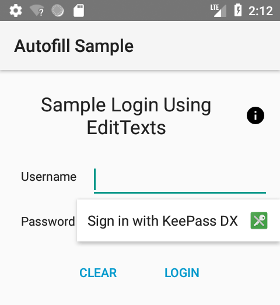
The service automatically fills in the user and password fields.
There may be improvements or small bugs to fix, in this case, check if a corresponding issue is not already open and leave your comment indicating how to upgrade the service. Autofill feature is constantly evolving with a custom algorithm according to your remarks.
The auto-fill service is built directly into the heart of the Android system, and was not present in earlier versions.
KeePassDX will not use the accessibility service for older devices. It is a service which is not made for this purpose, and this technical aspect is deprecated by Google. In addition, this will require too much work for devices that are no longer produced.
You can however use the Magikeyboard, which was specifically created to overcome this problem and is compatible with older devices.
The form to fill in username and password is recognized if explicitly defined with android:autofillHints or if it contains input elements (with types : username and password). Otherwise, the dialog box is not offered. When KeePassDX is started in autofill mode (after clicking "Sign in with KeePassDX"), each entry becomes a callback function that returns username and password. If you want other behavior, please request it.
The Chrome browser may not offer autofill, this is a known bug that cannot be resolved from the KeePassDX app. It's a Chrome bug, try updating your browser or changing it by antoher if autofill is a feature you want.
The autofill may not work if the form has explicitly requested to disable autofill (with importantForAutofill="no" or autocomplete="off"). In this case, ask the application or website to remove these tags.
Part of the autofill code is inspired by Android-AutofillFramework.