Repository navigation

Replies: 3 comments 1 reply

|
Thanks @kruemelro, good idea, and it's built. It comes with the next release. In the labs settings, the list gets a "Group by category" option. It's off by default, so nothing changes until you switch it on. With it on:
While I was in there, two small things got fixed too: the marker form can now clear a panel, context or range bound you no longer want, and merging two markers keeps the panel name when the marker you keep didn't have one. |
|
@kruemelro This is out in v1.47.1. Settings, Arrangement, Labs has the "Group by category" switch, and the labs guide describes the groups. If a marker lands in a group where you wouldn't expect it, tell me which one. |

|
I just tested it and it works great! What would be great if i could change the sorting of the groups also. 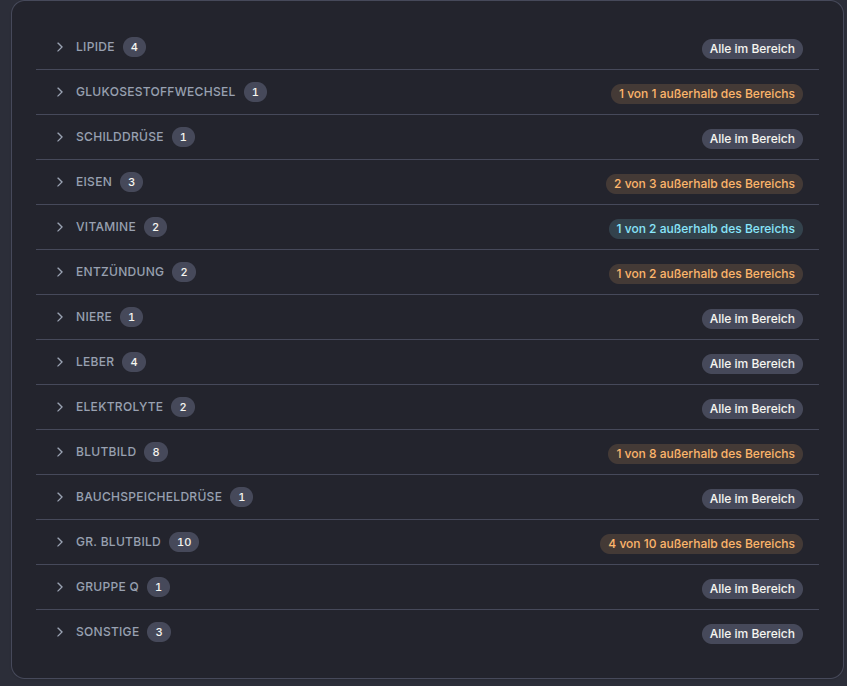
|

|
@kruemelro The category order is in v1.47.2. With "Group by category" on, Settings, Arrangement, Labs now has a "Category order" card: move a category with the handle or the arrows. To answer how they were ordered so far: the built-in categories in a fixed order, then your own panels alphabetically, and Other last. That stays the order until you change it. A category that turns up later joins the end of yours, and the order is saved with your account, so every device that groups the list shows the same order. |


Uh oh!
There was an error while loading. Please reload this page.
I added my Biomarkers from my Lab results to Healthlog and i have to say its a really great feature!
But the list of markers could be very long and gets difficult to read.
Some of the labs i've got results from are grouping the markers into categories and i've found it much easier to read.
So maybe this would be a helpfull feature for Healthlog.
My thoughts to the implementation:
All reactions