Repository navigation
Tools for coloring and georeferencing
Three tools (hdmapping-camera_lidar_*) support camera calibration with LiDAR and applying colors to data from a session.
Mandeye hardware includes a camera synchronized with the LiDAR (available on both product and open-source builds). Camera data is stored alongside the point cloud data in a CAMERA_0 directory; each file is named with a timestamp, and a metadata JSON (from the libcamera library) is saved alongside it.
Applying color to a point cloud requires two calibrations, done in order:
-
camera_lidar_intrinsics_calib -- checkerboard-based camera intrinsic calibration (OpenCV rational distortion model). Determines the camera's internal parameters — focal length, principal point, and lens distortion. This is per-device and only needs to be done once per camera.
- Load a set of checkerboard images.
- Detect corners.
- Run calibration — outputs the parameters plus a reprojection error (a few pixels is acceptable).
- Save the result to
intrinsics.yaml— required as input for extrinsic calibration.
-
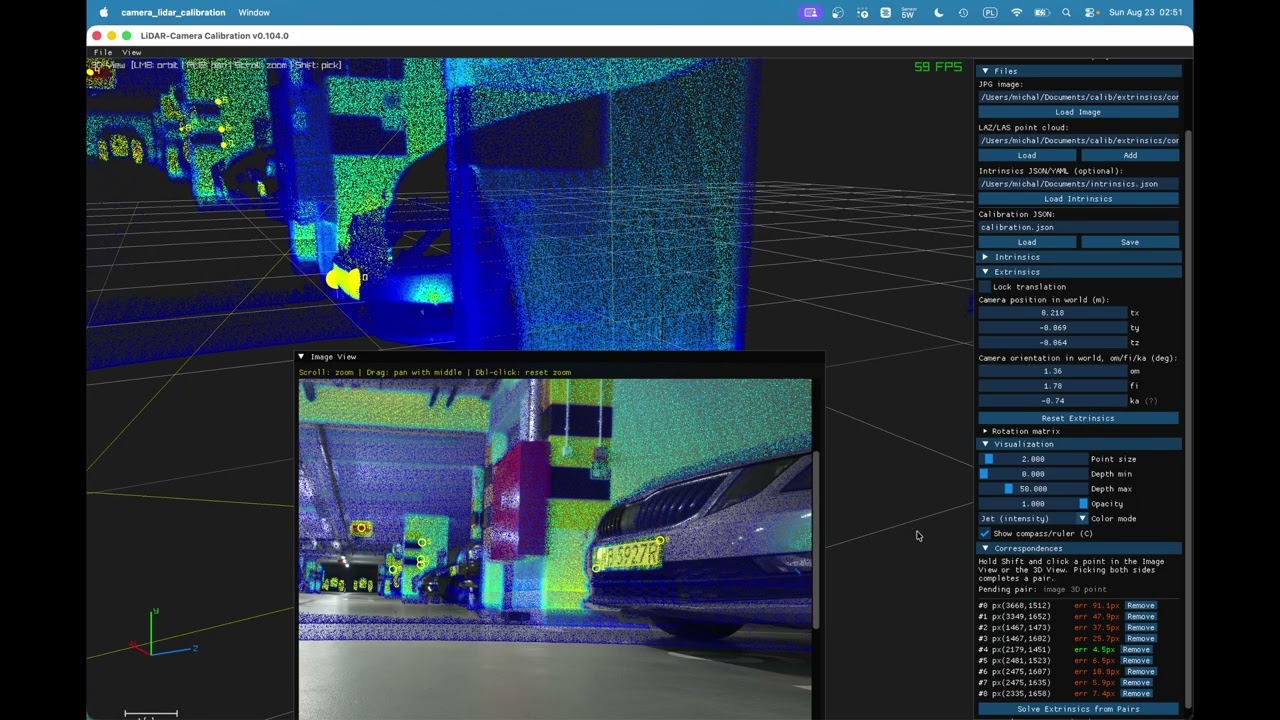
camera_lidar_calibration -- interactive LiDAR-camera extrinsic calibration: aligns a LAZ/LAS point cloud to a camera image with live GPU-shader reprojection feedback. Determines the camera's transform relative to the LiDAR, using a captured calibration scene (at least 3 point clouds recommended for a dense map).
- Load the calibration image and the intrinsics from the previous step — the image is rectified automatically.
- Add the point cloud(s).
- Align camera pose to the point cloud, either by:
- manually adjusting the 6DOF sliders (translation/rotation), with live GPU-rendered feedback, or
- point picking (hold Shift on the image / equivalent in 3D to pick matching points) followed by automatic optimization — the more robust approach.
- Verify alignment in RGB mode (toggle with Ctrl on Mac / Alt on PC): intensity gradients in the point cloud should line up with the corresponding edges in the image; visible drift indicates parallax/misalignment error.
- Save calibration to
extrinsics.json— stores the 4x4 extrinsic matrix plus the intrinsics. Calibration can be reopened later (load image + point cloud) to refine it further.
-
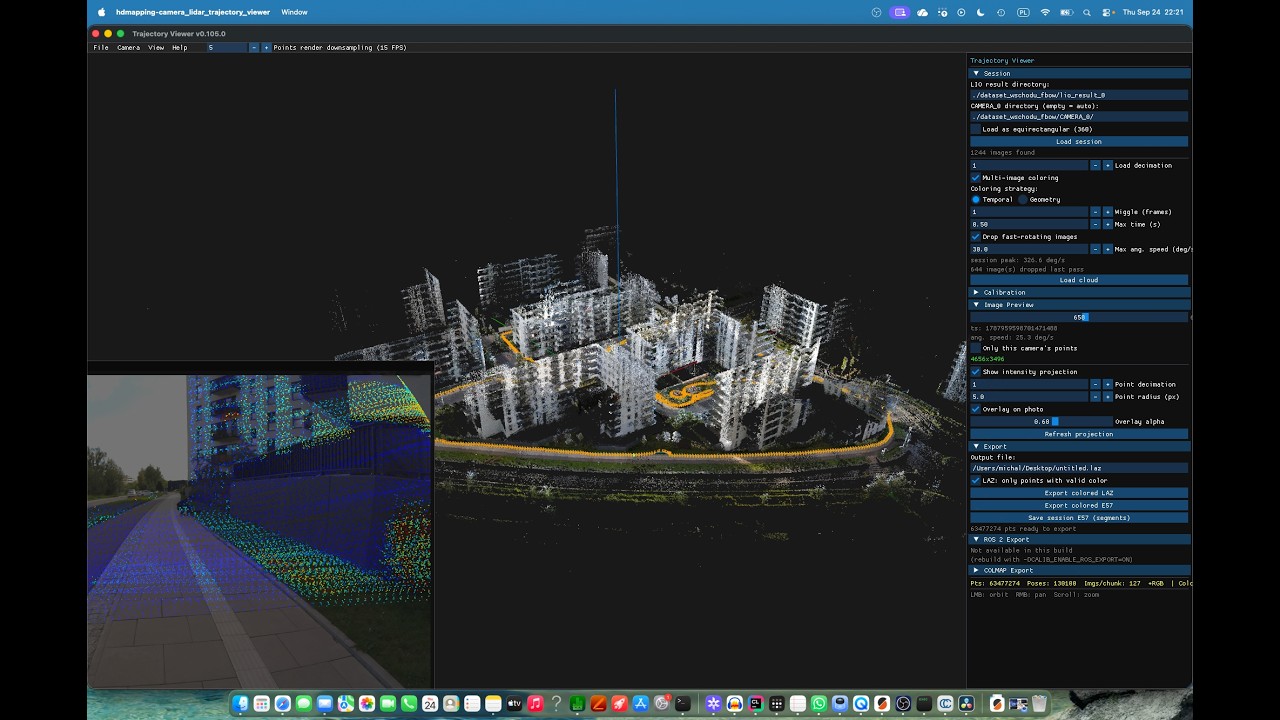
camera_lidar_trajectory_viewer -- multi-camera trajectory/point-cloud viewer that assigns per-point "which camera colored this point" RGB, with LAZ export, plus optional COLMAP sparse-model and ROS 2 bag export. Takes a registered session (output of step 1/step 2), a camera directory, and the
extrinsics.jsonfrom the previous step. Can be run via the GUI file menu or via CLI arguments (-hfor help), e.g. pointing at the session'ssession.mjs, thecamera-0subfolder, and the calibration file.- By default only the trajectory (camera positions) loads; Load cloud performs the actual projection/coloring, which is blocking and can take a while for large sessions.
- Max angular speed filters out frames captured while the rig was rotating too fast (useful in low-light conditions where those frames are blurry); such dropped frames are flagged in the image preview.
- Toggle between intensity and color view (Ctrl/Alt) to sanity-check synchronization and calibration quality — there should be no visible "jumps" between the two.
- Image preview lets you step through captured frames, see per-frame point projection overlays, and optionally load a mask (e.g. to exclude the rig/self from coloring).
- Additional coloring modes: camera ID (colors points by which camera captured them) and camera-visibility (points seen vs. not seen by a given camera) — useful for debugging coverage.
-
Export options:
- Colored point cloud (LAZ) — optionally restricted to points with valid color only.
- ROS 2 bag — replays camera + LiDAR data along the trajectory, mimicking a live robotic system.
- COLMAP sparse model — for downstream dense reconstruction or Gaussian-splat training.
| Calibration | Coloring |
|---|---|
 |
 |
Georeferencing requires a session with a synchronized GNSS/RTK stream (e.g. the extra RTK GNSS service running on Mandeye hardware, timestamp-synced with the laser).
Workflow (step 2, using the Mandeye/HDMapping tool):
- Open session – load the session containing the continuous scan.
-
Load GNSS data –
File → GNSS → Load and map, then select the GNSS files for the session. Correspondences between trajectory and GNSS are built from timestamps and can be shown/hidden. -
Align trajectory to GNSS – in Manual loop closure, either:
- Fuse trajectory with GNSS (rotates/rescales the trajectory to match), or
- Compute pose graph SLAM (also deforms the trajectory to fit GNSS constraints) — recommended when RTK data is available.
-
Export – with the trajectory now georeferenced (origin = first GNSS measurement), export the point cloud (MetaScan) in a target coordinate system, e.g. PUWG92 (Polish equivalent of UTM).
- Choose a geoid model or ellipsoid height reference at export. The geoid file must sit next to the executable to be used.
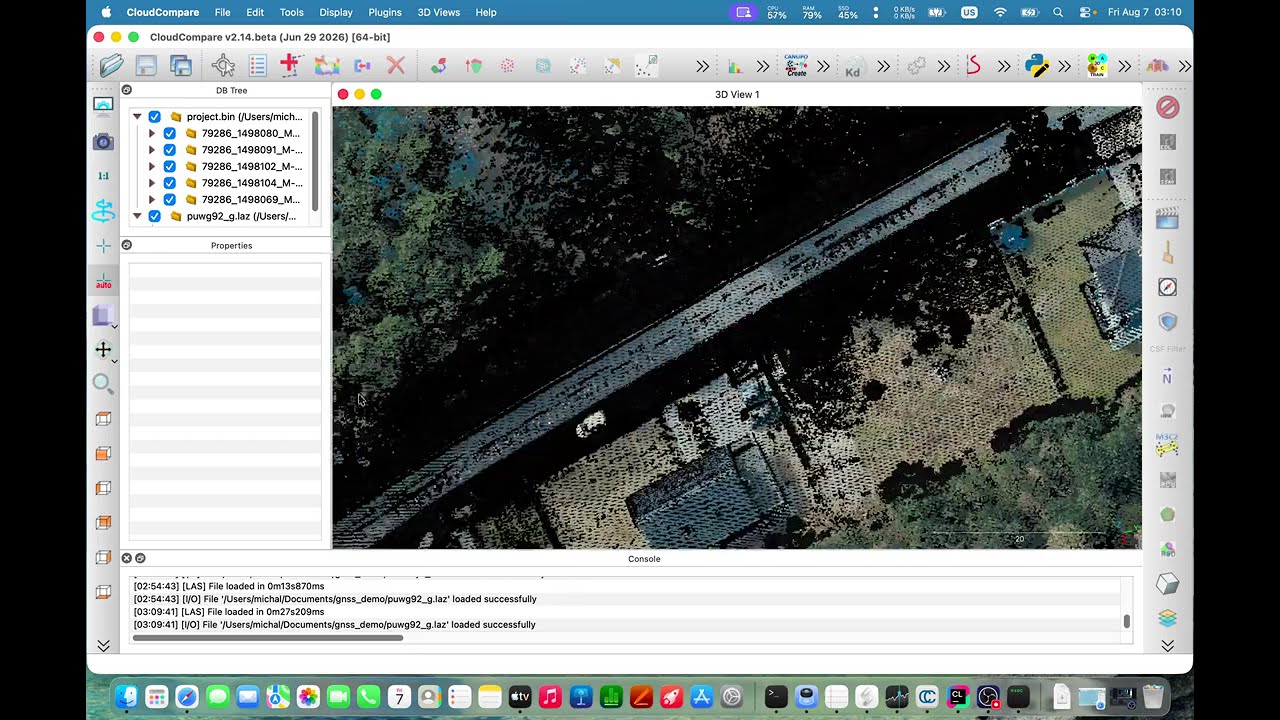
Geoid vs. ellipsoid matters: validated in CloudCompare against Polish GeoPortal airborne LiDAR (also in PUWG92) — the geoid-corrected export aligned well in both ground plane and elevation, while the ellipsoid-only export showed an elevation error of several tens of meters.
| Georeferencing |
|---|
 |
A portable NTRIP (Networked Transport of RTCM via Internet Protocol) client for M5Stack devices that receives RTK correction data from NTRIP casters and forwards it to u-blox GNSS receivers for high-precision positioning: https://github.com/michalpelka/M5NtripClient