Repository navigation
V2.0.0-beta - Radian
Pre-release
V2.0.0-beta - Radian
Fate UI 2.0 takes the workspace off the desktop. Radian splits Fate into a host that runs Pi and clients that show it. The host can still be the desktop app. It can now also be a small Node process on another machine, and you work on it from the desktop app, from a browser, or through SSH.
Under that change sit a move to Pi SDK 1.0, an MCP client, questions from the agent, a Monitor dashboard, a new ownership and recovery model, and an optional SQLite storage.
Important
This is a pre-release for beta testers. Back up ~/.pi before you install it over an existing installation. Installed stable copies are not offered this build; the stable release stays 1.1.1 until 2.0.0 is final. To leave the beta, uninstall it and install the stable release again.
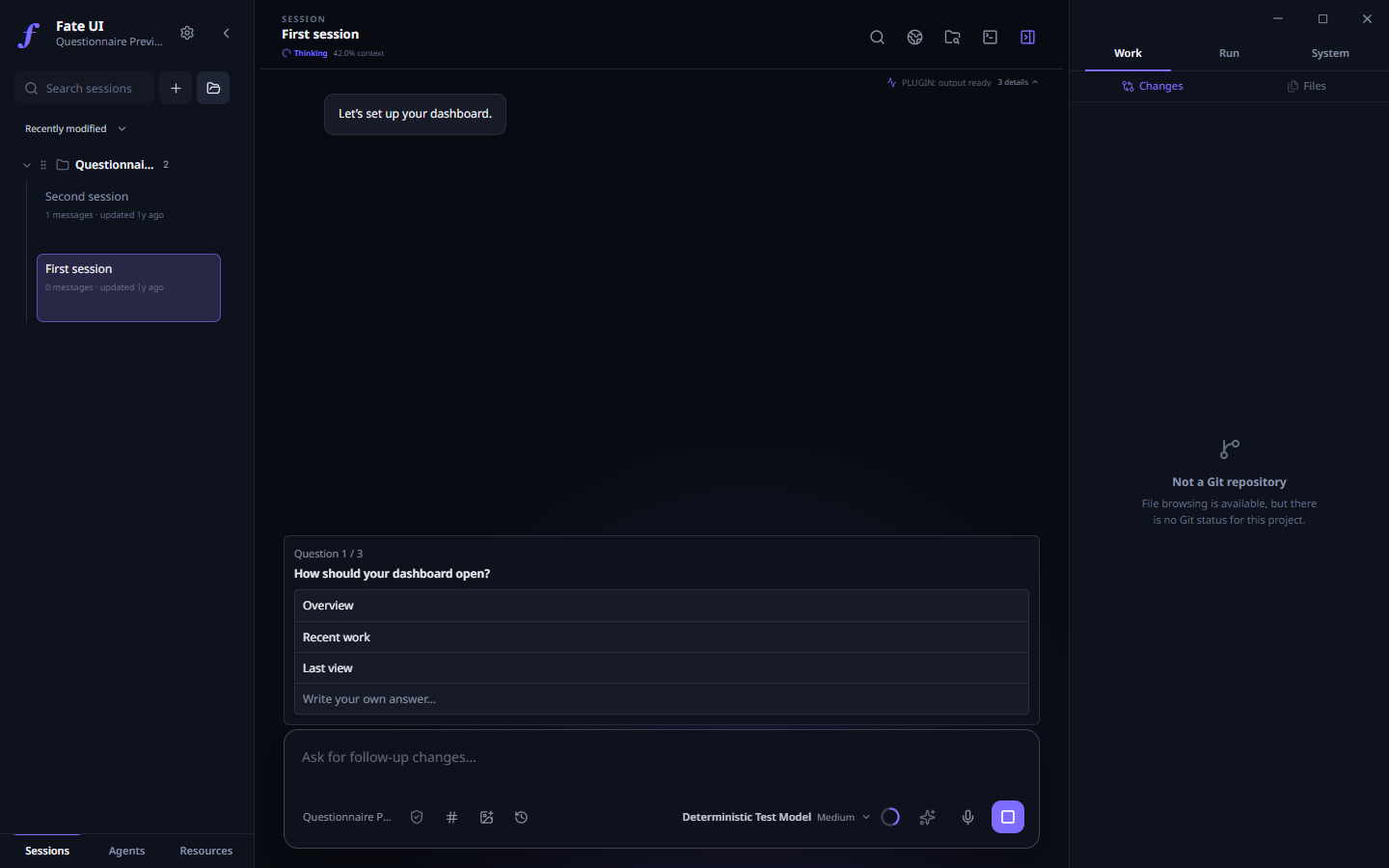
Actual Electron UI with a demonstration project and a test model: the agent asks, you choose.
Size of this release: 38 commits, 695 changed files and about 71,700 added lines since 1.1.0, checked by more than 3,900 automated tests. The 1.1.1 hotfix for large saved sessions is included.
Run Fate where the code lives
The Node companion: fate-server
A plain Node process that owns Pi, your registered workspaces and the provider credentials. It has no window and no Electron. Closing a client does not stop it, so a run on the host continues after you close the browser or the laptop.
| Command | What it does |
|---|---|
fate-server init |
Creates a private profile for one trusted workspace. |
fate-server serve |
Runs the host without a web page. |
fate-server web |
Runs the host and serves the browser workspace. |
fate-server provider login / status |
Sets up the model provider on the host. Keys never pass through a browser. |
fate-server auth-code |
Issues a one-use login code for a browser. |
fate-server access-key create |
Issues a workspace-scoped credential for a desktop client. |
fate-server doctor |
Reports the state of a profile and changes nothing. |
fate-server migrate |
Moves existing state to the new storage (see below). |
A profile made this way starts with a read-only permission maximum and the terminal off. Both are raised only by explicit flags at init. The host listens on 127.0.0.1 only; there is no public mode and no mode without login. A sample systemd user unit and a service guide are included.
The browser workspace
Open the login page, enter the one-use code, pick a registered workspace. The page is built from the same interface code as the desktop app.
- Conversation: chat, model and thinking level, new session, message queue, stop a run on the host, export a bounded text copy of the session.
- Context: attach a text file from your device, or a file of the project on the host.
- GoalMax and tasks: create, edit and clear a goal; create, reorder, change and clear tasks.
- Agent Teams: create a Team and use its lifecycle controls.
- Monitor: what is active and what needs attention, with a jump to the work behind a row.
- Files: the tree and a text preview of the registered project.
- Git: changed files, a diff for one file or for all, "reviewed" marks, history, and the content of one commit.
- Saved history: read an old conversation page by page from its start.
- Permissions: request a lower or a higher permission. Each change needs a one-use confirmation, and nothing above the host maximum is granted.
- Terminal: an optional manual shell in the browser, when the host was set up for it.
The desktop app as a remote client
The desktop app has a new Execution host selector. Add an SSH host, pin its server ID, choose the private client credential, and connect — or run fate connect PROFILE. The app opens the tunnel through your system OpenSSH and checks the host identity, the protocol and the workspace before any work starts. An unknown or changed host key blocks the connection. A failed connection never starts a local agent in its place.
Observers and one controller
- Every client starts as an observer. To change something, it claims control: a bounded lease that the host owns. You can renew it or release it.
- Control never raises the permission.
- When control moves to another client, requests from the earlier one are refused. A takeover is possible only when the host policy permits it.
- The selected session is shared in a workspace. When the controller selects another session, every client follows.
After a lost connection
- What you see is the last known state, marked as possibly stale. The host can still be working.
- After a reconnect or a host restart, the client needs a fresh snapshot before it can control again. Events arrive in order behind that snapshot.
- Each change request has an ID and a recorded outcome on the host. If the answer is lost, you review the original request. The client does not send it again.
- Interrupted work is shown as interrupted. It is not resumed without you.
New in the desktop app
Pi SDK 1.0
Fate moves from Pi 0.85.1 to Pi 1.0. A prompt is either admitted by Pi or refused; there is no half-queued item. The standard Pi 1.0 themes and their new color format are supported.
MCP servers
Settings → MCP adds a client for the Model Context Protocol, built on the official SDK. Add a local command or an HTTPS endpoint, press Test saved server, and turn it on. No server is on by default, and a project file cannot start one. The agent reaches MCP tools only in a Full access session. MCP guide
Switch from Pi Terminal
Settings → MCP → Switch from Pi Terminal imports the provider entries and the compatible global MCP servers that Fate does not have yet. It never replaces a Fate value. A new Fate profile also starts with the model and thinking level you chose in Pi.
Questions from the agent
Pi can stop and ask. A question card opens above the composer with two to four choices and a field for your own answer; several questions come one after the other. The agent waits for you. Skin packs can style the card.
Monitor
One panel lists the runs, Teams, tasks and activity that are active or need attention, and opens the work behind each row. The agent can read the same dashboard with a tool. It cannot approve, stop or resume work through it.
GoalMax and Agent Teams
- A failed verification can now be linked to a later passing run of the same check. The failure stays in the timeline as stale, with the reason.
- A sub-agent in an isolated worktree keeps its own sub-agents in that worktree, unless it asks for another workspace.
- After a restart, a saved Team is checked against its stored child sessions. Nothing is run again.
Sessions and permissions
- Session files are read as a stream with a bounded preview. Sessions and Agent home sessions larger than 128 MiB open, and the file is never shortened.
- A saved session is tied to its real project, also when two project paths map to the same Pi folder name.
- A saved permission is restored only inside the current host limit. Unreadable or damaged permission storage blocks the agent; it never grants more access.
Interface and launcher
- The heaviest side panels load when you first open them. If one fails to load, the other tabs stay usable.
- Push-to-talk runs its keyboard hook in a helper process. A hook that hangs cannot freeze the app; push-to-talk is then reported as unavailable.
- The
fatelauncher gainsfate connect PROFILEand passesinit,serve,web,provider,auth-code,access-keyanddoctorto an installed companion.
Ownership, storage and recovery
One owner for each profile
One process owns a profile and its checkouts. A second app or host on the same data is refused, so two processes cannot write the same state. After a crash, a forced quit or a power loss, the next start recovers the lock when the operating system confirms that the old process is gone. A lock is never taken because it looks old.
Native durable storage (opt-in)
The default storage is unchanged, and existing sessions, Team history and worktrees stay as they are. A new profile can select native-durable: one SQLite store, through Pi's durable runtime, for the queue, the tasks and the GoalMax documents. New workflow graphs are then admitted and ordered by Pi's native tasks. A damaged or incomplete native store blocks the start; Fate never falls back to the old storage silently.
Migration with a way back
fate-server migrate shows a dry run first. prepare writes a plan, apply makes a verified private backup and imports, and rollback returns to the original state. It does not copy provider credentials, trust or full-access grants, and it does not replay old work. Migration procedure
Review after an uncertain stop
If a workflow stopped in an unknown state, its history must be reviewed before new work is admitted. A storage close that could not be confirmed keeps the profile locked for an operator. An ordinary crash does not. Workflow review
Security defaults
- Browser login: a one-use code with a five-minute life, sent in a POST body; then an HttpOnly, SameSite=Strict session cookie and a CSRF token. Requests with a wrong Host or Origin are refused.
- Profile and credential files must be private. Windows ACLs and POSIX modes are checked, and a profile that is not private is refused.
- A workspace must be registered and trusted on the host. A remote path never leaves the host, and secrets are removed from network views and host logs.
- The manual terminal is an unsandboxed shell of the host account. It needs an acknowledgement flag at
init, current control, and a warning confirmation in the browser. - Snapshots, lists, history pages and transport buffers have fixed limits.
- Full access stays an explicit, unsandboxed grant.
Fixed
Defects that were in 1.1:
- The application could fail to quit: every quit started the global keyboard hook only to stop it, and that start could block for good.
- The music player reported a missing yt-dlp when the bundled one needed more than five seconds to start.
- The Git view could receive a status that was read before the agent's latest edit.
- A tooltip covered neighboring controls after a dialog returned focus to its opener.
- The Activity panel showed ledger rows for one frame after a project lost trust.
- Narrow inspector tabs, panel splitters, focus outlines on search fields, select filters after a keyboard choice, and the Monaco fallback workers.
Defects that the first V2 package runs found, fixed before this beta:
- The installers lacked 165 runtime libraries.
- The two standard Pi themes were missing on a profile without its own Pi themes.
- The browser terminal lost its connection and its control when a shell ended.
- The Windows
fatelauncher failed on a PC with several Node installations, and under the default Windows script policy.
Beta testers: please try these
- Start again after a forced quit or a crash.
- Push-to-talk, especially on macOS and Linux. No automated check can press a global hotkey.
- Agent Teams with isolated worktrees and nested sub-agents.
- Your MCP servers, the import from Pi Terminal, and questions from the agent.
- A Node companion with a browser, and the desktop app over SSH.
Report problems in the issue tracker.
Known limits
- The Node companion is not among these release files. Its builder supports Linux x64 only. Build it from this tag with the package guide. It needs Node 22.19 or later.
- The network client has no built-in browser, file reveal, voice, hotkeys or rich media. It cannot commit, revert, fetch, pull or push. Provider keys and MCP servers are edited on the host only. Saved Agents, Routines and Memory Learning are local-desktop only. The terminal over the network is browser only. Full table
--new-instancestill shares one profile owner: a second instance on the same profile is refused.- On Windows and macOS a lock left by a crash stays while another program holds the old process number. Lock recovery needs a filesystem with hard links.
- Real SSH hosts, a Linux service installation and push-to-talk in the packaged macOS and Linux apps were not exercised by an automated runner.
Installation
| Platform | Architecture | Formats |
|---|---|---|
| Windows | x64 | EXE |
| macOS | Apple Silicon and Intel | DMG, PKG |
| Linux | x64 | AppImage, DEB |
This build passed the package, install and smoke matrix on all four runners, and the exact seven-installer checksum set was verified before publishing. Installers remain unsigned, and macOS builds are not notarized. Verify your download with SHA256SUMS; a checksum does not replace code signing.
Setup guide · Security and limits · Troubleshooting · Report an issue
Fate UI is an independent community project and is not an official Pi distribution.