Repository navigation
V2.2.2 - SpaceTime

V2.2.2 - SpaceTime
The first stable release since 1.1.1, and the one where the agent gets hands. SpaceTime lets the agent see your screen and use your mouse and keyboard. It also brings everything from the 2.0 and 2.2 betas to the stable channel, plus branch worktrees and long chats that open fast.
Agents become assistants you talk to. Fate can run on another machine and be used from a browser. Pi moves from 0.85 to 1.3. The agent can now see your screen and use your mouse and keyboard when you allow it.
Important
Back up ~/.pi before you install this over 1.1.x. Check for Updates offers this build to stable copies. Saved Agents become global, and the Agents library from 1.1 is replaced by one chat per Agent (see Upgrading).
Size of this release: more than 100 commits and about 835 changed files since 1.1.1. The 2.0.0-beta, 2.0.1-beta and 2.2.0-beta changes are all included; their pages stay up for the details.
Computer use: the agent can use your computer
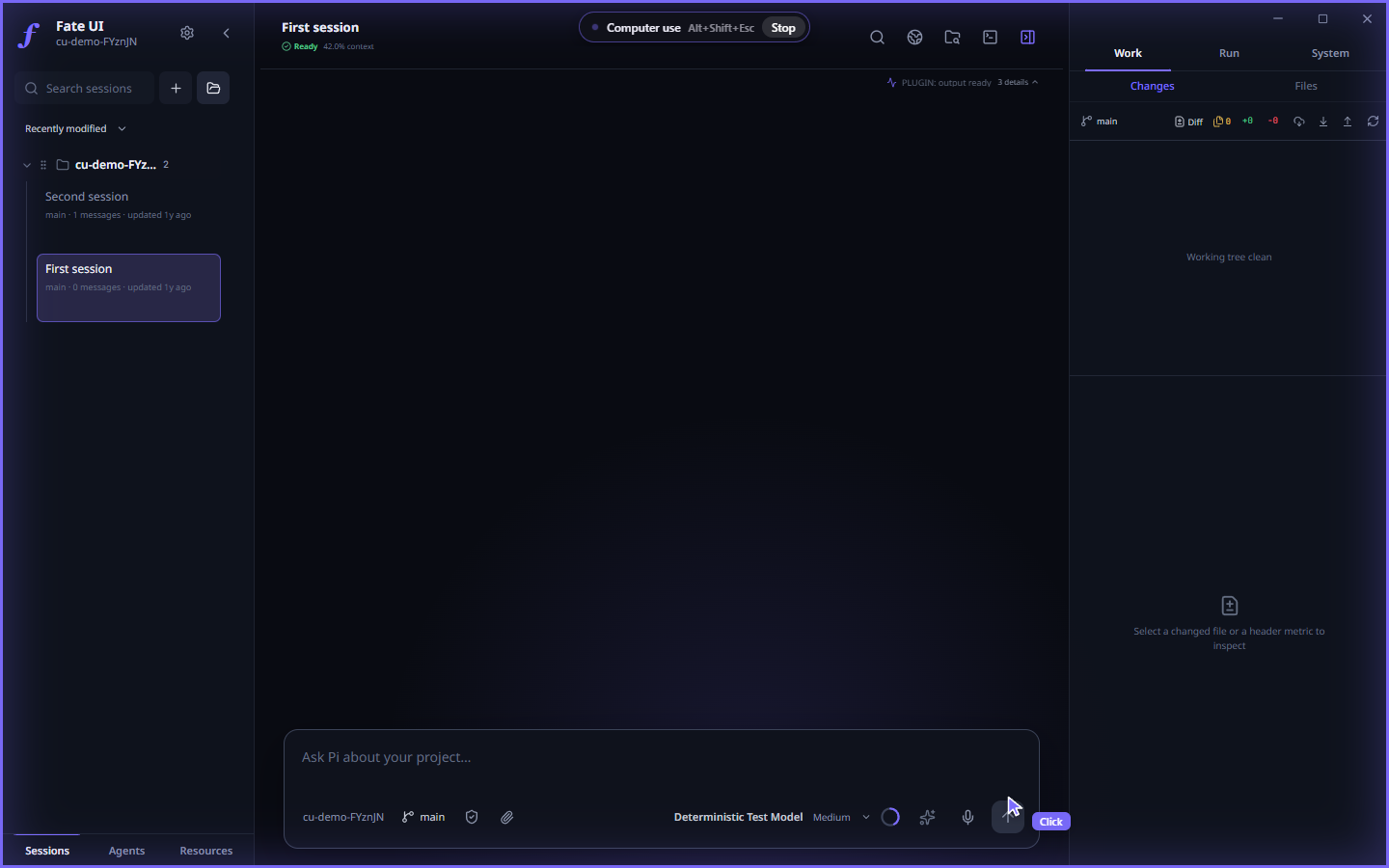
While the agent is acting, a frame lights up around every screen, a pill shows Computer use with its stop shortcut and a Stop button, and the agent's cursor is labelled with what it is doing. The frame, pill and cursor are the real overlay markup from the app, drawn over a Fate UI window.
The agent can take screenshots and drive the mouse and keyboard through a new computer tool: click, double and triple click, drag, scroll, type, key chords, hold a key, zoom into a region, and pick a display.
- Off until you turn it on. Use the switch in the permission menu of the composer or Settings → Workspace → Computer use. It only works in a Full access session; turning it on from the composer moves the session to Full access.
- Always stoppable. An overlay shows when the agent is acting, with a Stop button, and Alt+Shift+Esc (⌥⇧Esc on macOS) turns it off from anywhere. It also turns off when the last window closes.
- Fate UI relaunches elevated (a UAC prompt on Windows, an administrator prompt on macOS,
pkexecon Linux) so the agent can reach every window. The whole app, its shell tool and its child processes then run with administrator rights, and the choice is remembered for the next start. On Windows the UAC prompt on the secure desktop is also switched off while computer use is on, so the agent can see it, and it is put back when you turn computer use off. Only turn it on if you accept that. - macOS asks for Accessibility and Screen Recording permission first. Linux needs an X11 or XWayland display; pure Wayland is not supported yet.
- Agent runs started from an Agent chat do not get the tool.
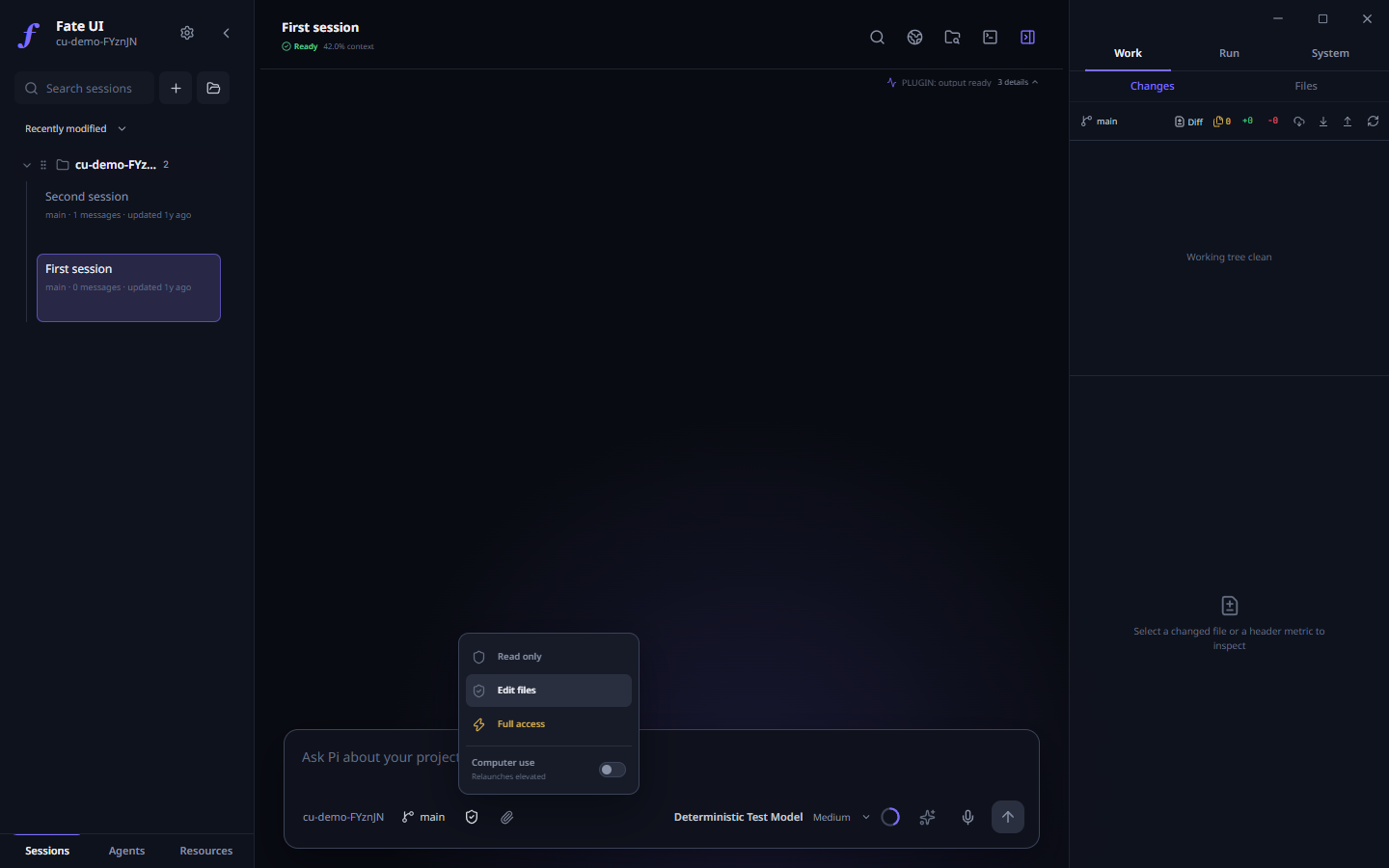
The switch sits in the permission menu of the composer, under the three levels. It is off by default.
Also new since 2.2.0-beta
Branches in their own worktree
- Picking a branch while you have uncommitted changes now opens it in a managed worktree and leaves your changes on the current branch, instead of failing.
- A branch that already has a worktree is listed with a worktree tag and opens that worktree.
- Each local branch has a delete button with a confirmation. Deleting a branch also removes its worktree. It refuses when a running session uses that worktree, or when the branch is checked out in the primary worktree.
- The picker no longer hides branches that are checked out in another worktree.
Long chats open fast
- A long session opens on its latest window of history. Scroll up and earlier messages load in pages, instead of being cut off for good.
- Images outside the recent budget stay as placeholders and load when you open them.
- Images you attach or receive are grouped into two-per-row tiles that open the full-size viewer. Tool-result images stay hidden while the tool card is collapsed.
Sessions and sidebar
- Delete a saved session of any project straight from the sidebar, not only of the open one. A project in the background keeps running.
- A background project whose selected session you delete closes cleanly first.
Fixed in this stretch
- Agent journal writes that Windows reported as busy are retried.
- The Agents tests and the Settings saved-toast checks no longer fail on slow runners.
- CI takes the pnpm version from
package.json. - A duplicate
deleteSessionbranch in the runtime router is gone; the one that ran before and the one meant to run now agree.
Agents, rebuilt
An Agent is a saved persona with exactly one conversation of its own, like a personal assistant chat. Agents are global and no longer saved per project.
- One chat per Agent. Select Agents in the sidebar and + to create one.
- Work in your projects. Ask for work in a trusted project. The Agent starts a background run with
run_in_project, answers right away, and continues when the run finishes. Up to four runs are active at once; each stops after 30 minutes. Open run shows it. - Inbox and notifications. Finished, failed and interrupted runs and Routine messages land in a per-Agent inbox behind the bell, with Unread and Read all. Desktop notifications fire while Fate UI is not focused; Mute notifications turns them off per Agent.
- Gmail and Google Calendar. With your own Google OAuth client (Settings → Agent → Google), an Agent can search and read mail and read your primary calendar. Sending mail and changing events waits for your answer in the chat. The client secret and sign-in are encrypted with the operating system's key store, and every decision is written to
google/receipts.jsonl. - Watches. Check a public page on an interval for any change, text appearing or disappearing, or a US dollar price crossing a threshold. Checks run without the model; only a hit posts into the chat.
- Routines post a message into the Agent's chat on an interval.
- Memory. The
remembertool saves what you state as a pending Memory Learning draft. Nothing is used until you approve it. - Tone and avatar, a live
fate_capabilitieslist so an Agent can walk you through what is not set up, and one permission setting shared by the chat and the card.
Web, PDFs and file search
Root sessions, Agent chats and Agent runs get these at every permission level:
web_search(Parallel's free Search MCP; turn it off in Settings → Agent → Web search) andweb_fetch, which refuses private, loopback and cloud metadata addresses, also after DNS and redirects.pdf_read; with Edit files or Full access alsopdf_fillandpdf_create.grep,findandlsat Read only and Edit files too, confined to the project.
Run Fate where the code lives
Fate 2 splits a host that runs Pi from clients that show it.
fate-serveris a plain Node process with no window. It owns Pi, your registered workspaces and the provider keys. A run on the host continues after you close the client. Commands:init,serve,web,provider login,auth-code,access-key create,doctor,migrate.- Browser workspace with chat, context, GoalMax and tasks, Agent Teams, Monitor, files, Git, saved history, permission requests and an optional terminal. Login is a one-use code, then an HttpOnly session cookie with CSRF protection. The host listens on
127.0.0.1only. - Desktop app as a remote client over SSH, with host key pinning (Settings → Hosts or
fate connect PROFILE). A failed connection never starts a local agent in its place. - Observers and one controller. A client claims a bounded control lease; control never raises the permission. After a lost connection the client shows the last known state as stale and reviews the original request instead of sending it again.
- One owner per profile, with recovery after a crash or power loss. Optional
native-durableSQLite storage andfate-server migratewith a verified backup and a rollback. Default storage is unchanged.
One orchestration engine
GoalMax, Agent Teams, Automations and Memory Learning now share one path. Agent Teams is the only executor for child sessions. A busy Team saves its state once per change instead of on every event (one child with 300 tool calls went from 706 saved snapshots, 78.8 MiB, to 5). Idle stays idle: Routines sleep until their next run, and GoalMax skips child bookkeeping while no goal is open.
Hooks, Code Intelligence, review and cost
- Hooks (Settings → Hooks) run your shell commands before a tool call, after a result, when the agent stops and at session start. Exit code 2 blocks, adds to the result, or sends the agent back to work.
- Code Intelligence connects language servers and gives the agent
lsp_diagnostics,lsp_definition,lsp_referencesandlsp_symbols. Everywriteandeditresult carries the file's fresh errors. - Checkpoints and Rewind on every Activity ledger row; hunk review with Keep and Reject in the Review Runway.
- Pull requests:
git_push(refusesmainandmaster),pr_createandpr_status; a branch chip withgit_branchfor the agent. - Usage and budget in Settings → Usage, a context inspector beside the composer, tool search, and optional Codemode.
- Reasoning slider in the model popover.
Pi SDK 1.3, MCP and more
- Pi 0.85 → 1.3. Resumed sessions keep their tools, model switches no longer leak old thinking, OpenRouter lists only your models, Kimi Code and Azure are updated (Azure is now one provider called
azure; sign in again if you used it), and many provider and retry fixes landed. A prompt is either admitted by Pi or refused. - MCP servers (Settings → MCP), Switch from Pi Terminal, questions from the agent, a Monitor panel and standard Pi 1.0 themes.
- Real tool times measured by Pi, and a stopped run stays stopped.
- Settings → System → Beta branch lets Check for Updates also offer pre-releases.
- Sessions larger than 128 MiB open and are never shortened.
Fixed since 1.1.1
- The app could fail to quit; push-to-talk now runs its keyboard hook in a helper process and cannot freeze the app.
- The music player reported a missing yt-dlp when the bundled one needed more than five seconds to start.
- The Git view could show a status that was read before the agent's latest edit.
- Changes panel errors during a project switch, a tooltip covering neighboring controls, ledger rows showing after trust was lost, narrow inspector tabs, panel splitters, search field focus outlines and Monaco fallback workers.
- The installers were missing 165 runtime libraries; the Windows
fatelauncher failed with several Node installations and under the default script policy.
Upgrading from 1.1.x
- Saved Agents are available everywhere. Earlier Agent home chats stay as normal sessions in their projects, and each Agent starts a fresh conversation. Automation files are not deleted.
- Azure users sign in again.
Known limits
- The Node companion is not among these release files. Its builder supports Linux x64 only. Build it from this tag with the package guide. It needs Node 22.19 or later.
- The network client has no built-in browser, file reveal, voice, hotkeys or rich media, and it cannot commit, revert, fetch, pull or push. Full table
- No automated check drives a real mouse, a global hotkey or an elevated relaunch, so computer use and push-to-talk are not covered by the test matrix on any platform.
- Computer use on Linux needs X11 or XWayland.
Installation
| Platform | Architecture | Formats |
|---|---|---|
| Windows | x64 | EXE |
| macOS | Apple Silicon and Intel | DMG, PKG |
| Linux | x64 | AppImage, DEB |
Installers remain unsigned, and macOS builds are not notarized. Verify your download with SHA256SUMS; a checksum does not replace code signing.
Setup guide · Security and limits · Troubleshooting · Report an issue
Fate UI is an independent community project and is not an official Pi distribution.