Repository navigation
Releases: NikaDzotse/shorts-studio
Release list
Shorts Studio 0.2.0

Install: download Shorts-Studio-Setup.exe below (the same file is also attached as Shorts-Studio-Setup-0.2.0.exe) and run it. It installs over older versions and keeps your Shorts and settings.
If Windows says "Windows protected your PC", click More info, then Run anyway.
What it does, screenshots and help: https://byttenapple.com/assets/shorts-studio
New: posting
-
Drag it in: drag a finished Short straight from Shorts Studio onto YouTube's or TikTok's upload page. Opening either upload page copies the title or caption, so you just paste.
-
Post from the app:
- YouTube: upload as public, unlisted or private, or schedule it.
- TikTok: send it to your drafts, post now, or schedule it.
Each Short shows how its posts went.
-
Accounts: connect them in Settings → Posting. Your sign-in stays on your PC, encrypted.
Posting straight from the app turns on once YouTube and TikTok approve Shorts Studio. Until then the Connect buttons say it isn't set up yet, and dragging the Short into the upload page is the way to post.
Also since 0.1.0
- Cuts tab: remove a cut or cut it again, cut by words, In/Out marks (I, O, X, Enter), snapping, exact cut times, and ▶ Check to hear a cut.
- Style presets.
- Unsaved editor changes come back after a crash.
- Fixed:
- closing the app now really closes it;
- a Short left half-made by a crash says "press Remake";
- the clip grid with many clips.
Shorts Studio 0.1.4
Install: download Shorts-Studio-Setup-0.1.4.exe below and run it. It installs over 0.1.0 and keeps your Shorts and settings.
If Windows says "Windows protected your PC", click More info, then Run anyway.
Easier, more controlled editing
- Cuts tab: every part that's cut out, and the ones you put back.
- Remove cut puts a part back in the Short; Cut again takes it out again. Your cuts are remembered after saving, smart trim's included.
- Type a cut's exact from / to times.
- ▶ Check plays across a cut the way the finished Short will.
- Cut by words: your clip's words as text. Select some and press Delete to cut them out; Put them back undoes it.
- In/Out marks: press I where a part starts and O where it ends, then X to cut it or Enter to keep it.
- Snapping: edges you drag snap to where words start and end, and to the playhead. Hold Alt to place them freely.
- No lost work: if the editor closes before you save, reopening the Short offers to restore your changes.
Presets
Save a Short's look as a named preset (layout, crops, theme, captions, title placement, branding, volume, music). Pick one when you make Shorts, or apply it to an existing Short in the editor.
Fixes
- Closing Shorts Studio now really closes it. Before, it could stay running in the background, and opening it again showed nothing.
- A Short that was being made when the app closed now shows "press Remake" instead of spinning forever.
- The clip grid no longer squashes the cards when you have many clips ("All time").
Shorts Studio 0.1.0
The first version of Shorts Studio: a Windows app that turns your Twitch clips into vertical Shorts for YouTube and TikTok.
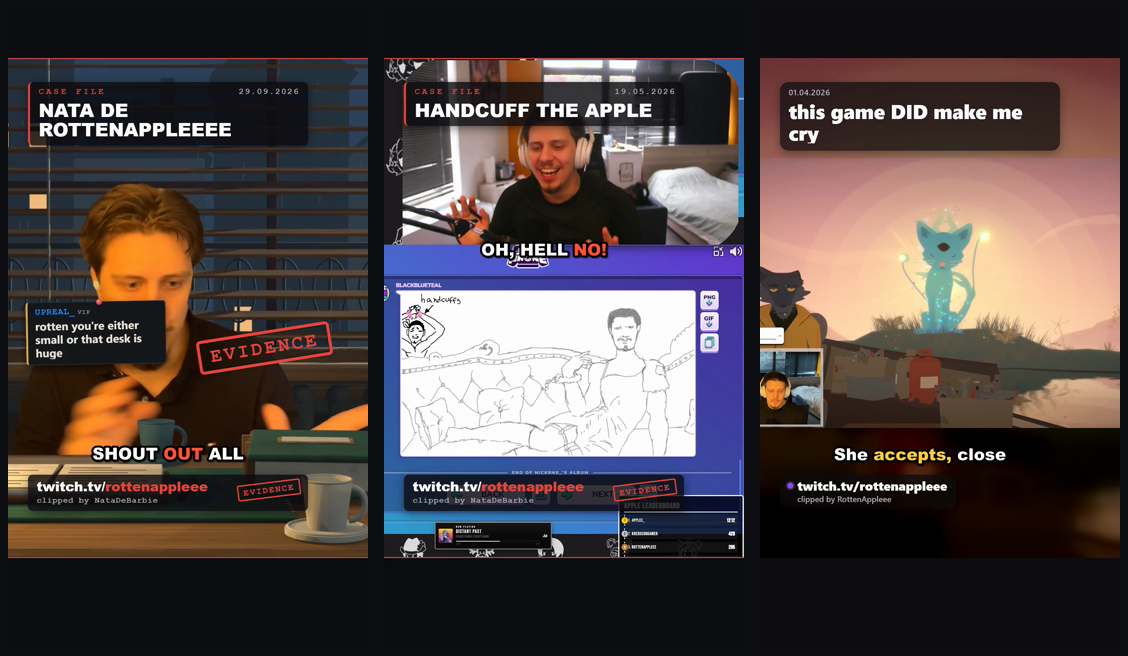
Install: download Shorts-Studio-Setup-0.1.0.exe below and run it.
Windows will probably say "Windows protected your PC", because the app isn't code-signed yet. Click More info, then Run anyway.
On first start, type your Twitch channel and pick a look. The speech model for captions (148 MB) downloads once.
What's in it
- Your channel's clips (today, this week, this month, all time), or paste any clip links.
- Also "Best of the week", which joins the week's top clips into one Short.
- Smart trim, word-by-word captions (whisper.cpp, on your PC), and chat from the VOD shown as notes.
- Two looks: Case File (noir) and Clean. Pick your own colour.
- A full editor:
- timeline, crops, layouts;
- captions (fix words, styles, colours, emoji, bleeps);
- chat, your own text, stickers;
- zoom, slow motion, freeze frames;
- sound effects, music that dips under your voice;
- joining several Shorts.
- An upload helper: copy the title, description and TikTok caption, then open the YouTube or TikTok upload page.
No Twitch login, API keys or accounts needed. Windows 10/11, 64-bit.