
Warning
Voice Incubator is experimental and not supported.

Voice satellites with commands you make yourself, recognized on your own Home Assistant. A command says what to listen for, where, and what happens: speak a response, run a script, activate a scene, or run an action. It hears and speaks English.
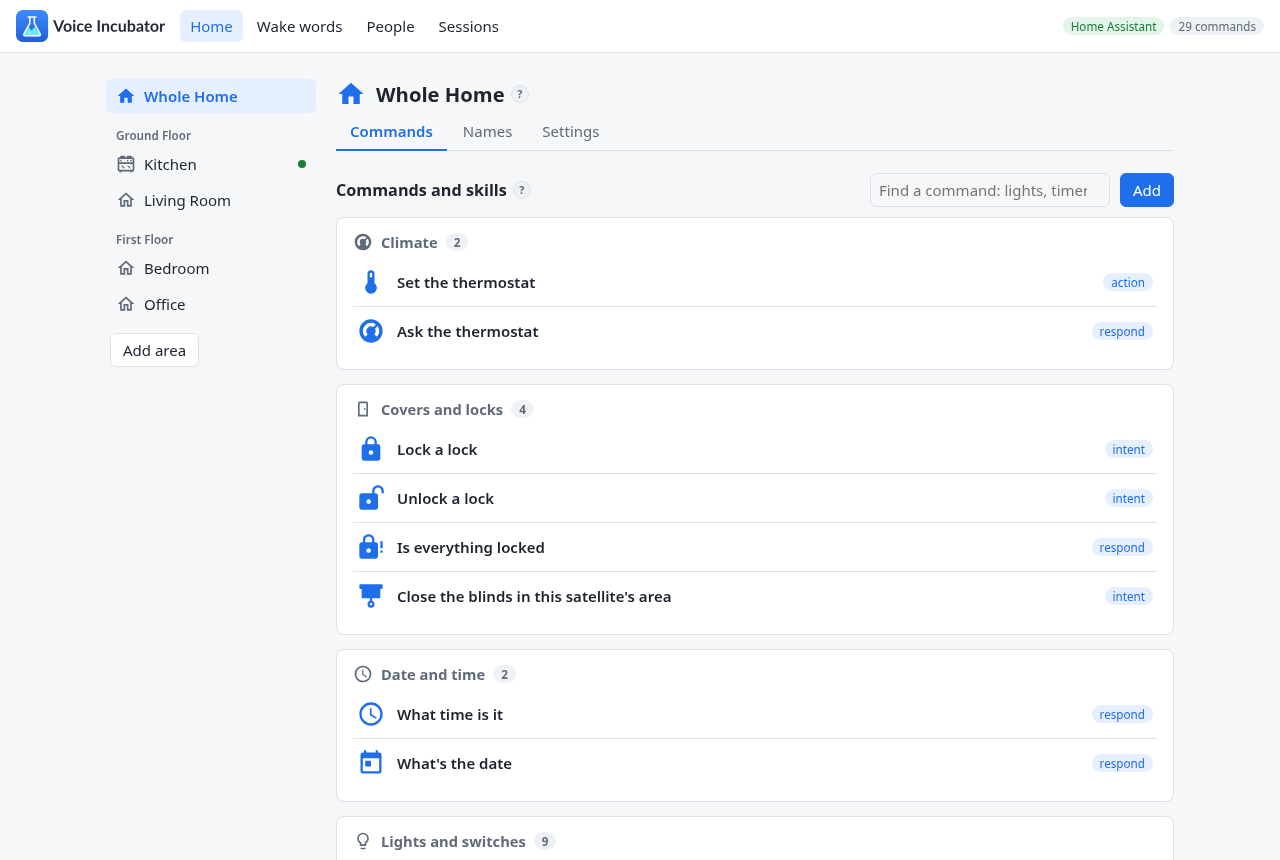
- Commands you make yourself. Start from the library -- lights, timers and alarms, music, weather, climate, covers and locks, lists, reminders, announcements and intercom -- or from scratch. A library command keeps following the library as it gets better, with your changes on top.
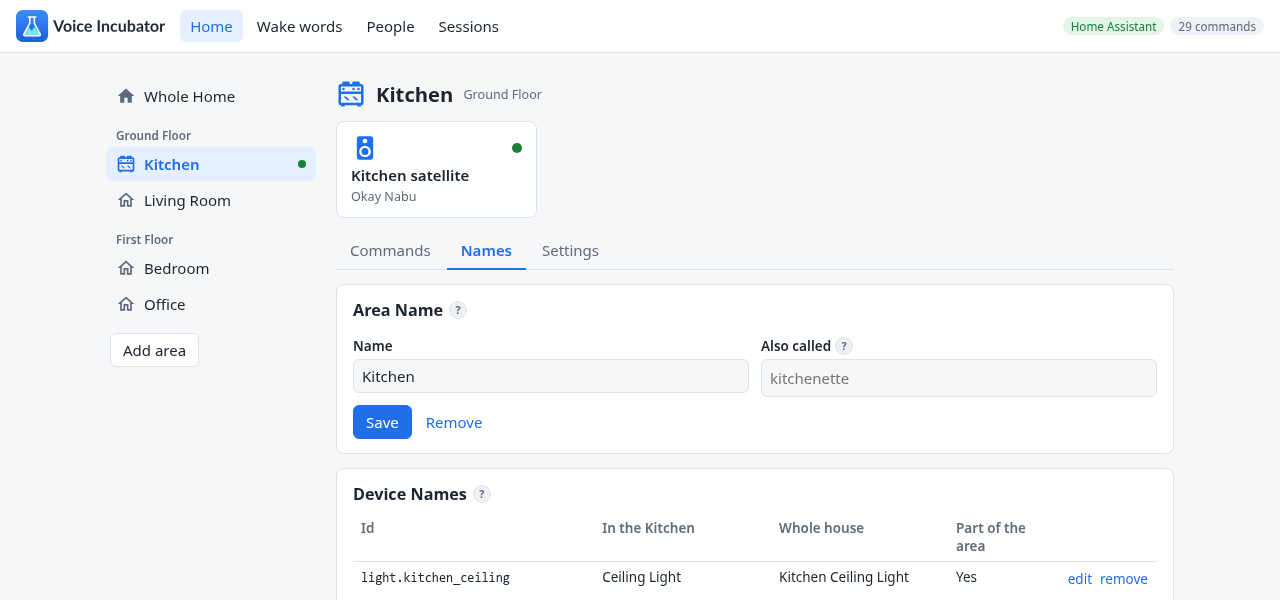
- Heard on your own machine. Commands are recognized in the audio itself, against the names of your areas and devices -- and the ones you give them on the Names page.
- Most of the work happens while you're still talking. The wake word is checked again and the speaker recognized as you speak; when you stop, it acts and answers.
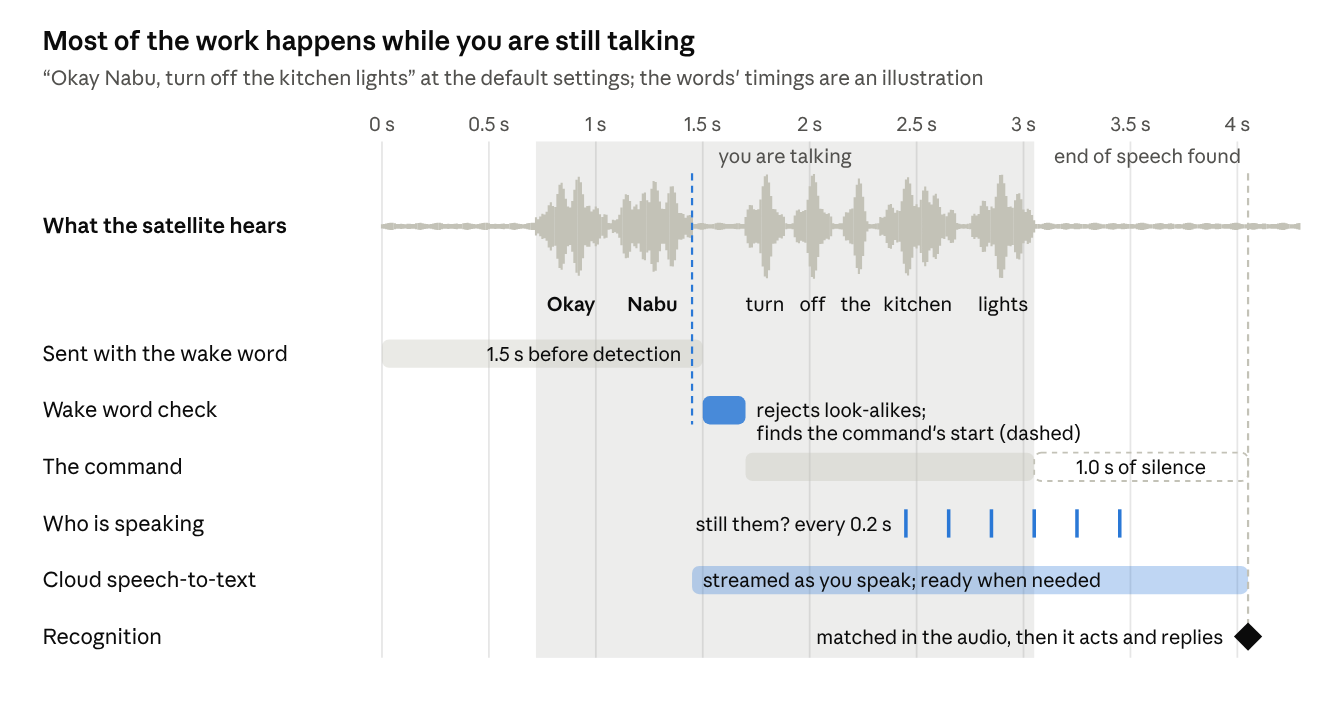
- Wake words, checked twice. The satellite listens generously, and every wake word it hears is checked again against phrases that sound like it ("hey travis", "hey microsoft"). Okay Nabu, Hey Jarvis and Hey Mycroft are built in; upload your own, or train one in the app. Up to five per satellite.
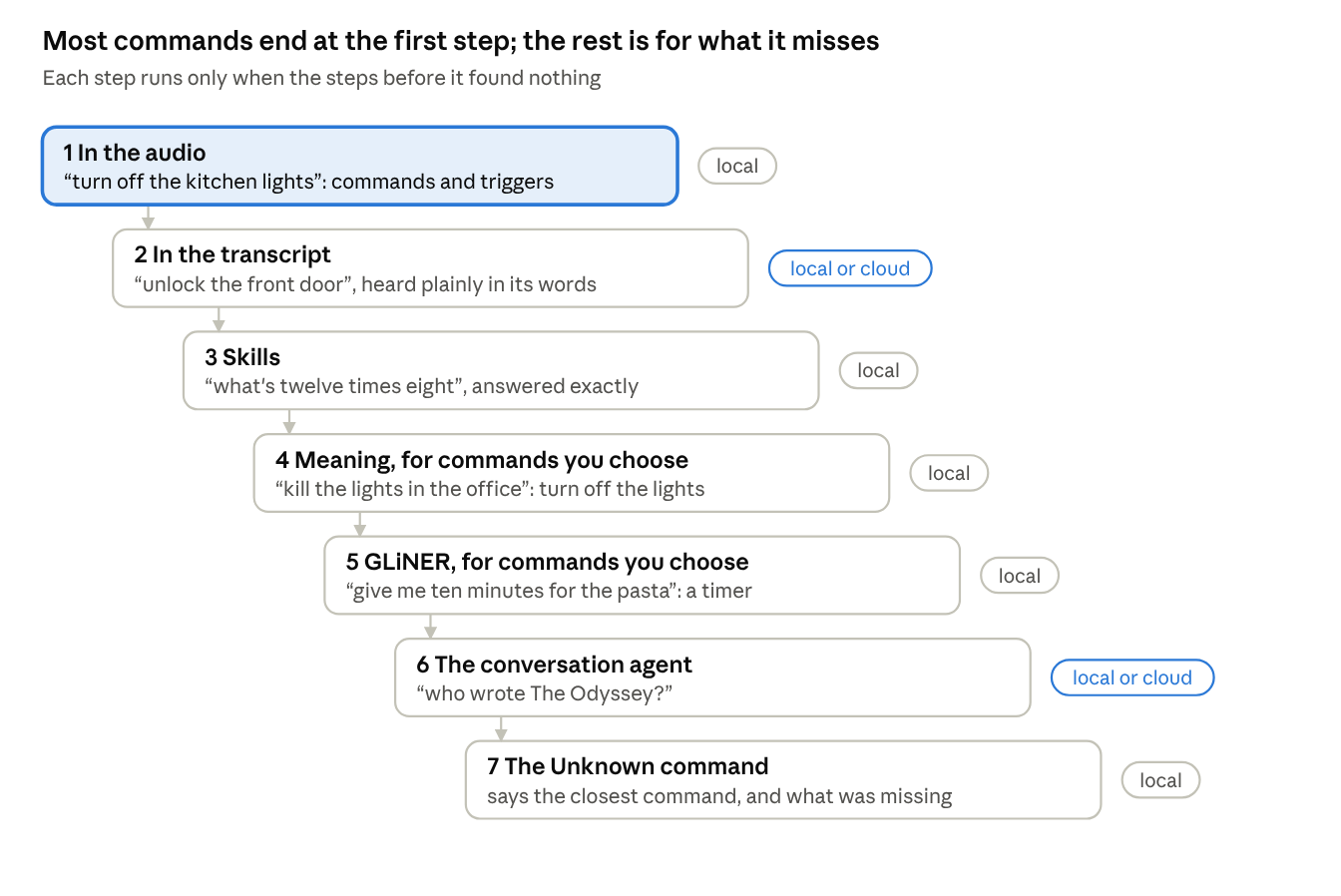
- Something sensible when nothing matches. Skills answer exactly ("what's twelve times eight"), the commands you choose are found by what you meant ("kill the lights in the office", "give me ten minutes for the pasta"), questions go to your conversation agent, and otherwise it says the closest command and what was missing.
- It knows who's speaking. Enroll voices on the People page, and "add call mom to my to-do list", "remind me" and "play my playlist" are the speaker's own. Their own conversation agent, and the voice its answers are said in, are picked there too.
- By area. A command is the whole home's or one area's, and the whole home's can be turned off where they don't belong ("That command isn't available in the Kitchen"). Do not disturb and night mode, area by area.
- Conversations, not just commands. A command can ask before it acts, and "it" is what you just named.
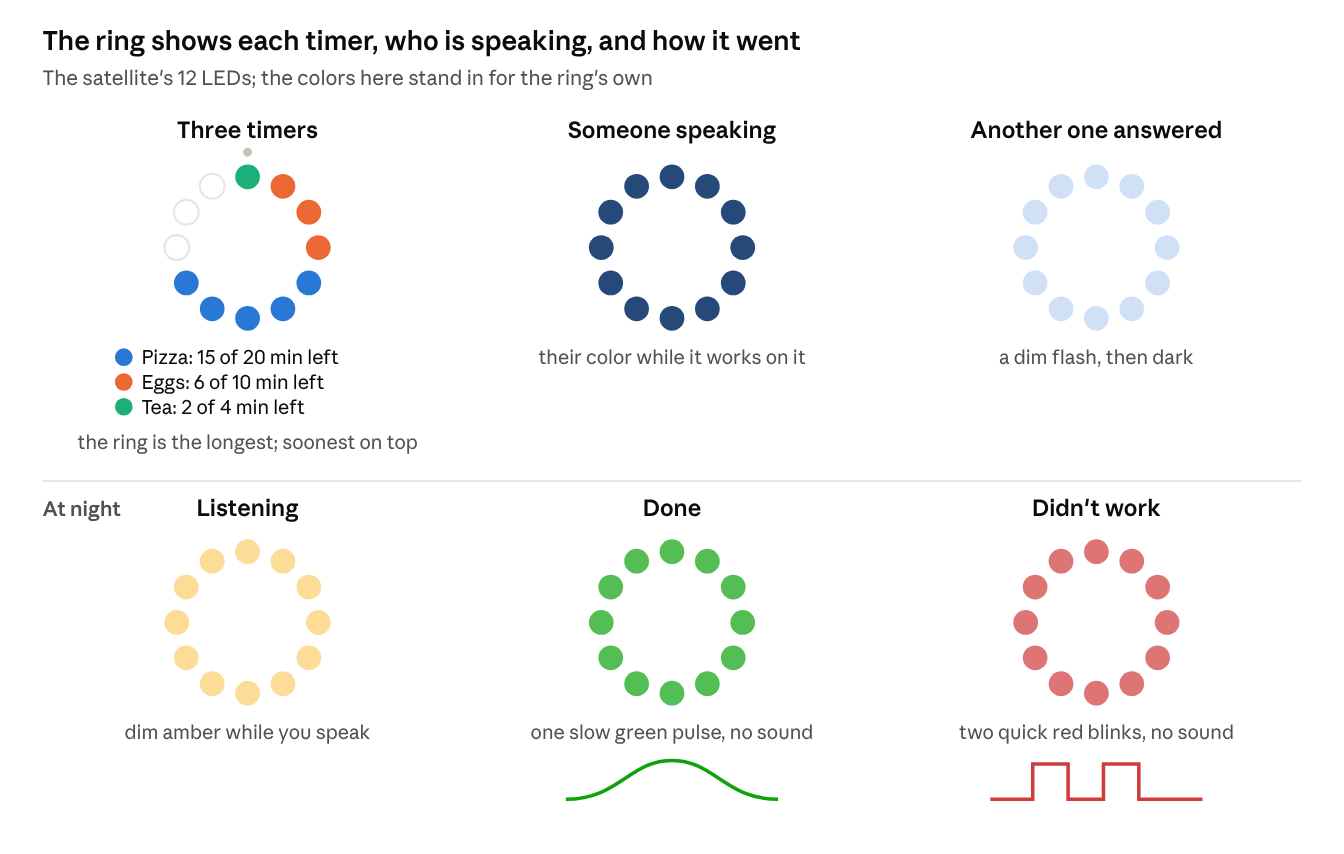
- Timers and alarms ring on the satellite that set them, and its LED ring shows each timer, who's speaking, and how it went.
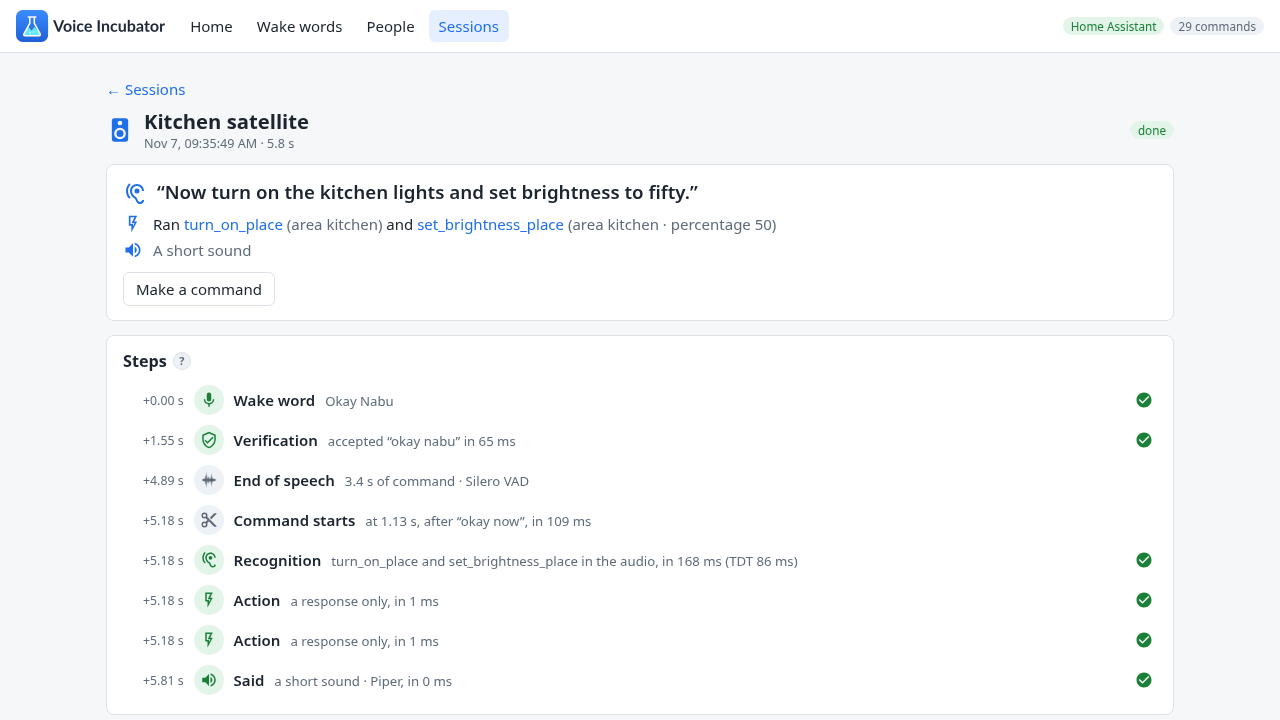
- Every session, step by step. What was heard, what ran and what was said, with how long each step took. Replay a session, or type a sentence to see what it would do.
- Other satellites too. Home Assistant's own voice assistants can use the app's speech-to-text, text-to-speech and conversation agent, through Wyoming.
You need Home Assistant 2025.10 or later, on amd64 or aarch64, and a Home Assistant Voice Preview Edition to flash -- or, through Wyoming, any satellite Home Assistant has.
- The app.
Add
https://github.com/OHF-Voice/app-voice-incubatorto Home Assistant's app repositories, then install Voice Incubator and start it. The first time it starts, it downloads its speech models -- about 530 MB: Parakeet (speech), EmbeddingGemma 2 (meaning), GLiNER (the command fallback) and Piper's Kristin (its voice) -- into its own storage, and its page shows how far it got. Later starts and updates keep them. - The integration.
In Home Assistant's Marketplace (Settings > Marketplace > Add from link), add
https://github.com/OHF-Voice/integration-voice-incubatorand install Voice Incubator. The app sets it up the next time it connects. It gives each satellite a device and its timers, and runs Assist's intents for the app. - The satellites. Flash a Home Assistant Voice Preview Edition from its install page and give it your Wi-Fi. The app finds it on the network and connects to it.


Then open Voice Incubator in Home Assistant's sidebar to make commands, name things, set up satellites and look at sessions. The guide has everything it does, page by page.
Without Home Assistant's app store, it runs as a container:
ghcr.io/ohf-voice/voice-incubator (amd64 and aarch64), given Home Assistant's
address and a long-lived access token.
docker run -d --name voice-incubator --network host \
  -e HASS_URL=http://homeassistant.local:8123 -e HASS_TOKEN=... \
  -v voice-incubator:/data ghcr.io/ohf-voice/voice-incubator
The web UI (8099) and Wyoming (10800) listen on every address the container
has, and neither asks who's there: anyone who can reach the web UI can run
actions in Home Assistant. Without the host network, publish what you want
reached, and where (-p 127.0.0.1:8099:8099 -p 10800:10800). Wyoming needs
nothing more -- add it to Home Assistant as a Wyoming Protocol integration --
but finding the satellites does: they're found by mDNS, which a container's
own network doesn't carry (--host reaches one without it). More options go
after the image name.
See Running from source in the design notes.
Without the Voice Incubator firmware, a satellite can still use the app: it is also a Wyoming service, for Home Assistant's own voice assistants. That's a Voice PE with Home Assistant's firmware, another ESPHome satellite, Linux Voice Assistant, your phone, or what's typed in Assist.
- Install the app and the integration (steps 1 and 2 above).
- Add the Wyoming service. Home Assistant finds it: Settings > Devices & services, Discovered. Standalone, add the Wyoming Protocol integration with the app's address and port 10800.
- Make a voice assistant in Settings > Voice assistants, with Voice Labs as its speech-to-text, text-to-speech and conversation agent -- all three, or any of them -- and choose it for the satellite.
- Name things on the Names page, and put the satellite's device in an area in Home Assistant: its commands are that area's.
The same as on a Voice Incubator satellite:
- Your commands, skills, "When nothing matches" and conversation agent, in the satellite's area. A question asked back keeps the conversation going, and the satellite listens for the answer.
- Speech-to-text writes what it heard as the command it heard, with your names spelled as on the Names page: "Turn on the Nanoleaf.", where the speech model alone hears "Turn on the Neno leave". With Voice Incubator as the conversation agent too, the command is recognized in the audio.
- Text-to-speech is Piper, with every voice it has: each is downloaded the first time it is used.
- Every session is on the Sessions page.
Only with the Voice Incubator firmware:
- The wake word, checked again. Elsewhere it is the satellite's own.
- Who's speaking. Elsewhere "my" means the only person on the People page, when there's one.
- Beeps. Elsewhere a command that would beep says its brief response.
- Timers, alarms, reminders, announcements and intercom. Elsewhere a timer is Home Assistant's own, and rings on that satellite; the rest play only on Voice Incubator satellites.
- Night mode, the ring and the app's sounds.
- The guide: everything the app does, page by page.
- DESIGN.md: how it works, what was measured to get it there, and how to work on it.
- CHANGELOG.md: what changed, version by version.
- The app: the Home Assistant app, built from a release of this source.
- The firmware, and its install page.