Repository navigation
Add Card and Variants
English · Español
The dialogs in src/features/variants/ that put a single card into the deck from Scryfall ("Add card"), swap the printing of a card already in the deck ("Change variant"), and link an own-image card to its real Scryfall card ("Link with a card", one at a time or in bulk). They all share one results grid and one fetch helper, and talk to Rust through card_search, card_prints, card_fetch and friends.
Screenshots: 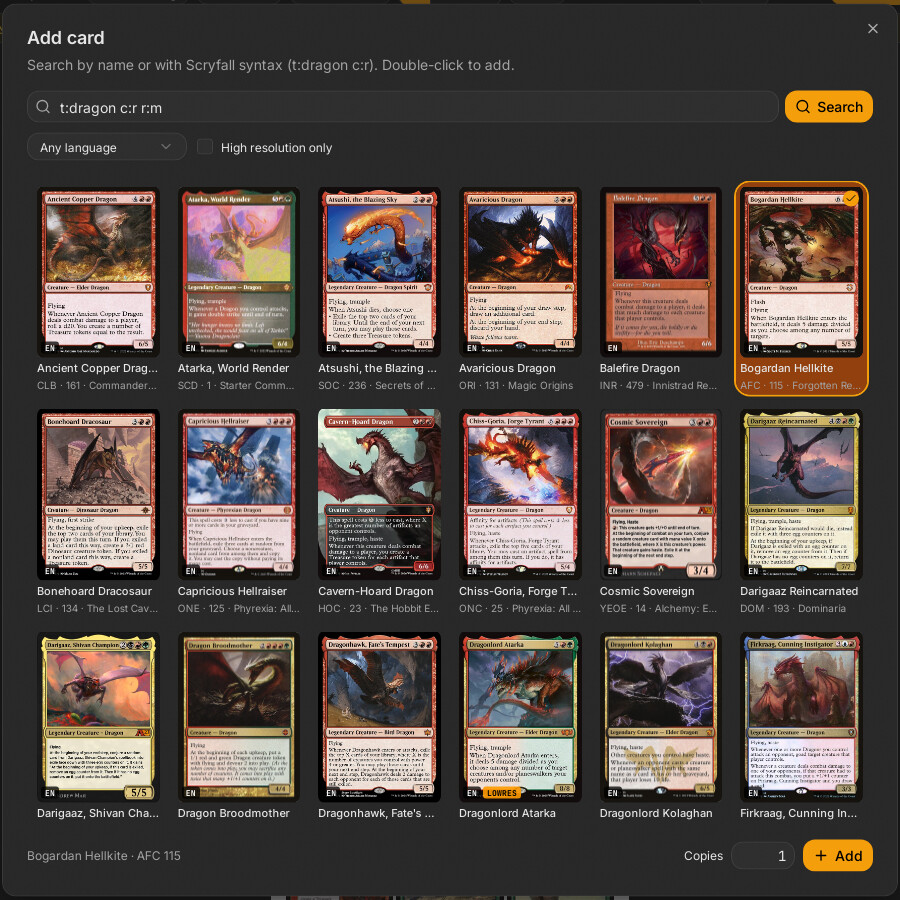
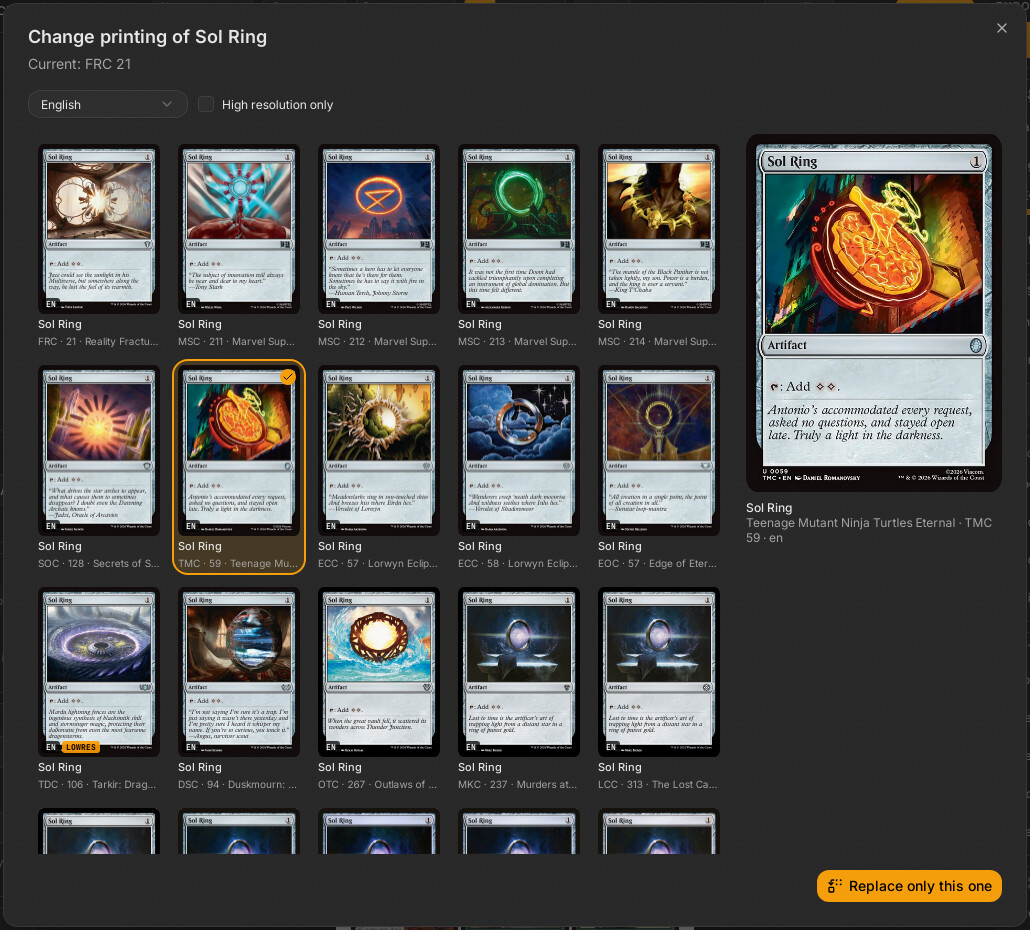
| File | Responsibility |
|---|---|
src/features/variants/add-card-dialog.tsx |
AddCardDialog: search (name or Scryfall syntax, autocomplete), pick a printing, copies, add |
src/features/variants/variant-dialog.tsx |
VariantDialog: all printings of a card, replace this copy or all copies |
src/features/variants/rejilla-cartas.tsx |
RejillaCartas: the shared thumbnail grid (also used by Set Browser and the token dialog of the Decklist Panel) |
src/features/variants/filtros.tsx |
FiltrosBusqueda (language + "high resolution only"; the language options are "any" plus IDIOMAS_SCRYFALL of src/lib/idiomas.ts, by their own names), idiomaParaRust
|
src/features/variants/traer.ts |
traerCarta: summary -> DeckCard, choosing the Scryfall or the external-source command |
src/features/variants/vincular.ts |
vincular, desvincular, propiasPorImagen, estaVinculada
|
src/features/variants/vincular-dialog.tsx |
VincularDialog: link one own card (search or OCR) |
src/features/variants/vincular-lote.tsx |
VincularLoteDialog: bulk link with review |
src/features/variants/ampliar-cartas.tsx |
AmpliarCartas: side-by-side comparison of the own image and the proposed Scryfall card |
src/features/variants/__tests__/vincular.test.ts |
Vitest for vincular.ts
|
All dialogs are mounted once in src/App.tsx and opened through the dialogo field of useUi (src/stores/ui-store.ts): { tipo: "anadir"; en?: number; hueco?: string }, { tipo: "variante"; id }, { tipo: "vincular"; id }, { tipo: "vincularLote"; ids?; soloSeleccion? }. Each dialog component renders its content only while open, so its local state (query, results, selection) resets every time.
All in src-tauri/src/commands/cards.rs unless noted. Arguments are camelCase on the JS side (highresOnly, scryfallId).
| Command | Args | Returns | What it does |
|---|---|---|---|
card_autocomplete |
q |
string[] |
Scryfall autocomplete. Returns [] without a call if q.trim().len() < 2. |
card_search |
q, lang?, highresOnly
|
CardSummary[] |
Free-text / Scryfall-syntax search, capped at 50. Appends Cockatrice tokens when lang is empty or en and not high-res-only (fuentes::buscar_cockatrice, merged by juntar_externas: after the Scryfall results, or before them when an external token matches the query name exactly and Scryfall has none with that name). |
card_prints |
name, lang?, highresOnly
|
CardSummary[] |
Every printing of an exact name (!"name", quotes stripped from the name), unique=prints with include_multilingual, up to 175. A Scryfall failure is swallowed (unwrap_or_default): a token Scryfall lacks is not an error. Adds Cockatrice entries under the same language rule. |
card_fetch |
scryfallId |
DeckCard |
Downloads one printing and returns it as a deck card (see below). |
card_fetch_externa |
fuente (FuenteCarta), id
|
DeckCard |
Same for a card from another source: an own card with its image and the link (fuentes::carta_cockatrice). |
card_link (commands/identify.rs) |
scryfallId |
CardMeta |
Card data for linking: from the local cache if present, otherwise Scryfall (and stored in the cache so statistics work offline). |
card_link_externa (commands/identify.rs) |
fuente, id
|
CardMeta |
The same for an external token (NotFound if the catalog lacks it). |
card_identify (commands/identify.rs) |
blob, hint?, ocr
|
CardIdentify |
Propose cards for an own image (see Card Identification and OCR). |
identify_batch (commands/identify.rs) |
items[{blob, hint}], ocr
|
u32 job id |
Bulk version with identify://progress / identify://done events. |
CardSummary (commands/cards.rs, exported to src/bindings/CardSummary.ts) is the light row used by every grid: id, name, printedName?, lang, set, setName, collectorNumber, thumb?, highres, imageStatus?, isDfc, typeLine?, fuente?. fuente is set only for cards from another source; id is then that source's id.
resumir(state, cartas) builds the summaries. For each card it takes the front face's normal (or small) image URL, hashes it with SHA-256 (huella_url) and registers huella -> url in AppState.miniaturas (a mutex-guarded map that is cleared when it exceeds 5,000 entries). The grid then loads urlBusqueda(c.thumb) = pbimg://…/t/<huella>. The protocol handler (src-tauri/src/protocol.rs, Ruta::Miniatura) serves it from app_cache_dir/renders/t/<huella>.jpg if present, otherwise looks the URL up in miniaturas, downloads it (Scryfall URLs via the Scryfall client; any other URL only through fuentes::Externo::bajar and limpiar_imagen), writes it to the cache and returns it. Why: the web view never touches the network (project rule: all network is Rust). A hash that is not registered (for example after the 5,000-entry reset) gives 404 and the card shows without image until searched again.
traer_carta (commands/cards.rs, generic over CardApi so tests use a fake Scryfall):
- Fetches the card (
NotFoundwithcarta= id if missing) and stores it in the Scryfall cache (cache::guardar). - Downloads the front face PNG (
c.print_url(0); if the card has no PNG it uses the large JPEG:ImageOrigin::ScryfallPngvsScryfallLarge) and puts it in the blob store (state.blobs.put_bytes). - For a double-faced card (
c.is_dfc()) downloads face 1 and setsback = BackSpec::Dfc { image }; otherwiseBackSpec::DeckDefault. - Builds the
DeckCard: new UUIDid;source=CardSource::Token { scryfall_id }if the layout istokenordouble_faced_token, elseCardSource::Scryfall { scryfall_id }; defaultedits,locked: false,metafromresolve::meta_de,design: None,marca: None. A card without image enters withfront: Noneand downloads nothing.
The command holds the busy marker (state.trabajo()), the same marker that blob_gc consults through state.ocupado(), so the garbage collector will not run mid-download.
Opened from any empty cell of the last sheet (CeldaVacia in src/features/preview/page-view.tsx), from the empty states in preview-pane.tsx, and from a blank slot: a plain left click or the "Add card from Scryfall…" item of its context menu (anadirEnHueco in acciones-carta.ts). The empty cells and the toolbar add at the end. A blank slot sets en (its position) and hueco (its id): on adding, the blank is removed (quitar) and the cards are inserted in its place, so the new card takes the slot instead of pushing it along.
Behavior (add-card-dialog.tsx):
- Search box: 200 ms after typing (when at least 2 characters) it requests
card_autocompleteand shows up to 8 suggestions. Enter runscard_searchwith the raw query (sot:dragon c:rworks); clicking a suggestion runscard_printswith the exact name, so the grid lists printings, not different cards. - Filters (
FiltrosBusqueda): language (default: the deck languageuseUi.lang, butanywhen the deck language is English, so the first search is not restricted) and "Only high resolution".idiomaParaRustconverts"any"tonull. - Results:
RejillaCartas; single click selects, double click selects and adds. If exactly one result comes back it is auto-selected. ANotFounderror is shown as "No results", every other error as a toast. - Footer: the selected printing, a "Copies" number (1-99) and "Add".
anadircallstraerCarta(c)once; copies after the first are clones with a freshnuevoId()(same images, no extra download). They are inserted withuseDeck.getState().setCartas((cs) => insertar(hueco ? quitar(cs, [hueco]) : cs, copias, en))(one undo step) and announce "N x card added". - The dialog refuses to close while adding (
ocupado={anadiendo}).
Opened from the card context menu (src/features/preview/slot-menu.tsx), enabled only for a single selected card whose source.kind is scryfall or token. Custom images and designed cards cannot change variant.
- On open (and whenever name, language or high-res changes) it calls
card_prints { name: carta.meta.name, lang, highresOnly }. The language filter starts at the card's ownmeta.lang(orany). Avigenteflag discards stale responses. - A large preview of the chosen printing appears on the right (
urlBusqueda(elegida.thumb)), with set name, collector number and language. - Two actions, each calling
traerCarta(elegida)once:-
"Replace only this" replaces the card with the same
idas the one the dialog was opened for. -
"Replace the N copies" (only shown when
copias > 1): replaces every card whosemeta.nameequals the name. Matching is by name, not by Scryfall id, so copies of different printings of the same card are all replaced.
-
"Replace only this" replaces the card with the same
-
reemplazar(vieja, nueva)keeps what belongs to the slot, not to the printing:id,locked,edits(rotation, filters, etc.) and a custom back (back.kind === "custom"); everything else (images,meta,source, DFC back) comes from the new card. - Applied through one
setCartascall, so one Ctrl+Z reverts it. Announces "Variant changed" or "Variant changed in all copies of X".
A CSS grid (repeat(auto-fill, minmax(120px, 1fr)), p-1.5 so rings are not clipped) of Tarjeta buttons. Rules it implements:
- Decision: thumbnails only exist while the card is near the viewport. Why: a search can return 175 cards and the project mounts images only for visible items.
TarjetausesuseVisible(el)fromsrc/features/preview/visibilidad; the enclosing scroll area must publish its viewport throughRaizScroll.Provider(dialogs passonViewportChange={setViewport}). Without the provider, visibility cannot be computed. - Badges: language code,
COCKATRICE(whenfuenteis set: a token Scryfall does not have) andLOWRES(when nothighresand not external). - Selection is a
Set<string>of ids owned by the parent; the grid only reportsonElegir(c, event)andonDoble(c).
Linking says which real card an own image is, without changing the image: the card gets name, set, type and prices for statistics and info. It is stored as CardSource::Custom { scryfallId?, externa? } (externa is RefExterna { fuente, id } for a token Scryfall lacks). CardMeta.imageLang stays the language of the image itself. See Deck Model.
vincular(id, destino, idiomaImagen?) (vincular.ts):
- Calls
card_link(orcard_link_externa) to get theCardMeta. - Sets the new
sourceandmetaon the card and on every own copy that has the same front blob (c.front?.blob === blob), so one link applies to all copies of that image. The meta overridesimageStatus: null,langFallback: false, keeps the card'shighres, and setsimageLangto the OCR-read language or keeps the previous one. - If Rust fails nothing changes (the store is only touched after the await).
-
desvincularresetssourceto{ kind: "custom" }for the card and its same-image copies.propiasPorImagen(ids?)returns one own card per image (optionally within a set of ids);estaVinculada(c)is true for a custom card withscryfallIdorexterna.
VincularDialog (opened from the card menu "Link with a card…" / "Change the link…"): the search box starts with the card's current name and runs card_identify with hint and ocr: false; the "Detect with OCR" button runs it with ocr: true, which may download the OCR models first, and shows the lines read plus the language read from the footer. The best candidate is preselected; "Remove the link" calls desvincular.
VincularLoteDialog: phases elegir -> leyendo -> revisar -> aplicando. It launches identify_batch through lanzarTrabajo("identify://progress", "identify://done", …) with one { blob, hint: c.meta.name } per own image, receives one result per image (p.result: CardIdentify, confidence: exact | probable | none), and shows rows with the proposal pre-checked for exact and probable matches. The user reviews, can change the candidate, compare in AmpliarCartas, then "apply" runs vincular sequentially for every checked row (cancellable). With a selection it can work on the selection or the whole deck (soloSeleccion, ids from useUi). Cancelling the read uses job_cancel.
| Situation | Behavior |
|---|---|
| Scryfall unreachable |
Network error -> toast; the grid shows "No results" with empty resultados
|
| Scryfall rate limit |
RateLimited after the client's retries |
card_fetch for an id Scryfall does not know |
NotFound with param carta
|
| Card without image on Scryfall | Enters with front: null (the MISSING / PLACEHOLDER badge comes from meta.imageStatus) |
| Unregistered thumbnail hash | 404 from pbimg://…/t/…, empty tile |
| No results for a variant search | "There are no printings with those filters." |
-
src/features/variants/__tests__/vincular.test.ts: linking applies to same-image copies, takes info but not image state, keeps image and edits, own card without image only links itself, unlinking, relinking, Rust failure leaves the deck unchanged,propiasPorImagen,estaVinculada. -
src-tauri/src/commands/cards.rs(mod tests): language filter, search and print query builders (quotes stripped), thumbnail registration and its 5,000 cap,traer_cartafor a normal card (PNG + deck back), no-PNG fallback to large, DFC (two faces), tokens enter asCardSource::Token, card without image, unknown card isNotFound.
- A new search filter: extend
FiltrosBusquedaand the query buildersconsulta_busqueda/consulta_impresionesincommands/cards.rs, then pass the new argument inadd-card-dialog.tsxandvariant-dialog.tsx. - A new external source of cards: add a
FuenteCartavariant and handle it incard_fetch_externa,card_link_externaandtraerCarta(see External Sources). - Anything that must look at images in a dialog grid: reuse
RejillaCartasand provideRaizScroll.