Repository navigation
SCRIPT.DAT
Contains all the scripts run by the game. Unlike TALK.DAT it handles map logic and skills, rather then dialog.
| Type | Size | Description |
|---|---|---|
| uInt | 4 byte | Number of scripts |
| uInt | 4 byte | Zero |
Next there is a list of addresses (4 byte) flowered by a equal length list of Ids (4 byte). Afterwards the binary script data starts.
Each command consists of a op code (byte) flowed by char that indicates the size of the body that contains the arguments.
| Name | Op Code | Arguments | Arguments Size | Description |
|---|---|---|---|---|
| fx00 | 00 | |||
| Sleep | 01 | Frames to sleep | 2 byte | Script sleeps for given amount of frames. |
| Return | 02 | None | 0 byte | Ends script |
| fx03 | 03 | |||
| fx04 | 04 | |||
| LockUser | 05 | None | 0 byte | Takes away control from user. |
| UnlockUser | 06 | None | 0 byte | Gives back control to user. |
| fx07 | 07 | |||
| fx08 | 08 | |||
| FadeOut | 0A | Unknown, Duration | 1, 2 byte | Fade out screen from black |
| fx0b | 0B | |||
| fx0c | 0C | |||
| fx0e | 0E | |||
| LoadTalkScript | 11 | scriptId, dungeonId, unknownFlag | 3, 2, 2 byte | Loads talk script into memory |
| RunScript | 12 | Script ID | 3 byte | Execute another script. |
| fx15 | 15 | |||
| fx16 | 16 | |||
| fx17 | 17 | |||
| fx18 | 18 | |||
| fx1c | 1C | |||
| fx23 | 23 | |||
| fx24 | 24 | |||
| SetCursorPos | 27 | Parent, X, Z, Duration | 2, 2, 2, 2 byte | Set/Animate the cursor position. |
| fx28 | 28 | |||
| SetCameraZoom | 29 | Duration, Distance to focus point | 2, 2 byte | Set/Animate camera's distance from look at position. |
| fx2a | 2A | |||
| fx2b | 2B | |||
| SetCameraPos | 2C | Parent, X, Y, Z, Duration | 2, 2, 2, 2, 2 byte | Set/Animate camera look at position. |
| fx2d | 2D | |||
| fx2e | 2E | |||
| fx32 | 32 | |||
| fx33 | 33 | |||
| fx34 | 34 | |||
| fx37 | 37 | |||
| fx38 | 38 | |||
| fx39 | 39 | |||
| fx3a | 3A | |||
| fx46 | 46 | |||
| fx4e | 4E | |||
| fx4f | 4F | |||
| fx50 | 50 | |||
| fx51 | 51 | |||
| fx53 | 53 | |||
| fx54 | 54 | |||
| fx55 | 55 | |||
| fx5a | 5A | |||
| fx5c | 5C | |||
| fx61 | 61 | |||
| fx64 | 64 | |||
| SetActorPos | 65 | Slot, Parent, X, Y, Z, Duration, Unknown | 2, 2, 2, 2, 2, 2, 1 byte | Set/Animate character position. |
| fx66 | 66 | |||
| SetActorAnimation | 67 | Slot, Animation ID, Facing override | 1, 2, 2 byte | Set character animation. |
| fx68 | 68 | |||
| fx69 | 69 | |||
| fx6a | 6A | |||
| fx6b | 6B | |||
| SetActor | 6D | Slot, Sprite ID, Level, Allegiance | 1, 2, 2, 1 byte | Spawn character. |
| fx6e | 6E | |||
| fx6f | 6F, CC | |||
| fx70 | 70 | |||
| fx71 | 71, CD | |||
| fx72 | 72, CE | |||
| RotateActor | 73 | Slot, Duration, Rotation | 1, 2, 2 byte | Rotate character. |
| fx74 | 74, CF | |||
| fx77 | 77 | |||
| fx78 | 78 | |||
| fx79 | 79 | |||
| SetMultRGBA | 7A | Slot, R, G, B, A, Duration | 2, 2, 2, 2, 2, 2 byte | Set character color. |
| fx7b | 7B | |||
| fx82 | 82 | |||
| fx83 | 83 | |||
| fx87 | 87 | |||
| fx88 | 88 | |||
| fx8c | 8C | |||
| fx8d | 8D | |||
| PlayBGM | 91 | BGM Index, Volume(0-128) | 1, 1 byte | Play background music. |
| fx92 | 92 | |||
| fx93 | 93 | |||
| fx94 | 94 | |||
| fx95 | 95 | |||
| fx98 | 98 | |||
| RunFunction | C8 | Function ID, Function integer value | 2, 3 byte | Execute various functions, like hiding characters (25). |
| fxc9 | C9 | |||
| fxca | CA | |||
| fxcb | CB | |||
| fxd0 | D0 | |||
| fxd1 | D1 |
- Op Code: 01
- Construction: 01 02 00 00
- Arguments: Frames to sleep
Script sleeps for given amount of frames.
- Op Code: 05
- Construction: 05 00
- Arguments: None
Disables the control of the camera and game interaction. However the user still can progress throw the dialog.
- Op Code: 06
- Construction: 06 00
- Arguments: None
Enables the control of the camera and game interaction. Should be used after calling LockUser.
- Op Code: 0A
- Construction: 0A 03 00 11 11
- Arguments: Unknown, Duration
By default, a level with an assigned script begins with a black background overlay that covers the screen. This command gradually fades out the overlay over a specified duration until it completely disappears. This is usually done after all the necessary cutscene characters have been spawned, so the player dosn't sees them pop in.
I have no idea what the first argument does. Testing different values doesn't seem to produce any noticeable effect.
- Op Code: 91
- Construction: 91 02 00 11
- Arguments: BGM Index, Volume(0-128)
Will start playing background music (BGM). Index is equivalent to the file name in DATA.DAT, for instance "BGM003" is the castle theme.
- Op Code: 6D
- Construction: 6D 06 00 11 11 22 22 33
- Arguments: Slot, Sprite ID, Level, Allegiance
This command "spawns" or modifies a character inside the specified slot ID with given level and allegiance. Note, new characters will not be displayed immediately; they must first be positioned using additional commands that reference the slot ID.
The Sprite ID references the id from CHAR_E.DAT, for example 3500 would be Pleinair.
The last argument, Allegiance, determines the character's behavior:
- 0: User controlled
- 1: Enemy
- 2: Enemy, third party (will have turn first)
- 3: Passive (will do nothing)
- 4: Neutral (will do nothing, and not agro enemies)
Geo Symbols should use "2: Enemy, third party", otherwise the game will use out of bounds memory to run code (probably AI) and eventually crash.
- Op Code: 65
- Construction: 65 0D 00 00 11 11 XX XX YY YY ZZ ZZ 55 55 66
- Arguments: Slot, Parent Slot, X, Y (height), Z, Duration, Unknown
Modifies the position of an actor in the specified slot. The position is relative to the given parent. If X, Y, and Z are all set to 0, the position will match the parent's position.
Parent Slot index 0x0000 corresponds to the first character on the map, while 0xCB00 (203) will be the map's teleporter. Unknown indices default the parent to the map's origin.
Coordinates are in OpenGL, thus Y defines the height. Every 120 units is equal to one tile. If the height (Y) is set, the character will fall until it hits the ground.
If a duration is specified, the character will move to the new coordinates over the given time period. However, no animation will be played during this movement. To animate the character (e.g., walking), use the SetActorAnimation command.
- Op Code: 73
- Construction: 73 05 00 11 11 RR RR
- Arguments: Slot, Duration, Rotation (Degree)
Will rotate actor around Y axis over a given duration. Note the rotation is cumulative, means the rotation is not be set, but added to the existing value. Sprites will "somewhat" snap to the nearest 90° angle.
- Op Code: 67
- Construction: 67 05 00 11 11 RR RR
- Arguments: Slot, Animation ID, Facing override
Sets the animation of an actor in the specified slot. I am not sure jet how the animation ids are defined, but for example ID 0 is 'idle' while 1 is 'walking'.
With Facing override (0-3) you can specify the exact facing of the animation, if the animation supports that, regardless of the actor rotation.
- Op Code: 7A
- Construction: 0C 05 00 00 RR RR GG GG BB BB AA AA 44 44
- Arguments: Slot, R, G, B, A, Duration
Sets sprites color multiplication of actor in the specified slot. Color channel values should be in the range between 0 to 100. For Example, if green is set to 0 then the sprite will loose all green color:

- Op Code: 12
- Construction: 12 03 00 00 00
- Arguments: Script ID
Run another script from SCRIPT.DAT. The script ID is the one defined in the header.
- Op Code: 2C
- Construction: 2C 0A 00 00 XX XX YY YY ZZ ZZ 44 44
- Arguments: Parent, X, Y, Z, Duration
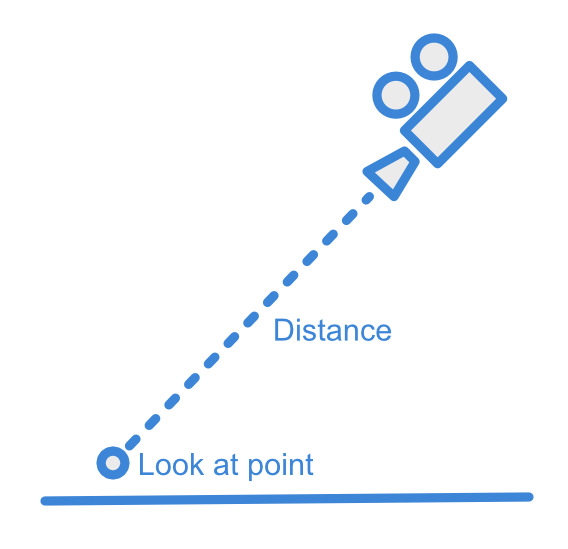
Modifies the position the camera look at point (focus at point). The position is relative to the given parent, so basically it functions the same as SetActorPos but just for the camera.
- Op Code: 29
- Construction: 29 04 00 00 11 11
- Arguments: Duration, Distance to focus point
Modifies the distance of the camera from the look at point (focus at point). The higher the value the more the map is zoomed out. Can be transitioned over a given duration.
- Op Code: 27
- Construction: 27 08 00 00 XX XX ZZ ZZ 33 33
- Arguments: Parent, X, Z, Duration
Modifies of cursor. The underneath tile will be highlighted. The position is relative to the given parent, it works simmilar to SetActorPos but without the height.