Repository navigation
SCRIPT.DAT
Contains all the scripts run by the game. Unlike TALK.DAT it handles map logic and skills, rather then dialog.
It is located at SUBDATA.DAT->START.DAT. START.DAT (needs to be decompressed first).

Original work has been done by Krisan Thyme by his Toolpack.
A Slot selects the actor a command acts on.
| Slot | Meaning |
|---|---|
| 0 - 63 | Unit placed by the map itself (.MPD actor index). |
| 64 - 95 | [Script actor, private to the running script.](#Script slots) |
| 101 - 108 | Entry 0 - 7 of the acting group of the current event. |
| 151 | First entry of the target group, so the unit a skill is aimed at. |
| 160 - 191 | Entry 0 - 31 of the event's third unit list, see variables 60300. |
| 200 | The object the script was started on. |
| 202 | Not a single actor: "every unit of the target group", accepted by most actor commands. |
| 203 | Not a single actor: the map's teleporter panel, used as a position parent. |
| 204 | First entry of the acting group, same actor as 101. |
| 210 | Not a single actor: the stored event position, used as a position parent. |
Commands that use a slot outside the defined range are usualy skipped (Nop) or the game just crashes.
The slots are no more then a reference (a pointer) the actors are actual stored in a seperate fixed array of 64 records. That array exists for as long as the game runs and entries are only flaged to be free or in use (byte is 0 or 1).
Commands like SetActor and SetActorSprite walk the array for the first record that is free and override its memory. And then write that index into the slot so the number can be found again. If all 64 records are in use the command quietly does nothing.
Slots 64 to 95 are not global slots they are reseved for the current running script chain. Map logic or other script chains can not see or find those slots. When the script chain ends the slots are released which is what makes a cutscene's cast disappear at its end without a command for it.
All script slots use there own seperete fixed array of 64 records. So they don't mix with map slots.
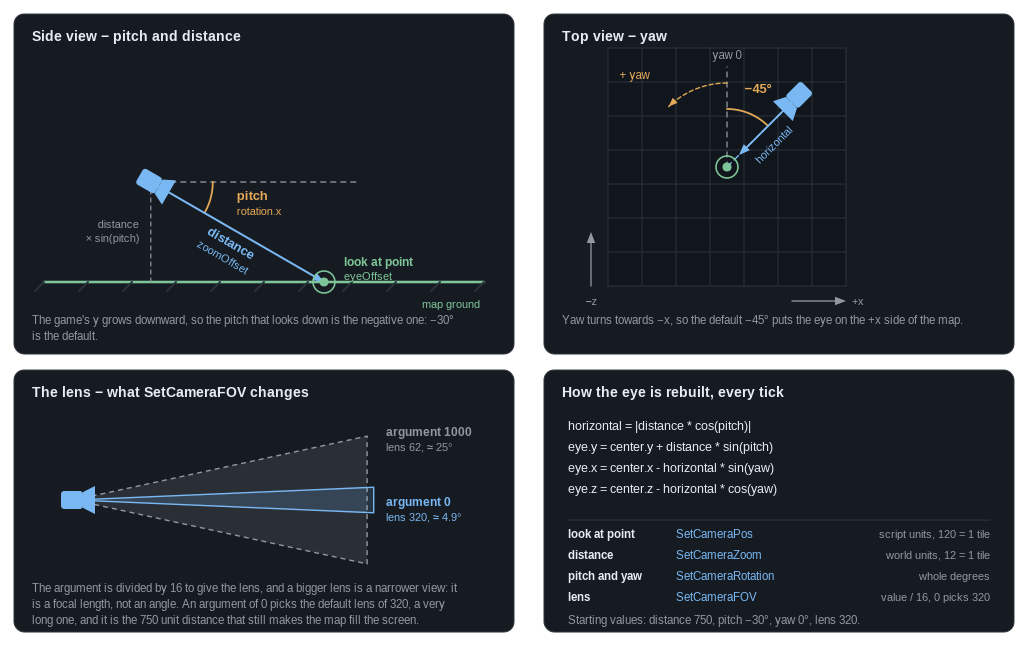
The camera is an orbit camera: Diefined over a look at point, a pitch, a yaw and a distance
Every game tick the eye positon is then computed:
horizontal = |distance * cos(pitch)|
eye.y = center.y + distance * sin(pitch)
eye.x = center.x - horizontal * sin(yaw)
eye.z = center.z - horizontal * cos(yaw)
The camera starts every scene at distance 750, pitch -30, yaw 0 and lens (fov) 320. Almost every script then opens with pitch -30 and yaw -45, which looks at the map diagonally from above, one corner towards the viewer.
Image by Claude:
| Type | Size | Description |
|---|---|---|
| uInt | 4 byte | Number of scripts |
| uInt | 4 byte | Zero |
Next there is a list of addresses (4 byte) flowered by a equal length list of Ids (4 byte). Afterwards the binary script data starts.
Each command consists of a op code (byte) followed by char that indicates the size of the body (body size) that contains the arguments.
-
Construction: OP BB BODY
- OP: Op Code
- BB: Body size
- BODY: Command body. Contains Arguments or other data to execute the command
| Name | Op Code | Arguments | Arguments Size | Description |
|---|---|---|---|---|
| ERROR | 00 | None (not even number of args) | 0 byte | Invalid command. |
| Sleep | 01 | Ticks to wait | 2 byte | Script wait for given amount of ticks. |
| Return | 02 | None | 0 byte | Ends script |
| RepeatStart | 03 | Counter start, Counter end | 2, 2 byte | The setup of a for(int i = CounterStart; i < CounterEnd; ++i) loop. |
| RepeatEnd | 04 | None | 0 byte | Indicator where the for loop ends. |
| LockUser | 05 | None | 0 byte | Takes away control from user. |
| UnlockUser | 06 | None | 0 byte | Gives back control to user. |
| If | 07 | Extended size, Compare operations, Code to execute | 1, 1,n * 7, x byte | If statement that executes code when true. |
| fx08 | 08 | |||
| Nop | 09 | None | 0 byte | Does nothing. Usualy used to indicate the end of an if code block. |
| FadeOut | 0A | Unknown, Duration | 1, 2 byte | Fade out screen from black |
| fx0b | 0B | |||
| fx0c | 0C | |||
| fx0e | 0E | |||
| LoadTalkScript | 11 | scriptId, dungeonId, unknownFlag | 3, 2, 2 byte | Loads talk script into memory |
| RunScript | 12 | Script ID | 3 byte | Execute another script. |
| SetDungeon | 15 | Dungeon ID | 2 byte | Will load the map with the given id. |
| fx16 | 16 | |||
| fx17 | 17 | |||
| fx18 | 18 | |||
| fx1c | 1C | |||
| fx23 | 23 | |||
| fx24 | 24 | |||
| SetCursorPos | 27 | Parent, X, Z, Duration | 2, 2, 2, 2 byte | Set/Animate the cursor position. |
| SetCameraMode | 28 | Mode | 1 byte | Set the behaviour of the camera. |
| SetCameraZoom | 29 | Duration, Distance to focus point | 2, 2 byte | Set/Animate camera's distance from look at position. |
| RotateCamera | 2A | Duration, Rot X, Rot Y, Rot Z | 2, 2, 2, 2 byte | Rotate the camera by an angle. |
| SetCameraFOV | 2B | Duration, Value | 2, 2 byte | Animate the camera's FOV. |
| SetCameraPos | 2C | Parent, X, Y, Z, Duration | 2, 2, 2, 2, 2 byte | Set/Animate camera look at position. |
| SetActorGravity | 2D | Slot, Gravity | 2, 2 byte | How fast an actor falls. |
| SetCameraRotation | 2E | Duration, Rot X, Rot Y, Rot Z | 2, 2, 2, 2 byte | Rotate the camera to a target angle. |
| fx32 | 32 | |||
| fx33 | 33 | |||
| fx34 | 34 | |||
| fx37 | 37 | |||
| fx38 | 38 | |||
| fx39 | 39 | |||
| fx3a | 3A | |||
| fx46 | 46 | |||
| fx4e | 4E | |||
| fx4f | 4F | |||
| fx50 | 50 | |||
| fx51 | 51 | |||
| fx53 | 53 | |||
| fx54 | 54 | |||
| fx55 | 55 | |||
| fx5a | 5A | |||
| fx5c | 5C | |||
| fx61 | 61 | |||
| fx64 | 64 | |||
| SetActorPos | 65 | Slot, Parent, X, Y, Z, Duration, Unknown | 2, 2, 2, 2, 2, 2, 1 byte | Set/Animate character position. |
| fx66 | 66 | |||
| SetActorAnimationSet | 67 | Slot, Animation Set ID, Facing override | 1, 2, 2 byte | Set character animation set. |
| fx68 | 68 | |||
| fx69 | 69 | |||
| fx6a | 6A | |||
| SetAnimationMode | 6B | Slot, Mode | 2, 1 byte | Modefies animation set (combat, non combat). |
| SetActor | 6D | Slot, Sprite ID, Level, Allegiance | 1, 2, 2, 1 byte | Spawn character. |
| fx6e | 6E | Slot, ? | ||
| fx6f | 6F, CC | |||
| fx70 | 70 | |||
| fx71 | 71, CD | |||
| fx72 | 72, CE | |||
| SetActorRotation | 73 | Slot, Duration, Rotation | 1, 2, 2 byte | Rotate character. |
| fx74 | 74, CF | |||
| fx77 | 77 | |||
| fx78 | 78 | |||
| fx79 | 79 | Slot, ? | ||
| SetMultRGBA | 7A | Slot, R, G, B, A, Duration | 2, 2, 2, 2, 2, 2 byte | Set character color. |
| fx7b | 7B | |||
| fx82 | 82 | |||
| fx83 | 83 | |||
| PlayVoice | 87 | ? | ? | Play character Voiceline |
| fx88 | 88 | |||
| PlaySound | 8C | Sound Index, Volume(0-128), Channel? | 2, 1, 2 byte | Play sound effect. |
| fx8d | 8D | |||
| PlayBGM | 91 | BGM Index, Volume(0-128) | 1, 1 byte | Play background music. |
| fx92 | 92 | |||
| fx93 | 93 | |||
| fx94 | 94 | |||
| fx95 | 95 | |||
| fx98 | 98 | |||
| RunFunction | C8 | Function ID, Function integer value | 2, 3 byte | Execute various functions, like hiding characters (25). |
| fxc9 | C9 | |||
| fxca | CA | |||
| fxcb | CB | |||
| fxd0 | D0 | |||
| fxd1 | D1 |
- Op Code: 00
- Construction: 00
- Arguments: None
Stop execution of script. Usually means there is an error.
- Op Code: 01
- Construction: 01 02 00 00
- Arguments: Ticks to wait
Execution waits for given amount of game ticks. During the time previously defined animations/effects are performed.
- Op Code: 03
- Construction: 03 04 00 00 11 11
- Arguments: CounterStart, CounterEnd
The start of a repeat loop, equivalent to a for loop for(i = CounterStart; i < CounterEnd; ++i). Nested loops are not allowed as counter (i) is a global variable.
Other commands can reference the counter (like Slot in SetActorPos) when its set to 0x3f21.
Example:
03 04 | 40 00 | 42 00 #RepeatStart from 64 to 66
65 0d | 21 3f | 65 00 | 00 00 | 38 04 | 00 00 | 3c 00 | 01 #SetActorPos with slot beeing the counter
04 00 #RepeatEnd
case 3: {
	disaScriptMemory->repeatLoopCounter = arg_1; //CounterStart
	disaScriptMemory->repeatLoopMax = arg_2; //CounterEnd
	disaScriptMemory->repeatLoopStartCodePointer = disaScriptMemory->codePointer + 6; //set next command as loop start
	disaScriptMemory->repeatLoopMax = clamp(disaScriptMemory->repeatLoopMax, 0, disaScriptMemory->repeatLoopCounter); //ensure values are valid
} break;- Op Code: 04
- Construction: 04 00
- Arguments: None
Loops back to start of loop if counter is smaller then max as defined by the last RepeatStart.
case 4: {
	if (disaScriptMemory->repeatLoopCounter < disaScriptMemory->repeatLoopMax) {
		++disaScriptMemory->repeatLoopCounter;
		disaScriptMemory->codePointer = disaScriptMemory->repeatLoopStartCodePointer; //loop back
	}else{
		//reset and exit loop
		disaScriptMemory->repeatLoopCounter = 0;
		disaScriptMemory->repeatLoopMax = 0;
	}
} break;- Op Code: 05
- Construction: 05 00
- Arguments: None
Disables the control of the camera and game interaction. However the user still can progress throw the dialog.
- Op Code: 06
- Construction: 06 00
- Arguments: None
Enables the control of the camera and game interaction. Should be used after calling LockUser.
- Op Code: 07
- Construction:
07 00  BB  NN  LL LL LL OP RR RR RR ... CODE
   └┬┘ └┬┘ └┬┘ └─────────┬─────────┘
    │   │   │            │
    │   │   │            └── Compare Operation(s)
    │   │   └── Number of Compare Operations (NN)
    │   └── Extended Body Size (BB)
    └── Body Size (00)
-
Arguments:
- 00: body size
- BB: extended body size
- NN: Number of Compare Operations
- LL LL LL OP BB BB BB: Compare Operation
- LL LL LL: leftArg
- OP: Operator
- RR RR RR: rightArg
- CODE: Commands to exectute if true
Conditional "if" statement, that has some unusual structure compared to other commands.
First the total size of the body computed differently than others due to the extendedBodySize field. This allows for the body to be larger than 256 bytes.
Thus the size of the body section is calculated as: totalBodySize = bodySize + extendedBodySize * 256 + 1.
Note: The
+1accounts for theextendedBodySizebyte itself, which is not included inbodySize. Everything after that — the compare operations and the code — is included.
Immediately following the size arguments is the number of comparison operations (NN). You can define multiple conditions, but in practice, the game appears to only accept up to two. If more than two conditions are provided, the entire statement will succeed! The code block will be executed even if the conditions evaluate to false.
Each comparison operation takes the form of: leftArg <operator> rightArg.
Where <operator> is one of the following:
| Code | Operation |
|---|---|
| 0x0A (10) |
== (equal) |
| 0x0B (11) |
< (less than) |
| 0x0C (12) |
> (greater than) |
| 0x0D (13) |
<= (less than or equal) |
| 0x0E (14) |
>= (greater than or equal) |
| 0x0F (15) |
!= (not equal) |
Multiple comparison operations are combined using either AND or OR, depending on an internal setting. If the evaluation is true (or if there are too many comparisons), the following CODE block will be executed. If any condition fails, the CODE block will be skipped entirely.
The OR case also negates the first value (unsure).
Pseudocode:
bool shouldExecuteCode(unsigned int operationsSize){
	//contains the results of each operation and some other data
	unsigned char* resultsOfOperations = &FP::getData<unsigned char>(0x006e80f0);

	if (operationsSize == 1) {
		return static_cast<bool>(*resultsOfOperations);
	}else if (operationsSize == 2) {
		if(resultsOfOperations[0x80] == 20)
			return static_cast<bool>(resultsOfOperations[0]) && static_cast<bool>(resultsOfOperations[1]);
		if(resultsOfOperations[0x80] == 21)
			return !static_cast<bool>(resultsOfOperations[0]) || static_cast<bool>(resultsOfOperations[1]);
	}
	 // If more than 2 comparisons, auto-execute
	return true;
}- Op Code: 0A
- Construction: 0A 03 00 11 11
- Arguments: Unknown, Duration
By default, a level with an assigned script begins with a black background overlay that covers the screen. This command gradually fades out the overlay over a specified duration until it completely disappears. This is usually done after all the necessary cutscene characters have been spawned, so the player dosn't sees them pop in.
I have no idea what the first argument does. Testing different values doesn't seem to produce any noticeable effect.
- Op Code: 8c
- Construction: 91 02 00 11
- Arguments: Sound Index, Volume(0-128), Channel
Will play a sound effect. Example, index 304 is an explosion.
- Op Code: 91
- Construction: 91 02 00 11
- Arguments: BGM Index, Volume(0-128)
Will start playing background music (BGM). Index is equivalent to the file name in DATA.DAT, for instance "BGM003" is the castle theme.
- Op Code: 6D
- Construction: 6D 06 00 11 11 22 22 33
- Arguments: Slot, Sprite ID, Level, Allegiance
This command "spawns" or modifies a character inside the specified slot ID with given level and allegiance. Note, new characters will not be displayed immediately; they must first be positioned using additional commands that reference the slot ID.
The Sprite ID references the id from CHAR_E.DAT, for example 3500 would be Pleinair.
The last argument, Allegiance, determines the character's behavior:
- 0: User controlled
- 1: Enemy
- 2: Enemy, third party (will have turn first)
- 3: Passive (will do nothing)
- 4: Neutral (will do nothing, and not agro enemies)
Geo Symbols should use "2: Enemy, third party", otherwise the game will use out of bounds memory to run code (probably AI) and eventually crash.
- Op Code: 65
- Construction: 65 0D 00 00 11 11 XX XX YY YY ZZ ZZ 55 55 66
- Arguments: Slot, Parent Slot, X, Y (height), Z, Duration, Unknown
Modifies the position of an actor in the specified slot (supports repeat). The position is relative to the given parent. If X, Y, and Z are all set to 0, the position will match the parent's position.
Parent Slot index 0x0000 corresponds to the first character on the map, while 0xCB00 (203) will be the map's teleporter. Unknown indices default the parent to the map's origin.
Coordinates are in OpenGL, thus Y defines the height. Every 120 units is equal to one tile. If the height (Y) is set, the character will fall until it hits the ground.
If a duration is specified, the character will move to the new coordinates over the given time period. The walkinganimation set (see SetActorAnimationSet) will automatically be set during the move.
- Op Code: 73
- Construction: 73 05 00 11 11 RR RR
- Arguments: Slot, Duration, Rotation (Degree)
Will rotate actor at slot around Y axis over a given duration.
It supports three different modes decided by duration alone:
| Duration | Mode | What happens |
|---|---|---|
0 |
set | Instantly sets the actors roatation |
1 - 9999
|
rotateBy |
rotation is added over duration ticks, rotation / duration per tick |
10000 and up |
rotateTo | Turns to rotation over duration - 10000 ticks |
rotateTo runs straight from the angle the actor has at to the target. So not the shortest angle path. (-90 to 180 will move over 0 and 90)
It does not pick the shorter way round, it takes the way the two numbers say.
Sprites will "somewhat" snap to the nearest 90° angle and play a different sprite animation depending on AnimationSet.
- Op Code: 67
- Construction: 67 05 00 11 11 RR RR
- Arguments: Slot, Animation Set ID, Facing override
Sets the animation set of an actor in the specified slot. The Set ID is the id of the animation set (like idle or walking), while facing override sets the rotation of the actor.
Animation mode is set back to Combat as a side effect, which is why most
cutscenes use is always followed by SetAnimationMode(2).
Slot 202 animates every unit of the target group. Used for skills.
Here is a list of known animation set ids.
| Code | Name | Combat base | Cutscene base | Info |
|---|---|---|---|---|
| 0 | IdleStanding | 1000 | 0 | |
| 1 | Walking | 1010 | 10 | |
| 2 | FastWalking | 1020 | 20 | In combat this is the frozen frame of an attack in mid air instead |
| 3 | Jump | 1030 | 1030 | |
| 4 | PunchAttack | 1500 | 1500 | The only set the actor's rank shifts, see below |
| 5 | Hurt | 1060 | 1060 | |
| 6 | VictoryPose | 1070 | 1070 | |
| 7 | Skill | 1080 | 1080 | Monster only, many sprites do not have it |
| 8 | Throw | 1090 | 1090 | |
| 9 | VictoryJump | 1050 | 1050 | Usually continues with VictoryPose |
| 10 | PunchFreezeFrame | 1610 | 1610 | Monster only |
| 11 | SkillAlt | 1620 | 1620 | Monster only, many sprites do not have it |
With Facing override (0-3) you can specify the exact facing of the actor, similar to SetActorRotation. If the value is equal 10 then keeps the facing the actor currently has.
Unconfirmed. The turn is not instant. Unlike
SetActorRotation, what can set the value directly, this only sets thetargetrotation.
- Op Code: 6B
- Construction: 6B 03 00 00 11
- Arguments: Slot, Mode
Further refines what animation is selected from the animation set. It picks which of the two base tables is read.
| Mode | Value | Description |
|---|---|---|
| None | 0 | The sheet a pose named, the angle and the camera have no say |
| Combat | 1 | Will use cutscene table |
| Cutscene | 2 | Will use cutscene table |
SetActorAnimationSet sets the mode to 1 and
SetActorPose and SetActorPoseDir set it to 0, so the mode has
to be written again every time one of those runs.
Nearly every script uses Cutscene.
- Op Code: 7A
- Construction: 0C 05 00 00 RR RR GG GG BB BB AA AA 44 44
- Arguments: Slot, R, G, B, A, Duration
Sets sprites color multiplication of actor in the specified slot. Color channel values should be in the range between 0 to 100. For Example, if green is set to 0 then the sprite will loose all green color:

- Op Code: 12
- Construction: 12 03 00 00 00
- Arguments: Script ID
Run another script from SCRIPT.DAT. The script ID is the one defined in the header.
- Op Code: 15
- Construction: 15 02 FF FF
- Arguments: Dungeon ID
Loads map with given id. The map is addressed as id / 100 and id % 100, but in effect its the same id found in the file names.
- Op Code: 28
- Construction: 28 01 00
- Arguments: Mode
Decides which unit the camera's look at point follows.
| Mode | Behaviour |
|---|---|
| 0 | Follow the map cursor, at the cursor height lifted by 9 units |
| 1 | Follow nothing |
| 2 | Follow the acting unit, the same unit slot 204 names |
| 3 | Follow the target unit, the same unit slot 151 names, the one a skill is aimed at |
What is considered acting/target unit is evaluated on command call, by writing the actors slot into a global variable (snapshot). So even if acting unit changes it still will follow the old unit until this command is called again.
So command itself does nothing more than store the choice. The following is done by the map loop, which runs once a frame and, for any mode but 1, moves the camera's look at point towards whatever the mode names. It does that with the same move as SetCameraPos performs, so a script can undo or overrule it with that command as well.
The duration is set to 5 x distance in tiles, thus the camera trails its subject rather than sticking to it.
- Op Code: 2C
- Construction: 2C 0A 00 00 XX XX YY YY ZZ ZZ 44 44
- Arguments: Parent, X, Y, Z, Duration
Modifies the position the camera look at point (focus at point). The position is relative to the given parent, so basically it functions the same as SetActorPos but just for the camera.
- Op Code: 2D
- Construction: 2D 04 SS SS GG GG
- Arguments: Slot, Gravity
Charactrers actually fall to the ground when for example SetActorPos sets them above the floor.
The value is a percentage, with 0 letting the actor float. A negative value restores the engine internal default of about 0.163.
Slot 202 applies it to every unit of the target group.
- Op Code: 2E
- Construction: 2E 08 DD DD XX XX YY YY ZZ ZZ
- Arguments: Duration, Rot X, Rot Y, Rot Z
Rotates the camera to the given angles, in whole degrees, over Duration ticks. Rot X is the pitch, negative looking down, and Rot Y the yaw. Rot Z is a roll the eye (in every game script its 0).
Unlike RotateCamera this rotation takes the short way round. A duration of 0 sets the angles at once.
Nearly every use is -30, -45, 0, which is the view the game starts a scene in.
In SetActorRotation they backed the two rotation modes into one command using the Duration to distinguish. For the camera they provided two distinct commands. Strange devs.
- Op Code: 29
- Construction: 29 04 00 00 11 11
- Arguments: Duration, Distance to focus point
Modifies the distance of the camera from the look at point (focus at point). The higher the value the more the map is zoomed out. Can be transitioned over a given duration.
- Op Code: 2A
- Construction: 2A 08 DD DD XX XX YY YY ZZ ZZ
- Arguments: Duration, Rot X, Rot Y, Rot Z
Other then SetCameraRotation this totates the camera by the given angles (adds to current angle), in whole degrees, spread over Duration ticks.
Rot X is the pitch and Rot Y the yaw, Rot Z is zero in every retail script.
A duration of 0 is read as 1, which makes it a single tick jump.
Unlike SetCameraRotation for an absolute angle this don't take the short way round, but turns by the given angles.
- Op Code: 2B
- Construction: 2B 04 DD DD VV VV
- Arguments: Duration, Value
Animates the camera FOV over Duration. The value is scaled by 1/16 first, and a value of 0 selects the default of 320.
The Value is a focal length, not a field of view: bigger means narrower.
The final FOV is computed this way:
half = (320 / value) * 0.075
glFrustum(-half, half, -half * 0.5666667, half * 0.5666667, 1.0, 11600.0)
The near plane is 1, the far plane 1160 and the aspect is fixed at about 16:9.
- Op Code: 27
- Construction: 27 08 00 00 XX XX ZZ ZZ 33 33
- Arguments: Parent, X, Z, Duration
Modifies of cursor. The underneath tile will be highlighted. The position is relative to the given parent, it works similar to SetActorPos but without the height.