Repository navigation
Releases
8.0.1 Firmware for Prusa XL+, XL, MINI+, MINI

Summary
- Fixed nozzle temperature swings and thermal runaway errors [MINI/+]
- Fan Test no longer fails on a print fan spinning faster than 7000 RPM [XL/+]
This is the stable release of firmware 8.0.1 for the Prusa XL+, XL, MINI+ and MINI, bringing two targeted fixes. Firmware 8.0.1 follows firmware 8.0.0; for a complete overview of the features introduced in 8.0.0, users can refer to its release notes.
Fixed nozzle temperature swings and thermal runaway errors [MINI/+]
Since firmware 7.0.0, the MINI could drive the nozzle heater at full power during retractions, so the nozzle temperature swung around the target and a thermal runaway error could stop the print. The heater power is now reduced during retractions as intended.
Fan Test no longer fails on a print fan spinning faster than 7000 RPM [XL/+]
The Fan Test in Control - Calibrations & Tests accepted print fan speeds of up to 7000 RPM. Depending on the version of the fan shroud, a healthy print fan can exceed this value, so the test failed and kept the tests that depend on it, such as the heater tests, from running. The upper limit is now 8000 RPM.
8.0.0 Firmware for Prusa CORE One L+, CORE One L, CORE One+ (Gen 2) INDX, CORE One INDX, CORE One+ (Gen 2), CORE One, XL+, XL, MK4S, MK4, MK3.9S, MK3.9, MK3.5S, MK3.5, MINI+, MINI

Summary
- New features
- OpenPrintTag support for reading filament parameters from NFC-tagged spools [C1/C1L] Filament usage tracking on OpenPrintTag spools [C1/C1L]
- New M204 F filament acceleration limit, enabled by default
- Filament UUIDs for filaments loaded from OpenPrintTag [C1/C1L]
- New Cyphal Info screen [C1/C1L/INDX/XL+]
- Changes and improvements
- Faster and more reliable connection to Prusa Connect during a print
- More detailed tool and filament data reported to Prusa Connect
- Faster loading, unloading and purging of flexible filaments (#5446)
- Extruder moves from Control - Move Axis now feed the entered length of filament
- Error screens show the printer model instead of the device hash
- Tool offset calibration retries only the failed tool and explains each failure [INDX/XL+]
- Gantry squareness check guides you through re-aligning the gantry [INDX]
- Improved accuracy of the nozzle cleaner calibration [INDX]
- Bed lowers further during calibrations that need hand access inside the printer [INDX]
- Dock calibration pushes the head into the dock gently [INDX]
- Faster firmware update of the CAN accessory boards [C1/C1L/INDX/XL+]
- Fixes
- Fixed a false Filament loading timed out error with the extruder filament sensor off [C1/C1L/INDX/XL/+]
- Fixed the accelerometer stopping working until a restart [MK4 family/C1/C1L]
- Fixed a possible crash at the end of a PrusaLink file upload
- Fixed a possible crash when PrusaLink lists files with no USB drive inserted
- Fixed a freeze during startup on the Tool offset sensor: ready screen [INDX]
This is the stable release for the firmware 8.0.0 for the Prusa CORE One L+, CORE One L, CORE One+ (Gen 2) INDX, CORE One INDX, CORE One+ (Gen 2), CORE One, XL+, XL, MK4S, MK4, MK3.9S, MK3.9, MK3.5S, MK3.5, MINI+ and MINI, introducing OpenPrintTag support for the CORE One and CORE One L
This release includes the security fixes introduced in firmware 7.0.0. For details, see the 7.0.0 release notes.
OpenPrintTag support for reading filament parameters from NFC-tagged spools [C1/C1L]
The CORE One and CORE One L can now read filament information from spools carrying an OpenPrintTag, the open NFC standard for filament spools. This requires a compatible OpenPrintTag reader. OpenPrintTag is not available on the CORE One INDX yet.
The new Settings - OpenPrintTag menu shows the Reader Status and offers Read OpenPrintTag to display the contents of the tag on the reader. The reader's firmware is part of the printer firmware and is updated automatically; when the update runs while the printer is idle, a progress screen is shown.
NOTE:
OpenPrintTag reading is turned off while the MMU is enabled. Enabling the MMU switches the reader off and unlinks any tag from the loaded filament.
M600 and the Load and Change buttons in the print preview load the filament specified by the G-code and do not use the tag. To use the tag for a filament change, start it from the Filament menu and choose Data From OpenPrintTag.
Filament usage tracking on OpenPrintTag spools [C1/C1L]
The printer now tracks filament consumption from OpenPrintTag spools and writes it back to the tag after loading, before unloading, at the end of a print, and at most every 5 minutes during printing. Usage is added to the stored total, keeping it accurate even when the spool is shared between printers.
Filament - Loaded Filament now shows the filament name, color, brand, remaining weight and length, and OpenPrintTag Status (OK, NOT ASSIGNED, WRONG TAG, TAG MISSING, or TAG PROBLEM). You can also unbind the tag here. Removing a linked spool from the reader prompts the printer to unload the filament.
Before printing, the printer warns Not enough filament if the tracked amount is insufficient for the G-code. With SpoolJoin, the combined amount is checked only when all linked spools are tracked by OpenPrintTag.
If consumption is still pending when unloading, OpenPrintTag Pending Write asks you to keep the spool near the reader. Tracking or writing failures trigger OPENPRINTTAG CANNOT TRACK or OPENPRINTTAG WRITE FAILED warnings.
New M204 F filament acceleration limit, enabled by default
The printer now limits filament flow acceleration to prevent sudden extruder speed changes caused by pressure advance. If the limit is exceeded, the printer reduces the acceleration of the entire printing move, including cornering speeds near extrusion moves. Travel moves without extrusion remain unaffected.
The limit is controlled by M204 F in mm/s² (e.g., M204 F120). The default is 120 mm/s² for all printers except the MINI (50 mm/s²). Use M204 F0 to disable it. The setting resets after a restart and can be checked using M204 or M503.
Filament UUIDs for filaments loaded from OpenPrintTag [C1/C1L]
OpenPrintTag filaments now have three identifiers: Material UUID, Package UUID, and Instance UUID (individual spool). These are read or derived from the tag according to the OpenPrintTag specification and reported to Prusa Connect.
UUIDs can be viewed and edited in the filament detail screen or set using G-code (M865.1 I0 A"<material UUID>" B"<package UUID>" C"<instance UUID>"). An empty string clears the value.
New Cyphal Info screen [C1/C1L/INDX/XL+]
The new Info - Version Info - Cyphal Info screen lists the accessory boards connected to the printer over the CAN bus – such as the OpenPrintTag reader, the AC controller of the CORE One L or the tool offset sensor. Selecting a board shows its node ID and state. The screen is meant mainly as a diagnostic aid when contacting support.
Faster and more reliable connection to Prusa Connect during a print
Establishing the secure connection to Prusa Connect is now several times faster – on the MK4, from about 11 to 2.4 seconds when idle. During a demanding print, the connection setup could previously take so long that it failed, and the printer could temporarily lose the connection to Prusa Connect.
More detailed tool and filament data reported to Prusa Connect
The printer reports its tools to Prusa Connect in a new, more detailed structure: each print head with its temperatures and fans, and on printers with the MMU each filament slot. For each tool, Prusa Connect also receives the loaded material with its color and temperatures and, for OpenPrintTag spools, the spool weight and the consumed filament.
NOTE: What is displayed depends on Prusa Connect, which is updated independently of the printer firmware.
Faster loading, unloading and purging of flexible filaments (#5446)
Firmware-controlled extruder moves with flexible filaments (loading, unloading, purging, pause/resume parking, tool changes and nozzle cleaning) now run at 1/2 instead of 1/6 of standard speed, making them three times faster and better suited to common TPU filaments.
This applies to filaments with Is Flexible enabled (e.g., FLEX). G-code printing moves remain unaffected.
Extruder moves from Control - Move Axis now feed the entered length of filament
Moving the extruder from Control - Move Axis now feeds the length of filament you entered. Previously, it fed about 5 % less on printers whose extruder is calibrated differently from its default setting. Extruder moves from G-code are not affected.
Error screens show the printer model instead of the device hash
The red and blue error screens no longer show the device hash and the [S] and [A] markers next to the firmware version. The printer model is now always shown instead.
Tool offset calibration retries only the failed tool and explains each failure [INDX/XL+]
When measuring a tool fails during the Tool Offset Calibration, the printer now repeats the measurement for that tool only, instead of the whole calibration. Each failure - a tool that could not be picked up, the sensor not being found, a failed or unsafe measurement - has its own screen with an error code and the affected tool.
Bed lowers further during calibrations that need hand access inside the printer [INDX]
The Dock Calibration, Nozzle Cleaner Calibration and Gantry Squareness check now move the bed down to 50 mm above its lowest position, instead of stopping 100 mm below the nozzle, so there is much more room to reach inside the printer.
Fixed a false Filament loading timed out error with the extruder filament sensor off [C1/C1L/INDX/XL/+]
When loading filament with the extruder filament sensor disabled or not calibrated, the printer stopped immediately with a misleading Filament loading timed out error, or the load screen simply closed. The printer now shows the Filament Sensor Not Ready warning, which explains that the sensor needs to be enabled or calibrated in the filament sensor settings.
Fixed the accelerometer stopping working until a restart [MK4 family/C1/C1L]
Under heavy load, a communication error could leave the accelerometer unusable until the printer was restarted, so the Input Shaper and Phase Stepping calibrations failed. The printer now recovers the accelerometer after such an error.
Known issues
Load and Change in the print preview do not use the OpenPrintTag, so the spool is not linked and its usage is not tracked [C1/C1L]
7.0.1 Firmware for Prusa CORE One+ (Gen 2) INDX, CORE One INDX

Summary
- Fix
- Fixed an issue where CORE One INDX printers could freeze during startup on the “Tool offset sensor: ready” screen.
Important: a newer firmware, 8.0.0, is already available. It includes all fixes and improvements from this 7.0.0 release, plus further changes. We recommend updating directly to 8.0.0. This release is published mainly for completeness and source code availability.
This is the stable release of firmware 7.0.1 for the Prusa CORE One+ (Gen 2) INDX and Prusa CORE One/+ INDX.
Note: Firmware 7.0.1 is compatible only with the Prusa CORE One+ (Gen 2) INDX and Prusa CORE One/+ INDX.
6.9.2 Firmware for Prusa CORE One+ (Gen 2) INDX, CORE One INDX
Summary
- New features
- Filament presets for PVA and BVOH are now available directly on the printer for loading these filament types.
This is the stable release of firmware 6.9.2 for the Prusa CORE One+ (Gen 2) INDX and Prusa CORE One/+ INDX (Firmware 6.9.2 is compatible only with the Prusa CORE One+ (Gen 2) INDX and Prusa CORE One/+ INDX).
NOTE: These presets were originally announced in the previous firmware release, but due to a process error they were not actually included. This has now been corrected and the presets are available as intended.
7.0.0 Firmware for Prusa CORE One L+, CORE One L, CORE One+ (Gen 2) INDX, CORE One INDX, CORE One+ (Gen 2), CORE One, XL+, XL, MK4S, MK4, MK3.9S, MK3.9, MK3.5S, MK3.5, MINI

Summary
-
New features
- HT hotend support with automatic hotend detection [C1/C1L] (not INDX)
- PPS and PPA filament presets for the HT hotend [C1/C1L]
- PVA and BVOH filament presets [6.9.2]
- Filament color support
- Tool mapping presets and Smart mapping
- Automatic Z-axis alignment on uneven bed [C1/C1L/INDX]
- Runout Reaction setting for instant or delayed runout handling (#5423)
- Reworked tool mapping screen [MMU] [6.6.0]
- Filament Sensor Calibration in Calibrations & Tests [MINI] [6.5.1]
- Dedicated screens for emptying the waste bin during a print [INDX]
- Redesigned error screens (BSOD/RSOD) [MINI] [6.5.1]
-
Changes and improvements
- New versioning policy
- Bed now moves further down after finishing, pausing or stopping a print [6.9.0] [C1/C1L]
- Reorganized Tune menu [6.9.0]
- Tool mapping is now preserved when reprinting a job [6.9.0]
- New Customize button for tweaking a loaded filament
- Stuck filament dialog now offers Ignore and Disable options [6.9.0]
- Improved Nozzle Wiper cleaning [6.10.1]
- Parking now lifts the Z axis faster [6.9.1, 6.10.2]
- Heater selftest now lowers the bed further to leave room for hands [C1/C1L] [6.9.1]
- Chamber vents now close automatically at the end of a print [6.9.0]
- Filament sensor selftest now detects a disconnected sensor [6.9.0]
- G-code lines sent over USB/serial that are too long now show a warning
- PrusaLink file downloads now keep long file names
- Prusa Connect now shows changed chamber, fan and light values within seconds
- MMU filament menu now shows the loaded filament and its color [MMU]
- Settings from firmware older than 5.0.0 are no longer migrated [MK4 family/MINI] [6.6.0]
- Immediate stop on filament runout [MK4 family/MINI] [6.8.1]
- Reorganized menus [MK4 family/MINI] [6.8.1]
- Improved filament change between different materials [MINI] [6.5.7]
- Tool offset calibration lowers the bed to 100 mm [XL+]
- Filament compatibility checks in more places [MK4 family/MINI] [6.8.1]
- Calibrations & Tests can continue with a single test at a time [MINI] [6.5.1]
- Filament load and unload positions use the calibrated nozzle cleaner offset [INDX]
- Unload All skips tools with no filament [INDX/XL/+]
- Custom filament names may contain lowercase letters [MK4 family/MINI] [6.8.1]
-
Fixes
- Security and robustness fixes (PSA-2026-002)
- Fixed unreliable homing [C1/+] [6.9.1]
- Fixed the Wi-Fi connection hanging after a communication error [6.9.1, 6.10.2]
- Fixed the PNG thumbnail of plain G-code files not showing in Prusa Connect
- Fixed chamber temperature serial reporting format
- Fixed an extra blob of filament when resuming after a power failure [6.9.0]
- Fixed settings being lost when power was cut while they were being saved [6.10.1]
- Fixed retract or purge running on a nozzle cooled down by the safety timer [6.9.0]
- Fixed the Not enough tools G-code check blocking prints with no way to bypass it
- Fixed a crash when the door was opened during homing
- Fixed wrong remaining time after resuming from a power failure [6.9.0]
- Fixed factory reset of the HW configuration not resetting calibrations [6.9.0]
- Fixed M340 refusing to set the syslog host when metrics were allowed [6.9.0]
- Fixed a crash on the print preview screen
- Fixed text overflowing on the factory reset screen
- Fixed a crash when changing Front PTFE Length [MMU]
- Fixed tool mapping being ignored when starting a print from Prusa Connect
- Display glitch recovery now also works on error and boot screens
- Fixed not saving a crash dump on a red screen error (RSOD) [6.9.0]
- Fixed homing failing permanently after an unsuccessful homing sensitivity calibration [MK4 family]
- Fixed not restoring the original temperature on filament runout/mid-print change [MK4 family/MINI] [6.8.1]
- Fixed resuming with a cold tool after a filament change on another tool [INDX/XL/+]
- Fixed Z shift after a Spool Join on an instant runout [INDX]
- Fixed a crash when printing files with more than 1024 objects [MINI] [6.5.7]
- The printer no longer beeps on boot in Silent mode [MK4 family/MINI] [6.8.1]
- An upward swipe on the touchscreen is no longer registered as a tap [MK4 family] [6.8.1]
Important: a newer firmware, 8.0.0, is already available. It includes all fixes and improvements from this 7.0.0 release, plus further changes. We recommend updating directly to 8.0.0. This release is published mainly for completeness and source code availability.
This is the stable release of firmware 7.0.0 for the Prusa CORE One L+, CORE One L, CORE One+ (Gen 2) INDX, CORE One INDX, CORE One+ (Gen 2), CORE One, XL+, XL, MK4S, MK4, MK3.9S, MK3.9, MK3.5S, MK3.5, MINI, introducing support for the new HT hotend – along with new features, quality-of-life improvements, and fixes. Firmware 7.0.0 follows firmware 6.8.1 for these printers and also includes changes already released for other printers in firmware 6.9.0, 6.9.1, 6.10.1, 6.10.2 (marked with the version tag). The jump to version 7 is a result of the new versioning policy described below.
HT hotend support with automatic hotend detection
The firmware adds support for the new HT (high-temperature) hotend. With the HT hotend installed, the nozzle can be heated up to 400 °C, which allows the printers to print advanced engineering materials such as PPS or PPA.
The printer detects the installed hotend type automatically. In most cases, the detection is instant. When the reading is ambiguous – typically on the first start after installing the HT hotend, or when restarting with a warm nozzle – the boot screen shows Detecting hotend type while the detection runs, which can take up to 30 seconds.
With the HT hotend installed, the printer also:
- Shows a Hotend burn risk warning when the door is opened while the nozzle is at 290 °C or more
- Limits the print fan to about 30 % while the nozzle is above 300 °C, to protect the fan
- Reminds you to check that the high-temperature idler door is installed on the Nextruder when loading PPS or PPA
NOTE: When the hotend type changes, the result of the nozzle heater test is reset. Run the test again in Control → Calibrations & Tests.
Filament color support
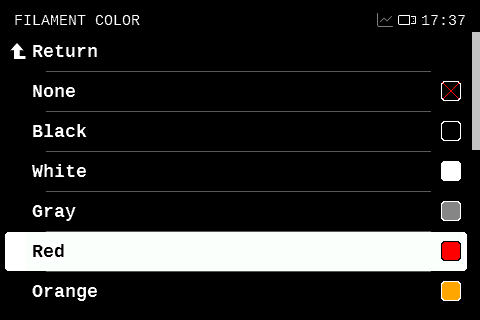
Loaded filaments can now carry a color. When loading a filament, the printer can ask for its color and offers a list of common colors to choose from. The color is stored with the loaded filament and shown as a swatch in the loaded filament menus and on the tool mapping screen before a print. Colors provided by the G-code (for example by M600 or M701) are applied as well.
Whether the printer asks for the color is set in Settings → User Interface → Ask Color On Load. By default, it asks only when more than one tool is enabled, i.e. with the MMU.
Custom filaments have a new Color parameter.
Tool mapping presets and Smart mapping
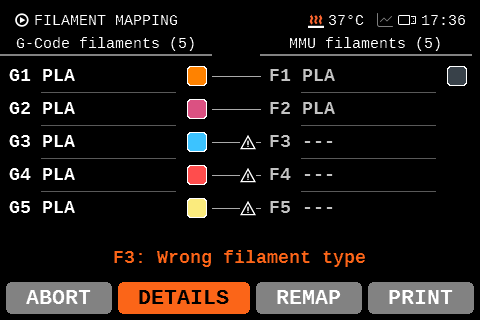
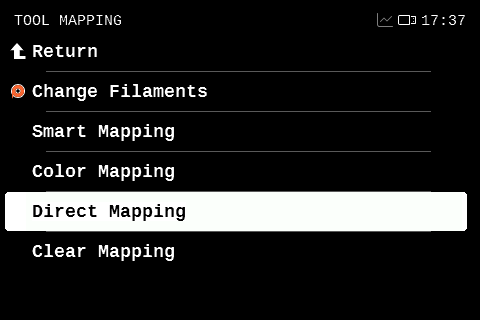
The tool mapping screen shown before a multi-material print now pre-fills the mapping from a selectable preset. The default preset is set in Settings → User Interface → Default Tool Mapping:
- Smart (default) – Maps the G-code tools to slots with compatible filaments, preferring the slot with the same number when equally suitable
- Smart+Color – Like Smart, but also matches the filament colors
- Direct – Maps each G-code tool to the slot with the same number
- Empty – Starts with no mapping
The Filament button on the tool mapping screen is replaced by Details, which opens a menu with the filament change and mapping options. When mapping manually, the suggested slots now avoid incompatible filaments.
Automatic Z-axis alignment on uneven bed
When mesh bed leveling detects that the bed is too uneven, which is usually caused by a misaligned Z axis, the printer now runs the Z-axis alignment automatically and repeats the bed leveling. The prompt offering the Z calibration is now shown only if the automatic alignment fails.
Runout Reaction setting for instant or delayed runout handling (#5423)
The new Settings → Runout Reaction setting controls how quickly the printer reacts to a filament runout and similar events:
- Instant (default) – Stops the print immediately and rehomes to recover possible skipped steps
- Delayed – Finishes the already queued moves first, as firmware versions before 6.8.1 did
Reworked tool mapping screen [MMU] [6.6.0]
The tool mapping screen shown before a multi-material print has been redesigned. It now shows the number of tools used by the G-code and explains why a mapping is not possible (for example an incompatible filament in the selected slot). The Change button is now called Remap, and aborting the print from this screen asks for confirmation.
Filament Sensor C...
Contributors

Assets 17
6.9.1 Firmware for Prusa CORE One+ (Gen 2) INDX, CORE One INDX
Summary
-
New features
- Square Gantry Wizard - A standalone wizard placed just before belt tuning. It is also launched from within the belt-tuning wizard after the user adjusts the screws, to verify that the screw adjustments have not skewed the gantry.
PVA & BVOH Profiles - Filament presets for PVA and BVOH are now available directly on the printer for loading these filament types.(This feature was actually not included in this release due to a process error. We apologize for the inconvenience, we will release a new version soon.)
-
Fixes
- Homing Fix - Some printers experienced homing issues where they could successfully complete the initial homing calibration, but subsequent homing attempts failed. We adjusted the motor currents to improve homing reliability.
This is the stable release of firmware 6.9.1 for the Prusa CORE One+ (Gen 2) INDX and Prusa CORE One/+ INDX.
Note: Firmware 6.9.1 is compatible only with the Prusa CORE One+ (Gen 2) INDX and Prusa CORE One/+ INDX.
6.10.3 Firmware for Prusa XL+, XL
Summary
- Changes and improvements
- Improved chamber temperature estimation.
- Reverted bed lowering to the previous behavior.
This is the stable release of firmware 6.10.3 for the Prusa XL+ and XL, bringing changes and improvements.
6.10.2 Firmware for Prusa XL+, XL
Summary
- Changes and improvements
- Increased Heatbed parking speed (5 mm/s → 15 mm/s)
- Fixes
- Fixed display randomly freezing
- Fixed print resume stuck at "Heating"
- Fixed extruder motor not spinning after manual tool change
- Improved Tool Offset Sensor stability [XL+]
- Fixed parking position in tool offset calibration [XL]
This is the stable release of firmware 6.10.2 for the Prusa XL+ and XL, bringing stability improvements and fixes, most notably for display freezes, stuck print resume on multi-tool printers and the tool offset sensor of the XL+.
Fixed display randomly freezing
Due to an interaction between the display and the Wi-Fi module, the display could randomly freeze. This has been fixed.
Fixed print resume stuck at "Heating"
On multi-tool printers, resuming a paused print waited for all tools, including the parked ones, to reach their target temperature, even when that meant cooling down. That could hold the resume at Heating... for several minutes.
Parked tools now only need to heat up, not cool down. The same applies to resuming after a power loss.
Fixed extruder motor not spinning after manual tool change
When a tool was picked up or parked by hand while the printer was idle, the printer did not fully activate the new tool, causing its extruder motor to not move. This has been fixed: a manual tool pick is now handled as a regular tool change.
Improved Tool Offset Sensor stability [XL+]
The tool offset sensor on the XL+ is now more reliable. Its measurements are more stable, it no longer gets stuck when a reading fails, and the calibration retries failed probes more times before giving up.
Fixed parking position in tool offset calibration [XL]
During the pin-based Tool Offset Calibration on the XL, the print head returned to the front after docking, getting in the way of removing the print sheet before installing the calibration pin. The head now stays at the docks, out of the way.
After the calibration, the head is parked with more clearance above the bed so that the print sheet can be put back on.
6.9.1-beta Firmware for Prusa CORE One+ (Gen 2) INDX, CORE One/+ INDX
Improvements
- Improved Tool Offset Calibration - Z probing and XY scanning now run at 150 °C instead of 170 °C.
- Improved Calibration Reliability - Increased the number of Z probe attempts during Tool Offset Calibration from 3 to 10, improving reliability in less favorable conditions.
- Improved Access During Calibration - During Tool Offset, Nozzle Cleaner, Dock, and Heating calibrations, the bed now moves to 10 cm when appropriate, providing better access for manual adjustments with hands or a wrench.
- Faster Calibrations and Pauses - Increased the parking Z lift speed, reducing waiting time during calibrations and pauses.
Fixes
- Fixed GUI Freezes - Fixed an issue that could cause the GUI to freeze after an unsuccessful Wi-Fi connection.
- Fixed Tool Offset Communication - Improved communication configuration to prevent Tool Offset communication dropouts.
- Fixed Tool Offset Recovery.
This is the beta release of firmware 6.9.1 for the Prusa CORE One+ (Gen 2) INDX, and Prusa CORE One/+ INDX.
Note: Firmware 6.9.1 is compatible only with the Prusa CORE One+ (Gen 2) INDX, and Prusa CORE One/+ INDX.
6.10.1 Firmware for Prusa XL+, XL
1ce23f3  danopernis
Daniel "Dano" Perniš
Summary
-
New features
- Support for the new Prusa XL+
- Contactless tool offset calibration [XL+]
- Nozzle thermal expansion compensation [XL/+]
- Immediate stop on filament runout [6.8.1]
- Guided calibration order [6.8.1]
- Filament compatibility checks in more places [6.8.1]
- Reworked tool mapping screen [6.6.0]
- Tool mapping is preserved when reprinting a job [6.9.0]
- Screen for unloading or changing all filaments at once [6.6.0]
- Redesigned error screens (BSOD/RSOD) [6.5.1]
- Crash dumps can be saved after a RSOD [6.9.0]
- Load All and Unload All in the Filament menu [6.9.0]
- Experimental Fast draw display mode [6.5.1]
-
Changes and improvements
- The bed moves down after finishing, pausing or stopping a print [XL/+]
- Reorganized menus [6.8.1, 6.9.0]
- More reliable probing and mesh bed leveling [6.6.0]
- Spool Join now unloads the filament [6.6.0]
- Improved filament change between different materials [6.5.7]
- Reworked filament sensor selftest [6.5.1]
- Calibrations and Tests can continue with a single test at a time [6.5.1]
- Custom filament names may contain lowercase letters [6.8.1]
- Nozzle diameters of 0.1 mm and 0.15 mm can be selected [6.5.1]
- Side LED dimming can be set to Never, Always or Idle [6.5.0]
-
Fixes
- Fixed layer shifts during high-speed curved moves [6.5.3]
- Fixed input shaper axis assignment [6.5.3]
- Fixed input shaper calibration exciting the wrong axes [6.5.7]
- Fixed a crash when printing files with more than 1024 objects [6.5.7]
- Fixed not restoring original temperature on filament runout/mid-print change [6.8.1]
- The last file in a folder was not visible, and related file list fixes [6.8.1]
- The printer no longer beeps on boot in Silent mode [6.8.1]
- An upward swipe on the touchscreen is no longer registered as a tap [6.8.1]
This is the stable release of firmware 6.10.1 for the Prusa XL+ and XL, introducing firmware support for the hardware of the new XL+ edition. Because the XL last received firmware 6.4.2, this release also carries across everything introduced for the other Prusa printers in the 6.5.1, 6.5.3, 6.5.7, 6.6.0, 6.8.1 and 6.9.0 releases, which is why the list of changes is unusually long.
Support for the new Prusa XL+
Firmware 6.10.1 adds support for the hardware that ships with the new XL+ edition. The printer recognises which variant it is at startup and configures itself accordingly, so no manual selection is required; the detected type is shown in Settings → Hardware.
The XL+ brings:
- A tool offset sensor, replacing the pin-based calibration. It is described in its own section below.
- A Nozzle Wiper, which physically wipes the nozzle clean before mesh bed leveling and during the tool offset calibration. The wiper replaces the original nozzle cleaning procedure.
- GT1.5 belts.
- A new print fan.
- Additional cooling fans for the mainboard and the heatbed electronics.
- High-flow nozzles as the default nozzle type.
NOTE: G-code sliced for the XL can be printed on the XL+ without changes.
Contactless tool offset calibration [XL+]
On the XL+, the calibration pin is replaced by an inductive sensor mounted on the print bed. Each tool's XY offset is measured by sweeping the nozzle across the sensor coils without touching them; the Z offset is then measured by touching the nozzle down.
The tools are heated during the measurement so that the result accounts for the thermal expansion of the nozzle. With the Nozzle Wiper installed, each tool is also wiped during the measurement.
Nozzle thermal expansion compensation [XL/+]
The printer now corrects for the nozzle length changing with the temperature. Please note that this feature is in the early stages of development.
The bed moves down after finishing, pausing or stopping a print [XL/+]
When a print finishes, is paused or is stopped, the bed now travels down so that the printed part is easy to reach and remove.