Repository navigation
Releases: STL2CURVES-MMM/Mesh-Mix-S2C
Release list
Manifold Mesh Mix 1.6.0

Manifold Mesh Mix 1.6.0 rebuilds the CAD side of the converter. Mechanical parts now come out as the few clean faces a CAD program would make, not hundreds or thousands of small patches. Every conversion is measured against the mesh before it's saved. Messy meshes (coarse OpenSCAD exports, noisy scans, files with broken geometry) convert far better than before. On our 57-file test suite, every file now converts to a valid solid that follows its mesh (1.5.1: 45 of 57 followed the mesh, 56 were valid), with 47% fewer faces in total.
Below is what changed, how each part works, and the measurements behind it.
Before and after
In each picture, every face has its own color: fewer, larger colors mean a cleaner, more editable part. The camera is the same for all three.
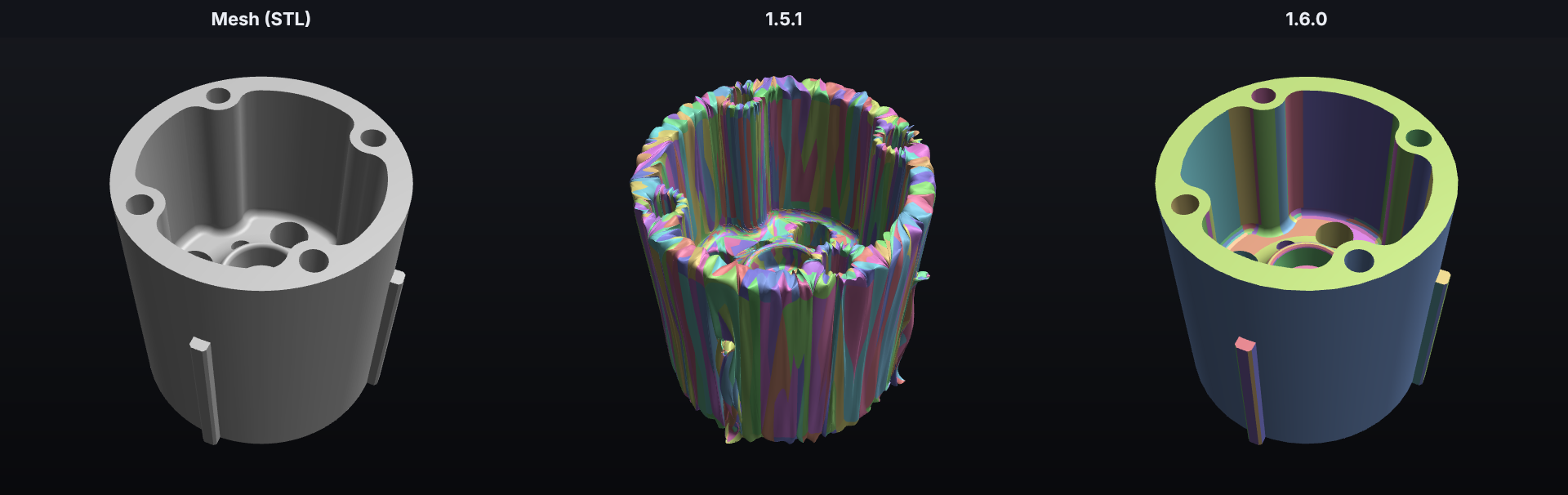
A printed hub (a user's problem file). 1.5.1 found no CAD result it trusted and saved 2,243 smooth patches. They crumple around the holes and are up to 2.8 mm off the mesh. 1.6.0 saves 214 CAD faces, all within 0.08 mm.
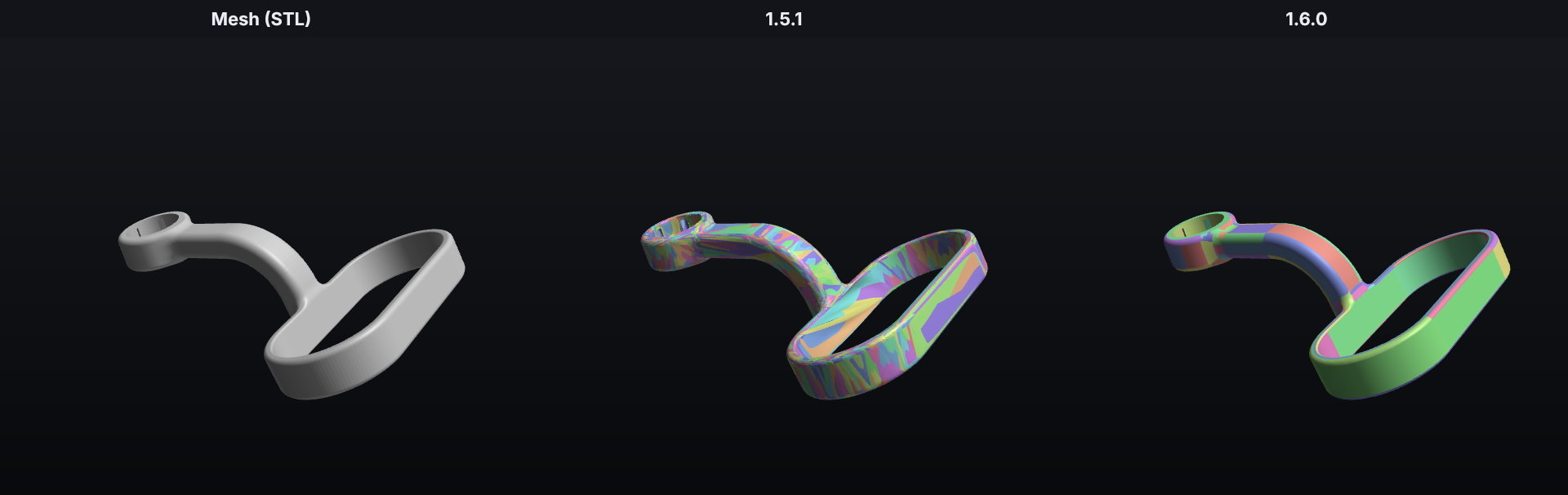
A headrest mount made in OpenSCAD (a user's problem file). 1.5.1: 2,156 wrinkled patches, up to 1.5 mm off. 1.6.0: 182 faces (87 flat, 54 cylinders, 32 fillets, 3 spheres, 2 revolved faces and 4 freeform), all within 0.07 mm.
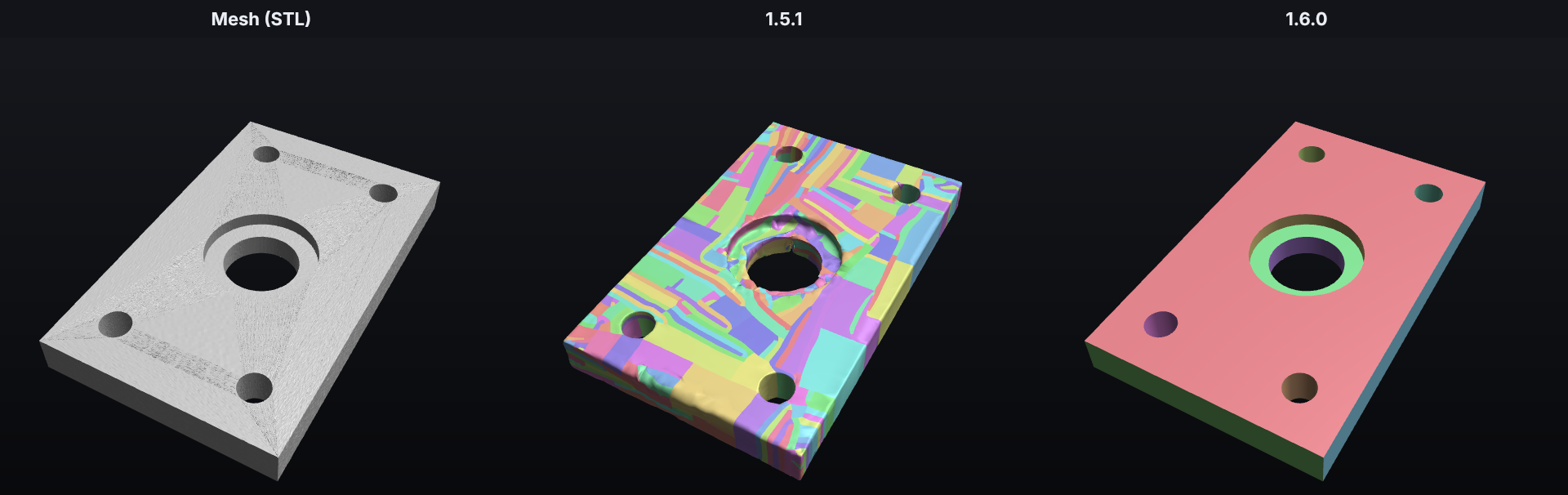
A noisy 3D scan of a plate with holes (test model). 1.5.1 followed the noise and made 443 lumpy patches, up to 0.7 mm off. 1.6.0 sees through the noise: 13 faces, 7 flat and 6 cylinders, within 0.05 mm.
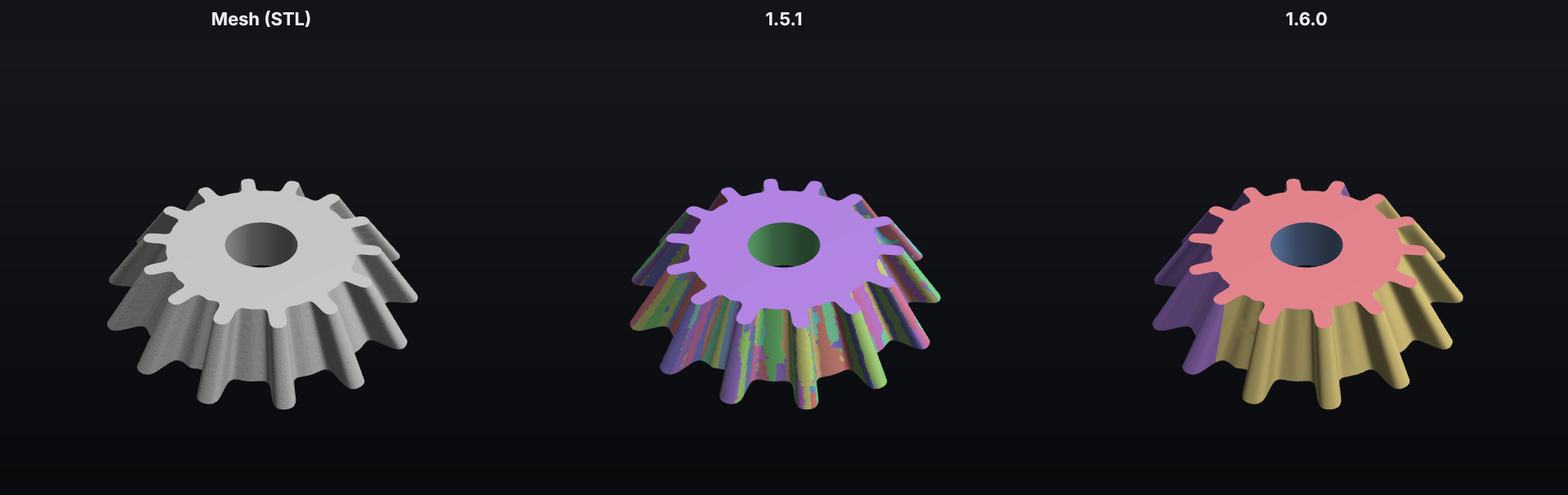
A bevel gear (test model). 1.5.1: 662 strips. 1.6.0: 5 faces. The tapered teeth are swept surfaces.
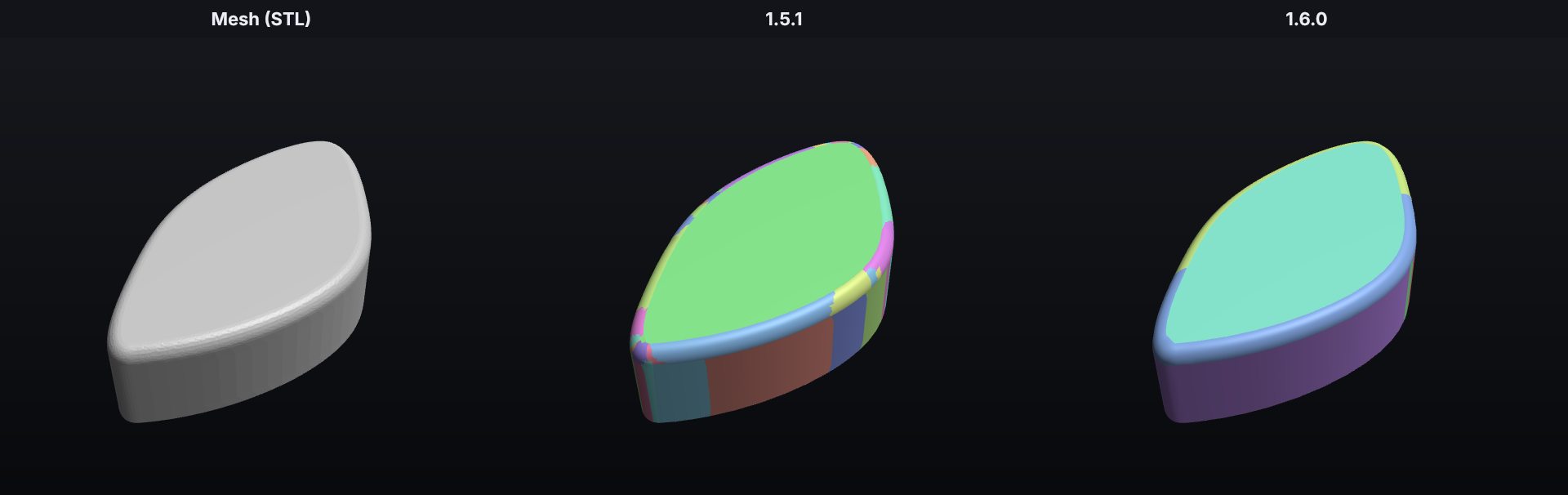
A cam with a fillet along its curved outline (test model). 1.5.1: 55 pieces. 1.6.0: 8 faces. The fillet follows the curve in a few long faces.
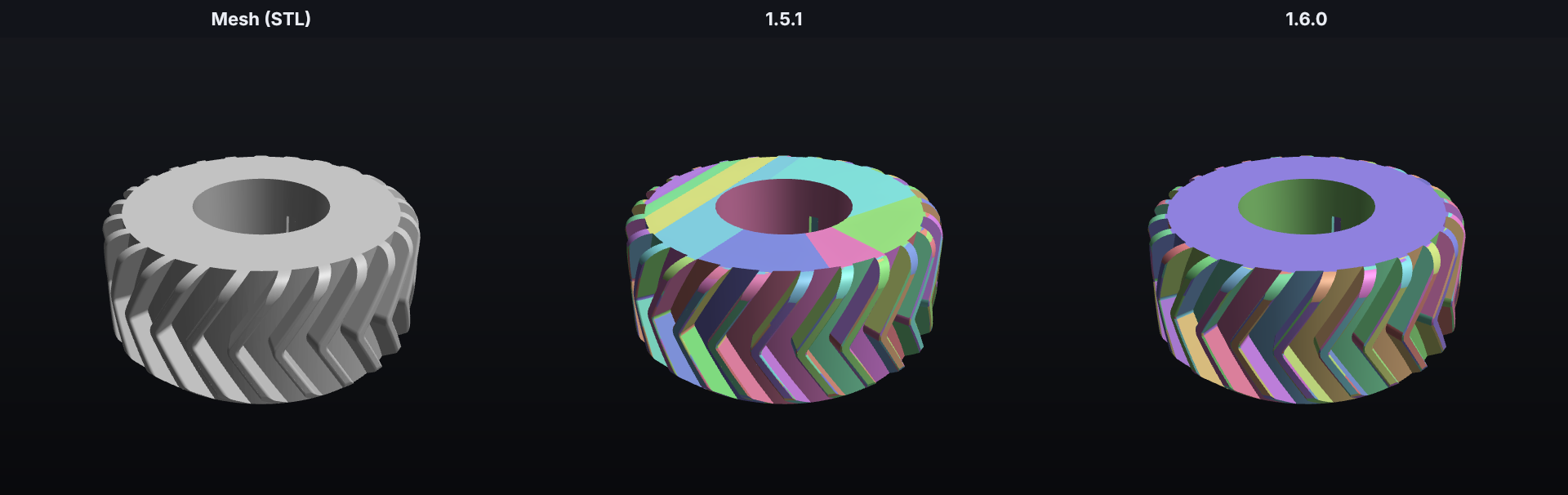
A tractor tire (a user's problem file). 1.5.1: 1,186 faces, up to 0.32 mm off. 1.6.0: 610 faces, within 0.12 mm, with straight borders between the tread faces.
Downloads
- macOS 14+ (Apple silicon):
ManifoldMeshMix-1.6.0-macOS-arm64.zip. Unzip it and drag the app into Applications. The app isn't notarized, so the first time you open it, right-click it and choose Open. - Windows 10/11 (64-bit):
ManifoldMeshMix-1.6.0-Windows-x64-Setup.exe. It installs just for your account, with no administrator password. If SmartScreen warns about an unknown publisher, click More info → Run anyway. - Linux (x86-64):
ManifoldMeshMix-1.6.0-Linux-x86_64.AppImage. Make it executable and double-click it. - Already have 1.0 or 1.5.1? Click the ⬇ button next to the app name; the app updates itself.
SHA256SUMS.txthas the checksums. The apps check them when they update themselves.
What's new
1. Every conversion is checked against the mesh
1.5.1 checked that a result was a valid solid with the right volume, and that the saved file read back fine. It never compared the shape with the mesh itself, so wrinkled, dented or saw-toothed results passed. 1.6.0 compares every result with its mesh the way you would by laying one over the other:
- The shape is cut into fine triangles again, finer than the fit tolerance, from a copy written out and read back, so the check sees what a saved file holds.
- Points are spread evenly over the mesh. For each one, the exact distance to the shape's surface is measured. Then the other way round, from the shape to the mesh, which catches extra material and flaps that no mesh point is near.
- At every point, the direction the surface faces is compared with the mesh. Wrinkles and dents stay close to the mesh but tilt the surface, so they show up here even when the distances look fine.
A result follows the mesh when 99% of its surface is within 3 tolerances, 99.9% within 8 (so even a small flap or dent counts), and almost none faces the wrong way. The File checked badge shows how closely, for example "99.9% of the surface is within 0.13 mm of the mesh".
Different meshes, different rules. A clean CAD export, a coarse OpenSCAD model and a noisy scan can't be judged the same way. The engine measures each mesh first and picks its rules from those measurements:
- Clean (CAD exports, sculpts): the checks as described above.
- Coarse (an OpenSCAD 16-sided "circle", a low-detail export): a true curve stands off the mesh's flat triangles by up to the faceting, so the tolerance grows to match it, measured spot by spot.
- Scan (noisy): a smooth surface through the noise is right, so the tolerance grows to the noise. Single noisy points facing the wrong way don't count; only whole patches do.
A certainty for every verdict. A result near a limit, or with one spot further off than the mesh's coarseness explains (a notch or a rounded-off tip too small to move the percentages), gets a low certainty. Then a second, finer check decides. When the first method's result only just passes, the other method runs too, and the closer result is kept. The queue tells you when this happens (for example "Fitting smooth surfaces too (the first result only just passed)"), so you know why a file takes longer.
We also checked the checker itself. Its numbers were compared with exact calculations and with the saved files read back. Several of its own errors were found and fixed: coarse tessellation of some faces, an approximate nearest-triangle search, OpenCASCADE's meshing mistakes counted as gaps, and one edge far off its face hanging the mesher.
2. New CAD faces: swept surfaces and fillets
Before 1.6, anything that wasn't a plane, cylinder, cone, sphere or torus became a patchwork of small freeform faces. Now the converter recognizes two more families of shapes:
- Swept surfaces: a profile moved along a path. That covers a straight pull (extrusions, straight gear teeth), a turn about an axis (revolved shapes), a screw motion (helical gear teeth, worm threads, tire treads) and a screw that also shrinks (tapered bevel-gear teeth).
How it works: such a surface is unchanged by its motion, so every surface normal is square to the motion's velocity at that point. That gives one linear equation per mesh point, and the best motion is the smallest eigenvector of a 6×6 matrix (Pottmann & Randrup). How much better it fits than the next motion tells how sure the fit is. The points are then moved back along the motion into one plane, a smooth profile curve is fitted to them, and swept again. Small neighbouring pieces that lie on the same sweep join it. - Fillets along curved edges: a rounded edge along a cam's outline, or where a pipe meets a sloping wall. These used to be cut into many small tori and cylinders. Now they're one pipe surface around a spine, measured from those pieces.
A new surface is only kept where it follows the mesh no worse than what it replaces, and simpler surfaces always win when they fit.
Results: a bevel gear went from 662 faces to 5, a planetary gear from 536 to 81, a small bevel gear part from 522 to 40, and a tapered boss from 32 to 4.
3. Clean borders between faces
Faces used to meet along saw-tooth borders that followed the mesh's triangles. That left jagged edges, faces that folded over themselves, and thin slivers that some slicers showed as bars or slits. Now:
- Jagged borders are straightened by a minimum cut through the triangles that fit both neighbouring surfaces, then smoothed.
- Slivers left behind join the surface they lie on. A border move that would leave a strip narrower than two tolerances is skipped.
- Edge curves are checked so they never fold back on themselves.
On the hub, mount and tire, this cut the number of saw-tooth edges from 154 to 48, 164 to 66 and 200 to 24.
4. Much better with bad meshes
- Noisy scans keep their real flat faces instead of falling apart into thousands of pieces, and slivers no longer punch holes in them.
- Coarse exports (few, long, thin triangles, typical of OpenSCAD) are judged by their own faceting. 1.5.1 misjudged how coarse they were at shallow creases and accepted surfaces that bulged between the mesh's points (a TPU liner's grooves were up to 1 mm off; now 0.01 mm).
- The mesh check's hole fills never cut through the part. Filling a big, uneven hole (the open back of a wheel, a car's window opening) with one patch could pass through the part behind it: on a car model, 13,087 of the 14,129 self-crossings reported were made by the fills themselves. Now each hole is filled on its own, only where the patch cuts through nothing, and the report says why any hole stays open.
- Pieces touching along an edge each stay closed when the mesh is repaired.
- A freeform face that blows up during fitting can no longer hang a conversion.
5. Files that are right in every program
STEP files don't keep everything OpenCASCADE keeps in memory. For example, per-edge tolerances are lost, so an edge saved with 0.1 mm reads back with 0.0000001 mm. A face that's valid in memory can therefore be broken in the saved file. 1.6.0 writes every face to STEP and reads it back before accepting the shape, and builds again any face that comes back broken. The finished file is still read back and checked after saving, as before.
6. Two versions when no method fits
If no m...
Manifold Mesh Mix 1.5.1

Manifold Mesh Mix 1.5.1 checks and fixes every mesh before converting it, asks what to do with 3MF parts that touch, explains problems in plain words, picks the quality for each file by itself, and comes with many fixes from a full review of all the code. Below is what changed, and how each part actually works.
⚠️ Known problems in 1.5.1 (the next version should fix them)
After 1.5.1 came out, we found that some conversions don't follow the mesh closely enough, even though they pass every check 1.5.1 runs (a valid solid, the right volume, the saved file reads back fine). 1.5.1 never compared the converted shape with the mesh itself, so these slipped through. Measured against the original meshes:
- Jagged, saw-tooth surfaces on CAD parts with grooves or ribs, especially parts from OpenSCAD, whose meshes are made of long, thin triangles. Example: a TPU liner whose grooves came out with teeth up to 0.6 mm off the mesh. The converter misjudged how coarse the mesh was at shallow creases and accepted surfaces that bulge between the mesh's points.
- Crumpled, wrinkled surfaces on some parts converted with smooth surfaces. Example: a PETG headrest mount came out wrinkled, with gaps up to 1.5 mm.
- Wavy surfaces on noisy 3D scans of mechanical parts (up to 0.7 mm off on a test plate).
- Small spots off the mesh on some CAD parts: on our test parts, a filleted bracket had a spot about 1 mm off and a shelled box one about 0.6 mm off (about 0.1% of the surface each).
- Very complex lattices (like gyroid shapes) take about 20 minutes and still come out wrinkled.
- No progress while a file is read and checked: the app only says "Reading" until the check is done.
What the next version changes: every conversion is compared with the mesh, point by point in both directions, including which way the surface faces, before it's saved. If the shape doesn't follow the mesh closely enough, the engine fixes those faces or tries another method, and keeps the result that follows the mesh best. The app shows what it is checking, fixing and verifying while a file is read.
Until then: check converted parts before using them (the 3D preview shows the shape). If one looks wrong, try a higher quality setting or another preset. If you find a file that converts badly, please open an issue and attach the report from Save Report….
Downloads
- macOS 14+ (Apple silicon):
ManifoldMeshMix-1.5.1-macOS-arm64.zip. Unzip it and drag the app into Applications. The app isn't notarized, so the first time you open it, right-click it and choose Open. - Windows 10/11 (64-bit):
ManifoldMeshMix-1.5.1-Windows-x64-Setup.exe. It installs just for your account, with no administrator password. If SmartScreen warns about an unknown publisher, click More info → Run anyway. - Linux (x86-64):
ManifoldMeshMix-1.5.1-Linux-x86_64.AppImage. Make it executable and double-click it. - Already have 1.0? Click the ⬇ button next to the app name; the app updates itself.
SHA256SUMS.txthas the checksums. The apps check them when they update themselves.
What's new
1. The mesh check: every mesh is checked, fixed and checked again
Meshes for 3D printing are often broken in ways a slicer quietly copes with but a CAD conversion can't: internal walls, holes, flipped triangles, surfaces passing through themselves. Version 1.0 only fixed a few of these, silently. Now every file goes through a full check when you add it, and again right before it's converted.
How it works. The check looks for each problem with its own detector and fixes it in an order where each fix makes the next one easier:
- Broken numbers: triangles with missing or infinite coordinates are removed.
- Squashed, duplicate and back-to-back triangles: triangles with two corners in the same spot, exact copies, and pairs lying face to face (a paper-thin double wall) are removed.
- Internal walls: where shapes were glued together (for example by a slicer or an online tool that merges several parts into one mesh), the touching faces often stay inside the part as zero-thickness walls. The check finds them two ways: closed pieces that enclose no material, and open sheets that lie exactly on an opposite-facing sheet and are attached only along tangled edges. Both are removed, so the outside is one clean surface.
- Tiny cracks: edges that should be joined but are a hair apart (or meet another edge halfway, a "T-junction") are joined.
- Flipped triangles: each connected piece keeps the direction most of its triangles face, and the others are turned around.
- Pinched points: where the surface touches itself at a single corner, the corner is split so each side gets its own.
- Loose debris: tiny stray pieces are removed.
- Holes and tangled edges (an edge shared by 3 or more triangles): small holes are filled directly, harder cases go through MeshFix. Big holes are filled with a simple surface, and the app tells you to check the shape. A surface that has no thickness at all is never "filled" into a fake solid.
- Surfaces passing through themselves: MeshFix removes the crossing triangles and patches the gaps, but on its own it can also eat into the part. So the app compares its result with the original patch by patch: for random points around each changed spot it works out whether they're inside the original solid (a point counts as inside when the surface wraps around it at least once, using winding numbers) and inside the repaired one. A patch is kept only if the two agree to within a sliver about 0.03 mm thick on a 140 mm part; every other patch is put back exactly as it was. Whatever crossings are left are listed, because the conversion usually copes with a few.
- Inside-out parts are turned the right way (cavities, like the inside of a hollow ball, stay inward).
- Overlapping pieces: pieces whose solids share volume are found with exact mesh booleans (Manifold). They might overlap on purpose (an assembly) or by accident (a model made of stuck-together shapes), so the app asks: they stay separate solids unless you click Merge Overlapping Pieces, which joins them into one solid and reads the file again.
- Open surfaces that can't be closed are converted as surfaces instead of solids, and the app says so.
- Scale: a model smaller than 1 unit or bigger than 3 meters gets a note, since it may have been made in inches or meters.
After fixing, a second check runs every detector again on the fixed mesh without fixing anything, and only calls the mesh ready to convert when that pass is clean.
What you see. In the Mesh view, a badge above the file says Mesh is clean, Mesh fixed, Your choice needed or Mesh has problems, and a card lists each problem in plain words with what was done about it, plus the result of the second check.
Save Fixed Mesh… saves the checked and fixed mesh as an STL or 3MF (one object per part), for example to print it. Your original file is never changed.
A real-world example: a headrest mount made in OpenSCAD and merged with its TPU liner by an online tool came out of 1.0 as 14 pieces, 6 of which weren't solids. The mesh check finds 50 internal walls, 340 squashed triangles, 269 back-to-back pairs and 9 pinch points, fixes them, and the part converts as one valid solid.
2. 3MF parts that touch: split or merge
A slicer project often holds parts that touch each other on purpose: a two-color print, or a soft liner in a hard mount. As separate parts they print fine, but if they're fused into one mesh carelessly, the touching faces turn into the hidden internal walls described above. Now the app finds parts that touch, and asks you right after reading the file: Split to Parts (each part becomes its own STEP file, or its own solid in one file) or Merge Into One (they're joined into one solid). You can change your mind later with Merge Touching Parts in the Mesh view.
How it works. Only parts of the same object are compared (separate objects on the plate each keep their own coordinates, so they can't really touch), or every part when you convert the whole build plate. Two parts touch when an exact mesh union (Manifold) joins them into one piece. Merging uses that same exact union, so the touching faces disappear cleanly and the volume is exactly the sum of the parts.
3. Plain-language errors and bug reports
When a conversion fails, the app now says what went wrong and why: for example that the file itself is the problem, that the computer ran out of memory, or that it's a bug in the converter. Save Report… writes a small text file you can send with a bug report (open an issue and attach it).
How it works. The report holds the app and system versions, your settings, the file's name, size and triangle count, the mesh check, the conversion result, the error with its technical details, warnings and the log. Before it's saved, the file's folder, the temporary folder and your home folder are replaced by placeholders everywhere in the text (including inside error details), and any remaining user name in a path is replaced too, so nothing in it points to you. The mesh itself is never included.
4. Auto quality
With the Auto preset, each file now gets its own position on the Speed ↔ Quality slider, from its size: under 50,000 triangles 90%, up to 300,000 80%, up to 1 million 70%, up to 3 million 60%, and 50% above that.
Why: small meshes convert in seconds even near the top of the slider, but at the top a 2-million-triangle sculpt takes about 20 minutes and makes a 130 MB STEP file. The slider shows the quality picked for the selected file. Moving it switches to ...
Manifold Mesh Mix 1.0.0
The first release of Manifold Mesh Mix for macOS, Windows and Linux. It turns 3D-printing meshes (STL, 3MF, OBJ, PLY) into editable STEP files made of real CAD surfaces.
Downloads
- macOS 14+ (Apple silicon):
ManifoldMeshMix-1.0.0-macOS-arm64.zip. Unzip it and drag the app into Applications. The app isn't notarized, so the first time you open it, right-click it and choose Open. - Windows 10/11 (64-bit):
ManifoldMeshMix-1.0.0-Windows-x64-Setup.exe. It installs just for your account, with no administrator password. If SmartScreen warns about an unknown publisher, click More info → Run anyway. - Linux (x86-64):
ManifoldMeshMix-1.0.0-Linux-x86_64.AppImage. Make it executable and double-click it. File → Add to Applications Menu adds it to your menu and to "Open With". SHA256SUMS.txthas the checksums. The apps check them when they update themselves.
What's new
-
Windows and Linux versions. Same look and features as the Mac app: drag and drop, Mesh/STEP 3D preview, presets, 3MF projects with "Split to parts", and the export window.
-
Automatic updates in every version. The ⬇ button next to the app name looks for a newer release here, downloads it, checks it and installs it. The app also checks quietly at launch, but never installs anything without a click.
-
Automatic STEP repair. Every saved file is opened again and checked. If that finds errors, the app repairs the file the way Fusion and other CAD programs do when they import one, then checks it again. The file is then clean in every program, including slicers and viewers that don't repair files. In order, it:
- opens the file and saves it again;
- heals the shape (tolerances, small edges, crossing boundaries);
- sews small gaps;
- as a last resort, converts just the broken part again another way: smooth surfaces instead of CAD faces, CAD faces for mechanical parts, or denser smooth surfaces for organic ones.
A step is only kept if the file reads back better and the shape and volume stay the same. When a repair happened, the result shows Repaired automatically.
-
Fine detail at Best quality. In the Best quality part of the slider, sculpts and scans get more surfaces the denser the mesh is, so cracks, scales and tool marks survive. On a 2-million-triangle bust, 99% of the surface stays within 0.016 mm of the mesh (before: 0.28 mm). This makes much bigger files and takes longer: that bust went from 25 MB to about 130 MB and from about 8 to about 20 minutes. A warning under the slider gives the expected file size before you convert.
-
Faster smooth surfaces. The surface fitting step uses about 4 times less memory and is up to twice as fast on big models.
-
Sharper mesh preview for very big meshes (over 1.5 million triangles). They're simplified evenly instead of having triangles dropped at random, so the Mesh view no longer looks speckled.
Good to know
- Best quality on very dense meshes needs a few GB of memory: about 5 GB for a 2-million-triangle model.
- The CAD preset is made for mechanical parts. On noisy 3D scans it can take a very long time; use Auto or Smooth for those.
- Problems in the mesh itself, like holes or missing pieces, can't be repaired automatically. The app lists them in plain words.