Repository navigation
Releases: Skylolerr/ha-energy-flow-mapper
Releases · Skylolerr/ha-energy-flow-mapper
Release list
v0.5.0

Highlight: a dashboard card for everyone – your device tree, read-only, on any dashboard.
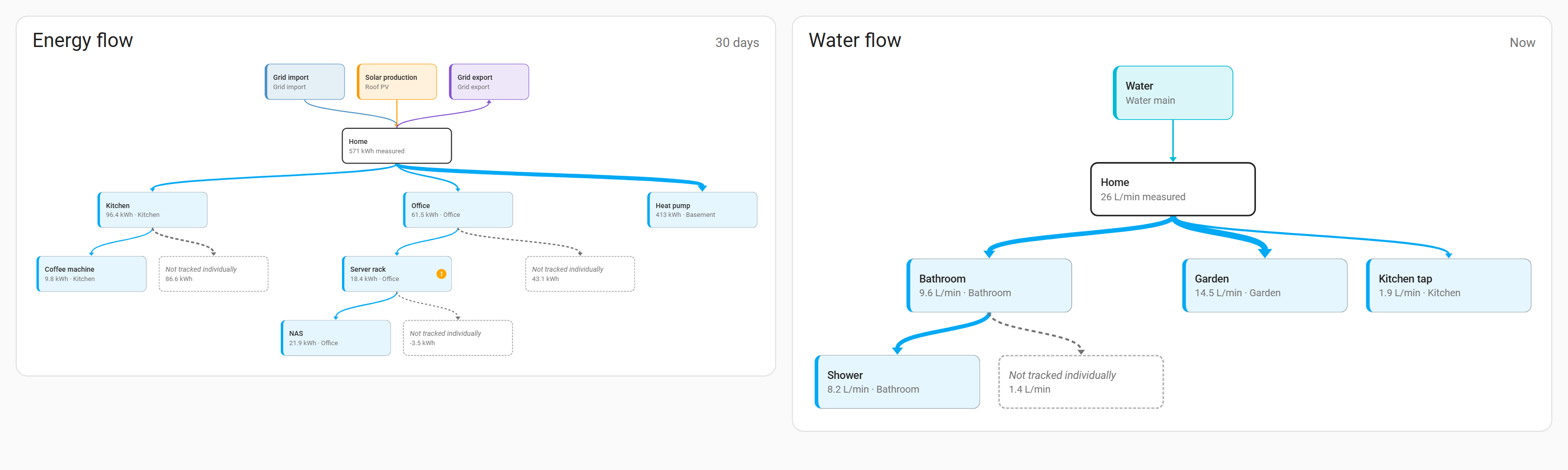
✨ Added
- Dashboard card
custom:energy-flow-mapper-card: the device tree of electricity or water on any dashboard, read-only and for every user. Period (now, today, 7 or 30 days), start at a device, sources and untracked consumption on or off, title; tap a device to open its history. Set up in the card editor; it comes with the integration without adding a resource. - A read-only command for the card, which users who are not admins may use too. It returns the tree, names and consumption only, never prices or costs.
Tested with Home Assistant 2026.10.4 · minimum 2026.10.0
v0.4.0
Highlight: water meters from flow sensors, undo in the draft, and a search for big diagrams.
✨ Added
- "Create meter" for flow sensors without a water meter in the Water tab: an integral helper that counts litres (or the unit of the flow) and is shown as water.
- "Undo change" in the bar at the bottom, and Ctrl+Z, take back the last change of the draft.
- "Find device" above the diagram: matching devices are highlighted, collapsed parents open, and Enter moves from match to match.
🐛 Fixed
- A zoom made before the diagram had its size is no longer replaced by the first fit.
- The diagram fits into the window again; since the tabs came in 0.3.0 it reached below the bottom edge.
Tested with Home Assistant 2026.10.4 · minimum 2026.10.0
v0.3.0
Highlight: water joins electricity – its own tab for water devices and water meters.
✨ Added
- Water tab: the water devices of the energy dashboard as their own diagram, edited like electricity devices (include, move to the top level, rename, remove, add free water meters and external volume statistics with their flow sensor).
- Water meters as sources: assign, replace (prices stay) and remove.
- Flow now, and water per period in litres and m³ (gallons with US units). Warnings when sub-devices used more than 5 % and 10 L more than their device.
- Export and import include the water devices; files exported with 0.2.0 still import and leave the water devices as they are.
- HACS installs the release ZIP (
zip_release), so the download count of a release shows roughly how often it was installed.
Tested with Home Assistant 2026.10.4 · minimum 2026.10.0
v0.2.0
Highlight: your energy settings as a file – export, import, and as many backups as you like.
✨ Added
- Option "Backups to keep" (5 to 100, default 20) under Settings → Devices & services → Energy Flow Mapper → Configure.
- Export of the current energy sources and devices, or of any backup, as a JSON file from the Backups dialog.
- Import of such a file: it is checked like a draft, the changes are shown for confirmation, and the current settings are backed up first.
- README section about where backups are kept and how they get into Home Assistant backups.
Tested with Home Assistant 2026.10.3 · minimum 2026.10.0
v0.1.0
Highlight: first public beta – the energy dashboard as a diagram you can edit by drag and drop.
✨ Added
- Admin panel Energy Flow Mapper in the sidebar that shows the energy dashboard configuration as a diagram: sources, Home and devices as blocks, arranged automatically, with arrows from each device to the devices it includes. Zoom and move with the mouse wheel, by dragging or with two fingers.
- Live power and energy per period (now, today, 7 days, 30 days): blocks, Home and arrow widths follow the value; devices with sub-devices show the consumption that is not tracked individually.
- Plausibility warnings when sub-devices used clearly more energy than their device (more than 5 % and 0.1 kWh).
- Edit by drag and drop or the ⋮ menu: include a device in another one, move it to the top level, rename or remove it. While dragging, valid targets are highlighted.
- Free sensors: unused energy meters and external energy statistics (e.g. from energy supplier portals) can be added as devices.
- Sources: drag a free sensor onto grid import, grid export, solar or battery, or tap a source to assign, replace or remove its sensor. Prices of the grid connection stay. Gas and water sources are shown only.
- Meters for power sensors without an energy meter: "Create meter" adds an ordinary integral helper (it keeps working without Energy Flow Mapper) and puts it into the draft; helpers created by the panel are labelled.
- Changes are collected in a draft, checked (loops, missing parents, duplicates, a sensor used as source and device or by two sources, and what Home Assistant itself would reject) and saved in one step after a confirmation. Every save stores a backup first (the last 20 are kept); "Undo last save" and "Backups" restore an earlier state.
- Saving is refused when the energy settings were changed elsewhere in the meantime; the panel reloads and keeps the draft.
- Repair issue and disabled editor when the energy settings of the Home Assistant release are not supported.
- Diagnostics with counts only (no entity names).
- English, German, French and Italian; light and dark theme; phone layout.
Minimum Home Assistant 2026.10.0