Repository navigation
OrcaSlicer V2.5.0 RC release
Pre-release
What's Changed
OrcaSlicer 2.5.0 is nearly ready, and this release candidate is your chance to try it before the final release. 2.5.0 is OrcaSlicer's biggest update yet: you can add features with Python plugins, print on belt printers, mix new colors from the filaments you have loaded, give surfaces real 3D texture, and design parametric parts in the experimental Design tab. It also supports the Bambu Lab H2C and A2L, and it starts, slices and exports noticeably faster. The alpha and beta release notes walk through everything new.
🧩 Give plugins a try! The community has already created and shared lots of plugins on the Orca Cloud plugin hub, so take a look: you may find just the tool you've been missing. Plugins can add one-click tools, fine-tune how layers and G-code come out, or bring whole new panels into OrcaSlicer. Open Plugins from the main menu, subscribe to the ones you like with your Orca Cloud account, and OrcaSlicer installs them and offers updates as their authors improve them. A plugin always asks your permission before it goes online, starts other programs or reaches outside OrcaSlicer's data folder. Have an idea of your own? The plugin development guide will get you started, and once you publish your plugin on the hub, everyone can enjoy it.
Thank you to everyone who tested the beta! This release candidate fixes many of the bugs and crashes you reported. Slicing works on the first click again, and several crashes are gone, including ones in the Device tab and when opening some projects. After a restart, OrcaSlicer reconnects to your last Bambu Lab printer and keeps the filaments it synced from your AMS. On the Bambu Lab H2D, X2D and H2C, each filament now goes to the nozzle it's actually loaded on. On Linux with Wayland, OrcaSlicer no longer quits when your mouse disconnects or goes to sleep, and lightning infill no longer freezes slicing on some models.
Heads-up if you print with more than one filament: in Filament for Features, a feature left on Default now always prints with the object's own filament. Before, choosing a filament for infill or a top or bottom surface could quietly switch other features left on Default to it as well. If an older project relied on that, set those features to the filament you want.
Note: This is the release candidate for 2.5.0 and is stable enough for everyday use. Please report any problems on GitHub.
Downloads
| Platform | File |
|---|---|
| Windows installer (x64) | OrcaSlicer_Windows_Installer_V2.5.0-rc_x64.exe |
| Windows installer (ARM64) | OrcaSlicer_Windows_Installer_V2.5.0-rc_arm64.exe |
| Windows portable (x64) | OrcaSlicer_Windows_V2.5.0-rc_x64_portable.zip |
| Windows portable (ARM64) | OrcaSlicer_Windows_V2.5.0-rc_arm64_portable.zip |
| macOS (Apple Silicon and Intel) | OrcaSlicer_Mac_universal_V2.5.0-rc.dmg |
| Linux AppImage (x86_64) | OrcaSlicer_Linux_AppImage_Ubuntu2404_V2.5.0-rc.AppImage |
| Linux AppImage (aarch64) | OrcaSlicer_Linux_AppImage_Ubuntu2404_aarch64_V2.5.0-rc.AppImage |
| Linux Flatpak (x86_64) | OrcaSlicer-Linux-flatpak_V2.5.0-rc_x86_64.flatpak |
| Linux Flatpak (aarch64) | OrcaSlicer-Linux-flatpak_V2.5.0-rc_aarch64.flatpak |
| Windows debug symbols (for developers) | Debug_PDB_V2.5.0-rc_for_developers_only.7z |
🌊 New Features & Improvements
-
Shortcuts to switch the main tabs by @Eldenroot and @raistlin7447 in 16301 and 16918
Press Ctrl+Tab or Ctrl+Shift+Tab to move to the next or previous main tab. On macOS these use the Control key, because Cmd+Tab belongs to the system. You can also give each main tab a shortcut of its own: look for Go to the … tab in the Keyboard Shortcuts dialog. They start without a key, so you can pick the ones you like.
-
Clearer help for connection error -1 by @downtime0 in 16273
When a LAN connection to a Bambu Lab printer fails with error -1, the message now tells you what to check: that the printer is on the same network and its IP address is correct, whether a different network plug-in version in Preferences helps, and theprinter.cercertificate.Before After 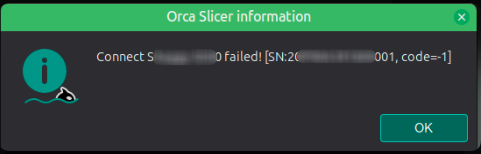

-
Pick Qidi Box slots when printing by @thelegendtubaguy in 16723
With Use printer agents instead of print hosts turned on in Preferences > Developer, the slot you pick for each filament in the print dialog is now sent to Qidi printers with a Qidi Box, such as the X-Plus 4, Q2, Q2C, X-Max 4 and X-Plus 5. The dialog shows the Box slots as soon as it opens, named "Qidi Box 1", "Qidi Box 2" and so on, and prints start through Moonraker, which the X-Max 4, Q2, Q2C and X-Plus 5 need to find the uploaded file. For Qidi printers, the Device tab shows the printer's web page and the Calibration tab is hidden. On any Moonraker printer, the print dialog no longer gets stuck at "Synchronizing device information..." or asks you to insert storage when the first connection attempt fails, as often happened on macOS right after launch.
🛠️ Bug Fixes
Slicing & Supports
-
Slice works on the first click by @anselor in 15180 — one click on Slice plate or Slice all is enough again. Before, slicing sometimes opened the Preview with nothing sliced, and you had to click a second time.
-
No false "G-code path exceeds the printable range" error by @cgarwood82 in 16931 — printers whose nozzle printable area is inset from the bed on two or more adjacent sides now slice normally. Before, every slice failed with this error, wherever the object sat. Printers with an area inset on one side only, such as the Bambu Lab H2D and X2D, weren't affected. Fixes #15746.
-
Features left on Default use the object's filament by @ianalexis in 17058
In Process > Multimaterial > Filament for Features, Default now always means the object's or part's own filament, just as the tooltips say. Before, choosing a filament for sparse infill, internal solid infill, or the top or bottom surface also moved some of the other features left on Default to it. Bridges still follow internal solid infill.Projects and presets that relied on the old behavior now print those features with the object's filament. That covers any that set a filament for sparse infill, internal solid infill (called Solid infill before 2.4), or the top or bottom surface while leaving related features on Default. To keep those features matching, set their filaments explicitly. Fixes #15430.
-
Z-hop settings follow the filament that's printing by @gazi-faysal-jubayer in 16965 — Only lift Z above, Only lift Z below and On surfaces now use the override of the filament that's actually printing. Before, they were read by extruder instead of by filament, so on a single-extruder printer every filament used filament 1's values, and a filament set to lift only above 1 mm could still lift from the first layer. Fixes #16185.
-
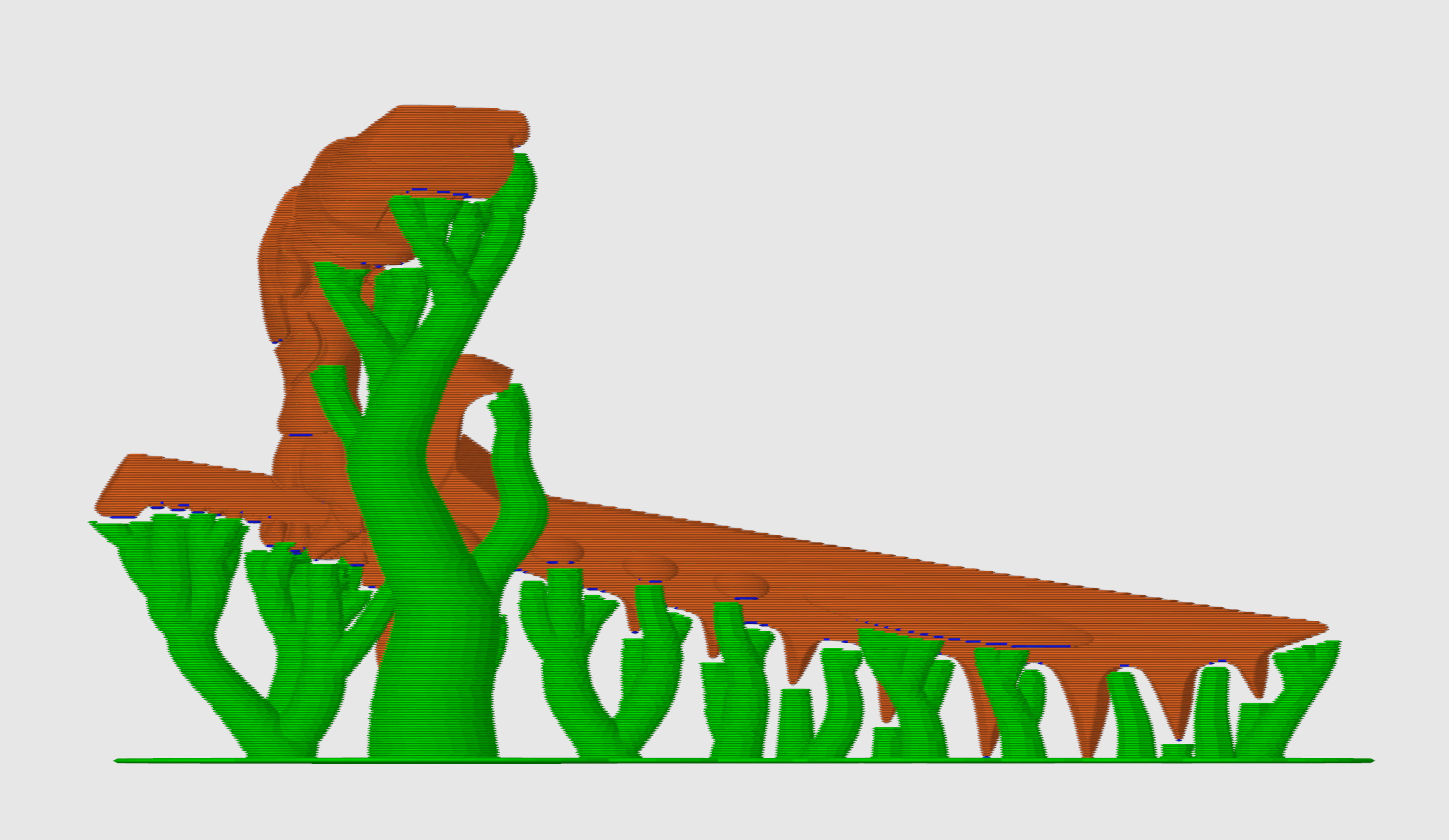
Build-plate-only tree supports keep their XY clearance by @kisslorand in 17060
With On build plate only turned on, Tree Slim, Tree Strong and Tree Hybrid support branches now stay outside the XY clearance around the model instead of growing into it. Fixes #16952.Before After 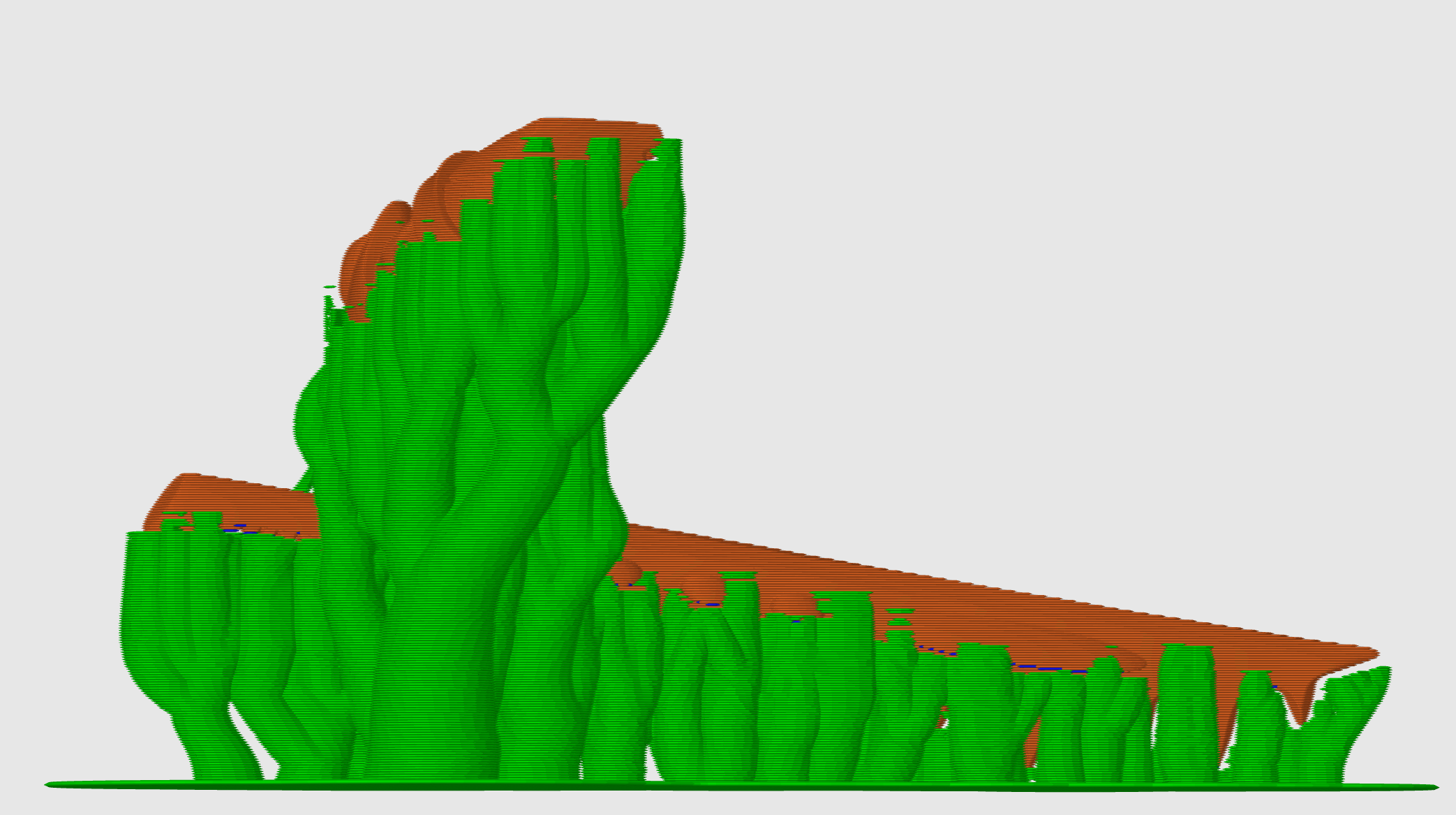
-
Toolchanges with No sparse layers stay clear of printed parts by @alternativniy in 15441
With No sparse layers (beta) on, the nozzle could still be down at the prime tower's lower height when a toolchange started, so parking, docking or other toolchange moves could hit taller parts that were already printed. Now, when the printer has change filament G-code or the toolchange switches extruders, OrcaSlicer first raises the nozzle back to the top layer height. If you write custom toolchange macros, note thatz_after_toolchangeon that path gives the layer height instead of the tower's. Fixes #11703.
Prime Tower & Multi-Material
-
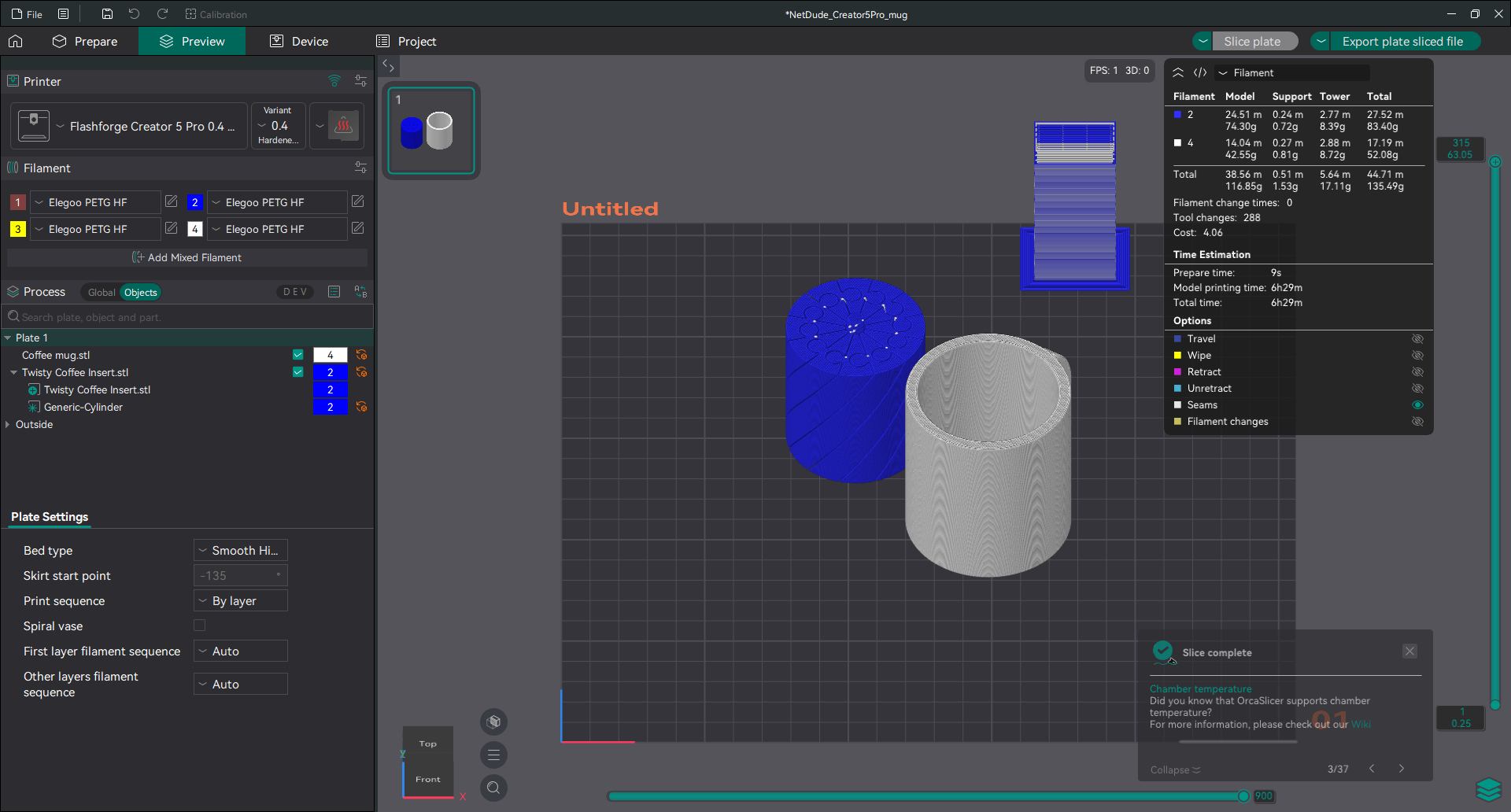
Prime tower with different layer height limits per extruder by @Art-Porto in 17000
Projects whose extruders have different Layer height limits in the printer settings now slice with a prime tower. Before, slicing refused the tower with "A prime tower requires that all objects are sliced with the same layer height", even when every object used the same layer height, and each object took its limits from the wrong extruder. Objects now use their own extruder's limits, and the prime tower check compares the layers themselves. Fixes #16938.Before After 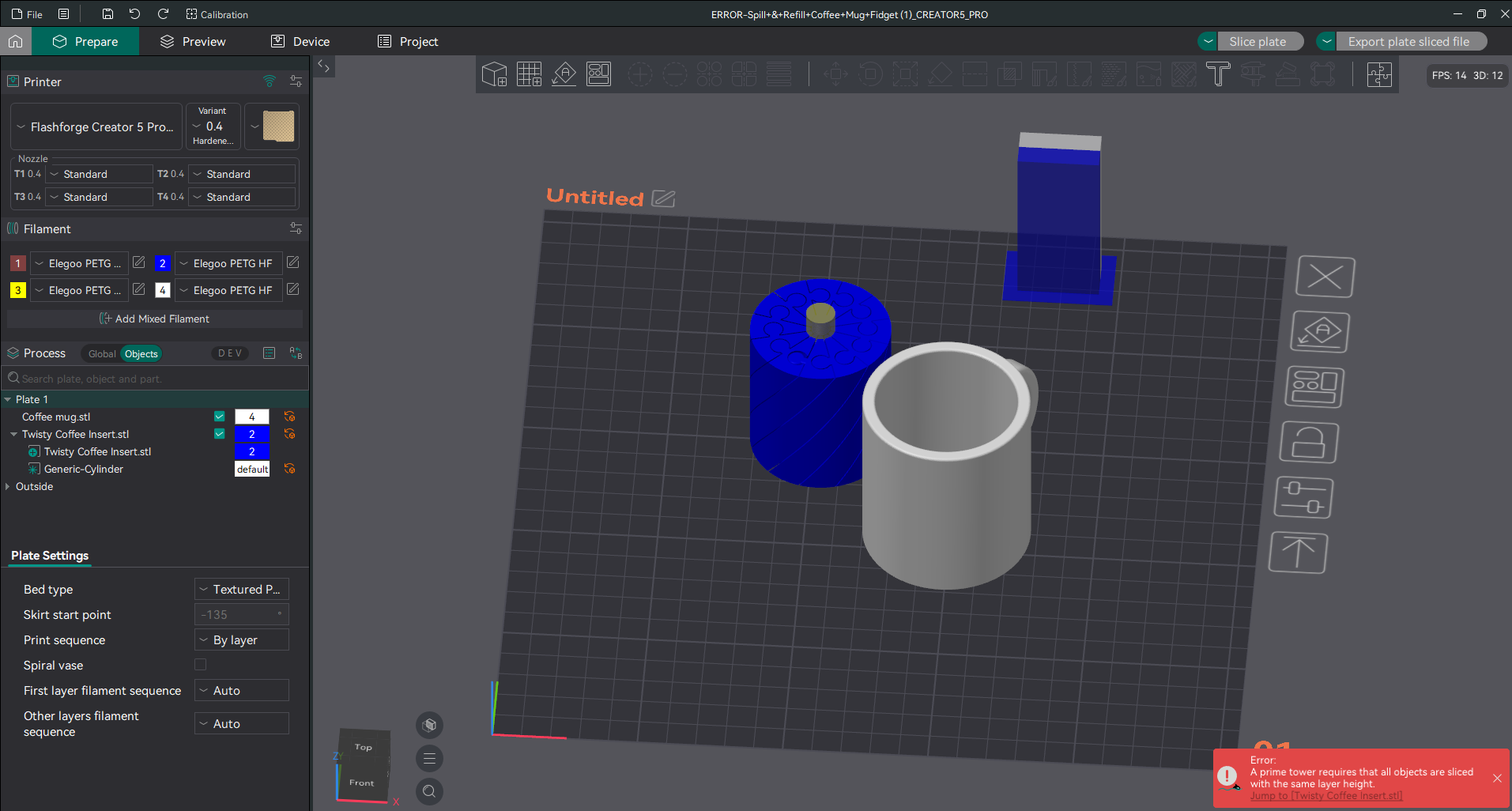
-
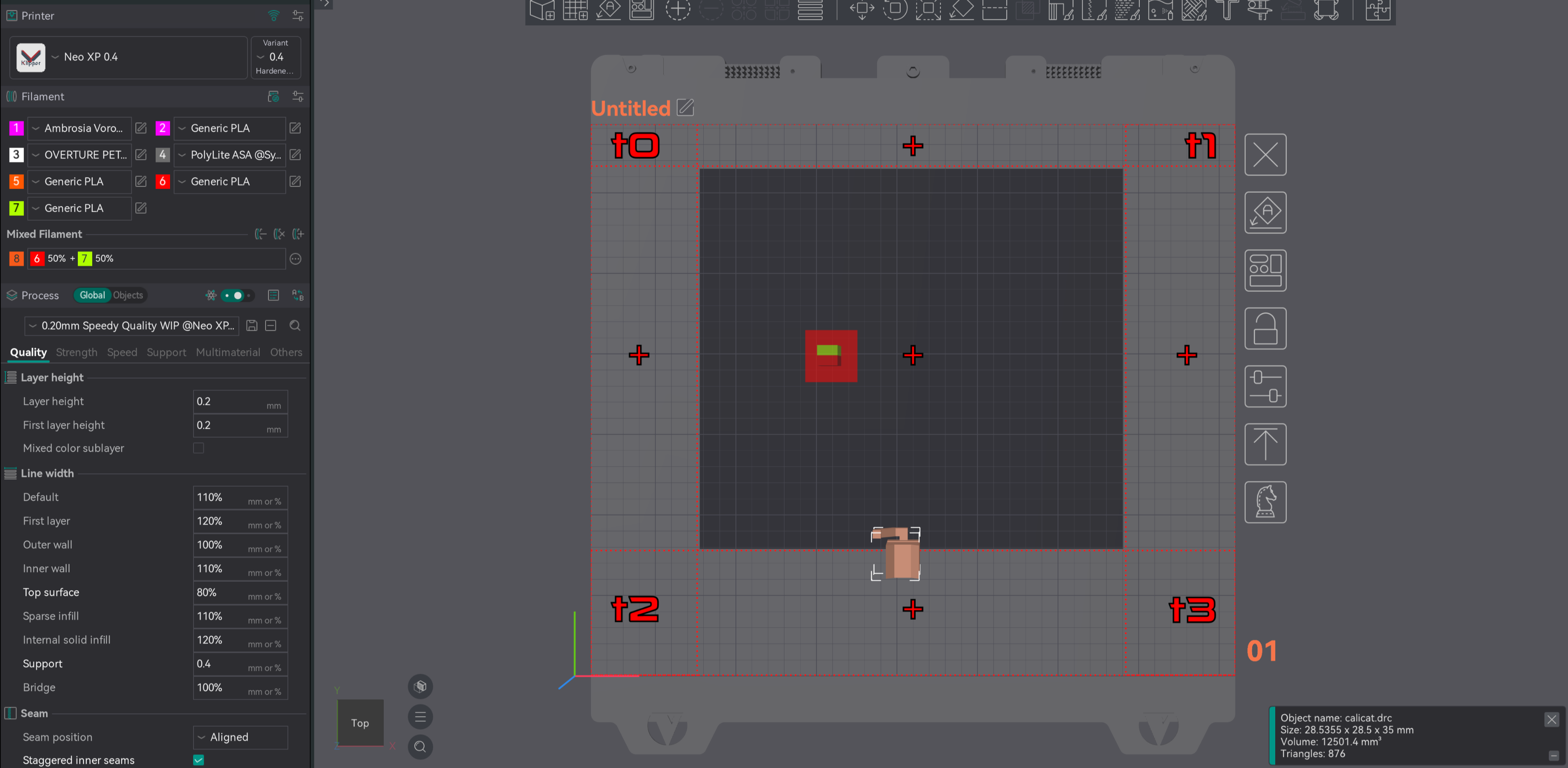
Mixed filaments checked against the right extruders by @cgarwood82 in 16947
On non-Bambu multi-tool printers, the printable area check, Arrange and the toolhead collision volume checks now judge an object in a mixed color by the extruders that print its component filaments. Before, they treated a mixed filament as a filament of its own, so the object could be blocked by an extruder that prints none of its components, or let through where one of its extruders can't reach. Fixes #16945.Before After 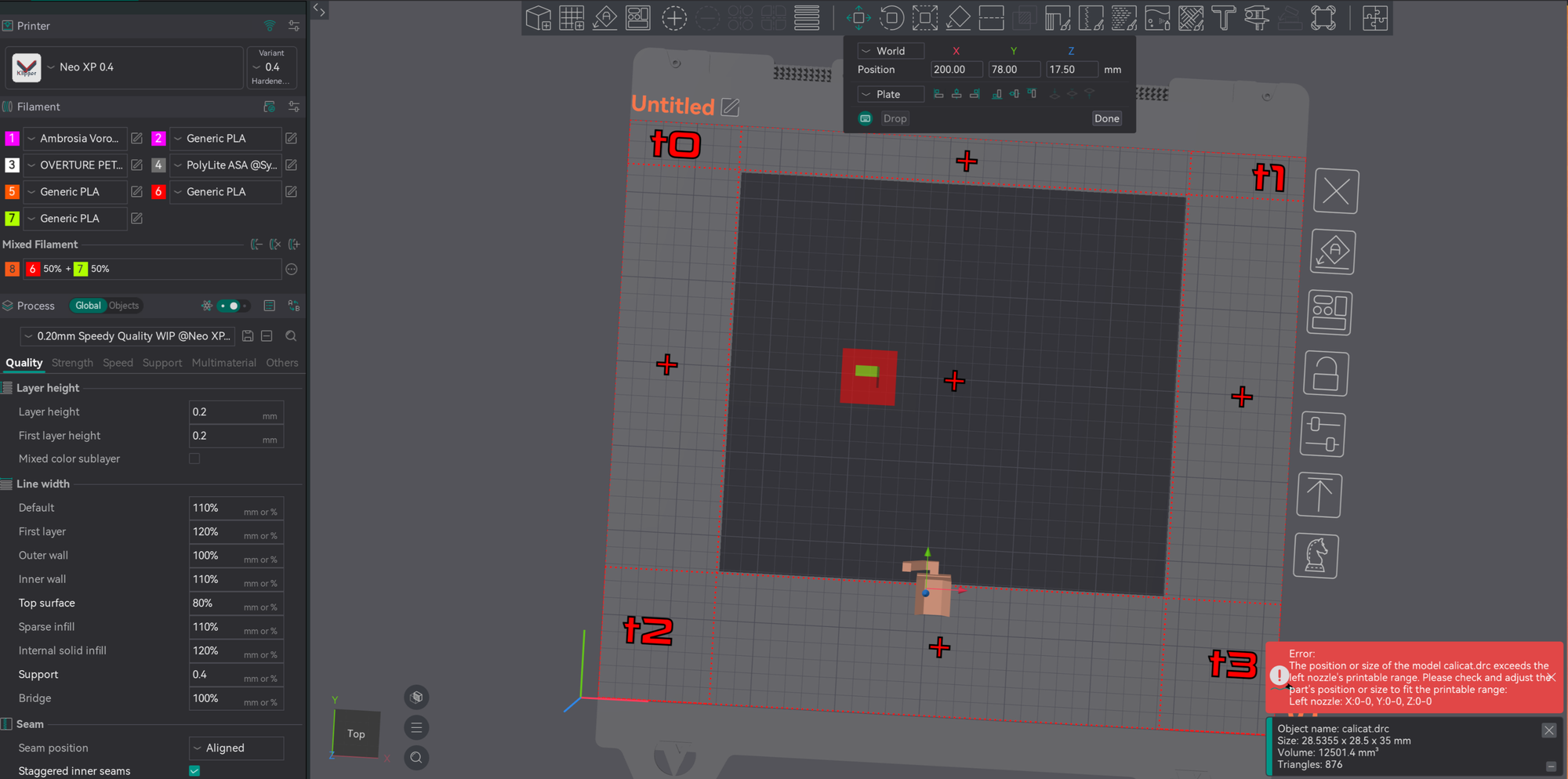
-
Filaments grouped onto the nozzle they're loaded on by @SoftFever in 17074
On the Bambu Lab H2D, X2D and H2C, Filament-Saving Mode now puts each filament on the nozzle that has it loaded. Before, it could put a filament on the main nozzle even when it was loaded only on the other one, so the Send print job dialog mapped it to a slot with the wrong color, or to no slot. In Convenience Mode, grouping now picks the closer of two very similar colors, and between slots of the same color it prefers the slot holding the same filament, such as Bambu PLA Basic over Generic PLA. Fixes #15177. -
Printable area checks on printers with 33 or more extruders by @cgarwood82 in 17002 — a printable area problem on extruder 33 or above is now reported against the right extruder. Before, it could be reported against a lower one, such as extruder 1 for extruder 33.
G-code & Export
-
Print and Export retry after a post-processing script or plugin fails by @SoftFever and @HanifKoh in 17095 and 17016
When a post-processing script or plugin fails on Print or Export G-code, pressing the button again now runs it again, so once you've fixed the script, or for a plugin that failed, a retry just works. Before, nothing happened on that plate until you changed a setting. A failed copy, such as to a write-locked SD card, also keeps the plate sliced. On Bambu printers, where scripts and plugins run while slicing, the next slice after one fails generates the G-code again. Fixes #17044.When Print to a print host failed before the upload started, because a script or plugin failed or you canceled the slice, every later Slice plate, even in a new project, tried the upload again and could send the file to the printer and start it. A failed upload is now dropped. Fixes #17007.
Before:
before-fix.mp4
After:
after-fix.mp4
-
No doubled extension when exporting objects by @nhchiu in 15296 — when you export objects as separate STL or DRC files, an object named
bracket.stlis now saved asbracket.stlinstead ofbracket.stl.stl.
Prepare & Preview
-
Correct shadows in the realistic view by @thelegendtubaguy in 16942 — in Preview with the print sequence set to By object, objects that are already printed keep their shadows when the layer slider moves into a later object. In the section view, parts the section cuts away no longer cast shadows.
-
Smoother center of mass markers by @thelegendtubaguy in 16958 — you can zoom while the mouse is over the details box, and Esc closes it. On belt printers the markers sit where the toolpaths are, at the top layer you can click the finished print's marker again, and the section view hides markers on the cut-away side.
-
Support painting includes faces at the threshold angle by @ianalexis in 16957 — Highlight overhangs and On highlighted overhangs only now include faces at exactly the threshold angle, which get supports anyway. Before, a blocker painted on highlighted overhangs left a strip of support along its edge. Fixes #11321.
-
Unprintable objects stay grey after deleting a modifier by @HanifKoh in 17003 — deleting the last modifier of an unprintable object no longer draws it as printable in the 3D view. The object list and slicing already treated it as unprintable. Fixes #16988.
-
Arrange keeps short objects on the plate when printing by object by @thelegendtubaguy in 17011 — with the print sequence set to By object, Arrange now keeps objects shorter than the Nozzle height on the plate. Before, some of them could land off the plate, and the plate then reported them as too close together. Fixes #16991.
Presets & Projects
-
Publish 3MF on multi-extruder printers and with filament variants by @lamweilun in 16940, 16971, 16984 and 17014
On printers with more than one extruder, the Printer section of Publish 3MF now shows the right value for every extruder, instead of "Undefined" or another extruder's value. Process settings that differ per extruder, such as speeds and accelerations, now get a tab for each extruder too, and checking one publishes only that extruder's value. Published files also record the author's extruder layout, so on import each value goes to the extruder with the same number when it has the same nozzle type.For filaments with several nozzle variants, such as Standard and High Flow, importing now puts each value on the variant with the same name, and a variant you don't have is reported instead of filled. Before, a published file could carry another filament's or another variant's value, and importing put every value on the first variant. Full Publish copies every variant, and a filament imported with Full Publish now stays in the project when you save and reopen it.
screenrecording-2026-10-28_12-51-25.mp4
-
Fewer false adaptive pressure advance warnings by @HanifKoh in 16978
On filaments with several nozzle variants, such as Generic PCTG on a Snapmaker U1 with a High Flow nozzle, editing the adaptive pressure advance model no longer ends in a "Line 1: flow value must be greater than PA value" dialog about a variant you weren't editing. Only the variant you edit is checked. A model typed with spaces after the commas no longer warns on every slice, and turning on adaptive pressure advance before entering a model now tells you that no measurements have been entered. Fixes #16412. -
Edits stay in the filament slot you edited by @fer-marino in 15896 — on printers with several filament slots, if you edited one slot and closed the editor without saving, editing another slot no longer saves the first slot's edits into it, and the unsaved-changes dialog no longer crashes. Fixes #15767.
-
Extra extruders on user printers keep their values by @SwineFlew931 in 16536 — a user printer preset with more extruders than the system printer it inherits from, such as a Snapmaker U1 with an add-on multi-material unit, now keeps the extra extruders' retraction, Z-hop, wipe and other per-extruder values after a restart. Before, they came back as extruder 1's values. Fixes #16535.
Calibration
- PA Line test uses the assigned filament by @gazi-faysal-jubayer in 16882 — the test now takes its speed limit, line width and extrusion from the filament it's assigned to, and applies that filament's flow ratio as regular prints do. Before, it used the first filament's values whichever filament it was assigned to, so results on any other slot were off. Fixes #16530.
Interface Fixes
-
AltGr characters in settings boxes no longer switch tabs by @raistlin7447 in 16918
On AZERTY and similar keyboard layouts, typing{,~or#with AltGr in a multi-line settings box, such as custom G-code or post-processing scripts, now types the character instead of switching to another main tab. Ctrl+1 to Ctrl+4 in a settings box no longer switch tabs either; they only change the camera view, as they do elsewhere. To jump to a tab, bind its Go to the … tab shortcut. Fixes #9649.
-
Gizmo values entered with Tab apply right away by @kisslorand in 16921 — in the Move, Rotate and Scale tools, a value you confirm with Tab now applies at once, instead of waiting for the mouse to move.
-
Camera orbit speed with a decimal comma by @thelegendtubaguy in 16967 — in languages that use a decimal comma, the Orbit speed multiplier now keeps its decimals. Before, 0.99 froze the camera and 1.99 acted as 1. Fixes #11534.
Crashes & Hangs
-
Device tab works with the Bambu network plug-in 02.08.04 by @HanifKoh in 16973 — the Device tab no longer crashes when it connects to a printer with a print task while the default Bambu network plug-in, 02.08.04, is installed. This crash first appeared in the beta. Fixes #16949.
-
No crash closing with a Bambu LAN printer connected by @SoftFever in 17087 — closing OrcaSlicer, or reloading the Bambu network plug-in, while a Bambu printer is connected over LAN no longer crashes inside the plug-in. With plug-in 02.03.00, closing can take up to about a second longer.
-
Projects with missing or empty settings open by @raistlin7447 in 17040 — a 3MF without a filament color setting, or a project from OrcaSlicer 2.3.1 or later with an empty settings file, now opens instead of crashing. If a project's settings can't be used, OrcaSlicer loads only its objects and keeps your presets, and objects on filaments past the first still get their filaments. Fixes #17008.
-
No slicing hang with lightning infill by @raistlin7447 in 17066 — some models used to stop at "Generating infill regions" while memory use grew until it ran out. The reporter's project, which has a vertical embossed text part, now slices in 4 seconds. Fixes #17051.
-
No crash slicing a very thin object with a raft by @raistlin7447 in 17013 — with raft layers on, slicing an object too thin for any layer now shows the "No layers were detected" error instead of crashing, as it does without a raft. Fixes #17009.
-
No crash transferring a post-processing script by @raistlin7447 in 16963 — picking Transfer to carry an unsaved post-processing script over to a print preset that has no scripts no longer crashes. Transferring onto a preset with more scripts now replaces them instead of keeping the extra ones, and the unsaved-changes dialog shows all scripts in one row. Fixes #16955.
-
No crash on exit with subscribed preset bundles by @yw4z in 16948 — OrcaSlicer no longer crashes while closing when a subscribed preset bundle has an update pending.
-
Windows starts with a hand-edited OrcaSlicer.conf by @SoftFever in 16983 — OrcaSlicer no longer refuses to start with "invalid string position" when
OrcaSlicer.confends right at its closing brace, as it can after you or a tool edit and save it. -
No crash on New Project after opening the Design tab by @SoftFever in 16997 — starting or opening a project no longer crashes when the Design tab was opened earlier in the session and OrcaSlicer isn't the active window.
-
No macOS hang when a message closes while a project opens by @HMITCHR in 16994 — opening a project with customized presets soon after launch no longer hangs OrcaSlicer at 100% CPU if you close the "Customized Preset" or "Modified G-code" message while the app is still preparing its pages in the background.
Linux, macOS & Windows
-
No exit on Wayland when the mouse goes away by @HanifKoh in 17015
Under Wayland on recent GNOME, KDE, Hyprland and other desktops that support pointer warping, OrcaSlicer no longer exits with "Error 22 (Invalid argument) dispatching to Wayland display" when a mouse or KVM disconnects, a wireless mouse goes to sleep, or the laptop lid is closed. Fixes #16990 and #15643. -
Plugins install in the Flatpak by @peachismomo in 17045 — plugins that need Python packages now install in the Flatpak too. It was missing uv, the tool OrcaSlicer uses to install those packages. Fixes #17006.
Printer Connectivity & Cloud
-
Last Bambu printer and AMS-synced filaments kept after a restart by @SoftFever in 17086
OrcaSlicer now remembers the Bambu printer you last connected to and reconnects at startup: a saved LAN printer right away, and a cloud printer once your printer list arrives, instead of waiting until you first open the Device tab. Switching to another brand's printer preset and back no longer forgets it, and signing out forgets the account's printer. Filaments an AMS sync put in the slots also stay there after a restart, because a full AMS sync now adds the system filaments it uses to your filament list. Before, slots with filaments not in your list went back to the first installed filament. Fixes #16124.
after_session2_relaunch.mp4
-
Nozzle diameters read correctly with a decimal comma by @SoftFever in 17079
With the interface in a language that uses a decimal comma, such as German, the H2C print dialog no longer warns that there are not enough available hotends and asks you to re-slice when the right hotends are installed. The nozzle mapping sent to multi-nozzle Bambu printers and the nozzle sync from a connected one read the diameters correctly too. Fixes #17025.
-
Print plate and Send upload G-code to Moonraker printers by @raistlin7447 and @DIEHARDave in 16968 — with Use printer agents instead of print hosts on, Print plate and Send now upload the plate's G-code, including any post-processing script changes, to Snapmaker, Creality, Qidi and other Moonraker printers under the job name. Before, they uploaded the plate's whole 3MF bundle as a
.gcodefile, so the printer cancelled the print right away (the Snapmaker U1 reported "Unrecognized G-code Commands"). Printers whose profile takes a 3MF, such as the Qidi Q2, Q2C, X-Max 4, X-Plus 5 and X-Smart 5, still get the 3MF, now named<job>.gcode.3mf, and Qidi printers can now print plates after the first. Fixes #16954. -
Every printer reachable from the Print and Send dialogs by @thelegendtubaguy in 16970 — for printers connected through a printer agent, such as Moonraker and Qidi printers, the Print and Send dialogs no longer refuse an idle printer with "Cannot send a print job while the printer is updating firmware." The Send dialog now lists each printer separately, even when several share a name, so you can send to any of them, and printers connected through a printer agent show their address, such as "Qidi X-Max 4 (192.168.1.166)", instead of "(LAN)".
-
Flashforge uploads with manual filament change by @Gregman-js in 15547 — sending a multi-filament plate to a Flashforge printer without an IFS, such as the Adventurer 5M, now works when the profile uses Manual Filament Change. Before, it failed with "Enable IFS". Fixes #15307.
-
Creality CFS filament sync fixes by @Ruivalim in 15857 — filament sync now reads the CFS slots on the Creality Hi. With an empty slot between loaded ones, selecting a filament after a sync no longer crashes, and loaded slots keep their color. When no brand preset matches, sync keeps the reported material type instead of picking a different material. Fixes #14143.
-
More Creality printers on the CrealityPrint host by @mjkl-gh in 15858 — the K1 Max and the CFS-C versions of the K1 Max, K1 SE and K1C now use the CrealityPrint host like the rest of the K1 family, and so does the K2 SE, so they can sync CFS filaments. The K1 Max also gets the LiDAR self-test option in the print dialog.
-
Clearer filament sync message on printers without a filament system by @HanifKoh in 17021 — syncing the filament list from a Moonraker or Creality printer that's online but has no AMS, CFS or other multi-material unit now says the printer is connected but has no filament system to sync. Before, it said OrcaSlicer couldn't connect.
-
Custom filament presets kept on AMS sync by @peachismomo in 16986 — syncing filaments from an AMS now keeps your custom filament preset in its slot, with your changes, instead of replacing it with the system preset it's based on. The tray's filament data still syncs.
🧰 Platform & Build
-
Smaller Windows portable zip and Microsoft Store package by @HanifKoh in 16926 — they no longer ship about 14,600 preset files, roughly 100 MB unpacked, next to the bundled profile caches that already hold them. Like the installer, they now carry only the caches.
-
Arch Linux builds use the bundled libjpeg by @SoftFever in 17082 — when built on Arch-based distributions, OrcaSlicer now links its own libjpeg instead of the system one. Before, JPEG images failed to load or save, and a JPG G-code thumbnail could close the app. Rebuild the dependencies from scratch to pick up the fix.
🖨️ Printer & Filament Profiles
New Printer Profiles
- BenFab 450 — 426 × 426 × 480 mm Klipper printer from BenGait Labs with 0.4, 0.6, 0.8 and 1.0 mm nozzles, Fine to Extra Draft process presets plus a Strength preset for the 0.4 mm nozzle, and a bed model and texture, by @Aditya-Sharma-12n in 16976
New Filament Profiles
-
PrintaLot PLA — 24 presets covering 56 Bambu Lab printer and nozzle combinations in the Orca Filament Library. The existing Printalot ABS profile is renamed PrintaLot ABS, and presets based on the old name keep working, by @sirjassam in 16951
-
3D-Fuel — Standard PLA, Tough Pro PLA, Pro PETG, Pro PCTG (also Matte, CF, GF and ESD) and PET CF, plus Refuel versions of Standard PLA, Tough Pro PLA, Pro PETG and Pro PCTG, in the Orca Filament Library, by @AlecJ88 in 17032
Profile Updates & Fixes
-
Blocks RF50 0.6 nozzle — pressure advance is now set at print start, now that the start G-code no longer has a stray comma before its pressure advance line, by @HugoCLSC in 16932
-
OpenEYE Peacock V2 — the profiles use the Moonraker host instead of OctoPrint, G-code file names use the model and plate names when they are set, and first-layer travel acceleration is 6000 mm/s², by @sezgynus in 17028
-
Qidi — process presets for the X-Plus 3, X-Max 3, X-Smart 3, X-Plus 4, Q1 Pro, Q2 and Q2C name G-code files after the filament being printed instead of the one in slot 1, by @foXaCe in 16922
-
Snapmaker U1 — Printer structure shows CoreXY instead of Undefined, with no change to slicing, by @gazi-faysal-jubayer in 16914 (Fixes #16413)
🗪 Localization
- Turkish translation update by @emincan2000 in 16943, filling 221 untranslated strings, most of them the new reasons shown when a setting is hidden or disabled
- Basque can now be selected in Preferences, as Euskara, by @mgoiogana in 17052
- Long tooltips are split into paragraphs, with notes and warnings on their own, a few no longer break lines mid-sentence, and words with several meanings, such as "Line" and "Tools", can now be translated separately, by @ianalexis in 17055
- Brazilian Portuguese AI translations reviewed by @afmenez in 16871
- Russian AI translations reviewed by @Felix14-v2 in 16849
❤️ Support OrcaSlicer
OrcaSlicer is — and will remain — free and open source.
Every release represents countless hours of behind-the-scenes work: building features, fixing bugs, validating profiles, and testing across real machines.
If OrcaSlicer helps you bring ideas to life, please consider supporting the project. Donations are used to support the open-source contributors who help build and maintain OrcaSlicer, and to cover project costs such as servers, development tools, test machines, filament, printer parts, and other infrastructure.
Your support helps us keep improving OrcaSlicer for everyone — while keeping the project free, open, and community-driven.
Thank you for being part of the OrcaSlicer journey. 🙏


