Repository navigation

Replies: 14 comments 40 replies

|
Hallo! Danke für dein Lob! @Just8it TUfast mobil wird für Firefox mit einigen Funktionen schon unterstützt. Einige Verbesserungen dafür werden hier diskutiert. Es macht meiner Meinung nach keinen Sinn das OPAL UI mit TUfast komplett neu zu gestalten. Der Aufwand und maintenance wäre zu groß. Der Gedanke hinter TUfast ist es einzelne, angreifbare Aspekte die Studierende im Alltag häufig begegnen signifikant zu verbessern - dazu zählen auch UI Verbesserungen. PS: Rein technisch wäre es möglich. Wir machen im Prinzip css, js und html injection. |

|
sgtm |

|
Hi @OliEfr, I finished a first TUfast-ready version of the OPAL Smart Search and pushed it to my fork. I’ll open the PR from What it currently adds:
I did not port the full OPAL Redesign UI. This is rebuilt for TUfast and kept a lot more lightweight. The search now works as a graph-indexed local search: OPAL is stored as I also added a standalone relevance lab with synthetic and OPAL-like fixtures, including some annoying edge cases like exact sheet numbers vs. date numbers. I tested it with:
There is probably still a lot that can be improved, but this should be a decent first version to look at. Happy to split the PR further if you would prefer smaller review chunks. |
|
Hi, yes, please open the PR. I am a bit busy the next days, but will review it asap. |
|
Most of it sounds good and interesting! Some things that come to my mind:
One powerful thing that comes to mind: Why should the search be restricted to the OPAL-page? Couldn't the user be interested to start the search from any browser tab, even without opening OPAL? "TUfast Smart Search" |
|
Sorry for the confusion, that’s on me. The short answer is: indexing, at least passive indexing, should cause almost no noticeable lag. That said, I have only tested it on my own PC, which is quite powerful. The longer answer is: What I meant by “conservative active indexing behind settings”There are currently two indexing modes:
By “conservative”, I mean that active indexing is deliberately bounded and not constantly crawling OPAL:
So the current worst case is roughly 3 course pages plus up to 48 section pages in one active run, and only if the user explicitly enabled active indexing. How indexing worksWhen the Smart Search content script starts on an OPAL page, it first loads the Smart Search settings. If the feature is disabled, nothing else happens. If enabled, it binds the If passive indexing is enabled, it:
Each node gets a stable ID, URL, title, type, parentId, courseId, visit metadata, and derived graph fields such as path titles, title tokens, path tokens, numbers, aliases, and children. The content script no longer writes IndexedDB directly. It sends nodes to the background script, which owns the extension IndexedDB, sanitizes URLs again, merges/upserts nodes, and rebuilds graph fields. Active indexing in more detailActive indexing only starts if enabled in settings. It reads known courses from For each course:
All URLs are restricted to Refreshing and stale entriesPassive indexing runs whenever the user visits OPAL pages, as long as it is enabled. Active indexing runs once per OPAL page context after startup, only if enabled and only for courses whose cooldown has expired. Existing nodes are refreshed by upsert: if the same node is seen again, its title/metadata can be updated, Old or removed OPAL entries are not deleted automatically yet. Right now, the index is additive plus refresh-on-seen. If a file disappears from OPAL, Smart Search will only know after re-checking the parent folder/course and comparing old children against newly observed children. I see two options here:
Option 2 is probably better long-term, but I intentionally kept the first PR less aggressive. I can add a small cleanup pass if stale entries would be a blocker. Does the user notice indexing?Passive indexing should be barely noticeable. It only parses the current DOM and sends a small node batch to the background script. It makes no additional network requests. Active indexing can create background network/page-load work because it loads OPAL pages in a hidden iframe. That is why it is behind a setting and bounded. It should not block the visible page, but it may still create some browser and network load, so I would like to test this more carefully with real OPAL courses before claiming that it is invisible. Concrete things I can test:
What is
|
|
I think the distinction between passive and active indexing is good.
|

|
I also noticed that multi-language support is not implemented yet. One blocker seems to be that many user-facing strings are still inline, so adding another language would require touching a lot of unrelated files. Would you be interested in centralizing those strings first, for example into one language file per locale? That would make a future German/English setup much easier to maintain. I think this could be a perfect job for AI assistance, since much of it is careful but repetitive find-and-replace work: finding user-facing strings, moving them into a central structure, and replacing the inline text with references. With a proper review afterwards, this seems like a relatively low-risk way to make the extension much easier to translate later. Are you already planning something in this direction, or would this be useful for TUfast? |
|
It would be useful, especially having an english version! This would be a separate PR. Use Claude code Opus, if you can. |
|
yes so much for the plan. |
|
@OliEfr Since I am completely revamping Smart Search, I have a few questions where I would really appreciate your input.
In the old version, the Smart Search UI did not really fit the existing TUfast search menu. My question is: should OPAL Smart Search stay separate, or should it be integrated into the existing TUfast search? I think keeping it separate has its merits, since these are two different features with different use cases. But having one central search entry point might also be valuable.
The current idea is close to where I wanted to take the old version in the end. The user would go through a small onboarding and choose whether they want to enable Smart Search. If enabled, passive indexing starts. That is the simple scraper/indexer that builds the graph from the OPAL pages the user naturally navigates through. When the user opens the search menu for the first time, there would be a popup asking something like: “Do you want to pre-index your course files?” Options would be:
If the user chooses yes, they see a small UI explaining that the indexer is running and that this may take a few minutes. During that time, the active indexer runs. It opens OPAL pages in multiple iframes and indexes as much course/file structure as it can. Once finished, it tells the user that indexing is done. The popup could return when the user changes their favourites, since that often means a new semester has started. The user should also be able to start this manually from the settings, reset the graph data, etc.
How should we handle old or outdated files? Possible options:
I am not sure what would fit TUfast best here.
Should the scoring system be read from a JSON config file? That would make future fine-tuning easier, and maybe even allow users to adjust parts of the ranking in the settings later. I am not sure if that is overkill, but it could make the search easier to tune without touching the actual search logic every time. |
|
Generally, everything we ship with TUfast should be working well and have desirable functionality for users. As a consequence, every new feature should be 'enabled' by default. If we don't ship it enabled, it wasn't worth building in the first place - as a consequences everything has to be tested well before integration in main. So features should be enabled by default. (There are exceptions to this rule, of course.) This also keeps TUfast simple: sensible default settings, minimal setup required. Think about this way: 90% of software you use do you want to understand it deeply, or should it just work? TUfast should be the latter. A nice user experience that doesn't require deep technical understanding or setup. So features should require minimal user interaction and setup. This is also why I like the wording 'SmartSearch' - it suggests something good is happening. Most users don't want to deal with "indexing", "pre-indexing", etc. When has the average Windows user ever thought "I am so happy to learn about Windows Search Indexing!"? Heck, I don't even know what it does. "Indexing" etc is something we use internally as devs, and can maybe expose partially to power-users via additional information & settings. See it that way: most setting options provided (AutoLogin disable, Opal Improvements disable) are not meant to be disabled by users, they are rather in case of emergency, eg something breaks on a users specific system which we cannot account for. Disables also serve as an emergency stop if we ship a feature that really breaks most systems and users cant wait for an update. This also forces us to keep all features cleanly behind one central toggle instead of having it all over the place. But its not supposed to be disabled by users in the general case. Good question. I would keep it now separate, and clear distinction. The "SmartSearch" searchbar in OPAL that you already have, must also be kept. This is really nice. However, generally speaking it also makes sense to have it in the popup-search. Maybe as a separate section below the "My Courses" / "Favorits" highlited as "SmartSearch" and it uses the same search bar. The pop-up can also already be activated with a keyboard shortcut from ANY webpage. Then everything would be in one place in the future. Size of current popup can also be increased, if necessary. However, this is just UI design. Can the SS logic not be implemented so that it fits both UI designs in the future? I like the idea for active indexing. Maybe call it "improve SmartSearch by active indexing". And its more meant for power-users. "The popup could return.." ... mh, idk, this also seems to need some parameters tuned and might be different for users preferences. Try to find something that generally works well without requiring user setup.
If you anticipate implementation details need to be adjusted later (pruning details, update details), you could write the code such that it will be possible to change. I will be bit more busy rest of the week. |
|
Maybe for the decision details: time-based is easiest. Always first week of semesters present the option in the popup to re-run active indexing. If users want to re-run some other time, they can always do so from settings page. in the popup could be a hint for this. This also has the advantage that the mechanism is very clear to all users and future devs: new semester -> new indexing. Way easier than "if one favorite changes AND first week of semester OR all favorites change OR all bookmarked coureses change OR etc", you get the idea. There could also be a prompt to run active indexing again, based on some other criteria we define later - but this can be tuned after first iteration works well. |
|
Then also you dont need an "enable active indexing" toggle. Just an "enable SS", and "improve your smart search" button that runs active indexing |
Get rid of all of this. Just always show a button like "improve your smart search" [Explanation: runs active indexing bla bla]. Then, every semester make this button red or sth to further encourage users to press that button. |
|
Both, the settings page could then have buttons "delete all SmartSearch data", "Run active indexing" (+explanation). And the settings page additionally has an "Enable smart search" toggle, that is enabled by default and toggled the entire feature. |
|
Short update: Smart Search indexes OPAL courses, folders, and files locally and makes them searchable with fuzzy, structure-aware ranking. It works in OPAL via Following the feedback, it is enabled by default, indexes passively during normal OPAL use, and offers manual active indexing through an “Improve Smart Search” button. Both UIs share one local index; no backend or OPAL writes are involved. Old entries are only removed after a successful complete refresh. |
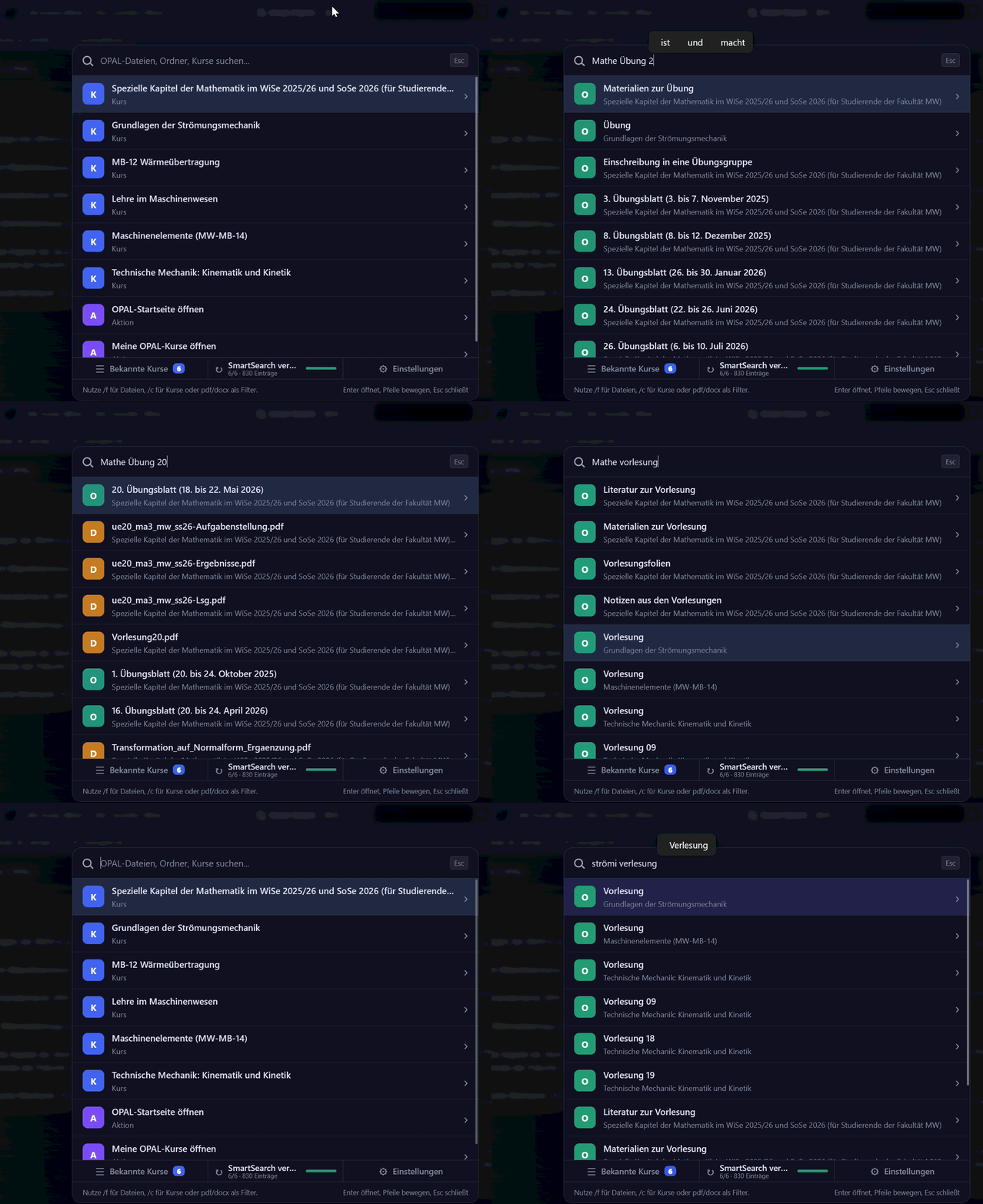
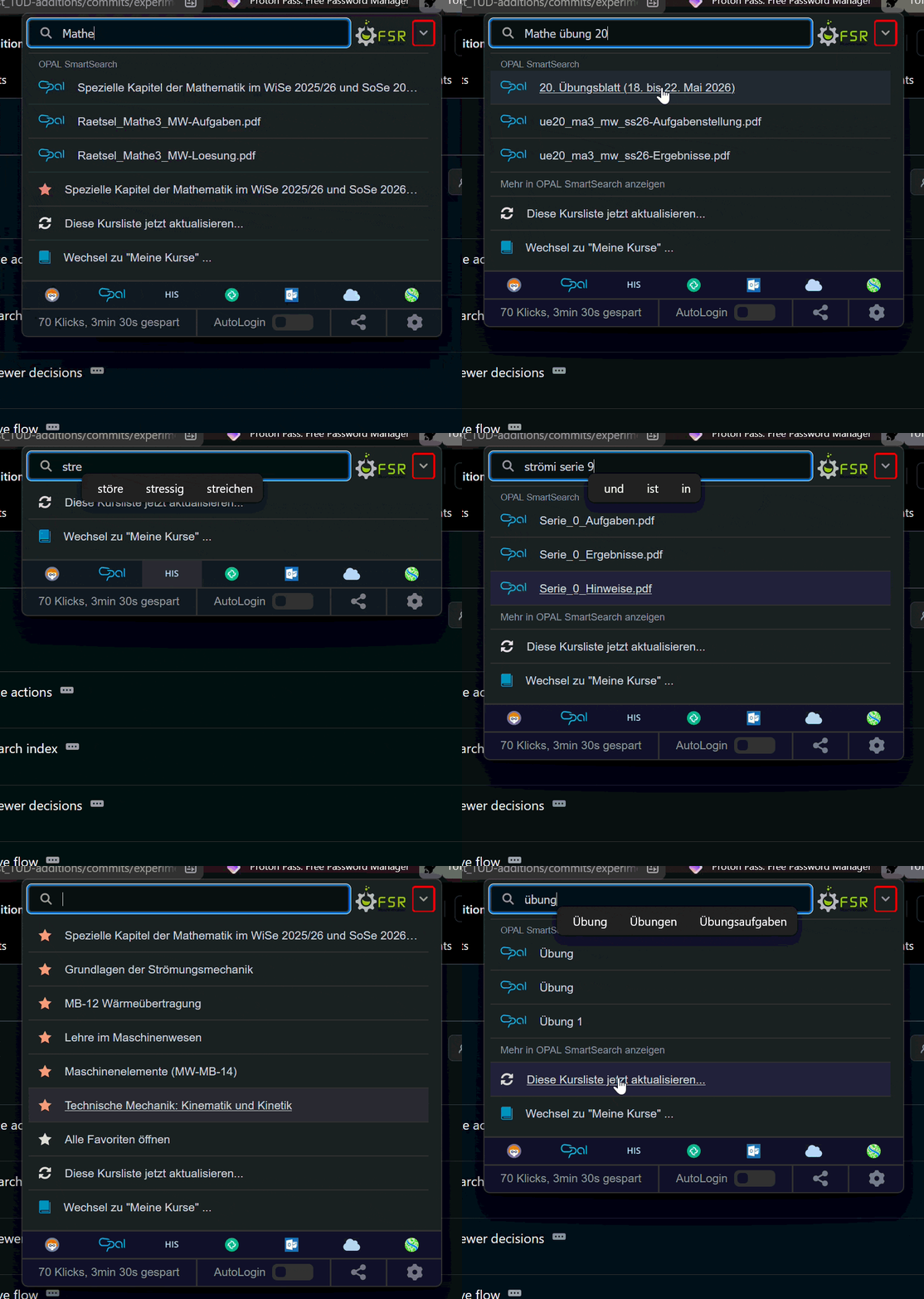
Pls ignore the colors, I had to heavily compress these. |
|
my Extention just updated to i18n, thanks for getting this done! |
|
Yes sorry it took some time - hope everything is working fine now!! |
|
Ok so, with Ai getting better and better i tried to again see, if some sort of ui/ux overhaul of Opal might be possible. And i have to say... i think It is quite good. not sure if i will make this public on stores, but it´ll be on github! |
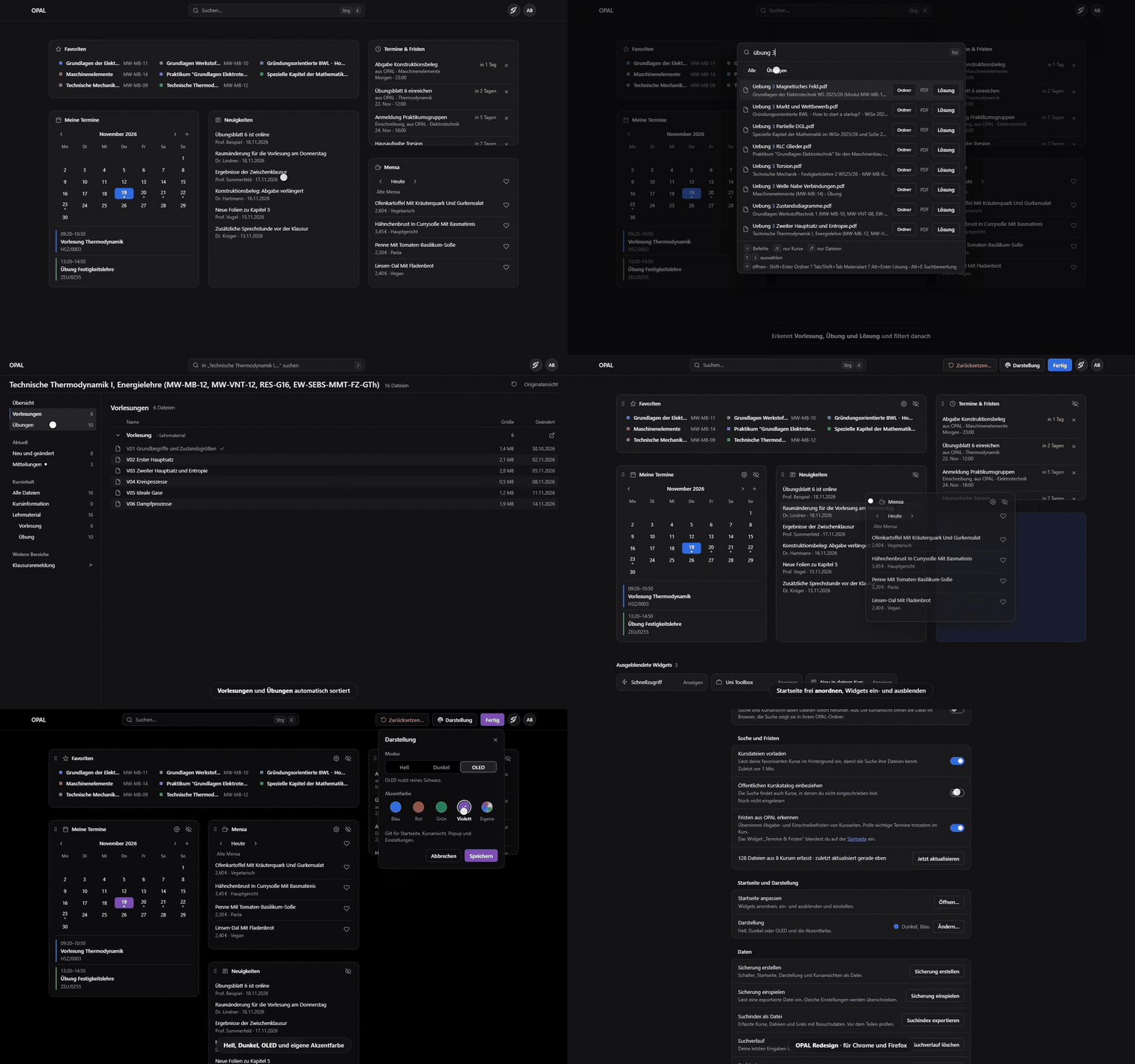
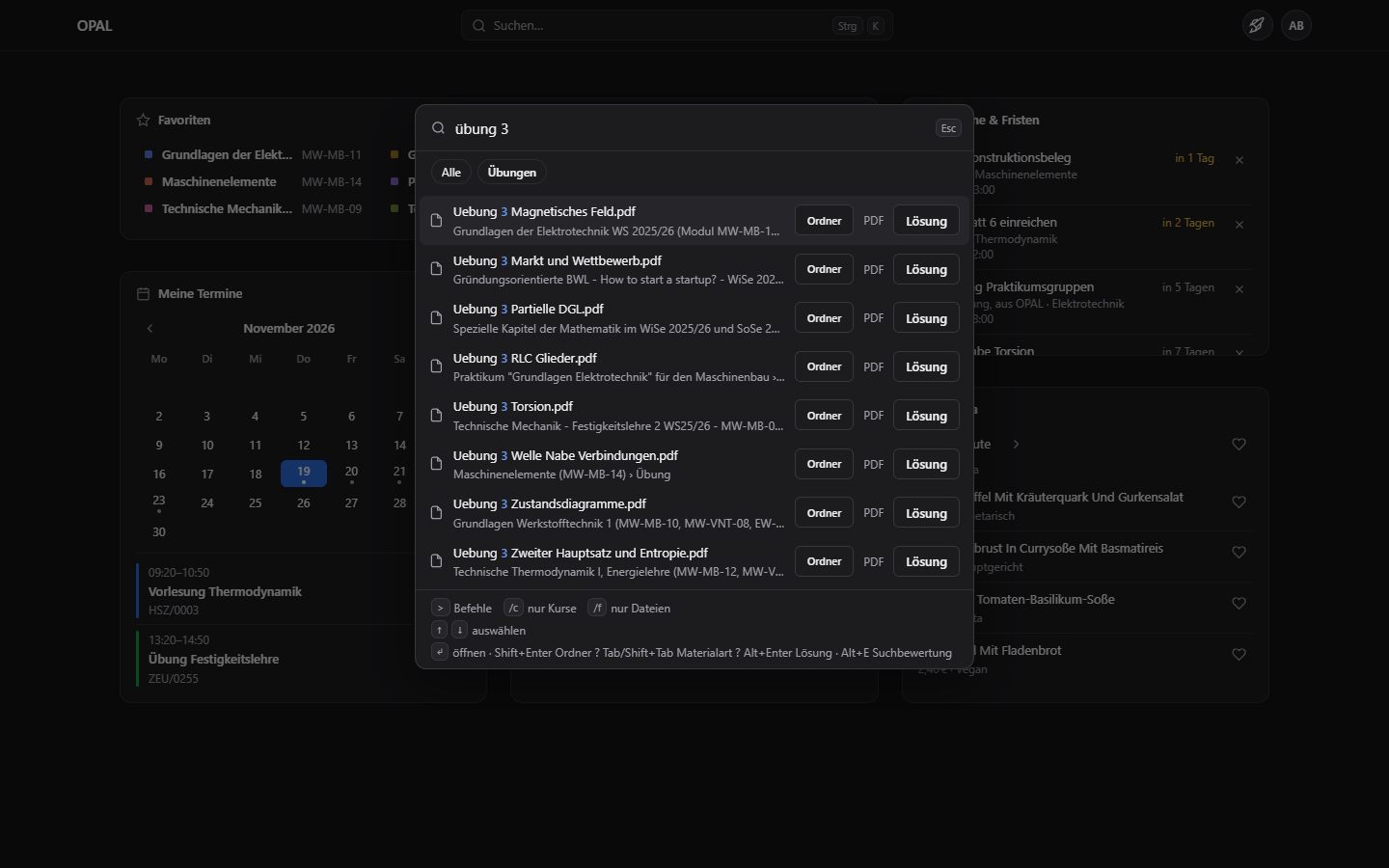
|
Is that your mail aswell? |
|
Do you have a custom domain? Or I might be to incapable to find your mail ;( |
|
There is an email icon at the bottom of my homepage. I dont want to paste it plain text due to spam. |
|
Is the TUM mail ok? |
|
yes. |


Uh oh!
There was an error while loading. Please reload this page.
Hi zusammen,
erst einmal wollte ich danke sagen für die unglaubliche Arbeit, die ihr hier mit TUfast leistet. Das Tool ist im Uni-Alltag ein echter Timesaver!
Nun zu meiner Frage: Ich habe mich seit Längerem gefragt, ob es möglich wäre, das doch sehr veraltete Design von OPAL grundlegend zu überarbeiten. Ich habe gesehen, dass ihr bereits an einer mobilen Version arbeitet. Da die aktuelle Webseite mobil fast unbrauchbar ist, wäre ein modernes UI-Overhaul (evtl. via CSS/JS Injection) ein riesiger Gewinn.
Da ich mich mit der internen Struktur von OPAL noch nicht im Detail auskenne, wollte ich fragen, ob ihr in dieser Richtung bereits Pläne habt oder ob es technische Hürden gibt, die das bisher verhindert haben?
All reactions