You signed in with another tab or window. Reload to refresh your session.You signed out in another tab or window. Reload to refresh your session.You switched accounts on another tab or window. Reload to refresh your session.Dismiss alert
{{ message }}
Repository navigation
Alpha 2026.11.1: we need to breathe. Your opinion wanted
#1045
Hi @johnnyh1975 and @Megalos (and anyone who might be interested in this topic),
You have both been part of this almost from the start, with tests, logs and pull requests, and several of the changes below came straight from your work (#1028 to #1033, #961, #893). As far as I am concerned you are part of the team for as long as you want to be, so before this cycle goes any further I would like your opinion on the road I took.
Looking at the panel once the full controller was in, my conclusion was simple. Despite the recent, much-needed reorganisation of the panel, there was too much of everything: too many buttons, too much text, settings that said the same thing in two places, and features doing similar jobs side by side. It had become hard to picture what would actually happen in the garden. We need to breathe.
So v2026.11.1-alpha1 is mostly about taking things away, and about showing rather than explaining.
What is gone
One choice instead of five switches
A single list says what Smart Irrigation does: Calculate and water, Calculate only or Stop everything.
It replaces the full controller switch, direct valve control, the main program's "Program on" and the start trigger card.
Existing installs move over once, on their own, and keep watering at the same moment: the trigger becomes a schedule of the main program. A repair notice tells the user.
Fewer buttons
Settings that said the same thing twice are gone. A program had a wait between steps, and each step had its own wait too: only the step's wait is left. The Modules page went as well: it edited what the zone card already edits.
Every "Enabled" row is gone: the switch now sits next to the title it turns on.
A schedule's weather is one list: all the conditions, some of them, or none.
Less text
Explanations sit behind a small "i" next to their title or label, read on hover or with a tap.
What tells you the state of things stays in sight: warnings, a run in progress, the planning.
What is new
Seeing rather than reading
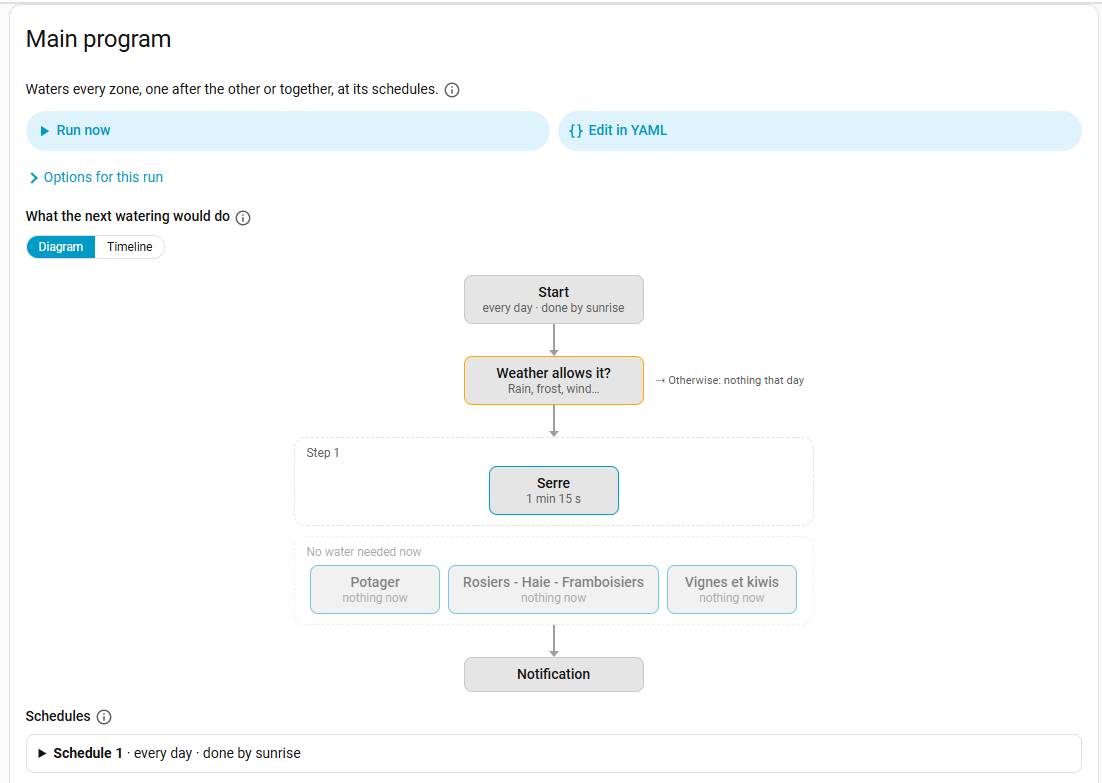
Each program is drawn as a flow: start, weather, pumps, steps with their valves side by side, passes and soaks, waits, notification. Zones with nothing to water right now show faded. A timeline view sits next to it.
- The Watering tab opens on the next 3, 7 or 14 days, one row per day, each run a block in its program's colour.
Being told
A program can notify people when it has watered: a phone of the companion app, any notify entity, or a notification in Home Assistant.
Three choices: at the start and at the end, only at the end, or only when something goes wrong. Problems are always sent with high priority.
For many users this replaces the "watering report" automation they wrote themselves.
Watching the hardware
A zone whose valve keeps failing can be set aside, with a repair notice and a button to put it back.
A meter that counts while every valve is closed raises a leak notice, an event and a hub sensor.
Configuring differently
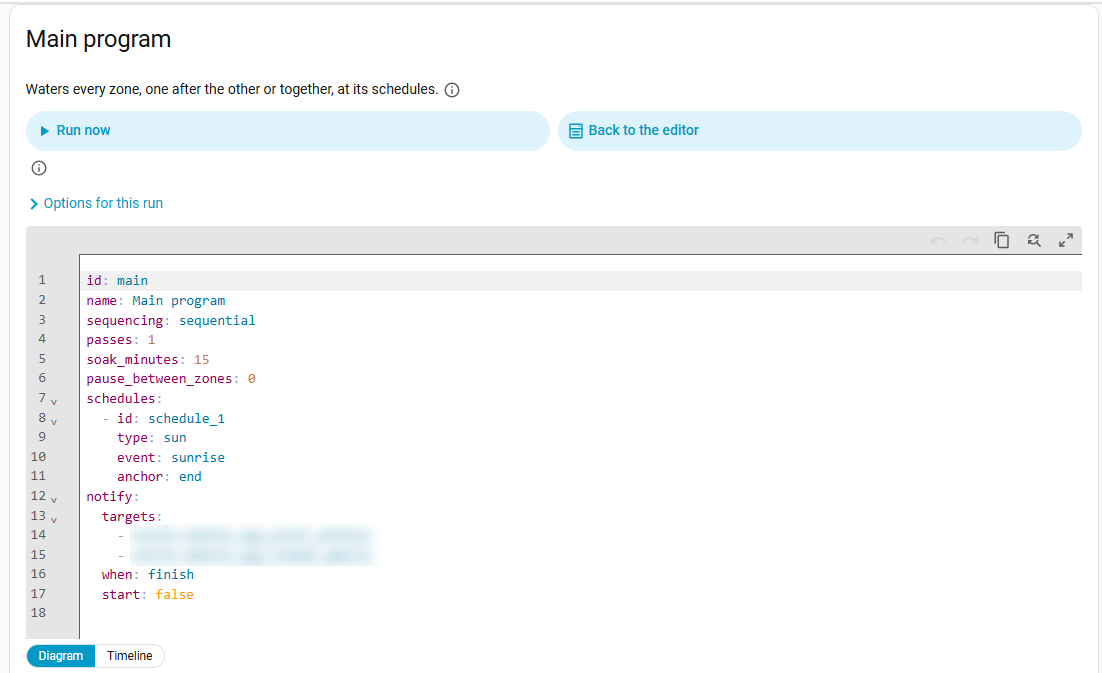
Every program can be edited in YAML, the main one included, with a live preview.
- Smart Irrigation offers itself to assistants through Home Assistant's own MCP server: tick it there, and Claude, ChatGPT or Assist can read and set up zones, sensor groups, settings and programs. It never starts a watering.
- The setup assistant asks, with the first zone, what Smart Irrigation should do, and asks every zone for its valve.
The full list is in the release notes.
Your opinion
I like the result a lot, but the approach is fairly radical for anyone who knows the panel by heart. So:
Does it feel lighter, or did I hide something you use?
Is anything harder to find now?
What else should go, or come back?
Honest feedback welcome, even "it was better before" 🌱
reacted with thumbs up emoji reacted with thumbs down emoji reacted with laugh emoji reacted with hooray emoji reacted with confused emoji reacted with heart emoji reacted with rocket emoji reacted with eyes emoji


Uh oh!
There was an error while loading. Please reload this page.
Uh oh!
There was an error while loading. Please reload this page.
Hi @johnnyh1975 and @Megalos (and anyone who might be interested in this topic),
You have both been part of this almost from the start, with tests, logs and pull requests, and several of the changes below came straight from your work (#1028 to #1033, #961, #893). As far as I am concerned you are part of the team for as long as you want to be, so before this cycle goes any further I would like your opinion on the road I took.
Looking at the panel once the full controller was in, my conclusion was simple. Despite the recent, much-needed reorganisation of the panel, there was too much of everything: too many buttons, too much text, settings that said the same thing in two places, and features doing similar jobs side by side. It had become hard to picture what would actually happen in the garden. We need to breathe.
So v2026.11.1-alpha1 is mostly about taking things away, and about showing rather than explaining.
What is gone
One choice instead of five switches
Fewer buttons
Less text
What is new
Seeing rather than reading
- The Watering tab opens on the next 3, 7 or 14 days, one row per day, each run a block in its program's colour.Being told
Watching the hardware
Configuring differently
- Smart Irrigation offers itself to assistants through Home Assistant's own MCP server: tick it there, and Claude, ChatGPT or Assist can read and set up zones, sensor groups, settings and programs. It never starts a watering. - The setup assistant asks, with the first zone, what Smart Irrigation should do, and asks every zone for its valve.The full list is in the release notes.
Your opinion
I like the result a lot, but the approach is fairly radical for anyone who knows the panel by heart. So:
Honest feedback welcome, even "it was better before" 🌱
All reactions