Repository navigation
Releases
v0.3.3 — timezone fix on writes, send_mail account & signature

Fixes
- Timezone shift when writing dates (#19): events, task due dates, reminders and recurrence end dates were stored one UTC offset early (e.g. 14:00 saved as 09:00 in UTC+5; a task due Oct 16 landed on Oct 15). Writes now go through a new
to_comhelper, the inverse ofto_iso. Thanks @ahartmanns. - Reconnect when a stale proxy raises a bare
AttributeError(#14). Thanks @kcjpro. - Correct YAML front matter in the Outlook skill definition (#12). Thanks @aleve99.
New
outlook_send_mailgains an optionalaccountparameter (SMTP address or display name) to send from, or save drafts to, a specific account (#18).outlook_send_mailgains an optionalsignatureparameter to append the account's default signature (#18). Fixes sending withsignature=true(E_INVALIDARG). Thanks @lukepower.
Both new parameters are optional; existing callers are unaffected.
Update: /plugin marketplace update outlook-classic-mcp, then /plugin update outlook@outlook-classic-mcp, or uv cache clean outlook-classic-mcp to pull the new PyPI release.
Contributors


Assets 2
v0.3.0 — MCP Apps: interactive in-chat UI
The server now implements the MCP Apps extension (SEP-1865): read tools ship beautiful, self-contained HTML views that supporting hosts (Claude, Claude Desktop, VS Code Copilot, Goose, Postman, ...) render in a sandboxed iframe right inside the conversation. Hosts without MCP Apps support are unaffected and keep getting markdown.
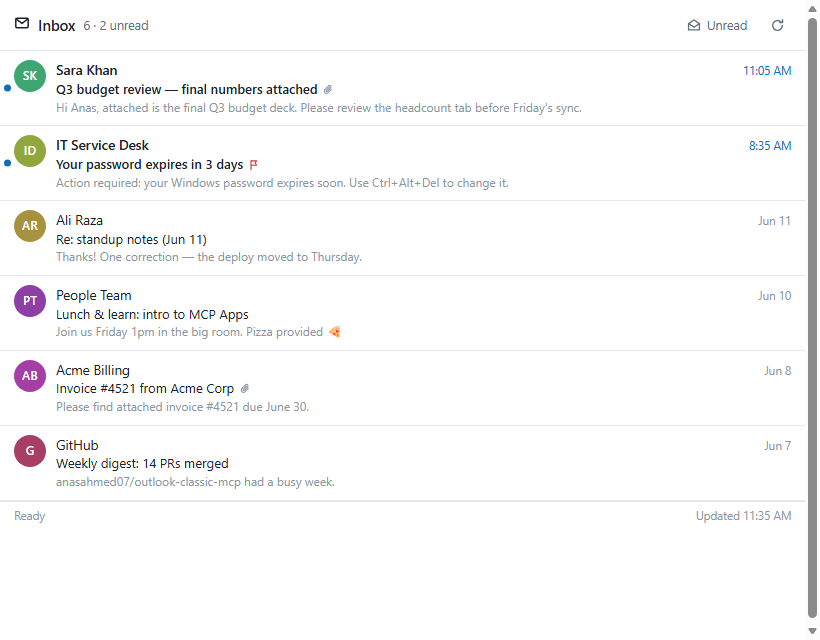
Interactive views
| View | Rendered by | What you can do in it |
|---|---|---|
| Mail list | list_mails, search_mails |
open mails in a reading pane, mark read/unread, flag, delete, filter unread, refresh |
| Mail reader | get_mail |
full body + attachment list, mark, flag, delete |
| Calendar agenda | list_events |
day-grouped agenda, expand events for attendees + body |
| Contacts | list_contacts, search_contacts |
live search incl. org directory, copy addresses |
| Tasks | list_tasks |
complete tasks, quick-add new ones, show completed |
All views follow the host light/dark theme, and in-app actions are reported back into the model context so the conversation stays in sync.
Other changes
- Mail items now include a
flaggedfield - UI tools return markdown for the model plus
structuredContentfor the app - Dev preview without an MCP host:
python scripts/preview_ui.py - Requires
mcp>=1.27
Install / update
/plugin marketplace update outlook-classic-mcp then /plugin update outlook@outlook-classic-mcp, and uv cache clean outlook-classic-mcp to pull the fresh PyPI build.
v0.2.5
What's new
Auto-reconnect
Closing Outlook while the MCP server is running no longer kills the session. The bridge detects the dead COM connection, relaunches OUTLOOK.EXE, reconnects, and retries the failed call automatically (expect one slow call of 15–30 s; subsequent calls are instant).
Timezone fix
pywin32 was mislabeling Outlook's local wall-clock timestamps as UTC, causing agents to shift times by the UTC offset. All returned timestamps now carry the real local UTC offset (e.g. 2026-06-10T16:33:22+05:00). outlook_whoami also exposes local_time, timezone, and utc_offset so agents can reason about the user's timezone.
Mail search overhaul
- Fixed DASL wildcard escaping — bracket syntax (
[%]/[_]) is Jet SQL, not DASL; queries containing_or%were silently returning 0 results. - Multi-word queries now use AND semantics: the most selective word is pushed into Outlook's server-side Restrict, remaining words are post-filtered in Python.
scope='from'now matches real SMTP addresses for Exchange senders via MAPI proptag0x5D02001F(previously only matched theEX:/O=...distinguished name).
Contacts + directory search
Corporate accounts typically have an empty personal Contacts folder — real contacts live in the Global Address List. search_contacts now walks all contact folders across all stores and scans the GAL. New outlook_resolve_name tool does a Ctrl+K-style name→SMTP lookup.
Reduced context bloat
outlook_get_mail now defaults to include_html=False (HTML body omitted) and max_body_chars=10000 (plain text truncated with body_truncated / body_total_chars flags). Agents can request more with explicit params.
Calendar fix
Fixed sort/recurrence order (Sort() must precede IncludeRecurrences = True) and 12-hour time format (%I not %H).
Multi-agent docs
README, plugin manifests, and skill docs updated to reflect support for Claude Code, Claude Desktop, Cowork, GitHub Copilot / VS Code agent mode, Cursor, Cline, Continue, and Windsurf. Removed the "from source" install option.
New tools (31 total)
outlook_resolve_name— resolve a display name or partial address to a verified SMTP address
Upgrade
uv cache clean outlook-classic-mcp
Then restart your MCP client. The plugin auto-fetches the new version on next call.
Full Changelog: v0.2.1...v0.2.5
v0.2.1 — Claude Code plugin + outlook skill
First release that ships the repo as a Claude Code plugin alongside the existing PyPI MCP server. Underlying server functionality is unchanged from outlook-classic-mcp 0.2.0 on PyPI — this release adds distribution and agent-guidance.
What's new
Claude Code plugin (single-plugin marketplace)
The repo now contains .claude-plugin/plugin.json + .claude-plugin/marketplace.json, so the whole repo is a Claude Code plugin marketplace. Two slash commands replace the manual pip install + install_to_clients flow:
/plugin marketplace add anasahmed07/Outlook-Classic-MCP
/plugin install outlook@outlook-classic-mcp
The plugin's mcpServers entry runs uvx --from outlook-classic-mcp outlook-mcp, fetching the published PyPI package on demand. No git clone, no pip install, no .venv to maintain — only a one-time uv install (single PowerShell line; see README).
Bundled outlook skill
skills/outlook/ is a self-contained operational reference that teaches Claude how to drive the outlook_* tools correctly:
SKILL.md— always-loaded operational core (folder reference syntax, EntryID handles, ISO-8601 dates, the Recurrence object, side-effect taxonomy).references/tools.md— full per-tool parameter / return-shape reference for all 30 tools.references/recipes.md— 19 worked multi-step workflows (triage, drafting replies, weekly digests, scheduling meetings, recurring events, attachments, multi-mailbox).references/gotchas.md— quirks and failure modes (EX:/O=Exchange addresses, Programmatic Access prompts, live mail-rule toggling, sandboxed paths, etc.).references/setup.md— install instructions an agent can walk a user through when theoutlook_*tools aren't connected yet.
Installing the Claude Code plugin auto-loads this skill. To use it elsewhere, copy skills/outlook/ into the surface's skill directory.
README
Install section rewritten with three options ordered simplest-first: Claude Code plugin (uvx), PyPI with uv pip install --system, from source (install.bat).
Upgrading
Already installed via the plugin? Pull this release with:
/plugin marketplace update outlook-classic-mcp
/plugin update outlook@outlook-classic-mcp
Server package
outlook-classic-mcp on PyPI remains at 0.2.0 — no server code changed. The plugin and skill are distributed via this repo, not via PyPI.
v0.2.0 — Initial release
First public release of outlook-classic-mcp — a local MCP server that exposes the classic Outlook desktop client (mail, folders, calendar, contacts, tasks, categories, rules, Out-of-Office) to MCP-aware agents like Claude Desktop, Claude Code, Cursor, Cline, Continue, and Windsurf.
It talks to Outlook over the COM API on Windows via `pywin32`, so it inherits whatever account Outlook is already signed into — no Azure / Entra app registration, no Microsoft Graph, no OAuth tokens. Useful when corporate tenants disable third-party app registration in Entra ID.
Highlights
- 30 tools across 9 categories, all prefixed `outlook_*` (mail, folders, calendar, contacts, tasks, categories, rules, OOO, account)
- FastMCP server fronted by a persistent STA-thread COM bridge so the event loop never blocks and Outlook stays warm across calls
- `install.bat` — uv-based bootstrap (Python 3.11 venv, editable install, pywin32 typelib pre-warm)
- Smart client installer (`scripts/install_to_clients.py`) — interactive checkbox menu detects installed MCP clients and writes their configs idempotently, with `.bak` snapshots
- Path sandbox under `%USERPROFILE%` by default for attachment / output paths; opt-out via `OUTLOOK_MCP_ALLOW_ANY_PATH=1`
- Pytest suite covering formatting, path safety, schemas
Install
```bash
pip install outlook-classic-mcp
python -m outlook_mcp.scripts.install_to_clients
```
Or from source, see the README.
Requirements
- Windows 10 / 11
- Outlook desktop (Classic) — `OUTLOOK.EXE`. The "new Outlook" (`olk.exe`) is not supported.
- Python 3.10+