Repository navigation
Releases
tuna-fonts v0.2.3

tuna-fonts 0.2.3: fixes for watched folders, from the first bug reports. If you have 0.2.1 or 0.2.2, the app will offer it when you open it.
Fixed
- "Stop watching" froze the app (#1). With a big folder, the first read takes a while, and stopping it in the meantime left the window "Not Responding". It now happens in the background.
- A watched folder could look empty. It only listed the families that were in that folder alone, so fonts you also had installed were left out, which is most of them in a font collection. Now it shows every font inside it, subfolders included (Fonts / Foundry / Family works fine). While the first read is going on, it says so instead of looking empty.
- Office fonts count as system fonts again. Since 0.2.1, the fonts that come with Office (Agency, Bodoni, Gill Sans, Rockwell...) showed up as yours, so the list jumped from a few dozen fonts to well over a hundred. They're locked and hidden again, like the Windows ones; fonts you installed yourself for all users still show up.
Small things
- Click a file path in a font's page to see it in File Explorer.
- Favorites doesn't show in the sidebar until you have at least one.
Downloads
tuna-fonts_0.2.3_x64-setup.exe: installer (per user, no admin rights needed). Updates itself.tuna-fonts_0.2.3_x64-portable.zip: portable version; unzip and runtuna-fonts.exe.
Windows 10/11, 64-bit. Not code-signed, so Windows SmartScreen may warn you the first time: More info → Run anyway.
Found a bug? Open an issue.
En español: la 0.2.3 arregla las carpetas vigiladas. «Dejar de vigilar» ya no cuelga la app mientras todavía lee una carpeta grande (#1). Una carpeta vigilada enseña todas sus fuentes, también las de subcarpetas y las que ya tienes instaladas, y mientras lee lo dice en vez de parecer vacía. Las fuentes de Office vuelven a contar como del sistema (con candado y ocultas); las que instalaste tú para todos los usuarios siguen saliendo. Además, un clic en la ruta de un archivo de la ficha lo enseña en el Explorador, y Favoritas no sale en la barra lateral hasta que tienes alguna.
SHA-256
c7674c52c55186edbf55f4f3aa3f4cef0e5f99d388617648442e1aaf39108160  tuna-fonts_0.2.3_x64-portable.zip
a2be79717e10d25de5691bedea032862b216c571826588935094fc9e2470f3a5  tuna-fonts_0.2.3_x64-setup.exe
tuna-fonts v0.2.2
tuna-fonts 0.2.2: a small fix and a tidier sidebar. If you have 0.2.1, the app will offer it when you open it.
Fixed
- The Ko-fi button in settings → about opened a folder (Documents) instead of your browser. Links are now opened the way Windows expects, so they always go to the browser.
Tidier
- Empty categories are hidden in the sidebar: a category only shows up when you have at least one font in it (or while it's the one selected, so you can clear it).
Everything new in 0.2.1 (tray icon with its own menu, open when Windows starts, fonts installed for all users showing up) is in the 0.2.1 notes.
Downloads
tuna-fonts_0.2.2_x64-setup.exe: installer (per user, no admin rights needed). Updates itself.tuna-fonts_0.2.2_x64-portable.zip: portable version; unzip and runtuna-fonts.exe.
Windows 10/11, 64-bit. Not code-signed, so Windows SmartScreen may warn you the first time: More info → Run anyway.
Found a bug? Open an issue.
En español: la 0.2.2 arregla el botón de Ko-fi de ajustes → acerca de, que abría la carpeta Documentos en vez del navegador, y esconde las categorías de la barra lateral que no tienen ninguna fuente. Las novedades de la 0.2.1 (bandeja con su menú, abrir al iniciar Windows, fuentes instaladas para todos visibles) están en las notas de la 0.2.1.
SHA-256
67cb4c62e2d558b76623443ac780958191b550255f9e1606128c5dcd0d4ce5ad  tuna-fonts_0.2.2_x64-portable.zip
ff95112f8415eb1c953bc4cd09d9ec74f62f13e17d33ae474154dd3c95bb4bde  tuna-fonts_0.2.2_x64-setup.exe
tuna-fonts v0.2.1
tuna-fonts 0.2.1: a tray icon, two fixes, and the first update that installs itself. If you have 0.2.0, the app will offer it when you open it.
New
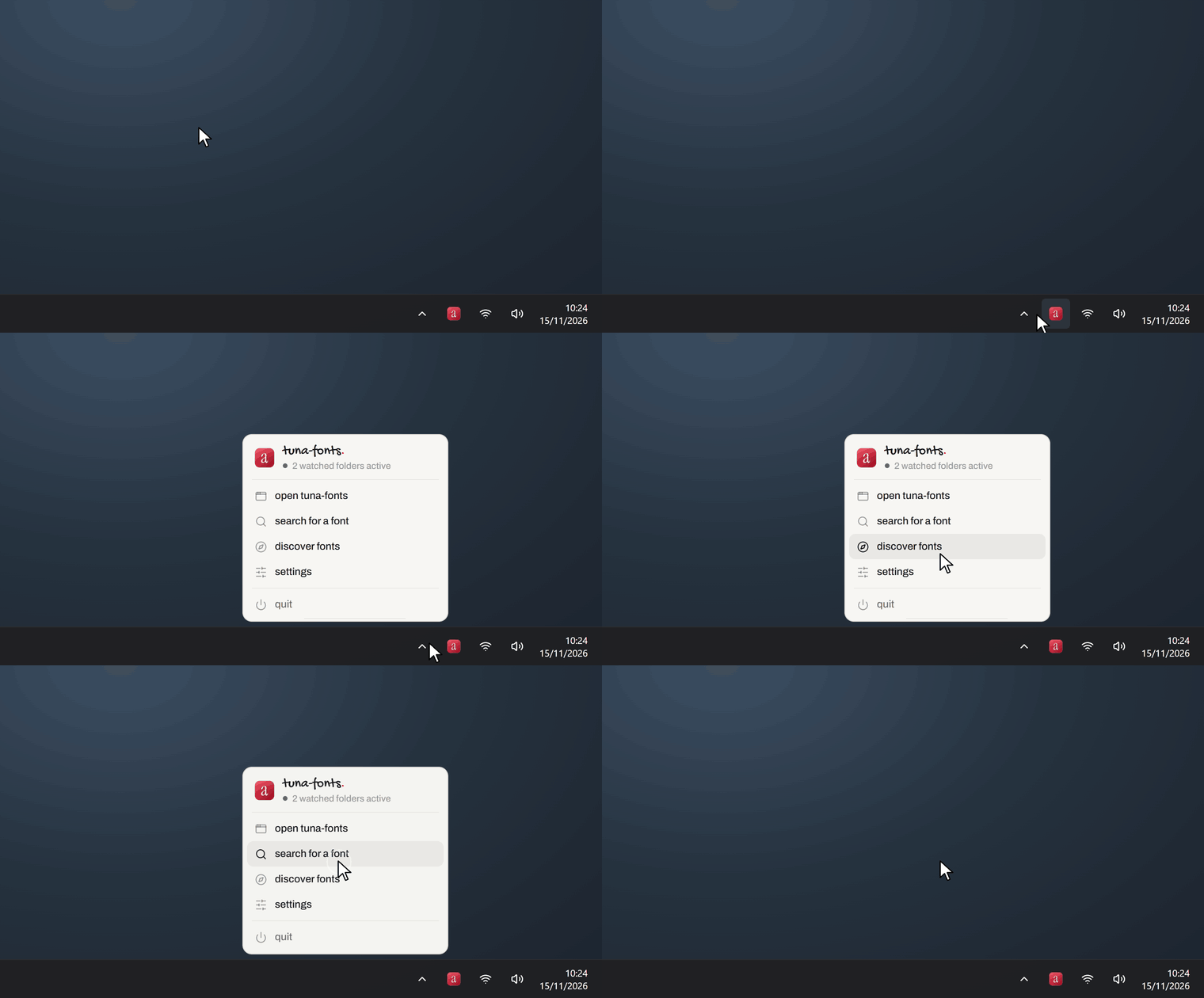
- It stays in the tray when you close the window, so fonts from your watched folders stay available (asked for on Reddit). Click the tray icon to open it again; right-click for a small menu (search, discover, settings, quit) that follows the app's theme and language. If you prefer the old behaviour, settings → when closing the window → quit.
- Open when Windows starts (off by default): it starts hidden in the tray, so your watched folders are ready from the start. Settings → open when windows starts. It's just for your user, and uninstalling removes it.
Fixed
- Fonts installed "for all users" now show up. Fonts you installed from File Explorer for every user, and the ones that come with Office, were treated as Windows fonts, so they were locked and hidden. Now only the fonts Windows itself ships with are locked; the rest show up in the list like your own (changing them still asks for admin rights).
- Switching theme on the specimen of a font with thousands of characters (Nerd Fonts, for example) no longer stalls halfway.
- Language when coming from 0.1.0. 0.1.0 always started in Spanish and saved it as your choice, so after updating it stayed in Spanish even on an English Windows. Now, if you never picked a language yourself, it follows your Windows language.
Also
- A Ko-fi link in settings → about, in case you'd like to support the app. It stays free either way: no ads, no nagging.
Downloads
tuna-fonts_0.2.1_x64-setup.exe: installer (per user, no admin rights needed). Updates itself.tuna-fonts_0.2.1_x64-portable.zip: portable version; unzip and runtuna-fonts.exe.
Windows 10/11, 64-bit. Not code-signed, so Windows SmartScreen may warn you the first time: More info → Run anyway.
Found a bug? Open an issue.
En español: la 0.2.1 se queda en la bandeja al cerrar la ventana, así que las fuentes de las carpetas vigiladas siguen disponibles (con clic derecho sale un menú con buscar, descubrir, ajustes y salir; o se cambia en ajustes), y puede abrirse al iniciar Windows, escondida en la bandeja (apagado por defecto). Además arregla dos cosas y es la primera que se instala sola desde la app. Las fuentes instaladas «para todos los usuarios» (las tuyas y las de Office) ya salen en la lista y sin candado; antes se trataban como fuentes de Windows y quedaban ocultas. Y si venías de la 0.1.0 con Windows en inglés, ahora sale en inglés: la 0.1.0 guardaba el español como si lo hubieras elegido tú. Cambiar de tema en el espécimen de una fuente con miles de caracteres ya no se atasca. Por último, hay un enlace a Ko-fi en ajustes → acerca de, por si quieres apoyarla; la app sigue siendo gratis igual.
SHA-256
8d91f94378fb2523da38394b21dedf39a3a39651ed092a20e498307873180012  tuna-fonts_0.2.1_x64-portable.zip
4a0458dc3aefcc4a1a679cb034708ddc3389083a616b36ae3c8ba42370b5d50f  tuna-fonts_0.2.1_x64-setup.exe
tuna-fonts v0.2.0
tuna-fonts 0.2.0 — what people asked for on r/coolgithubprojects. Thank you all.
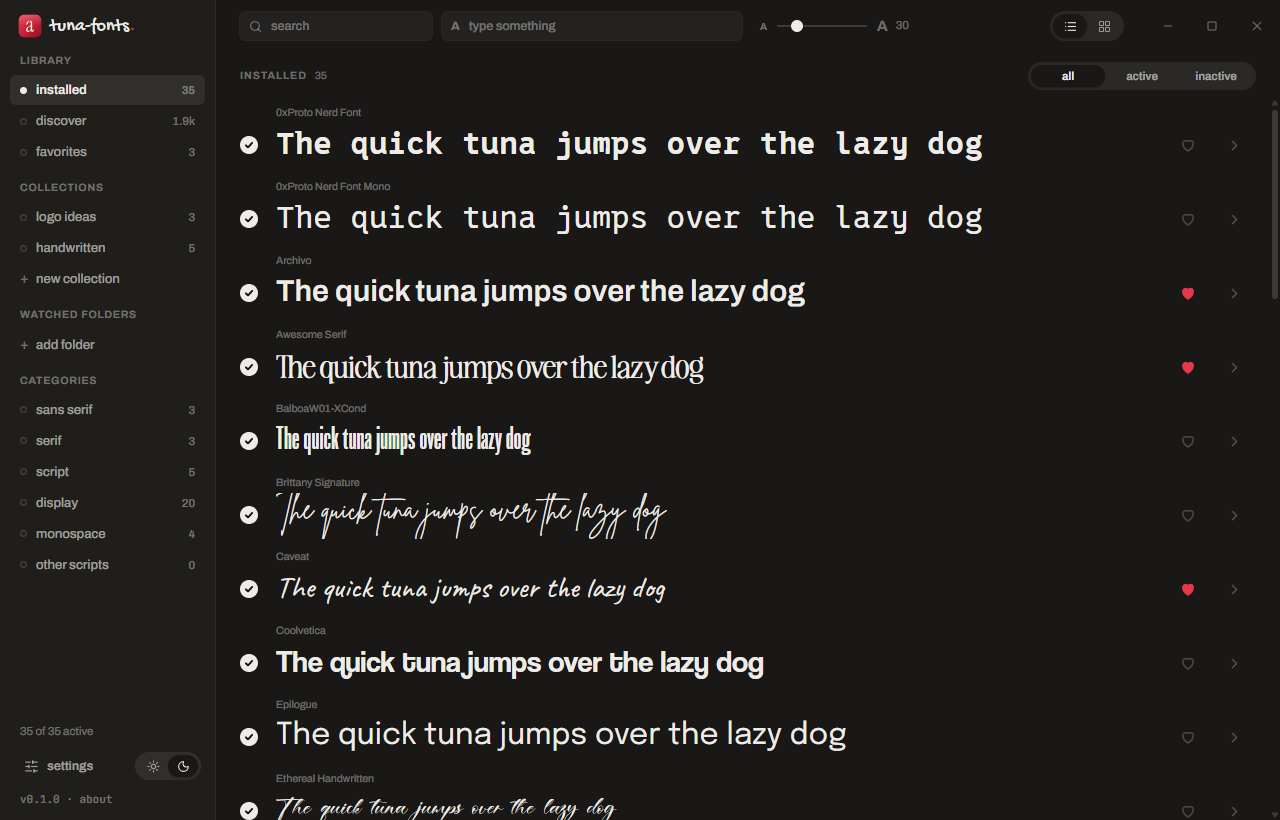
Asked for on Reddit
- Starts in your Windows language. The first time, it opens in Spanish if Windows is in Spanish and in English otherwise (it always started in Spanish). After that, whatever you pick in settings.
- Installs in
%LOCALAPPDATA%\Programs\tuna-fonts, the standard place for per-user apps, instead of%LOCALAPPDATA%\tuna-fonts. - Ctrl + mouse wheel changes the preview size instead of zooming the window. The size slider now goes down to 10.
- Favorites in Discover, as a wishlist. The heart on a Google font saves it in your favorites without installing it; there it shows as not installed, with a live preview and its install button. Installing it keeps it as a favorite, and so does deactivating it.
- Tidier sidebar. New collection and add folder are now a small + next to their headings. A new collection is named in place and only created when you press Enter.
- Updates itself. When there's a new version it tells you, and one click installs it and reopens the app. Only packages signed with the project's key are accepted. You can turn the startup check off in settings → check for updates on startup.
- winget is on its way: the manifest is ready and goes out after this release.
Also new
- The tick, the heart and the arrow in each row are centered with the whole row, and so is the install button in Discover.
- Fonts with big flourishes no longer spill out: the "Aa" in the grid is measured and shrunk to fit its card, the size scale in the specimen wraps instead of being cut off, and there's room above and below for swashes.
- The selection bar slides up from the middle, the settings window keeps its title and close button in place while you scroll, the window buttons are rounded like the rest of the app, and the empty "click + to…" hints are gone.
- Folders (Programs, Fonts, AppData) are asked from Windows as known folders instead of being built from environment variables.
- About links to the other tuna app (tuna-dlp) and to the bug report form.
- Built by GitHub Actions from the tagged source, with a portable
.zipand the SHA-256 of every file below.
Coming from 0.1.0
Run the new installer once. It removes the old copy from %LOCALAPPDATA%\tuna-fonts and keeps all your data: settings, favorites, collections, shortcuts, watched folders and your deactivated fonts. From 0.2.0 on, updates are automatic. If you had tuna-fonts pinned to the taskbar, pin it again: the old pin points to the old folder.
Downloads
tuna-fonts_0.2.0_x64-setup.exe: installer (per user, no admin rights needed). Updates itself.tuna-fonts_0.2.0_x64-portable.zip: portable version; unzip and runtuna-fonts.exe. It tells you when there's a new version but doesn't update itself.
Windows 10/11, 64-bit. Not code-signed, so Windows SmartScreen may warn you the first time: More info → Run anyway.
Stay in the loop: Watch → Custom → Releases. Found a bug? Open an issue.
En español: la 0.2.0 trae lo que pedisteis en Reddit. La primera vez arranca en el idioma de Windows. Se instala en %LOCALAPPDATA%\Programs\tuna-fonts. Control + rueda cambia el tamaño de las muestras, que ahora baja hasta 10. El corazón en Descubrir guarda la fuente en favoritas sin instalarla, como lista de deseos. La barra lateral tiene un + para crear colecciones y añadir carpetas. Y la app se actualiza sola (se puede desactivar en ajustes), aceptando solo paquetes firmados. Además, los iconos de cada fila van centrados y las fuentes con adornos grandes ya no se salen de su tarjeta ni del espécimen. Si vienes de la 0.1.0, abre el instalador nuevo una vez: quita la vieja y conserva todos tus datos, también las fuentes desactivadas. Si la tenías anclada a la barra de tareas, vuelve a anclarla.
SHA-256
5c13c73cf09e3c75d2d25581e342ceffe390a9edeb961166ae166ed04fe88c26  tuna-fonts_0.2.0_x64-portable.zip
c38d65ac25894a3ab4d41ced26b1641081b5d9ee9d1211693cb857bad896bffb  tuna-fonts_0.2.0_x64-setup.exe
tuna-fonts 0.1.0

First version of tuna-fonts, a font manager for Windows 10 and 11.
What's in it
- Installed fonts grouped by family, as a list or a grid, previewed with your own text and size.
- Activate and deactivate fonts without deleting them.
- Install
.ttf,.otfand.ttcby dropping them on the window, just for you or for every user. - Discover: the Google Fonts catalog with one-click install.
- Favorites, collections, a multi-select bar, specimen with the real character map, and compare 2 to 4 fonts.
- Watched folders: their fonts are available while the app is open, without installing them.
- System fonts locked and hidden by default; they can be unlocked in settings (asks for admin rights, keeps a backup, never touches the ones Windows needs).
- Light and dark theme, Spanish and English, editable shortcuts.
Install
Download tuna-fonts_0.1.0_x64-setup.exe below and run it. It installs for your user only, no admin rights needed. The installer isn't code-signed, so SmartScreen may warn you the first time: More info → Run anyway.
SHA-256: 999febb86870815bc91da79a7f7025de65191150eeec1ec6d50a8bd01386f55a