Repository navigation
Releases: beanguri/Maple-Classic-Exp-Overlay
Release list
Maple Classic Exp Overlay v0.9.14 (beta)

Potion counts on the controller bar and at Ideal UI size, your level read with the game's own font, and a steadier overlay.
Potions on every bar
- Potion counts now work on the controller bar (Standard or Cross-Style) as well as the keyboard bar, with the game's UI Size on Default or Ideal. The overlay recognises the bar by itself, and you can switch while it runs.
- Counts are read with the game's own font. Skill icons on the bar aren't mistaken for potions, and a count whose last digits are under the mouse cursor isn't counted as drinking.
- If the potion cost can't be worked out, it says why instead of showing 0: "Potion bar not seen" or "No price for: ..." (type a price in Settings, Potions, Prices).
Your level
- The orange LV badge (used when the EXP bar shows only a %) is read with the game's own font instead of the text reader.
Steadier
- Your log is never saved over while antivirus or OneDrive holds the file for a moment.
- Settings is never taller than your screen and scrolls when needed. A Size too big for your screen uses the biggest that fits there.
- A monitor plugged in or out while the overlay runs is noticed within a minute.
- Files saved by another editor, hand-edited numbers, a damaged map list or odd release notes no longer break anything.
- A bug report's picture of the whole game (it can show chat and names) is deleted after 5 minutes.
Health reports (only if you said yes)
- They also count which game UI size and potion bar layout you use, and how often new test readers for mesos and party size agree with the current ones. Still numbers only: never amounts, names or pictures.
Full list: CHANGELOG.md. Privacy details: the README's Privacy section.
Check this download
- SHA-256 of Maple-Classic-Exp-Overlay-v0.9.14-beta.zip:
184043a99f8ede0034962ed6197ec0c32b2830a6f2119e7e1ffc81969bd219cf(also in SHA256SUMS.txt). In PowerShell:Get-FileHash .\Maple-Classic-Exp-Overlay-v0.9.14-beta.zip - Built by GitHub from this tag, not on a PC. Check it with the GitHub CLI:
gh attestation verify Maple-Classic-Exp-Overlay-v0.9.14-beta.zip --repo beanguri/Maple-Classic-Exp-Overlay - The same file is on the build's page, where GitHub shows the same SHA-256.
Maple Classic Exp Overlay v0.9.13 (beta)
Fewer reading problems, health reports (your choice), and a way to send a bug report without a GitHub account.
Fewer reading problems
- If one part can't be read (map name, class, mesos, potions, level badge), EXP keeps reading, and the status line says which part has trouble.
- A stuck or missing Tesseract (the text reader) no longer freezes the EXP display, and the message says what's wrong and how to fix it.
- The overlay keeps starting even if a folder on your PC can't be looked into, and reading tries again if Windows briefly refuses the screen capture.
High levels (a bar with only a percentage, about Lv 57+)
- Leveling up into the first level with only a % no longer gets stuck on "level changed".
- Runs at these levels count in your log and on the overlay (they showed 0). They're still never shared.
- A window over the LV badge now says so and offers Settings, Level fallback. Reset forgets the old level.
- A partly covered name under your character no longer starts your session over by itself.
Health reports (off until you say yes)
- Once a day the overlay can send numbers about how well it reads your screen: how many looks read fine, screen and game size, how long a look takes, which kinds of errors happened. Never pictures, names, chat, map names or your log. It uses its own random ID, not linked to shared runs. It asks you once; change it any time in Settings.
Send a report without GitHub
- Report a bug, then Send to the developer: type what went wrong and send it. You see exactly what is sent first. Text only, up to 3 a day.
- Bug reports (both ways) now also take your Windows user name and folders out of error messages.
A new EXP reader, tested quietly
- A new way to find and read the EXP bar (by shape, not colour) runs in the background and only notes whether it agrees with the current one. It changes nothing you see, and it slows down or switches off if it would cost too much CPU on your PC.
Full list: CHANGELOG.md. Privacy details: the README's Privacy section.
Check this download
- SHA-256 of Maple-Classic-Exp-Overlay-v0.9.13-beta.zip:
e20ed3f14006fe5c944b46ce385b9092af92c77b496d6340a5ea50c30126c4e6(also in SHA256SUMS.txt). In PowerShell:Get-FileHash .\Maple-Classic-Exp-Overlay-v0.9.13-beta.zip - Built by GitHub from this tag, not on a PC. Check it with the GitHub CLI:
gh attestation verify Maple-Classic-Exp-Overlay-v0.9.13-beta.zip --repo beanguri/Maple-Classic-Exp-Overlay - The same file is on the build's page, where GitHub shows the same SHA-256.
Maple Classic Exp Overlay v0.9.12 (beta)
Hotfix 0.9.12-beta: EXP bar with only a percentage
If you are around Lv 57 or higher (levels that need a million EXP or more), the game stops showing your EXP number and shows only the percentage, like EXP. [58.47%]. The overlay couldn't find the bar then and showed nothing. This update fixes that.
- Your level is read from the orange LV badge on the status bar. EXP is then worked out from your level and the percentage, so EXP/hr, last 5 minutes, gained and current are estimates and show a ≈ in front (also in your log).
- If the badge can't be read, it keeps your level from before the number went away (only for the same character; it compares a small picture of the name row in memory and never reads, saves or sends your name), or you can type it in Settings, Level fallback.
- Estimates stay on your PC. A run made from a percentage alone is never shared with the best-maps website.
- Fixed an error in the status line before the first EXP reading.
Thanks to everyone who reported it.
Full list: CHANGELOG.md.
Check this download
- SHA-256 of Maple-Classic-Exp-Overlay-v0.9.12-beta.zip:
7d3b88172512d614c7543215d46e6d7354a1d30e76dc689090f79de5a20902d4(also in SHA256SUMS.txt). In PowerShell:Get-FileHash .\Maple-Classic-Exp-Overlay-v0.9.12-beta.zip - Built by GitHub from this tag, not on a PC. Check it with the GitHub CLI:
gh attestation verify Maple-Classic-Exp-Overlay-v0.9.12-beta.zip --repo beanguri/Maple-Classic-Exp-Overlay - The same file is on the build's page, where GitHub shows the same SHA-256.
Maple Classic Exp Overlay v0.9.11 (beta)
What's new in 0.9.11-beta
Net mesos/hr: what you really make
Mesos/hr says what you pick up. Net mesos/hr takes off what your potions and food cost, so you can see which map really pays.
Keep your potions on the quick-slot bar, bottom right!
- Keep the potions you use on the quick-slot bar (the hotkey slots at the bottom right of the game) so their counts show. The overlay reads that bar every 3 seconds: when a count goes down (326 to 325), that's one used. Potions only in your inventory window aren't seen.
- It counts only while tracking is on and EXP is coming in. Paused or in town, nothing counts. Buying or looting more is never a use.
- Prices are the NPC shop prices. Potions no NPC sells (Mana Elixir, Power Elixir, Sap of Ancient Tree...) count as free until you type what you pay: Settings, Potions, Prices.
- Where: a Net / hr tile in the full view, Potion cost and Net mesos / hr in Details, a Net/hr column in your log, and "net" in the Square, Wide and Bar shapes.
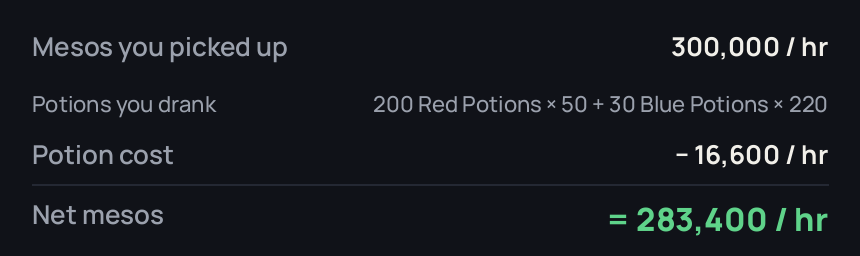
Example: 300,000 mesos/hr. In that hour you drank 200 Red Potions (50 each) and 30 Blue Potions (220 each) = 16,600. Net: 283,400 mesos/hr.
Potion data stays on your computer. Don't want it? Switch it off in Settings, Potions.
Mesos/hr you can trust
- Mesos you spend or move at an NPC shop, storage or a trade are left out. Only mesos you pick up count, and the status line says what was left out.
- The inventory doesn't have to stay open: open it when you start and now and then. After a trip to town, open it when the overlay asks.
The best-maps website (mcwo.app)
- Only clean 15-minute runs are shared: one map, no break of 15 seconds without EXP, and no shop, storage or trade during the run.
- A run is shared with its mesos when you opened the inventory as it started and again within 30 seconds after it ended (if you pause right then, the overlay asks you to). Otherwise it is shared with EXP only.
- The site now ignores mesos it can't trust, including mesos from older overlay versions from October 29. Please update.
Full list: CHANGELOG.md.
Check this download
- SHA-256 of Maple-Classic-Exp-Overlay-v0.9.11-beta.zip:
2fa36ae33f739c35eb9681a55212fcf7c455b5e12cda1b9e5b31cb3178abb9ff(also in SHA256SUMS.txt). In PowerShell:Get-FileHash .\Maple-Classic-Exp-Overlay-v0.9.11-beta.zip - Built by GitHub from this tag, not on a PC. Check it with the GitHub CLI:
gh attestation verify Maple-Classic-Exp-Overlay-v0.9.11-beta.zip --repo beanguri/Maple-Classic-Exp-Overlay - The same file is on the build's page, where GitHub shows the same SHA-256.
Maple Classic Exp Overlay v0.9.10 (beta)
Compact shapes, a covered-minimap fix, a What's new window, and more on the best-maps site
- Compact mode now has three shapes: Square (as before), Wide (longer sideways, a row of four numbers) and Bar (one thin strip). Pick one in Settings, under Compact shape. The full view and the log are unchanged.
- A new install picks its shape on the first launch, from three small pictures.
- A short "What's new" window shows once after you update (never on a first install).
- If the minimap's name is covered, the status line tells you after 3 seconds and tells you when it's back. A short cover changes nothing. While it's hidden nothing new is saved to the log, so a map change can't be saved under the old map. If it stays hidden for 45 seconds, tracking pauses. It also looks for the name again faster.
- Towns aren't logged.
- Map names are matched against the game's own list of maps (from meowdb.com, thank you), so OCR slips like "Boar Il" for "Boar II" become one map.
- The best-maps website is now at mcwo.app. Older overlays keep working on the old address for now.
- Best maps site: an "Include new players" box (off by default), a closer level range, % of a level per hour and time per level, sorting, a leveling ladder, a copy-link button, and runs are checked harder against fakes.
macOS: run from source. The new shapes passed the automated tests on GitHub's Mac machine but haven't been seen on a real Mac screen yet.
Check this download
- SHA-256 of Maple-Classic-Exp-Overlay-v0.9.10-beta.zip:
bcffcb19599a752cb3bd4eb58a938bd00c6fea010c06b6e6f8285703b9dcf9b9(also in SHA256SUMS.txt). In PowerShell:Get-FileHash .\Maple-Classic-Exp-Overlay-v0.9.10-beta.zip - Built by GitHub from this tag, not on a PC. Check it with the GitHub CLI:
gh attestation verify Maple-Classic-Exp-Overlay-v0.9.10-beta.zip --repo beanguri/Maple-Classic-Exp-Overlay - The same file is on the build's page, where GitHub shows the same SHA-256.
Maple Classic Exp Overlay v0.9.9 (beta)
Smaller sizes, a transparency limit, a hotkey fix, "Select area" fixed, and much more detailed bug reports.
New
- Smaller sizes: Settings > Size now goes down to 70% and 60% (it was 80%). The smallest text stops at a readable size.
- Transparency stops at 40%. More and the window could fade so far that you couldn't find Settings again. A higher saved value becomes 40%.
Fixed
- Hotkeys in Settings: clicking one to change it could leave several looking selected (and the first click could fail with an error). Now only one waits for keys at a time: clicking another moves it, clicking the same one again (or Esc) cancels, and your hotkeys come back right away if you turn them off or click away from Settings.
- Select area crashed on Windows ("expected integer but got bold") since 0.9.7. It opens again.
- A long number in the three small panels (like 99,999,999) now shrinks to fit instead of running out of its box.
Better bug reports
- The Report a bug button now also saves bug-report.txt: your screens and Windows scaling, the game window, where each part (EXP bar, mesos, minimap, party list) was found, how the reading thread is doing, what the overlay last said (with times), and the end of errors.log. At the top it lists what looks wrong, like "the overlay is covering the class name". Neither file has your character name or Windows user name.
- The picture now also shows where the class and the map name are read from, with a line on how each went. View capture shows the same, and says why the class wasn't read.
- It also asks if you want to save a small picture of the whole game window. That can show chat and names, so it's saved only if you say yes, and you choose whether to attach it.
Your log, notes and settings carry over as they are.
Check this download
- SHA-256 of Maple-Classic-Exp-Overlay-v0.9.9-beta.zip:
5e2f72c806ffe151f157d459f198f8dbf93683c23e18830ef7dacc57ff430d1c(also in SHA256SUMS.txt). In PowerShell:Get-FileHash .\Maple-Classic-Exp-Overlay-v0.9.9-beta.zip - Built by GitHub from this tag, not on a PC. Check it with the GitHub CLI:
gh attestation verify Maple-Classic-Exp-Overlay-v0.9.9-beta.zip --repo beanguri/Maple-Classic-Exp-Overlay - The same file is on the build's page, where GitHub shows the same SHA-256.
Maple Classic Exp Overlay v0.9.8 (beta)
New look, much lighter on your CPU, and a fix for storage and trade windows.
New
- A redesigned overlay: a big EXP/hr, a trend chip (is your pace rising or falling vs the last 5 minutes?), a progress bar to your next level, and a status pill. Three key numbers up front; everything else is under Details, which remembers if you opened it. The title bar matches the window.
- "Don't log" is now a switch called Log this run. Select area and View capture are under the ... menu. The log, notes, Settings and this update window match the new look. The typeface (Manrope, SIL Open Font License) is included.
- Compact mode now shows mesos/hr too, in the same window size.
Lighter and more reliable
- Far less CPU. The overlay used one thread per core for tiny pictures, and the threads mostly waited on each other. It now uses one. On my 1080p test a normal look went from about 100 ms of CPU to 12 ms, and the look at the whole window from about 350 ms to 60 ms. How much you gain depends on your core count.
- Reading the map name and your class asks Tesseract once instead of six times (about 4.5x faster), with the same answers. Map names and classes also work now when your Windows user name has letters your PC's text code page can't hold (they were never read there before).
- Storage and trade windows show a second mesos box next to yours, and the overlay could read that one. Now it reads neither until the window is closed, then picks yours up again (thanks to Xoere, whose recording showed it).
- pytesseract isn't used any more: one less package in the download.
- Thanks to thanhphamvan, whose fork's measurements pointed at the extra threads and the six Tesseract runs.
Your log, notes and settings carry over as they are.
Check this download
- SHA-256 of Maple-Classic-Exp-Overlay-v0.9.8-beta.zip:
46e8651a888aa3ecf70f51b560a7cda9d13de1f21c98d320f9eeddb275ba439d(also in SHA256SUMS.txt). In PowerShell:Get-FileHash .\Maple-Classic-Exp-Overlay-v0.9.8-beta.zip - Built by GitHub from this tag, not on a PC. Check it with the GitHub CLI:
gh attestation verify Maple-Classic-Exp-Overlay-v0.9.8-beta.zip --repo beanguri/Maple-Classic-Exp-Overlay - The same file is on the build's page, where GitHub shows the same SHA-256.
Maple Classic Exp Overlay v0.9.7 (beta)
New
- Notes on your log lines: click a line and write a note about it in the box under the log: the party, the pots, the loot, why you left. A ✎ in the new Note column marks lines that have one. Notes save as you type and stay on your PC only: they live in your log file, are never shared with the best-maps site, and the overlay's tests check that nothing it sends can include them. Renaming a map, farming more on a line, and updating keep your notes. Deleting a line asks first, and says its note goes too.
- One log line per party: playing a map in a party, people join and leave, and each party size used to get its own line. Now a map's party sizes on a day share one line (e.g. "4–5ppl ▸") with the numbers over all that time. Click it to see a line for each size. Your log itself isn't changed, only how it's shown.
- A backup of your log each day (the last 7, in a
backupsfolder next to it), so a recent copy of your log and notes is always there. - macOS (running from source, with the game in CrossOver, Whisky, Parallels or a stream): thanks to thanhphamvan, who also moved the Windows-only code into its own part so both share the rest. The Windows version behaves exactly as before. Hotkeys aren't available on macOS yet. See "For developers" in the README.
Heads up on macOS: it has only been tried on a real Mac with the game by thanhphamvan, who wrote it. I don't own a Mac, so I can't test it myself. GitHub's automatic tests run on a real Mac, but not with the game. If you try it, please tell me how it goes.
Fixed
- Mesos: a small change across a digit boundary, like 9,980 to 10,020, is now counted instead of dropped. Thanks to TaylorAdamCA.
- Typing "!" in a note or a map name no longer triggers the Shift+1 hotkey.
Safer
- This download was built by GitHub from this code, not on a PC, from exact package files checked against their SHA-256. You can check it yourself: see "Check this download" at the bottom.
- Built with Pillow 12.3 (fixes the problems published since 11.3), and it never runs a
tesseract.exefrom the folder it was started in.
Beta: it works, but there may be rough edges. Found a problem? Use Report a bug in Settings.
How to install or update
- Download Maple-Classic-Exp-Overlay-v0.9.7-beta.zip below (not "Source code").
- Right-click it → Extract All... → Extract.
- Open the Maple Classic Exp Overlay folder and double-click Maple Classic Exp Overlay.exe. If Windows says "Windows protected your PC", click More info → Run anyway.
Updating? Use the new folder instead of the old one. Your log, notes and settings are kept. Full guide: see the README.
Check this download
- SHA-256 of Maple-Classic-Exp-Overlay-v0.9.7-beta.zip:
6702193115e6051d8f7b4972a9ace140e37fffe7e95db0d7211654abc60b94be(also in SHA256SUMS.txt). In PowerShell:Get-FileHash .\Maple-Classic-Exp-Overlay-v0.9.7-beta.zip - Built by GitHub from this tag, not on a PC. Check it with the GitHub CLI:
gh attestation verify Maple-Classic-Exp-Overlay-v0.9.7-beta.zip --repo beanguri/Maple-Classic-Exp-Overlay - The same file is on the build's page, where GitHub shows the same SHA-256.
Maple Classic Exp Overlay v0.9.6 (beta)

Where this download comes from (updated Oct 17): the zip below is the one GitHub built from the v0.9.6-beta tag (build run), replacing the copy I first uploaded, which I had built on my own PC. Same code, nothing in the program changed, so there's no need to download it again.
SHA-256 of the zip: 8c7008dd06a172094ae06de0bce3214e1fac14d56bc4e5b8bda4d8cff02405cb (also in SHA256SUMS.txt). If you look at the build run's page, GitHub shows a different SHA-256 there (9b403d1d…). That's because GitHub stores everything it builds inside one more zip, and shows that outer zip's hash. Extract it once and the zip inside is this same file, 8c7008dd…. Builds from the next version on are kept without the extra zip, so the SHA-256 is the same everywhere, and they come with an attestation you can check with gh attestation verify. See Where the download comes from.
New
- Compact mode: click Compact at the top (or press Shift+4) for a much smaller window with just EXP/hr, when you'll level, the last 5 minutes, mesos/hr and Start/Pause. The button then says Full, to bring everything back.
- Hotkeys, while MapleStory or the overlay is in front: Shift+1 Start / Pause, Shift+2 Reset, Shift+3 Don't log, Shift+4 Compact. You can change them, or turn them off, in Settings.
- Size in Settings: makes the text and the window smaller or bigger, from 80% to 200%, and changes right away.
Fixed
- On a second screen with different Windows scaling (like a 1440p screen next to a 5K one), the window was far too big. It's now sized for the screen it's on, and resizes when you move it.
- The Settings window could cut off its contents after the size changed.
Beta: it works, but there may be rough edges. Found a problem? Use Report a bug in Settings.
How to install or update
- Download Maple-Classic-Exp-Overlay-v0.9.6-beta.zip below (not "Source code").
- Right-click it → Extract All... → Extract.
- Open the Maple Classic Exp Overlay folder and double-click Maple Classic Exp Overlay.exe. If Windows says "Windows protected your PC", click More info → Run anyway.
Updating? Use the new folder instead of the old one. Your log and settings are kept. Full guide: see the README.
Maple Classic Exp Overlay v0.9.5 (beta)
Download removed: this version was built on my own PC, before downloads were built by GitHub. Get the latest version here: https://github.com/beanguri/Maple-Classic-Exp-Overlay/releases/latest
Fixed
- Dying (losing a few % of your EXP) made EXP gained and EXP/hr go down, even below zero. Now the loss isn't counted: it says how much you lost and carries on.
- A run the best-maps site turned down was sent again every 30 minutes, and enough of them could stop newer runs from being shared.
- A log file edited by hand (or damaged) could stop the overlay from starting. Lines it can't use are now left out (a copy of the file is kept), and it starts as usual.
The best-maps website is also harder to fake: every run is checked against the EXP its levels hold, only a few players can share from one internet connection a day, and other websites can't send runs through their visitors.
Beta: it works, but there may be rough edges. Found a problem? Use Report a bug in Settings.
How to install or update
- Download Maple-Classic-Exp-Overlay-v0.9.5-beta.zip below (not "Source code").
- Right-click it → Extract All... → Extract.
- Open the Maple Classic Exp Overlay folder and double-click Maple Classic Exp Overlay.exe. If Windows says "Windows protected your PC", click More info → Run anyway.
Updating? Use the new folder instead of the old one. Your log and settings are kept. Full guide: see the README.