Repository navigation
Releases: burakgon/opendictate-desktop
Release list
OpenDictate 0.1.1

A polish release on top of 0.1.0.
New
- 🎧 Pause media while recording: music and videos (any MPRIS player on Linux) pause while you speak and resume afterwards. Turn it on in Settings → Microphone.
- 🔔 Update notice: a once-a-day check of the latest GitHub release shows a banner when a new version is out (Settings → Interface to turn off).
- 💬 Error notifications when the overlay is off or unavailable (e.g. GNOME on Wayland).
- 🎙️ Muted microphone hint: recordings of pure digital silence now say "No sound from the microphone" instead of "No speech detected".
Improved
- Rate-limited (429) and transient upstream errors are retried automatically with backoff, honouring the provider's retry hint.
- Starting in the tray (e.g. at login) no longer loads the main window — about 200 MB less memory while idle.
Downloads
| Platform | File |
|---|---|
| Linux (any distro) | OpenDictate_0.1.1_amd64.AppImage |
| Debian / Ubuntu | OpenDictate_0.1.1_amd64.deb |
| Fedora / openSUSE | OpenDictate-0.1.1-1.x86_64.rpm |
| Arch Linux | packaging/arch/PKGBUILD |
| macOS (Apple Silicon / Intel) |
OpenDictate_0.1.1_aarch64.dmg / OpenDictate_0.1.1_x64.dmg |
| Windows |
OpenDictate_0.1.1_x64-setup.exe or .msi |
Warning
macOS and Windows are experimental and untested: they compile and pass unit tests in CI but haven't been run on a real machine yet. Linux is tested end to end.
OpenDictate 0.1.0

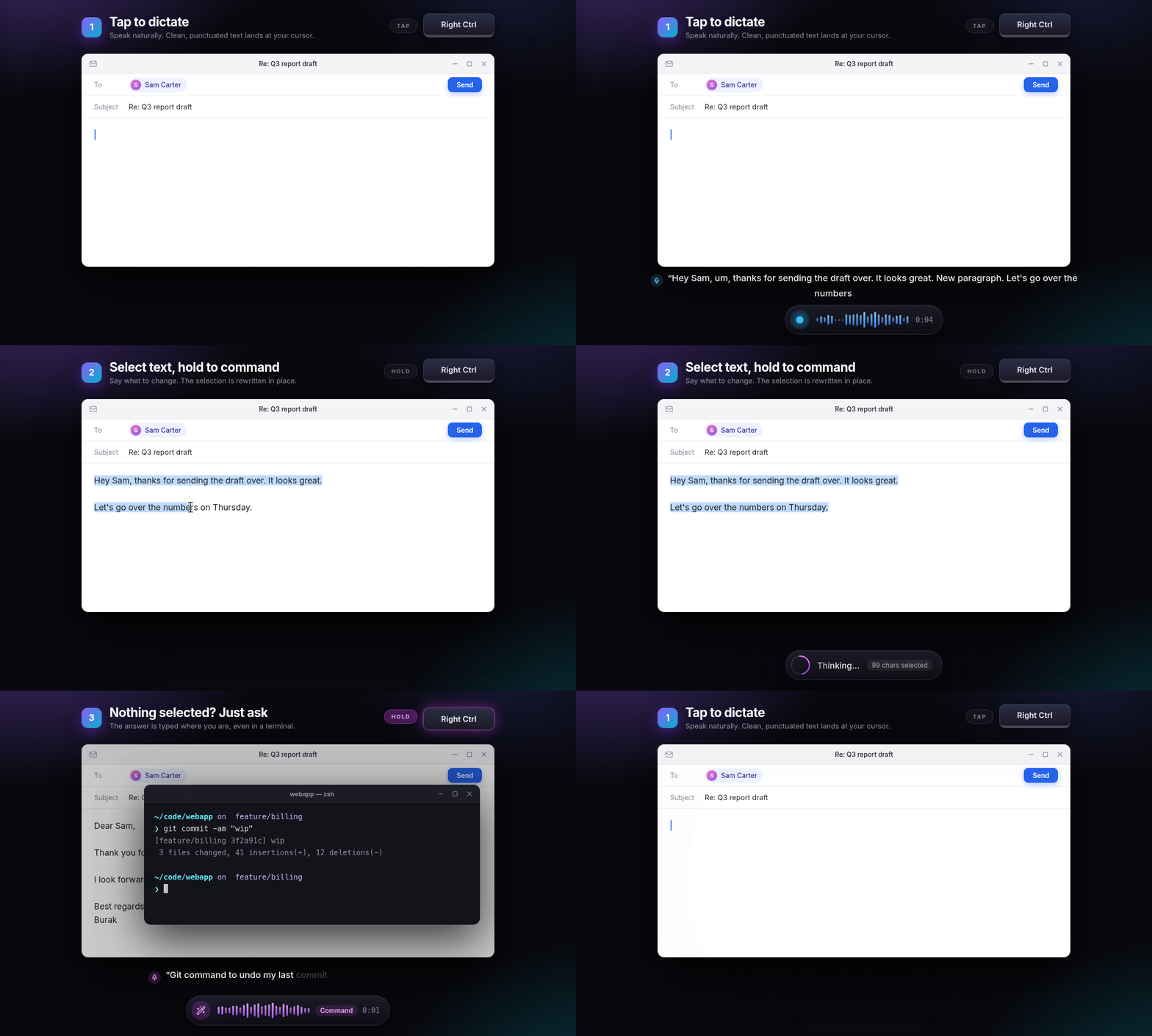
OpenDictate turns your voice into text in any app. Tap a key to dictate; hold it (or double-tap) to tell AI what to do with the text you've selected. Bring your own OpenRouter, OpenAI, Groq, Mistral, Gemini, Anthropic or local models.
Highlights
- 🎙️ Dictate into any application, about a second from "stop talking" to "text appears"
- 🪄 Voice commands on your selection: rewrite, translate, summarize, fix grammar, change tone…
- ✨ Smart formatting you can say: "new paragraph", "bullet milk, bullet eggs", "scratch that"
- 🗣️ Command word ("Jarvis, make this formal"), quick actions, keep-talking queue, retry on network errors
- 🖥️ Terminal-aware pasting, history & stats, scriptable CLI
- 🐧 First-class Linux: Wayland (KDE, GNOME, Hyprland, Sway) and X11, layer-shell overlay, any key as a hotkey (even a lone Right Ctrl or the Copilot key), one-click permissions
Downloads
| Platform | File |
|---|---|
| Linux (any distro) | OpenDictate_0.1.0_amd64.AppImage |
| Debian / Ubuntu | OpenDictate_0.1.0_amd64.deb |
| Fedora / openSUSE | OpenDictate-0.1.0-1.x86_64.rpm |
| Arch Linux | packaging/arch/PKGBUILD |
| macOS (Apple Silicon) |
OpenDictate_0.1.0_aarch64.dmg |
| macOS (Intel) |
OpenDictate_0.1.0_x64.dmg |
| Windows |
OpenDictate_0.1.0_x64-setup.exe or .msi |
Warning
macOS and Windows are experimental and untested. OpenDictate is developed and tested end to end on Linux. The macOS and Windows builds compile and pass the unit tests in CI, but haven't been run on a real machine yet; the overlay may take keyboard focus there (turn it off in Settings if pasting fails). Reports are very welcome. See the README for unsigned-app instructions.
See the README for setup and the full feature list.