Repository navigation
Positional placeholder in for file in folder #2268

Replies: 2 comments 1 reply

|
There is no format token for “the Nth file in this folder”.
For “open every markdown file in a folder, split right each time”, skip placeholders and use a user script as a Macro step: module.exports = async (params) => {
const { app } = params;
const folder = "Your/Folder"; // vault-relative, no trailing slash
const files = app.vault
.getMarkdownFiles()
.filter((f) => f.parent && f.parent.path === folder)
.sort((a, b) => a.name.localeCompare(b.name, undefined, { numeric: true }));
for (const file of files) {
await app.workspace.openLinkText(file.path, "", true, { state: { split: "vertical" } });
}
};
If you only need two or three notes and the set is stable, keep the Macro Open file commands with explicit paths. If the folder contents change, the script is the thing that tracks position (index A positional If this unblocks the macro, please mark the answer as accepted. |

|
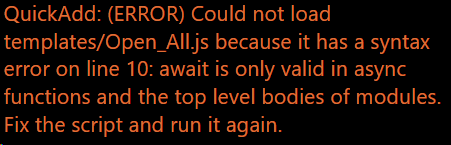
I'm afraid this script returned this error: Apologies if this is due to me missing something, but I'm almost completely useless when it comes to code. |

|
That error means Here is a complete script and setup guide that uses the current note’s folder and opens its immediate Markdown files in separate right-hand panes. It returns focus to your starting note, matching your “Focus opened file” off setting. No folder path or numbered filenames need editing. In QuickAdd, create a Macro, add the file through User scripts → Browse, enable Add to command palette, go back to save, then run QuickAdd: Folder comparison with a note open. The guide includes the exact steps and ordering. Each run adds new panes, including a second view of the starting note; existing panes stay open. Checked with a real Macro User Script in Obsidian 1.15.0 / QuickAdd 2.33.1, including renamed/new files, repeated runs, editor focus and an unrelated existing pane. Your edited file was not attached, so this does not identify its exact syntax mistake. |


Uh oh!
There was an error while loading. Please reload this page.
I commonly use Obsidian to compare notes and have made a macro to open all files in a folder, including splitting to right each time. Unfortunately, I have only figured out how to do this by specifying file names. Usually I can make this work by using [[filename]]1, [[filename]]2, etc. However, this isn't always viable, so I was wondering if there was a placeholder for opening a file by its position in the folder, ie. first file, second file, etc.?
I'm including screenshots for what I was able to piece together so far so my intent is hopefully clearer:
Thanks in advance.
All reactions