Repository navigation
Releases: chrisjo-dev/mockup-canvas
Release list
mockup-canvas v0.2.1: smoother large canvases

Smoother and sharper canvas on large ideas. Independently evaluated before release.
What changed
- Boards turn sharp sooner: after a pan or zoom stops, visible boards show live content in about 0.2 to 0.3 s (was up to 2 s). Visible boards load first, largest first.
- Small repeated pans no longer keep cancelling loads: boards become live by the 2nd or 3rd nudge instead of staying as thumbnails.
- Sharper at mid zoom: thumbnails are requested at a resolution that matches the screen, and on high-DPR screens live boards start at 34% zoom.
- First open of a large canvas renders the boards you are looking at first (visible boards finish in about 8 s on a 71-board idea, was 26 to 40 s).
- Edited boards stay fresh, even when they were offscreen: new content shows within about 0.2 s when you come back.
- The F (fit) key responds faster in Firefox and WebKit.
Performance is unchanged in Chromium (about 59 to 60 FPS, p95 under 25 ms, no frame over 50 ms on a 71-board canvas). 171 unit tests and the Playwright e2e suite pass in Chromium, Firefox, and WebKit.
Known issue
- WebKit: at 50% zoom an occasional single frame over 50 ms (present before this release too).
mockup-canvas v0.2.0: draw, review, build
mockup-canvas is now a set of three skills that cover planning, review, and build: draw mockups, review them, then turn the approved screens into real app code that is visually compared against the mockups.
New skills
- mockup-review: reviews an idea against the brief and a checklist (missing states, broken flows, token consistency, accessibility, mobile reach), leaves comments on the exact artboards, and writes
design/<idea>/review.md. It never edits boards and never approves on your behalf. - mockup-to-code: implements only approved artboards in your app (React, Next.js, Vue, Svelte, plain HTML), maps
tokens.cssinto your app's design tokens, then compares each running route with its artboard until only intentional differences remain, and records which route and files implement each board.
New commands
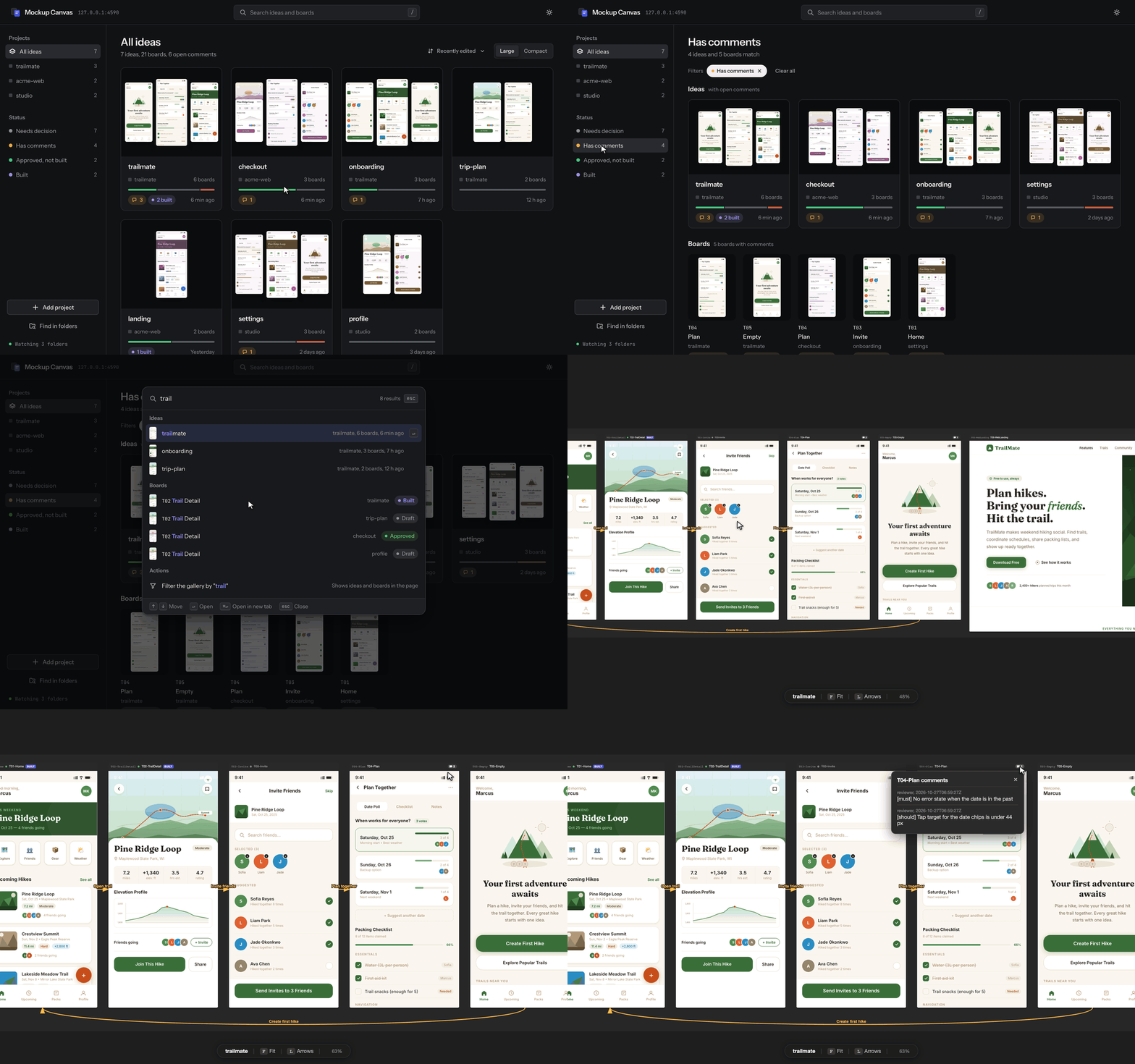
snap: screenshot a running page at an exact viewport.compare: board vs app side by side with a diff image and a mismatch percentage;--align-top/--ignore-topfor fake status bars.impl: record implementations and list approved boards that still need code (--strict).comment: review comments shown as badges and a panel on the canvas.render --full-page, andadd --sizeto resize a registered board.
Canvas
- Smooth with large canvases: on a 71-artboard canvas, pan and zoom stay at about 59 to 60 FPS with no frame over 50 ms in Chromium, on first open and with cached thumbnails. Live boards are virtualized and thumbnails are used at low zoom.
- A board you have seen never turns blank white again.
- Built badges, comment badges and panel, phone-friendly toolbar.
Fixes and hardening
- Screenshots now use the exact viewport (390 px boards were laid out at 500 px before).
- Board renders and thumbnails cannot read local files or reach private network hosts; malicious PNGs are rejected with bounded memory; Chrome is always cleaned up when the server stops.
- 170 unit tests and an optional Playwright end-to-end suite (Chromium, Firefox, WebKit, mobile) in
e2e/.
Install
/plugin marketplace add chrisjo-dev/mockup-canvas
/plugin install mockup-canvas@mockup-canvas
Manual install for Claude Code or Codex: clone the repo and run ./install.sh (links all three skills).
mockup-canvas v0.1.0
First public release of mockup-canvas: a Claude Code plugin and OpenAI Codex skill where your AI agent draws screen mockups as plain HTML files and you review them on a local, Figma-like canvas.
Highlights
- Local canvas: pan, zoom, drag to arrange (saved to
canvas.json), undo and redo, flow arrows between screens, approval badges and notes, groups, live reload. - One server for all your projects: register design folders from the CLI or the index page.
- Agent skill: a step-by-step workflow (tokens first, draw, register, link, check, render, serve) plus a first-draft retrospective where the agent proposes improvements to its own skill.
- Phone viewing: read-only LAN share with a random token and auto-stop, or a static export.
- No pip dependencies: Python 3.8+ standard library; Google Chrome, Chromium, or Edge only for PNG rendering.
- Security: localhost by default, Host header allowlist (DNS rebinding), CSRF checks on every write, sandboxed artboards, path containment, request timeouts. See SECURITY.md.
- Docs in English, 한국어, 简体中文, 日本語. 92 tests.
Install
In Claude Code:
/plugin marketplace add chrisjo-dev/mockup-canvas
/plugin install mockup-canvas@mockup-canvas
Manual install for Claude Code or Codex: clone the repo and run ./install.sh.