Repository navigation
Releases: chung223/Presence
Release list
Presence 0.3.2

下載 Presence-0.3.2.zip,解壓縮後拖進「應用程式」資料夾。已經裝了 Presence 的話,會自動收到更新。
修正
- Mac 睡眠醒來後,iPhone 與 Apple Watch 連不上。之前每次 Mac 睡眠醒來,Presence 都會多加一份藍牙服務、舊的沒有移除;手機連到舊的那份就收不到 Mac 的回覆,一直顯示「還沒有收到 Mac 的狀態」,要重新配對才會好。同一個原因也讓 Mac 收不到 iPhone 的加密確認,所以不會自動解鎖。現在醒來時會先移除舊的服務。iPhone 上的 Presence Remote 0.3.2 也修正了這個問題。
Download Presence-0.3.2.zip, unzip it, and drag Presence to Applications. If you already have Presence, it updates automatically.
Fixed
- iPhone and Apple Watch couldn't connect after the Mac woke from sleep. Each time the Mac woke, Presence added another copy of its Bluetooth service without removing the old one. Your iPhone connected to an old copy and never got the Mac's replies, so it kept showing "No status from your Mac yet" until you paired again. For the same reason, the Mac didn't receive your iPhone's encrypted confirmation and didn't unlock automatically. Presence now removes the old service when the Mac wakes. Presence Remote 0.3.2 for iPhone fixes this too.
Presence 0.3.1
下載 Presence-0.3.1.zip,解壓縮後拖進「應用程式」資料夾。已經裝了 Presence 的話,會自動收到更新。
修正
- 接投影機時,雷射筆、聚光燈、螢光筆會畫在投影機上。之前如果投影機的解析度比 Mac 的螢幕小(像教室常見的 1024×768),又開著簡報者畫面,紅點會畫在 Mac 自己的螢幕上,台下看不到。現在會選播放簡報的外接螢幕。
Download Presence-0.3.1.zip, unzip it, and drag Presence to Applications. If you already have Presence, it updates automatically.
Fixed
- With a projector connected, the laser pointer, spotlight, and highlighter now appear on the projector. Before, if the projector had a lower resolution than your Mac's display (such as the common 1024×768) and the presenter display was open, the red dot appeared on your Mac's own screen where the audience couldn't see it. Presence now picks the external display that's showing the slideshow.
Presence 0.3.0
下載 Presence-0.3.0.zip,解壓縮後拖進「應用程式」資料夾。已經裝了 Presence 的話,會自動收到更新。
新功能(搭配 iPhone 的 Presence Remote 0.3.0,Presence Pro)
- 雷射筆、聚光燈、螢光筆:手指在手機上移到哪裡,投影畫面上就出現紅點、聚光燈或螢光筆的線。只畫在最上層、不會點到任何東西,Keynote、PowerPoint、Google 簡報、PDF 都能用。螢光筆的線幾秒後淡掉,翻頁時馬上清掉。
- 從 iPhone 或 Apple Watch 調 Mac 的音量:簡報裡的影片太大聲或太小聲,不用走回電腦。直接調系統音量,投影畫面上不會跳出音量圖示。
修正
- 在「系統設定 › 選單列」關掉 Presence 的圖示時,Presence 不會再跟著結束。
Download Presence-0.3.0.zip, unzip it, and drag Presence to Applications. If you already have Presence, it updates automatically.
New (with Presence Remote 0.3.0 on iPhone, Presence Pro)
- Laser pointer, spotlight, and highlighter: wherever your finger moves on your iPhone, a red dot, a spotlight, or a highlighter line appears at the same spot on the projected screen. It's drawn in a click-through overlay, so it works with Keynote, PowerPoint, Google Slides, and PDFs. Highlighter lines fade after a few seconds and clear when you change slides.
- Adjust your Mac's volume from iPhone or Apple Watch when a video in your slides is too loud or too quiet. It changes the system volume directly, so no volume indicator appears on the projected screen.
Fixed
- Presence no longer quits when its menu bar icon is turned off in System Settings › Menu Bar.
Presence 0.2.1
下載 Presence-0.2.1.zip,解壓縮後拖進「應用程式」資料夾。已安裝的 Presence 會自動更新。
改進
- iPhone 與 Apple Watch 上的狀態(例如「Apple Watch 在附近」)改由手機與手錶用自己的語言顯示,不再跟著 Mac 的語言。
- 「手機與手錶」頁的簡報遙控說明換了更清楚的說法:暫時讓投影畫面全黑、對 Mac 正在使用的 App 按鍵。
- 手機上顯示的「Mac 正在使用的 App」只算一般的 App,不會再出現系統的背景程式名稱。
Download Presence-0.2.1.zip, unzip it, and drag Presence to Applications. Existing installs update automatically.
Improvements
- Status on iPhone and Apple Watch (such as "Apple Watch nearby") now appears in the phone's and watch's own language instead of the Mac's.
- Clearer Presenter Remote wording under iPhone & Watch: temporarily blank the projected screen, and keys go to the app you're using on your Mac.
- The "app in use on your Mac" shown on the phone only counts regular apps, so system background processes no longer appear.
Presence 0.2.0
下載 Presence-0.2.0.zip,解壓縮後拖進「應用程式」資料夾。已安裝的 Presence 會自動更新。
新功能
- 簡報遙控:用 iPhone 和 Apple Watch 上的 Presence Remote 翻頁、跳頁、把投影畫面變黑、開始與結束播放,手機鎖著也能在鎖定畫面翻頁。到「手機與手錶」打開「允許簡報遙控」。手機與手錶這一端是 Presence Remote 的付費功能(Presence Pro);Mac 版照樣免費、開放原始碼。
- 播放簡報時不自動鎖定:Keynote、PowerPoint、Folium 正在播放簡報時暫停自動鎖定;結束播放後人不在附近就馬上鎖定。在「情境」頁,預設開啟。
- 更多語言:新增日文、韓文、簡體中文、德文、法文、西班牙文。
修正
- 「情境」排程的「結束」英文誤譯成 Quit。
Download Presence-0.2.0.zip, unzip it, and drag Presence to Applications. Existing installs update automatically.
New
- Presenter Remote: change slides, jump to a slide, black out the screen, and start or end the show from Presence Remote on your iPhone and Apple Watch — even from the Lock Screen. Turn on Allow Presenter Remote under iPhone & Watch. The phone and watch side is a paid feature of Presence Remote (Presence Pro); the Mac app stays free and open source.
- No auto-lock while presenting: automatic locking pauses while Keynote, PowerPoint, or Folium is playing a slideshow, and locks right away when the show ends if you're away. Under Context, on by default.
- More languages: Japanese, Korean, Simplified Chinese, German, French, and Spanish.
Fixed
- The schedule's end time in Context was labeled "Quit" in English.
Presence 0.1.2
修正
- 「登入時自動啟動」的背景項目壞掉時會自動修好。之前換過不同來源的 App(例如從自己建置的版本換成這裡下載的版本)後,Presence 可能在登入時開不起來,意外結束後也不會自動重開。
iPhone 與 Apple Watch
- 手機和手錶不用裝任何 App 就能使用 Presence。配套 App Presence Remote 是選用的,已送 App Store 審核,上架後會在 README 附上連結。
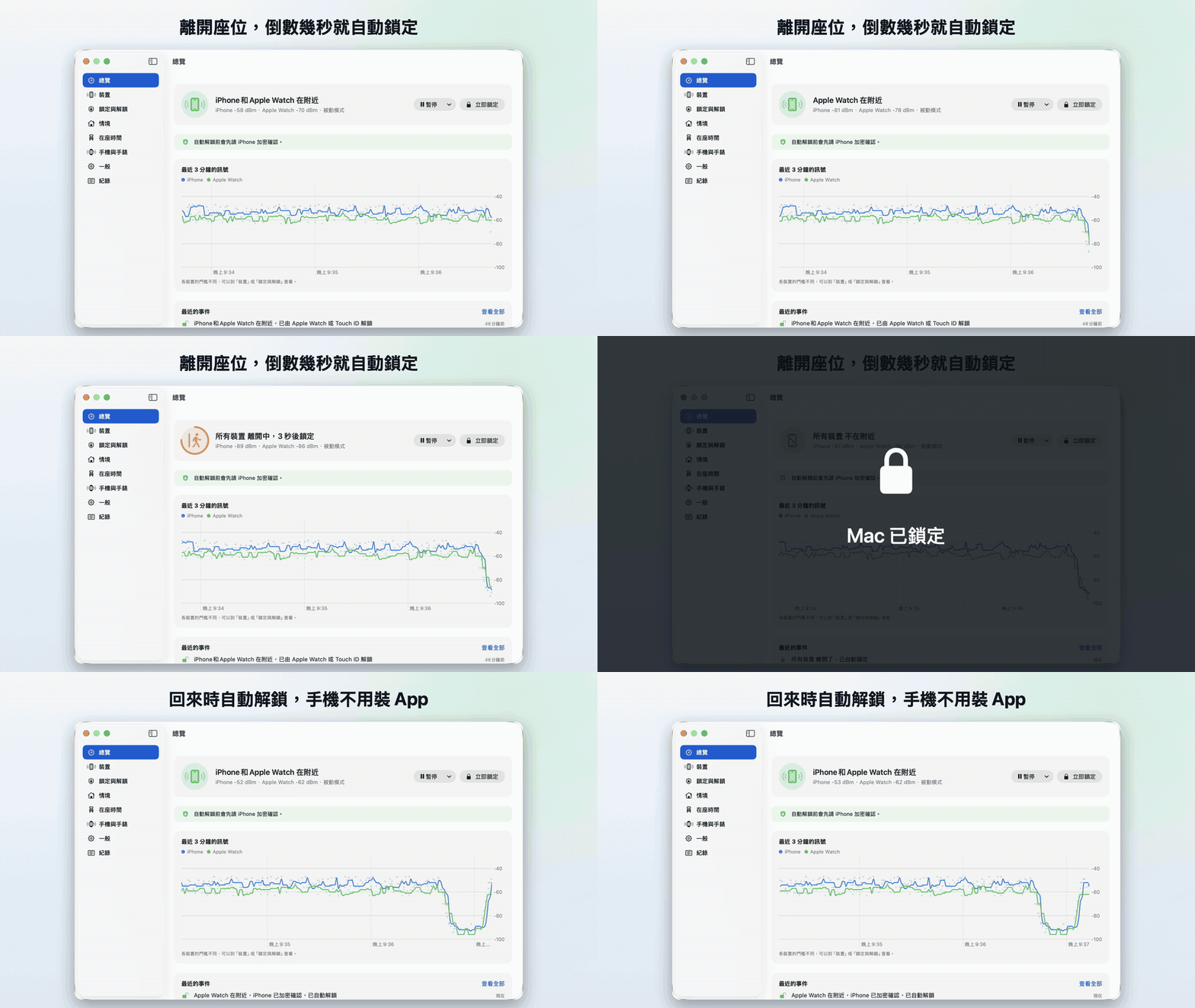
宣傳影片:下方的 presence-promo-zh-Hant.mp4(英文版 presence-promo-en.mp4),各 37 秒。更多截圖見 README。
安裝:下載 Presence-0.1.2.zip,解壓縮後把 Presence 拖進「應用程式」資料夾。已安裝 0.1.0 或 0.1.1 的話會自動收到這次更新。
Presence 0.1.1
修正
- 自動解鎖後,螢幕不會在你還沒碰鍵盤滑鼠前就暗下來、又重新上鎖。之前手錶解開後約 5 秒,系統會因為閒置而讓螢幕變暗;設了「螢幕變暗就要密碼」的話就又鎖住了。
安裝:下載 Presence-0.1.1.zip,解壓縮後把 Presence 拖進「應用程式」資料夾。已安裝 0.1.0 的話會自動收到這次更新。
Presence 0.1.0
Presence 的第一個公開版本。用 iPhone 或 Apple Watch 的藍牙訊號判斷你在不在座位上:離開時自動鎖定 Mac,回來時自動解鎖。
安裝:下載 Presence-0.1.0.zip,解壓縮後把 Presence 拖進「應用程式」資料夾再打開,照主視窗的步驟允許藍牙與輔助使用、選擇裝置、設定登入密碼。App 已經過 Apple 公證,之後的新版會自動更新。
這一版有
- 離開自動鎖定、回來自動解鎖;有開「用 Apple Watch 解鎖」時先讓手錶解,解不開才輸入密碼
- 同時監控多台裝置、一鍵校準門檻、即時訊號圖
- 正在操作鍵盤或滑鼠時不鎖定,鎖定前可以先通知
- 依情境暫停(信任的網路、接著電源、時段)、暫停 15 分鐘到 4 小時
- 全域快捷鍵與「捷徑」動作;離開或回來時執行捷徑
- 在座時間統計與久坐提醒
- 裝置不在時被手動解鎖可以拍照存證(預設關閉)
- 意外結束時自動重新開啟
- 繁體中文與英文介面
需求:macOS 26 以上、支援藍牙 LE 的 Mac。
iPhone 與 Apple Watch 的 Presence Remote(遠端鎖定、通知、小工具、iPhone 加密確認)還沒上架,目前要從原始碼建置。
想法來自 Takeshi Sone 的 BLEUnlock(MIT)。