Repository navigation
Camera Pose Roll
When reasoning about spatial transformations, it can be helpful to individually reason about each distinct coordinate reference frame. There are at least five frames relevant to understanding the GPano:Pose values.
| Coordinate Frame | Up direction | Forward direction | Right direction |
|---|---|---|---|
| Real World | sky | north | east |
| Camera | top of camera | front lens | right side of camera |
| Uncorrected Image | image top | image center | image right |
| Viewer App | top of screen | user eye -> screen center | screen right |
| Corrected Image | image top | image center | image right |
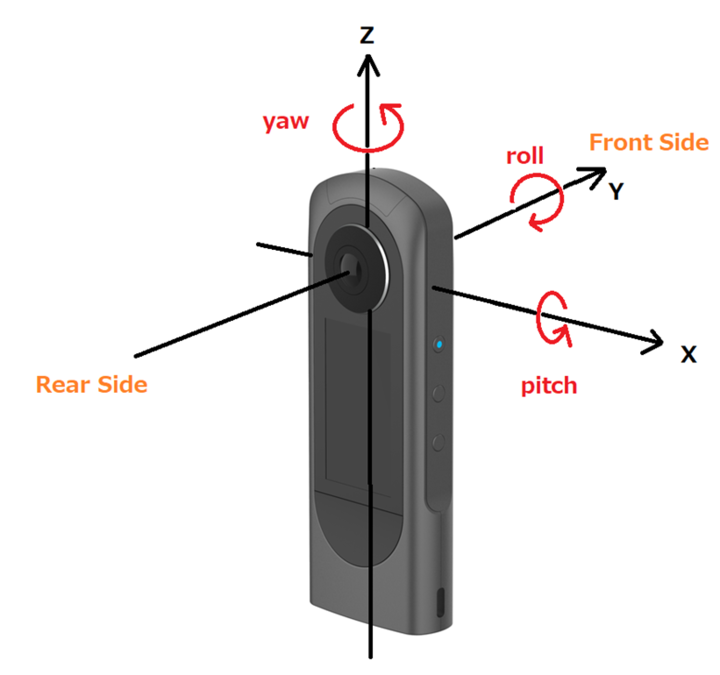
The three pose angles GPano:PoseHeadingDegrees, GPano:PosePitchDegrees, and GPano:PoseRollDegrees describe the orientation of the camera used to capture panoramic 360 image. In particular they represent the pose of the camera frame as it relates to the world frame. These three rotation values heading, pitch, and roll are directly related to the same concepts used in aviation and aerospace, where the heading (yaw), pitch, and roll describe the orientation of an aircraft in the world. These angles have the same meaning in both the aerospace and photography fields.
| Camera (Ricoh Theta) | Aircraft |
|---|---|
 |
 |
NOTE: The red arrow showing camera yaw angle (above) from the Ricoh Metadata documentation actually points in the opposite direction to how it really works. Pitch and roll are correct.
The following table shows the meaning of the camera pose roll angle in each of the reference frames, including some photos I took to demonstrate how it works in the popular Ricoh Theta series of cameras.
The GPano angle metadata are created by the camera itself. This line of cameras has been in popular use for more than ten years.
| Coordinate Frame | Zero camera roll | Positive camera roll GPano:PoseRollDegrees |
|---|---|---|
| Real World (never changes) |
forward north right east 
|
forward north right east
|
| Aviation analogy | nose north wings level  /> /> |
nose north right wing dipped down 
|
| Camera My Ricoh Theta S |
lens points north camera level 
|
right side dipped down
|
| Uncorrected image (schematic) |
north at center horizon level
|
horizon rotated ccw
|
| Uncorrected image (cropped) |
 |
 |
| GPano:PoseRollDegrees (from the camera itself) |
-0.7 degrees | +10.1 degrees |
| Viewer correction | (negligible) | rotate horizon cw
|
| Corrected image (schematic) |
north at center horizon level
|
north at center horizon level
|
| Corrected image (vimage viewer) |
 |
 |
I loaded the same +10.1 degree PoseRollDegrees image from the table above in several panorama viewers. Remember this input image is taken directly from the camera without modification. It is a raw unmodified camera image.
| Viewer | Result | Verdict |
|---|---|---|
| 360PanoMeta |  |
PASS |
| 360PhotoCam |  |
PASS |
| PanoramaGenerator |  |
PASS |
| PhotosphereViewer |  |
PASS |
| renderstuff |  |
PASS |
| vimage | |
PASS |
| FSPViewer |  |
FAIL (metadata ignored) |
| Html360 |  |
FAIL (metadata ignored) |
| Pannelum |  |
FAIL (metadata ignored) |
| Panoee |  |
FAIL (metadata ignored) |
| Panoraven |  |
FAIL (metadata ignored) |
| SimplePanoramaViewer |  |
FAIL (metadata ignored) |