Repository navigation
Releases
TriAevum v0.8.0-beta.1.2 - The Grass Learned to Stay Put (and So Did the Credits)

TriAevum v0.8.0-beta.1.2
The Grass Learned to Stay Put (and So Did the Credits)
Warning
Still a beta. One developer, two NVIDIA machines, one AMD machine
drafted into service since the last version, and your reports, which remain
the only test lab with real coverage. If something breaks (or works), please
open an issue with your
GPU, driver version, operating system, the console output and
logs/oot3d_native_game.log (Windows: next to TriAevum.exe; Linux: inside
TriAevum's data folder, for the Flatpak under
~/.var/app/io.github.coccofresco.TriAevum/), plus what you were doing right
before it went wrong. "It crashed" is a feeling; the log is evidence.
Beta.1.2 is what happens when you publish a beta and people actually play it.
Every item in the first section below is somebody's bug report, and the rest is
the grass, 4K and input-lag work that had been waiting for a release to ride
on. Windows and Linux, as usual.
You reported it, we fixed it, you get to check
- The pause map forgot how stairs work (#89): in dungeons, the D-pad and
the circle pad change floor again. Jabu-Jabu's belly is navigable once more,
which is more than Jabu-Jabu can say. - Holding A turned the lights off (#91, #95, #99): with Roll Dash on,
holding A to run flickered the lighting, the shadows and Navi's hat into the
"no scene" state, as if Link had sprinted out of the game world. The dash
hook had been clobbering the game's own idea of which scene it was in. It
keeps it now; Navi enters the hat only while Link actually dashes, and the
scene identity survives the whole run. - "Won't launch from a long folder" (#92) and "crashes on
installation" (#103): same culprit, Windows' 259-character path limit,
which the game's title files were cheerfully exceeding under any deep folder
(OneDrive,Documents\Games\...and friends). The game and Forge keep their
files within the limit now. If your folder path is very long, it works; if
it is absurdly long, Forge tells you exactly how many characters to give
back instead of letting Windows find out for you. - Crash on the very last scene (#104): the end credits asked the DSP to
flush and invalidate its data cache, two commands the host had never
implemented, because who finishes the game? The reporter did. Both commands
are served now and the credits roll to the end. - Video memory growing until it crashed (#98): textures that no draw has
sampled for a while are released, the grass refuses buffers past its VRAM
budget and frees them after the frame, and the texture-pack cache no longer
keeps the previous pack as a souvenir. The budget is read through the Vulkan
loader at run time, so the executable still starts on a loader older than
Vulkan 1.1 (the0xC0000139reports of the first beta, #12 and #35, stay
fixed; the release audit caught the import before you could). - Barinade, round two (#76): the precompiled Enhanced shader library is
recorded again on this exact runtime, on both machines, and a release
refuses a library that does not match its own source, or a recording made on
a runtime that decides shaders differently. From an empty cache, the fight
still compiles zero shaders. Round three is not planned. - AMD (#78, #84, #93): this is the first release qualified on an AMD GPU
(Radeon, Mesa RADV, Linux), because there is finally one in the room. Forge
installed from the ROM, the game booted to the file select with zero shader
compiles, twice, from both the AppImage and the Flatpak. Windows AMD drivers
remain untested by us; please keep the reports coming.
Ocarina Reframed's file selection
The file select is now Ocarina Reframed's: Link stands beside the three files
on the upper screen, with the copy and erase confirmations, all drawn by typed
code at the game's own block boundaries. The title logo is drawn as a layer
over the resolved scene, and the file select has its own scene lighting
identity, so starting a new game and loading a save look the same, instead of
one of them looking like a different game.
SingleScreen 3.1 and the HD interface
- Sheikah Stone Visions list on the upper screen (3.1): play, complete and
cancel without losing the game (#83 asked for the 3.1 update; here it is). - HD interface by language: Forge offers the HD UI texture pack for the
language your ROM boots in, downloaded with your consent and never bundled,
and ships the SingleScreen HD font (with its author's permission). The
SingleScreen 3.1 archive is preselected when you drop it beside Forge. - Vanilla+ Link (optional): a local RomFS overlay in
mods/remodels Link
without touching the ROM. Your ROM stays yours; Link gets a tailor.
Grass, 4K and input lag
- Grass that stays: its placement and residency now live within a VRAM
budget; when the budget is tight the visible grass is thinned evenly instead
of vanishing by cluster order in one camera direction. Hyrule Field no longer
mows itself when you turn left. Whole blades draw with early depth, as
camera-facing ribbons by default, and two more surface rules find grass
where the first ones missed it. - 4K without an upscaler: water reflections and ambient occlusion run at
half resolution with a depth-aware upsample, which is where the 4K frame
went. On an RTX 3060 at 3840×2160, Kokiri Forest goes from about 19 to 18 ms
and Hyrule Field with the river from 26 to 18 ms per frame, with the same
image and a lot less heroism from the GPU. - Input lag: input is sampled after the previous frame ended and the
presentation cadence was fixed; at 60 Hz with interpolation the time from
button to screen goes from about 33 ms to 9 ms on the development PC. Link
now jumps when you press the button, not shortly after.
In-game menu
Esc (or R3) opens a settings menu in the game's own UI renderer, with a photo
mode tab and an aspect ratio picture. F1 stays for everything else, because
some habits deserve respect.
Windows package layout
The ZIP's root holds TriAevumForge.exe, README.md and LICENSE; Forge
puts TriAevum.exe at the root when it installs, with its DLLs in runtime/.
Launch the game from the root as before. Fewer files to stare at, same game.
Updating
Back up your saves first; it is still a beta.
- Windows: extract the ZIP to a new folder and run
TriAevumForge.exe.
To keep your progress, copy thedata\savedatafolder of your previous
folder into the new one before starting the game. The first installation on
a machine prepares the larger shader library and takes a few minutes; later
ones take under a minute. - Linux: replace the AppImage, or install the new Flatpak bundle with the
sameflatpak install --usercommand; saves stay where they are.
Use your own decrypted EUR/USA .3ds or .cci dump (original or Rev 1);
Japanese, Korean and Taiwanese releases are not supported yet. The previous
notes: beta.1.1, beta.1c,
beta.1b, beta.1.
TriAevum v0.8.0-beta.1.1 - The Mod Moved House, So It Lives With Us Now
TriAevum v0.8.0-beta.1.1
The Mod Moved House, So It Lives With Us Now
Warning
Still untested in the wild. One developer, two NVIDIA machines, and a
growing pile of reports from PCs that politely disagree with both. Thank you
for every one of them: this version exists because of them.
Your feedback is the test plan. If something breaks (or works), please
open an issue with your
GPU, driver version, operating system, the console output and
logs/oot3d_native_game.log (Windows: next to TriAevum.exe; Linux: inside
TriAevum's data folder, for the Flatpak under
~/.var/app/io.github.coccofresco.TriAevum/), plus what you were doing right
before it went wrong.
It is called beta.1.1 and not beta.1d because beta.1d sounded like a vitamin.
It is the update for everyone: Windows and Linux, beta.1b and beta.1c.
Forge installs again
- No download, no archive, no TopScreen 2.1.1 (#81, #82, #86, #88). The
author of TopScreen replaced version 2.1.1 on GameBanana with its successor,
SingleScreen 3.0, so Forge's pinned download received a web page instead of
a ZIP and every new installation stopped at "Could not prepare TopScreen
textures". Hosting someone else's mod on a random drive is not a plan, so:
with the author's permission, the two SingleScreen 3.0 files TriAevum needs
(the low-resolution UI atlas and Link's extra animations) now ship inside the
package. Forge needs your ROM and nothing else. All rights in those files stay
with M-1 (rlgcarrot), the author of
SingleScreen; see
LICENSES/SingleScreen-3.0.md. - HD interface, if you want it. Place the official SingleScreen 3.1
(singlescreen_31_989c3.zip) or 3.0 (singlescreen_30_25aeb.zip) archive
besideTriAevumForge.exe, inmods/beside it, or indata/downloads/:
Forge verifies it and imports its HD UI atlas and HD fonts. Without it you
get the native resolution, as on a 3DS.
TopScreen grows into SingleScreen 3.0 and 3.1
TriAevum's TopScreen profile is now a port of SingleScreen 3.0 with the 3.1
fixes, written as typed code at the game's own block boundaries. None of the
mod's code or patches is executed.
- Items page with the four-row shortcut column: circle pad and D-pad
navigation, reordering, the in-page D-pad picker (hold A, also from the Gear
page) and held-X clearing. - View Model: X on the Gear page, or Y in the D-pad picker, shows the
item's 3D model; the circle pad turns it, X and Y zoom, the D-pad pans it, B
closes it. Yes, you can now inspect the Hylian Shield like it owes you money. - Gameplay options: quick put away, landing roll, roll dash and the aiming
reticle, plus 3D rain. - SingleScreen 3.0's HUD: its button circles, D-pad cross and labels, its
placement of the A and button groups, the rupee counter, the C-stick aim
speed, the Items hint and the D-pad cycle marks, the cutscene rules (no HUD
during cutscenes) and the pause page titles. Compared side by side with the
real mod running in an emulator, not eyeballed. - SingleScreen 3.1 fixes: the landing roll breaks the Deku Tree's floor
web again, as any self-respecting landing should; leaving a scene while
objects were still loading could
corrupt memory, and no longer can; room changes wait for their files the
same way; the roll dash cross-fades its animation.
One TopScreen layout for everyone
The maintainer's layout is now the standard: HUD at 70 %, its margins, every
gameplay option and 3D rain on. F1 → Display → TopScreen HUD offers one
choice, Native (100 %) or Optimized (70 %, the default), and the
SingleScreen credit. The HUD tab is gone; the TopScreen sections of Controls
(shortcuts, gameplay options, C-stick aiming, free camera) stay where they
were. Fewer sliders, fewer ways to make Link's hearts sit on his head.
Fewer crashes
- AMD Radeon cards dying during preparation (#78, #84). When the driver
refused a Vulkan pipeline, NVIDIA's NRI library calledDebugBreak(), which
outside a debugger simply means "close the game". A refused pipeline is now
retried as a whole pipeline and reported in the log
(TRIAEVUM_NRI_PIPELINE_CREATE_FAILED), and the game carries on. There is no
AMD GPU in the test lab, so this is unverified on AMD hardware. The access
violation insideamdvlk64.dllreported later in #84 may be a different
problem: if it still happens, the console output and a crash dump would help
a lot. - Changing the window or display settings on the title screen no longer
closes the game (#87), and runs with the TopScreen profile no longer end
after a minute with "native PICA display transfer source has no Vulkan render
target". Resizing during parallel presentation also kept its GPU copies
instead of reaching into the running game. - SELECT opens Save/Quit again (#80), as in TopScreen.
- "Cannot query the playable runtime: Expecting value" (#85): the cause on
the affected machines is still unknown. Forge now saves everything the
runtime printed inTriAevum-preflight-error.jsonand ignores lines another
program prints before the answer. If it happens to you, please attach that
file.
Faster, and no shader compiling in the middle of a boss fight
- Barinade stops stuttering (#76). The Enhanced graphics preset relies on a
library of precompiled shaders, and that library had quietly fallen behind
the renderer: from an empty cache, the boss fight compiled shaders on the
spot, for about 22 seconds in total. The library is now rebuilt from recorded play, every scene
of the game under both the default and the maintainer's settings, plus boss
fights, storms, a game over, a cutscene and the boot to the file select. A
release now refuses a library that does not match its own source code. With
an empty cache, the Barinade fight compiles zero shaders. - 4K is faster. At 3840×2160 without an upscaler, the water reflections
searched every pixel for a pond that was not on screen. They now look only
where water can be: on an RTX 3060, Kokiri Forest goes from 37 to 55 fps, the
opening scenes from 52 to 54, with the same image. - Grass is cheaper: its selection runs on the GPU, entering Hyrule Field
stalls less, and trees, bushes, rocks and signposts shadow the grass again
(their shadows are cached instead of redrawn every frame). - Texture packs reach the TopScreen HUD (#73): with Henriko's 4K pack the
hearts, item icons, rupees, button rings and digits are upscaled too. - A video memory leak is gone: each change of the texture pack setting
kept about 15 MiB of the previous textures until the game closed.
For Intel Arc on Linux
The noise reported in #72 is not confirmed fixed: two kinds of behaviour
that Vulkan leaves undefined, and that only some drivers forgive, are gone
(a texture level computed from log2(0), and upload buffers that were never
flushed). The log now starts a fresh file at every launch and keeps the
previous ten, so attaching it no longer means scrolling through a week.
Updating
Back up your saves first; it is still a beta.
- Windows: extract the ZIP to a new folder and run
TriAevumForge.exe
(under a minute on the development PC). To keep your progress, copy the
data\savedatafolder of your previous folder into the new one before
starting the game. - Linux: replace the AppImage, or install the new Flatpak bundle with the
sameflatpak install --usercommand; saves stay where they are.
Use your own decrypted EUR/USA .3ds or .cci dump (original or Rev 1);
Japanese, Korean and Taiwanese releases are not supported yet. The previous
notes: beta.1c, beta.1b,
beta.1.
Qualification record: v0.8.0-beta.1.1-qualification.md.
TriAevum v0.8.0-beta.1c - Save States Found a Place to Live (Linux hotfix)
TriAevum v0.8.0-beta.1c
Save States Found a Place to Live
A Linux hotfix for beta.1b. Windows players can stay on beta.1b: on Windows
this version changes nothing.
-
Save states work in the AppImage and the Flatpak (#61). Pressing F5 (or
F1 → Game → Save states → Save state) failed with "Save state failed: cannot
create the folder (Read-only file system)": the default folder sat next to
the game's executable, inside the read-only package. On Linux, save states
now go beside your save data:- AppImage:
~/.local/share/TriAevum/data/savestates - Flatpak:
~/.var/app/io.github.coccofresco.TriAevum/data/TriAevum/data/savestates
A folder you chose with Browse... in that tab is still used as before.
On Windows, save states stay in thesavestatesfolder next to
TriAevum.exe. - AppImage:
Warning
Still untested in the wild, as beta.1b. If something breaks (or works),
please open an issue
with your GPU, driver, operating system, the console output and
oot3d_native_game.log.
Updating: back up your saves first; it is still a beta.
- Linux: replace the AppImage, or install the new Flatpak bundle with the same
flatpak install --usercommand; saves stay where they are. - Windows: nothing to do. If you install it anyway, extract the ZIP to a new
folder, runTriAevumForge.exeand copy thedata\savedatafolder of your
previous folder into the new one before starting the game.
Everything else is beta.1b:
release notes.
Use your own decrypted EUR/USA .3ds or .cci dump (original or Rev 1);
Japanese, Korean and Taiwanese releases are not supported yet.
TriAevum v0.8.0-beta.1b - The Upscaler Has Left the Building (and Came Back Properly Dressed)
TriAevum v0.8.0-beta.1b
The Upscaler Has Left the Building (and Came Back Properly Dressed)
Warning
Still untested in the wild. Same story as beta.1: one developer, two
NVIDIA machines, and now a growing list of PCs that disagree with both. This
update exists because the first testers broke things within hours. Thank
you, and please keep doing exactly that.
Your feedback is the test plan. If something breaks (or works), please
open an issue and attach:
- your GPU, driver version and operating system;
- the console output: run
TriAevum.exefrom a Command Prompt on Windows, or
the AppImage/flatpak run io.github.coccofresco.TriAevumfrom a terminal
on Linux, and copy everything it prints. It now starts with
TRIAEVUM_VULKAN_DEVICEandTRIAEVUM_UPSCALERSlines that name your GPU
and what it can run; logs/oot3d_native_game.log(Windows: next toTriAevum.exe; Linux:
inside TriAevum's data folder, for the Flatpak under
~/.var/app/io.github.coccofresco.TriAevum/), which now records the GPU
and any error that closes the game;- what you were doing right before it went wrong.
Check back often over the next hours and days. Fixes keep shipping as
reports arrive.
A hotfix for beta.1. Same game, same data, fewer ways to leave it.
- DLSS actually ships now. In beta.1, choosing NRI Upscaler on an NVIDIA
GPU picked DLSS, which had nothing to run with, and the game closed; since
the choice was saved, it closed at every launch after that. DLSS now comes
with NVIDIA's own runtime in a separate module, and it works. Your saved
DLSS setting from beta.1 simply starts working. - No upscaler can close the game any more. F1 offers only the upscalers
your machine can really run, and greys out the rest with the reason. If one
still fails mid-game, you get the picture unscaled and the option is
withdrawn, instead of a goodbye. - FSR works on Windows (its runtime was missing too). On Linux FSR is not
offered: AMD's runtime for it exists for Windows only. - Too-old graphics drivers get a straight answer. A GPU whose driver
stops before Vulkan 1.2 is no longer picked, and the message names the GPU,
its Vulkan version and the fix (update the driver from the GPU maker's
site), instead ofvkCreateRenderPass2. - Better crash reports. Errors that close the game now reach the log file,
and a crash on Windows lists each frame's module and offset instead of the
same wrong name. - The item description no longer stays on screen after closing the
Items menu with START at the wrong moment (#60). Closing it while the game
was still preparing the description now closes both; closing it a moment
earlier, while the item's icon was loading, could also crash the game, and
no longer does. That crash is also the one behind pressing START over and
over (#67). - The START menu opens without the wait. The first START of a session
froze the game for one to two seconds, and every later open or close
stuttered: the scene drawn behind the page made the grass rebuild itself
each time. Now nothing is rebuilt, and START opens the page directly, the
way TopScreen 2.1.1 does, about a tenth of a second sooner than before. - TopScreen catches up with 2.1.1. On an open Items or Gear page, SELECT
shows the item's description over the page, like the 3DS mod; START
reopens the page you left (Items, Gear or Map); L and R hints sit beside
the page tabs; the Navi prompt sits in its 2.1.1 place and also shows with
View unmapped or the D-pad icons hidden; the horse-stamina row and the
dungeon key counter follow 2.1.1. - Dungeon maps show their markers again with TopScreen. The boss skull
and the chests (with the compass) were missing from the dungeon map page,
because the minimap layout of the HUD also moved them; it now leaves them
alone while a pause page is open, as TopScreen 2.1.1 does. - The TopScreen FOV setting works. It never changed the view: it watched
the wrong camera value. Release builds also skipped the TopScreen steps that
sit in the middle of the game's code, such as the FOV, the scene guards
behind the pause pages and the touch-button rule. The title module now
starts a block at each of them, and the game refuses a title module that
does not. - The Items page uses the full width of the upper screen, as in
TopScreen 2.1.1: the grid and the ZR/X/Y/ZL column move outward and the
right stone edge gives way to the column. Dungeon maps widen the same way,
with the map, compass and key icons on the left and the floors on the
right. - The Save page shows the game behind it, as in TopScreen 2.1.1, instead
of the brown pause background and stone edges. - No more thin lines across empty Gear slots. The Gear page samples its
textures the way 2.1.1 does. - Link no longer flattens when he turns round at 60 or 90 FPS. Between
two game frames, a model turning to face the other way was squashed for a
frame; it is now shown turned part of the way. - No more freezes on scene changes with Extended draw distance (#69,
#74). With the option on, the game drew more characters and objects than
its per-frame lighting space holds. The overflow spilled into the queue
that loads scenes and writes saves, so a door, a scene change or a save
could hang or crash the game. Extended draw distance now adds only as many
extra actors as that space has room for. Savestates made after an overflow
may already be damaged: load an in-game save instead. - New default grass, for everyone. The default grass profile now has 25
maps that decide where grass grows, up from 6; Lon Lon Ranch gets its grass
back. A configuration from beta.1 takes the new maps once, at the first
start of this version, and keeps every other grass setting (density, draw
distance, performance and the rest). - One lighting standard for outdoor areas whose time is set on entry.
Lon Lon Ranch no longer ships a lighting profile of its own, so it follows
that group's standard, which has a new sun direction. Kokiri Forest keeps
its own daytime profile. - Smoother motion at 60 or 90 FPS. The frames drawn between game frames
move each character as one piece (Link's hand stays on his arm, the Iron
Knuckles stop trembling), and scrolling textures such as the clouds no
longer jump for a frame. Motion vectors follow each actor by its own
identity, so a repeated model no longer borrows another one's motion. - DLSS with frame interpolation no longer loses the GPU after a scene
change (the game closed withVK_ERROR_DEVICE_LOST). - A resolution or display mode that crashes no longer locks you out (#65).
If a launch ends within its first minute, the next one starts with the
default resolution, window mode, anti-aliasing and upscaler, says so in the
log, and keeps everything else. - The AppImage starts more than once (#66). It used to remember where it
was mounted the first time and could not find its own files afterwards
("OTR file not found"); an installation from beta.1 repairs itself on the
first start of this version. - The AppImage runs on older Linux systems (#72). It now carries the C++
runtime it was built with and uses it only when the system's own is older,
plus libdecor for SDL. On Intel GPUs with Mesa, graphics pipeline libraries
are off by default, both in the game and in Forge: they made the process
grow past 27 GB.TRIAEVUM_NRI_PIPELINE_LIBRARIES=0now turns them off
in Forge too, on any GPU. - Controllers in the Flatpak (#71). The Flatpak asked only for the input
devices permission that Flatpak 1.15.6 introduced; older Flatpak versions
ignore it, so the game saw no controller at all. It now asks for device
access the way emulators on Flathub do. - Cleaner licensing. NVIDIA's NGX SDK no longer sits inside the GPL
runtime: it lives only in the separately licensed DLSS module, next to
NVIDIA's signed runtime and NVIDIA's licence (LICENSES/). Upscaling by
NVIDIA DLSS. NVIDIA and DLSS are trademarks and/or registered trademarks of
NVIDIA Corporation; TriAevum is not sponsored or endorsed by NVIDIA. The
Linux packages list the licences of the system libraries they carry, with
a link to their sources, inLICENSES/linux.
OptiScaler users: DLSS 5 neural rendering still attaches to TriAevum's DLSS
(docs/TRIAEVUM_OPTISCALER_DLSS5.md); nothing of OptiScaler is shipped.
Updating: back up your saves first; it is still a beta.
- Windows: extract the ZIP to a new folder and run
TriAevumForge.exe, as for
beta.1 (about 3 minutes on the development PC). To keep your progress, copy
thedata\savedatafolder of your beta.1 folder into the new one before
starting the game. - Linux: replace the AppImage, or install the new Flatpak bundle with the same
flatpak install --usercommand; saves stay where they are.
Everything else is beta.1:
release notes.
Use your own decrypted EUR/USA .3ds or .cci dump (original or Rev 1);
Japanese, Korean and Taiwanese releases are not supported yet.
TriAevum v0.8.0-beta.1 - Hyrule Gets Its Lights Back On (untested, reports wanted)
TriAevum v0.8.0-beta.1
Hyrule Gets Its Lights Back On
Warning
Untested in the wild. This beta has been qualified on every PC its single
developer owns: one Windows machine and one Linux box, both NVIDIA. Yours is,
statistically, neither. AMD and Intel GPUs, laptops with two GPUs, older
drivers, remote desktops and other creative setups have not been tried, and
the first early reports already include an AMD driver crash and a GPU too old
for Vulkan 1.2 (native PICA requires Vulkan vkCreateRenderPass2).
Your feedback is not optional: it is the test plan. If something breaks
(or, shockingly, works), please
open an issue and attach:
- your GPU, driver version and operating system;
- the console output: run
TriAevum.exefrom a Command Prompt on Windows, or
the AppImage/flatpak run io.github.coccofresco.TriAevumfrom a terminal
on Linux, and copy everything it prints; logs/oot3d_native_game.log(Windows: next toTriAevum.exe; Linux:
inside TriAevum's data folder, for the Flatpak under
~/.var/app/io.github.coccofresco.TriAevum/);- what you were doing right before it went wrong.
Check back often over the next hours and days. Fixes will ship as fast as
reports arrive, so the build you download at breakfast may be the old one by
dinner. One developer, one desk, an unknown number of PCs out there: you are
the QA department now. Congratulations on the promotion.
The first beta. Hyrule now has weather in its lighting, fire that actually
lights things, and water that knows it is water. The grass is still there. We
checked.
- Two lighting models. Native keeps the 3DS look. Modern lights every
pixel: a key light that follows the scene's own sun, a rim light, ambient
occlusion, and shadows. Fresh installs start on the tuned Enhanced preset. - Scenes come with their own light. Day and night environment profiles,
per scene or per group of scenes, blend on the game's own clock. This release
ships the profiles authored so far (Temple of Time included) as read-only
defaults. Edit any of them in F1 and save your own; Use group standard
brings back the default. - Fire lights things. Torches while lit, the Poe sisters' torches, fire
Keese, flame traps, fire walls and other flames light the Modern scene.
Interior lamps and doorway daylight become real lights, prepared by Forge
from your own RomFS. Place your own sun, spot, point, surface and omni lights
from F1; surface lights have a spread to aim them. - Shadows everywhere they should be. Point lights cast cube-map shadows,
contact shadows add the small ones, smooth surfaces stop shadowing their own
facets, and the sun reaches into interiors through their openings. - Water. Reflections from the game's own water bodies, flow from the
texture scrolling, ripples, white water where rivers step down. - MXAO. iMMERSE MXAO by Pascal Gilcher joins GTAO and CACAO, with face
normals and temporal accumulation. It is a separately licensed module
(triaevum_immerse), used with the author's permission; TriAevum runs
without it if it is removed. - DLSS reconstructs the frame upright, with the transformer model on
Enhanced. OptiScaler users can try DLSS 5 neural rendering on their own;
seedocs/TRIAEVUM_OPTISCALER_DLSS5.md. Nothing from OptiScaler is shipped. - F1 reorganized into seven tabs, with your own graphics presets and a
save-state tab. Save states hold the game moment, not your graphics
settings, and are compressed. - Faster where it counts. The precompiled title is profile-guided, shader
programs are prepared ahead from recorded game sessions, and the title intro
runs above 60 fps at 2160p on the development PC. Results vary by hardware;
this is not a promise of zero stutter.
First setup: after reading your ROM, Forge prepares this GPU's pipelines
once; the rooms' interior sunlight and light sources come precomputed with the
release and are matched to your own ROM's rooms. On the development PC (12
threads) this part takes about 3 minutes; slower PCs take longer. Later
launches reuse the work. The first frames show a short preparation screen.
Before updating: back up saves and settings. Prefer normal in-game saves.
Global illumination is still experimental and not offered by this build. The
game's simulation remains 30 Hz; 60/90 FPS modes interpolate visuals. Android
and macOS are not included in this release.
Windows: extract the portable ZIP and run TriAevumForge.exe. Linux: make the
AppImage executable and open it; use --forge to return to setup. Or install
the Flatpak with flatpak install --user TriAevum-v0.8.0-beta.1-Linux-x86_64.flatpak
(the Freedesktop 25.08 runtime comes from Flathub) and start it from the
menu or with flatpak run io.github.coccofresco.TriAevum; it updates an
alpha.2 Flatpak in place, keeping its saves. Use your own
decrypted EUR/USA .3ds or .cci dump (original or Rev 1). Japanese,
Korean and Taiwanese releases are not supported yet: Forge declines them.
Special thanks to Pascal Gilcher (Marty's Mods)
for MXAO and the permission to use it, to rlgcarrot, whose
TopScreen mod is reimplemented here
(please consider supporting their work), and to
Sion (999sian) for the Linux foundation; see
the contribution record.
And thank you to Ship of Harkinian, Azahar, NRI, Godot, FidelityFX, and the
other donor projects. The lights did not place themselves; well, some of them did.
[BROKEN - WITHDRAWN] TriAevum v0.6.0-alpha.3b
TriAevum v0.6.0-alpha.3b
BROKEN - WITHDRAWN. Do not use this release. Downloadable packages have
been removed pending further verification. The original notes below are
retained for historical reference, not as a current reliability claim.
Start Means Start
- Fixed #48: pressing Start during the title sequence no longer ends your
adventure before the save menu. An ambitious speedrun category, now retired. - The same renderer composition fix is included on Windows and Linux.
- Everything else from alpha.3 stays: TopScreen, HD fonts, configurable graphics,
and an entirely unreasonable quantity of grass. Save formats are unchanged.
Windows: portable ZIP. Linux: AppImage. Back up saves/settings before updating;
prefer normal game saves over savestates made during Sheik's revelation flashback.
Steam Deck remains a compatibility target, not a hardware-tested certification.
Thanks to rlgcarrot for TopScreen,
reimplemented here (support their work),
Sion / 999sian for their PR contributions, and Ship of Harkinian, Azahar,
NRI and the other donor projects.
[BROKEN - WITHDRAWN] TriAevum v0.6.0-alpha.3
TriAevum v0.6.0-alpha.3
BROKEN - WITHDRAWN. Do not use this release. Downloadable packages have
been removed pending further verification. The original notes below are
retained for historical reference, not as a current reliability claim.
Sheik Can Finish a Sentence
More game, fewer arguments with the window. Still an unreasonable amount of grass.
- Linux travels lighter. One AppImage replaces Flatpak, with Forge included.
Prepare in Desktop Mode, then add the AppImage to Steam for Gaming Mode.
Steam Deck is a compatibility target, not a hardware-tested certification. - TopScreen gets its bearings. Centered, proportion-preserving HUD, minimap
and contextual-menu fixes, and Game Over choices that actually show up.
The game may defeat you; the menu should not. - Sharper words. TopScreen HD fonts are prepared by Forge and used
automatically at 480p and above. No magnifying glass DLC required. - Controllers cooperate more. Unified SDL routing, improved mouse/stick
aiming and automatic motion aiming on supported controllers. Gyro affects
aiming, not free camera. Virtual/third-party sensor support still varies. - Cutscenes can finish their business. Sheikah Stone Visions playback and
the Temple of Time revelation now progress through their previously blocked
paths. The latter returns to gameplay on Windows and Linux. - Renderer housekeeping. Improved frame pacing, grass visibility work and
native shader infrastructure, plus the black-background/toon correction.
This is not a promise of zero stutter or a universal FPS increase.
Before updating: back up saves and settings. Prefer normal in-game saves;
restoring a savestate made during the revelation's flashback remains unreliable.
F1 keeps the established settings menu. 60/90 FPS modes interpolate visuals;
game simulation remains 30 Hz. Android/macOS are not included in this release.
Windows: extract the portable ZIP and run TriAevumForge.exe. Linux: make the
AppImage executable and open it; use --forge to return to setup. Use your own
decrypted EUR/USA .3ds or .cci dump. Existing Flatpak data is not migrated
automatically: keep it backed up and separate from the new AppImage installation.
Special thanks to rlgcarrot, whose TopScreen mod
is reimplemented here: please consider supporting their work.
Thanks to Sion (999sian) for the Linux foundation
and PR contributions informing display, shader preparation and TopScreen support;
see the contribution record
for individual PRs and integration scope. And thank you to Ship of Harkinian,
Azahar, NRI, and the other donor projects. The grass did not write itself.
v0.6.0-alpha.2c: Fullscreen, Not Full Stop
Alpha 2c: Fullscreen, Not Full Stop
A small maintenance update for Windows and Linux. Same game, fewer window dramas.
- Fixes a reproduced crash when minimizing or restoring the game around
fullscreen transitions: the runtime now waits for a valid graphics frame
instead of submitting to an unavailable window surface. - Keeps window events responsive while the display surface is being recreated,
without advancing game time during the pause. - Adds repeatable checks for fullscreen/windowed transitions, resolution changes
and automatic rollback of unconfirmed settings.
USA/EUR ROM support, Forge's bundled shader preparation, TopScreen and save
formats are unchanged. No title recompilation or SDK is needed.
Back up your saves and settings before updating. Windows users should extract
the ZIP into a fresh folder and keep their previous installation until the new
one is working. Linux users can install the Flatpak over the previous version;
application data remains outside the package.
This fixes a concrete reproduced failure, not every possible driver or fullscreen
issue. Physical Steam Deck testing and unrelated Windows loader investigations
remain outstanding.
Thanks to Sion (@999sian) for the Linux, compatibility, cache and TopScreen
contributions retained from alpha.2; individual PR credits.
And to rlgcarrot for the TopScreen design reimplemented here, plus Azahar,
Ship of Harkinian, libultraship and NRI for the foundations.
Contributors

Assets 5
TriAevum v0.6.0-alpha.2b - USA Is Back on the Guest List
Alpha 2b: USA Is Back on the Guest List
Small packaging fix, same excessive grass.
- Restores USA ROM import and equivalent EUR/USA dump recognition accidentally
omitted from alpha.2, on both Windows and Linux. - Adds a release audit that rejects packages missing these qualified input
contracts. A matching Program ID alone is still not enough: Forge checks the
actual decrypted content. - Keeps the tested alpha.2 game, Forge, renderer and bundled shader preparation
unchanged. No compiler or SDK is needed, and no new Flatseal permissions are
required to fix this particular rejection.
Use your own decrypted EUR/USA .3ds or .cci dump. If alpha.2 rejected it,
update and run Forge again. Windows users should extract into a fresh folder;
keep the previous installation and back up saves/settings before moving data.
Linux users can install this Flatpak over the previous version; application
data remains outside the package.
Verified with real frozen Forge installations and 300-presentation intro runs
on Windows and Linux, including a logically equivalent repacked USA input on
Linux. This is not a full-game compatibility claim; physical Steam Deck testing
is still outstanding. Unrelated Windows loader failures remain under investigation.
The packages retain the exact corresponding source for their unchanged alpha.2
binaries (source freeze 72e4c37). The input-coverage correction is b1702ea,
with verification recorded in fb8161c and this release's tagged source.
Thanks again to Sion (@999sian) for the Linux, compatibility, cache and
TopScreen contributions incorporated into alpha.2; see the
contribution record
for individual PR attribution. And to rlgcarrot for TopScreen, whose
single-screen design is reimplemented here, and Azahar, Ship of Harkinian,
libultraship and NRI for the foundations.
Contributors
Assets 5
TriAevum v0.6.0-alpha.2 - More Hyrule, less housekeeping
TriAevum v0.6.0-alpha.2
More Hyrule, less housekeeping
The renderer obsession continues. This time, a little more attention went to
the part where you actually play the game.
Special thanks to Sion (999sian) for the Linux
foundation (#6), display feedback
(#14), and contributions informing
shader preparation (#11) and
TopScreen fixes (#13,
#18). These were selectively
integrated or adapted, not blindly merged. Thanks also to
Pablo Souza for the capture work from
#16.
- Linux joins the party. One Flatpak for Linux desktops and the Steam Deck
target, with Forge included. Windows stays portable: unzip, prepare, play. - Forge does more homework. The bundled shader corpus is prepared
automatically for your GPU during setup. No extra files to choose; missing
variants are still learned and cached while playing. - Grass has learned some restraint. Adaptive clusters, better distant
coverage, and closer matching to the terrain's color and lighting. Still grass.
Just less determined to occupy your entire GPU. - TopScreen gets a tune-up. Fixes for item slots, ocarina guidance, HUD
flickering, mounted layouts, minimap markers and ammunition placement. - Fewer arguments with the controls. A clearer F1 binding interface,
press-to-bind controls, and fixes for mouse aiming and camera recapture. - Less window wrestling. Resolution/fullscreen fixes, clearer display-error
feedback, ROM-aware language selection in Forge and F1, and Linux presentation
and shutdown fixes.
Still an alpha, not a full-playthrough certification. Steam Deck hardware and
Gaming Mode have not been tested directly. Android is not part of this release.
Shader coverage is not complete, and first encounters can still compile shaders.
60/90 FPS modes interpolate presentation; game simulation remains at 30 Hz.
Use your own decrypted EUR or USA dump in .cci or .3ds format. On Windows,
extract the entire ZIP to a writable folder and run TriAevumForge.exe. On
Linux, install the Flatpak and open TriAevum; Forge handles the first setup.
For the Steam Deck target, prepare in Desktop Mode before adding it to Steam.
Back up saves and settings before updating. F1 configures the renderer; F2
temporarily disables the main graphical additions without discarding settings.
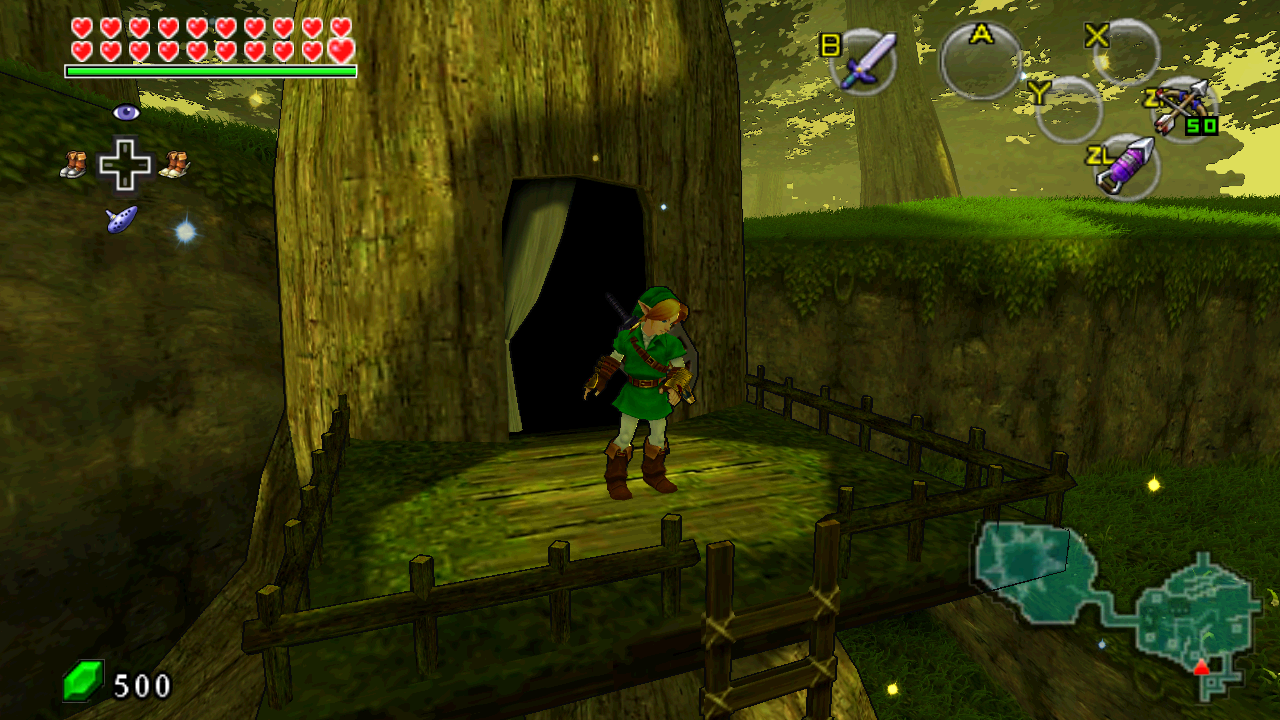
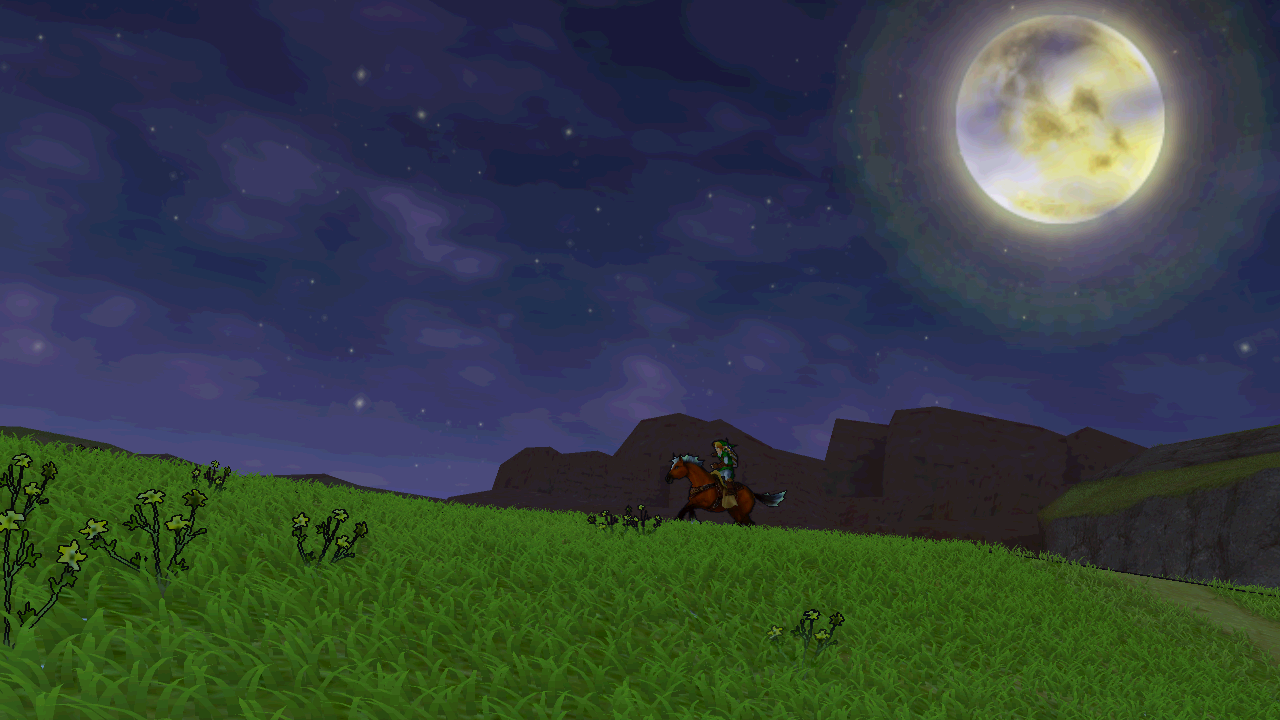
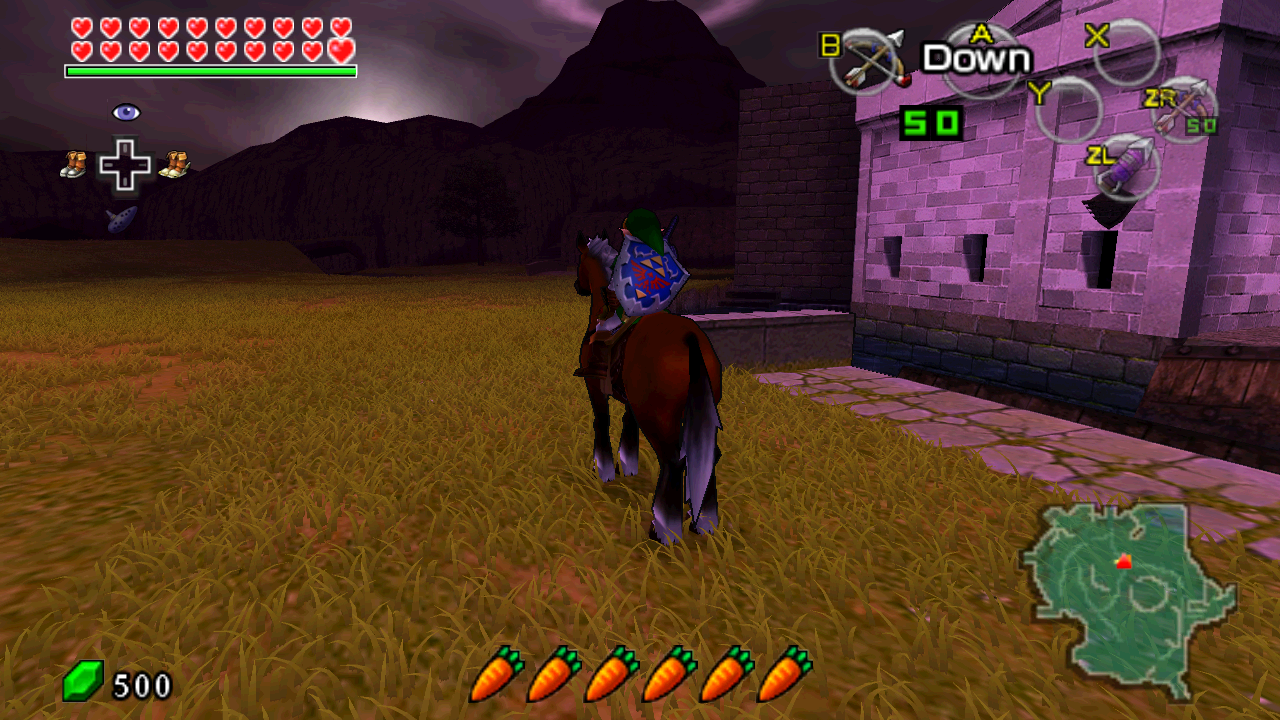
In pictures
Actual alpha.2 framebuffer captures, using the default graphics profile.
TriAevum would not exist in its current form without rlgcarrot's TopScreen
mod, whose behavior is reimplemented here. Please consider
supporting their work. Thank you to Ship of
Harkinian, Azahar, NRI, and all the other donor projects and contributors.
See the contribution record
for the exact integration scope and attribution.