Repository navigation
Releases: coldi1337/DankChat
Release list
DankChat v0.6.1

Fixed
- Restore attachment and save dialogs on DMS 2.0 by recognizing the renamed
DCommonfile-picker module, while retaining the DMS 1.6.x fallbacks. - Avoid QML binding loops in the message placeholder and when a file-picker
error closes its dialog. - Keep the isolated UI and service tests working with both DMS module names
and runtimes that do not allow replacing QML methods.
The minimum DMS version and external dependencies are unchanged. The Telegram
application-ID issue remains open, as documented in 0.6.0.
Validation
120 application tests passed; 153 WhatsApp tests ran with one skip and no failures. QML parsing, QtTest and manifest validation passed. German/English UI, service, missing-picker and preview checks passed against DMS 1.6.3 and the DMS 2.0.0 QML source on Qt 6.12.0 / Quickshell 0.3.2. No real-account actions were performed.
Updating
Update the plugin and restart DMS when convenient to load the changed QML. No new dependencies or account relinking are required by this patch. Unsent drafts are kept only in memory.
DankChat v0.6.0
Fixed
- Refresh only the account (and chat) that reported an update instead of every
account of the service, and bundle bursts of updates from busy groups. - Serve the Telegram chat list from cache until an update or a write changes it,
refetching at most every 3 seconds and at least every 5 minutes. Refresh
failures are now shown instead of silently keeping an outdated list. - Back off after Telegram refresh failures and respect reported flood waits.
Concurrent writes and cancelled fetches no longer leave the chat cache clean
when another refresh is still needed. - Stop the 2-second account refresh once the window is closed while the account
view was open. - Chats beyond the 40 most recent no longer fail with “Select an existing
Telegram chat first” for a few seconds after sending or deleting. - Retry automatic read synchronization when a read is still running or fails, so
messages arriving meanwhile are also marked read on other devices. - A failed edit request while reconnecting no longer blocks sending until DMS restarts.
- Cache WhatsApp health checks instead of starting
wacli doctorandsystemctl
on every refresh. - Logging out an additional account no longer shows the original account as
disconnected; the reconnect notice clears after the next action. - Show accurate errors when sending is busy or more than 10 attachments are chosen.
- An expired WhatsApp QR login is reported as expired on Python 3.10.
- Add missing German translations for service errors and the new controls.
Improved
- Day headings (“Today”, “Yesterday”, date) in conversations and the time of the
latest activity in the chat list. - Telegram conversations reload from a local cache that update events clear,
instead of fetching the history from Telegram every five seconds. Reactions by
others and read receipts of sent messages update through events. - Press Up in an empty composer to edit your last message; Escape cancels a reply.
- Add missing tooltips and accessible names to chat action buttons.
- Cleanup removes abandoned partial-download directories older than an hour.
Security and reliability
- Automatic read synchronization in the app window requires the window to be active.
- Ask before opening received documents, including SVG images, externally.
- An attachment whose upload was not confirmed is kept but excluded from the next
send until it is explicitly included again. - WhatsApp writes that outlive a request timeout keep sync paused until they finish
and refresh the conversation when they complete. - Wait for outstanding WhatsApp writes before logout, shutdown or clearing shared
temporary files; cancelled writes still waiting their turn are never sent later. - Previews of sent attachments are stored in the cache directory instead of the
memory-backed runtime directory, with one shared 256 MB limit for all accounts. - The receipt webhook only accepts connections from the same user, handles them
concurrently and times out idle connections. - Setup verifies wacli against checksums pinned in the repository and installs
Python dependencies with--require-hashes. - A restarted service waits for its predecessor instead of exiting silently.
- Ask before removing downloaded media.
Removed
- The unused
link-whatsappandopen-link-terminalscripts, which required wacli 0.17.1.
Known limitations
- A dedicated Telegram application ID and shared custom credentials for additional
accounts are deferred. The inherited Telegram Desktop API credentials remain
the default in this release. - CPU, battery and network savings have not been measured. Media players are
still created when their message delegates load.
Updating
Update DankChat, rerun python3 scripts/setup in its installed folder, and restart DMS when convenient. Accounts and settings are retained; unsent drafts live only in memory.
DankChat v0.5.1
This patch fixes the blank chat window reported with newer DMS builds after the file-browser API changed. Both the legacy and modern native file pickers are supported.
Fixed
- Fix the blank chat window on newer DMS builds where
FileBrowserContentwas
removed. The file dialog now selects the modern or legacy native picker at
runtime, preserving support for older DMS versions (issue #1). - Preserve the native picker's layout and theming when loading it dynamically.
- Show a clear English/German error if no compatible picker is available, while
keeping the conversation usable. - Clear diagnostic-export mode when the file dialog is dismissed.
Improved
- Support selecting multiple attachments at once in the modern DMS picker.
- Check file-picker components and shared dependencies in
check-environment,
and distinguish this file check from a full QML runtime test. - Extend UI coverage for selection, media/diagnostic export, cancellation,
missing picker types and layout geometry on both DMS generations. - Fix the test runner's shutdown path after a QML loading failure and isolate
its home directory as well as its settings and account data.
Upgrade notes
Update DankChat and restart DMS. If setup has not been run since upgrading from
0.4, run python3 scripts/setup in the plugin folder first. This patch adds no
new dependencies and preserves existing accounts and settings. Restarting DMS
clears drafts held only in memory.
Validation: 93 project tests, 152 vendor tests (one intentional skip), Qt/QML and manifest checks, English/German picker fixtures, and the service fixture against current DMS source. Selection, save, cancel, missing-picker behavior and layout were checked with synthetic data. The reporter’s exact ChaoticAUR package has not been installed or tested.
DankChat v0.5.0
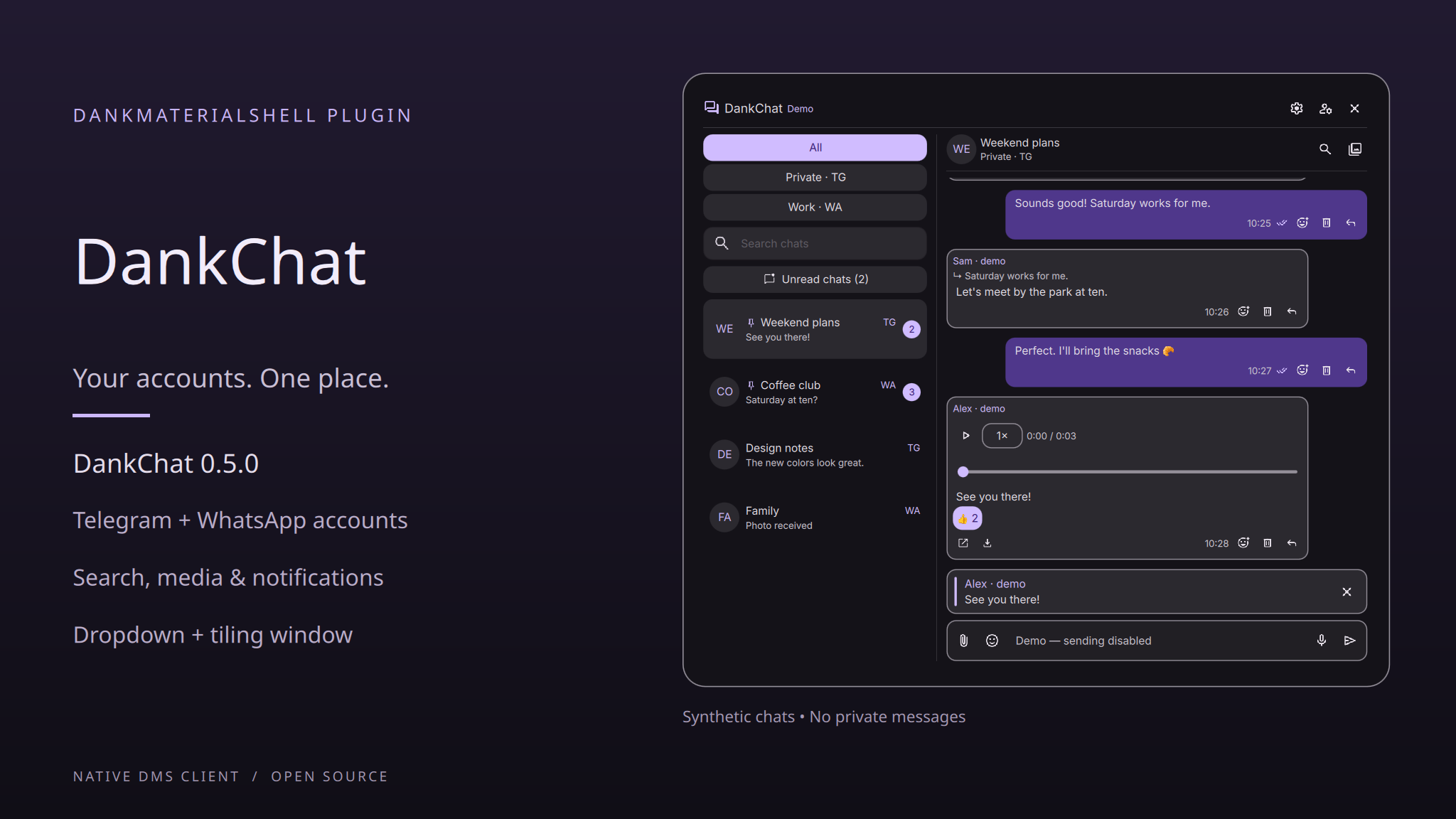
DankChat 0.5.0 adds multiple accounts, message search, app settings and a simpler setup, alongside media and read-state improvements.
Added
- Multiple Telegram and WhatsApp accounts, with separate sessions, editable names
and vertically stacked account buttons. - App settings for read synchronization, notifications, automatic media downloads,
cache limits and dropdown behavior. - Message search and media browsing, with pagination and jumps to the original
conversation. WhatsApp searches the history available on the linked device. - Editing your own messages, with an edited marker and service-specific limits.
- Notifications with per-account and per-chat overrides, optional previews and
sound. Mentions-only notifications are supported for Telegram. - Installed version, GitHub release checks and diagnostic reports that exclude
messages, account identities, credentials and attachment paths. - Keyboard shortcuts for chat and message search, switching chats and replying.
- One setup command for Python dependencies, verified wacli installation, desktop
launcher and background services. Existing compatible wacli builds are retained.
Improved
- Separate request queues per account let conversation updates continue while
uploads and media downloads are running. Media caches avoid repeated downloads. - Sent media appears from the local confirmed attachment while the service catches
up. Transfer states distinguish uploads, downloads and unconfirmed sends. - More reliable scrolling to the latest message when opening a chat, including
when images change the message height after loading. - Clipboard image handling and attachment errors, including media no longer
available from WhatsApp. - Bidirectional read-state synchronization, with automatic marking limited to the
visible latest conversation. Telegram reads stop at the latest loaded message. - English and German text throughout the new settings and account views.
Fixed
- Use DMS's public
DankPopoutAPI instead ofDankPopoutStandalone, resolving
the loading failure reported with DMS Git revision80060ee(#1). - Accept compatible wacli versions from 0.17.1 instead of requiring an exact
version. The recommended and tested release is now 0.19.0 (#2). - Download WhatsApp media without interrupting the background sync store.
Upgrade notes
Update the plugin, run python3 scripts/setup in its folder and restart DMS when
ready. The setup adds the service template needed for additional WhatsApp accounts.
Existing accounts and settings are kept. Read synchronization remains opt-in and
notifications start disabled. Drafts remain in memory only.
Validation: 93 project tests, 152 vendor tests (one intentional skip), QML/Qt checks, English/German UI fixtures and the isolated service fixture. Fresh and repeated setup were tested with real downloads in an isolated home. Automated tests do not send messages to real accounts.
DankChat v0.4.0
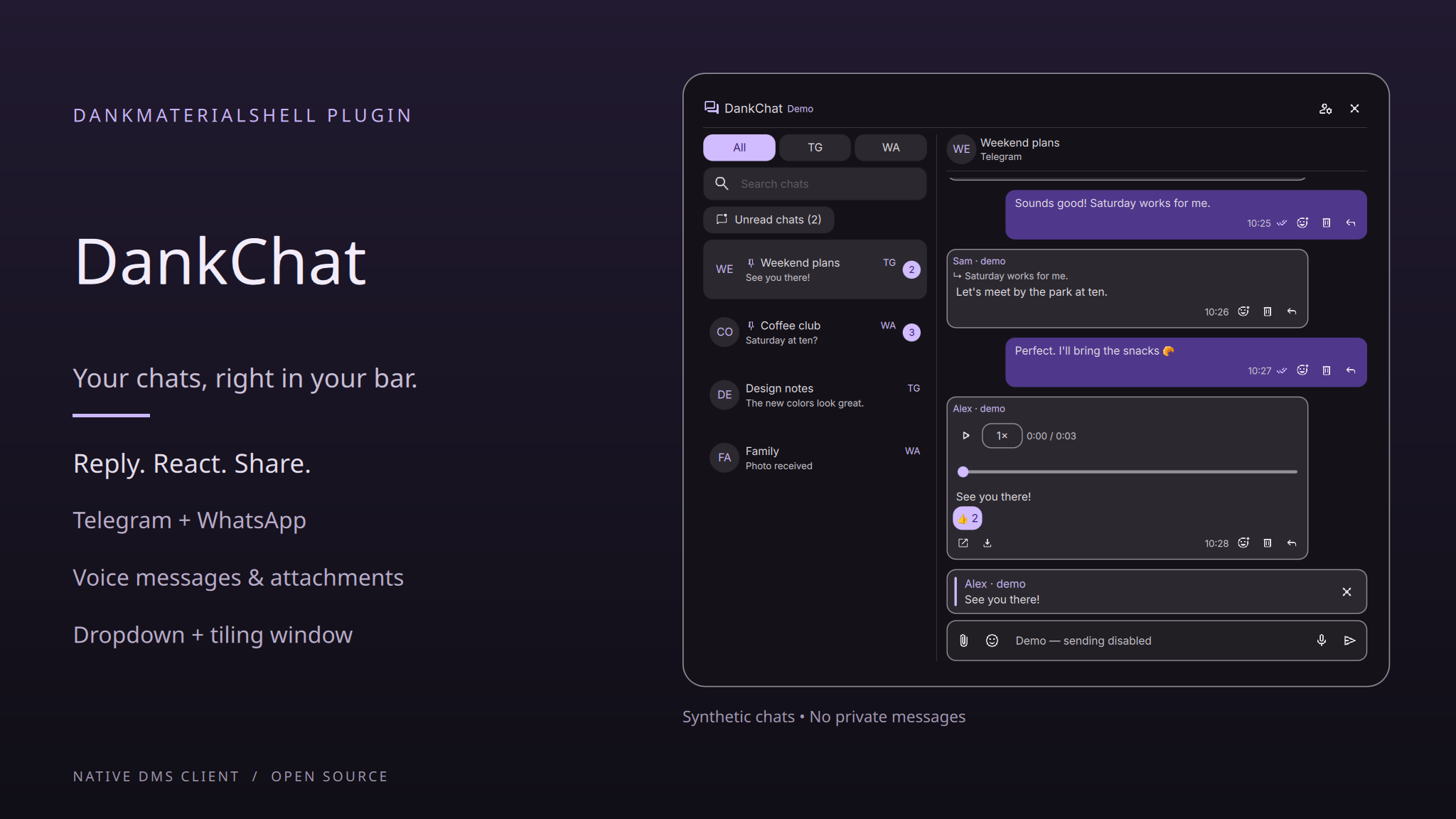
DankChat now supports recording and sending voice messages in Telegram and WhatsApp, with a preview before sending. The inline player adds seeking and 1×/1.5×/2× playback.
- Delete individual messages with confirmation, for yourself or everyone where supported.
- See typing and recording activity in both services, plus Telegram online/last-seen status.
- Unavailable WhatsApp attachments no longer trigger the generic send-error warning.
- Updated English/German text, a shorter README and clearer third-party license notices.
Voice recording requires FFmpeg with libopus and PulseAudio input, using PulseAudio or PipeWire with pipewire-pulse. WhatsApp online/last-seen status remains unavailable through the current backend.
Validation: 59 project tests, 152 upstream WhatsApp tests (one intentional skip), QML/QtTest/schema checks, English/German UI checks and a 218-step synthetic service run. The maintainer reports successful hands-on testing in their setup.
DankChat v0.3.0
Changes
- Paste screenshots from the clipboard with Ctrl+V, Shift+Insert or the composer menu. Review the image before sending.
- Paste multiple local files copied in a file manager, or collect files using Add files. Preview and remove individual attachments before confirming.
- Send up to 10 attachments sequentially, with the draft caption on the first file. Sending stops on the first error without automatic retries; this is not native album sending.
- Show composer replies in a themed quote box with the sender, bounded quote text and a cancel button.
- Preserve send errors while automatic media loading continues.
- Update English/German UI text, documentation and the promotional preview.
Requirements and limits
Install wl-clipboard for clipboard images and file lists. Normal text paste remains available without it. Clipboard images are limited to 20 MB, other attachments to 100 MB each. Existing DMS, Python, Qt and WhatsApp/wacli requirements are unchanged.
See the v0.3.0 README for setup and limitations. The DMS registry PR is awaiting review.
Validation
45 project Python tests, 152 retained WhatsApp tests (one intentional skip), QtTest suites, QML/schema checks, isolated English/German UI checks and the 200-step service test. Fixtures cover clipboard staging/cleanup, multiple attachments and partial-send failure. Tests do not use the user's clipboard or send real messages.
DankChat v0.2.0
Changes
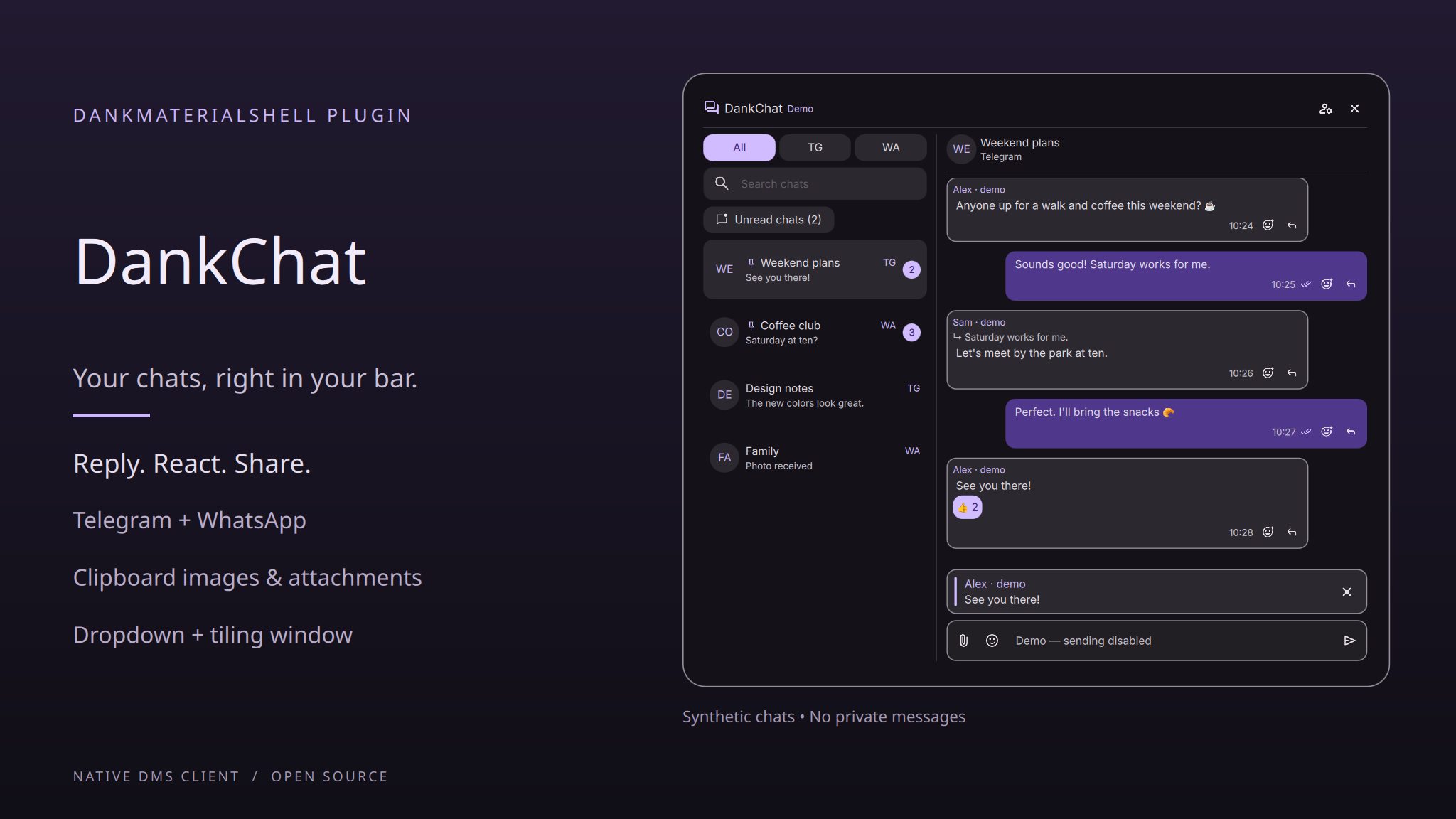
- React to Telegram and WhatsApp messages using the searchable emoji picker.
- Display reaction counts and highlight your own reactions; click your reaction again to remove it.
- Include reactions on older pinned Telegram messages and refresh reaction caches after changes.
- Count unread chats consistently in the bar and unread filter, with a clearer filter label.
- Play MP4-encoded WhatsApp GIFs saved with a
.f4vextension in the video player, using MIME type and extension detection. - Update the README and German translations.
Validation
38 project Python tests, 152 retained WhatsApp tests (one intentional installer skip), both QtTest suites, QML parsing and manifest schema checks passed. Isolated UI tests cover reaction selection/removal, chat-switch protection, reaction display and an MP4 GIF fixture; the 200-step service test also passed. No real reactions were sent by the automated tests.
Installation and limitations
See the v0.2.0 README for installation and update instructions. Requirements remain unchanged, including DMS 1.6.1+ and wacli 0.17.1 for WhatsApp.
Telegram reaction availability depends on the chat. Custom Telegram emoji use placeholders; sending custom emoji and multiple Premium reactions is unsupported. The documented test environment remains Arch Linux/Hyprland.
The DMS registry submission is awaiting review; this release does not imply catalog availability.
DankChat v0.1.0
First release of DankChat: Telegram and WhatsApp in one native DankMaterialShell plugin, without Electron or an embedded browser.
Features
- DankBar dropdown and a regular, resizable, tiling-capable window, with shared per-chat drafts.
- Combined chat list, provider/search filters, an unread-only toggle, chat pinning and explicit mark-as-read actions.
- Text messages, replies with navigation to the original message, clickable links and provider-supported delivery/read indicators.
- Automatic media loading, inline images/stickers, image zoom and pan, video/audio playback, attachment sending and media export.
- Offline search across 3,953 Unicode Emoji 17.0 entries with English/German keywords and categories.
- In-app QR linking for both providers, Telegram password support, and account disconnection.
- DMS theming and German translations. Incremental message updates preserve video players and reading position.
Setup
Requires DMS 1.6.1+, Quickshell, Python 3.10+ and systemd user services. WhatsApp requires wacli 0.17.1; inline media requires Qt Multimedia and image-format support.
Extract the source archive into a permanent directory, then run:
sh scripts/setup-telegram
python3 scripts/install-local
Run the Python setup for WhatsApp-only use too: both QR flows use its dependencies. The installer does not install wacli. Enable DankChat in DMS Settings → Plugins, add the widget to DankBar, and link accounts from the Accounts panel.
See the versioned README for complete installation and usage instructions. DMS registry PR #884 is awaiting review; this release does not imply catalog availability.
Validation and limits
Automated validation includes 31 project Python tests, 152 passing upstream WhatsApp tests (one intentional skip), QtTest suites, QML/schema checks, isolated UI/media regressions and a 200-step service run. The maintainer also reports successful broader hands-on testing. The documented environment is Arch Linux/Hyprland; other platform combinations are not yet verified.
Drafts are not persisted across restarts. Message editing/forwarding, reactions, full older-history browsing and some media formats remain unsupported. Full details and test history are in the README and validation record.
MIT-licensed integration, retaining upstream and Unicode data licenses. Developed with AI assistance.