Repository navigation
Ability to customise thumbnail sizes in the admin (ie entries display) #11521


|
We have starting working withCraft recently, and so far we love it — except …
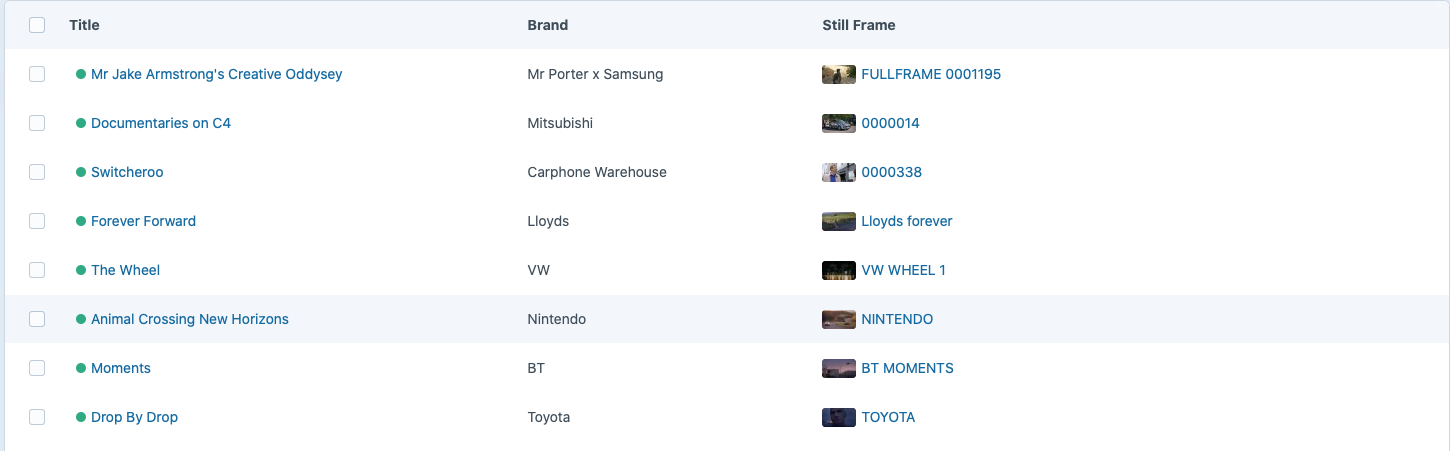
An example above for a site we are working on right now for some video editors. As you can see we just see a sequence of barely distinguishable brown rectangles. We will be migrating over a video portfolio site form Wordpress, where the main back-end function will be adding video reels, and the reordering them with drag and drop to create showcase video pages. As you can imagine, being able to SEE a video still per entry is by far the quickest / easiest way to intuitively edit the showreels. But this is impossible with Craft, the thumbnails are painfully small :( What can we do? We need thumbnails at least 2 times taller than they currently appear in the entries files (ideally more)... Wordpress is painful in many ways, but the ability to customise the interface and in particular the thumbnail display in the backend is super useful and worth having! |
Replies: 3 comments 3 replies

|
Agree! However you can add any content you want to the element index. (Found this in one of our recent Craft4 projects) Add something like this to the use craft\base\Element;
use craft\elements\Entry;
use craft\events\ElementIndexTableAttributeEvent;
use craft\events\RegisterElementTableAttributesEvent;
use craft\events\SetElementTableAttributeHtmlEvent;
use craft\helpers\Html;
...
// Register element index column
Event::on(
Entry::class,
Element::EVENT_REGISTER_TABLE_ATTRIBUTES, function(RegisterElementTableAttributesEvent $event) {
$event->tableAttributes['bigFeaturedImage'] = ['label' => Craft::t('site', 'Big Featured Image')];
});
// Column HTML
Event::on(
Entry::class,
Element::EVENT_SET_TABLE_ATTRIBUTE_HTML, function(SetElementTableAttributeHtmlEvent $event) {
if ($event->attribute == 'bigFeaturedImage') {
/** @var Entry $entry */
$entry = $event->sender;
$event->html = 'n/a';
$event->handled = true;
// Don't wait for transformed images if generateTransformsBeforePageLoad = true
$config = Craft::$app->config->general;
$oldSetting = $config->generateTransformsBeforePageLoad;
$config->generateTransformsBeforePageLoad = false;
if ($entry->featuredImage) {
$image = $entry->featuredImage->one();
if ($image) {
$image->setTransform(['width' => 250, 'height' => 140]);
$event->html = Html::tag('img', '', [
'src' => $image->url,
'style' => 'border-radius: 3px',
'width' => $image->width,
'height' => $image->height,
'alt' => $image->alt ?? $image->title,
'ondblclick' => "Craft.createElementEditor('craft\\\\elements\\\\Asset', {elementId: {$image->id}, siteId: {$entry->site->id}})"
]);
}
}
$config->generateTransformsBeforePageLoad = $oldSetting;
}
});
// Enable eager loading, requires Craft 4.1 so that fetching the assets with `->one()` will work.
Event::on(
Entry::class,
Entry::EVENT_PREP_QUERY_FOR_TABLE_ATTRIBUTE,
function(ElementIndexTableAttributeEvent $event) {
$query = $event->query;
$attr = $event->attribute;
if ($attr === 'bigFeaturedImage') {
$query->andWith(
['featuredImage', ['withTransforms' => [['width' => 250, 'height' => 140]]]]
);
}
});Instead of using EVENT_SET_TABLE_ATTRIBUTE_HTML, it looks cleaner to move that code to an entry behavior. (Could be a bit slow though, didn't dig deep enough to find out whether this can be somehow eager loaded. And it does not support double clicking the image to open the slide out editor. But hey, it works.) ** ** EDIT /Mel |

|
@wsydney76 — Very interesting, we haven't got into custom modules yet, but will be having a look for sure, thanks!! |

|
@wsydney76 Am I right that with the method you have above you would have to have a normal image size in the columns alongside this new, bigger version. If so do you have any examples of how we would retrieve the image from the entry rather than the column? |

|
@josh-attwood In this example we have a custom asset field And we add a custom column named So when you customize your element index columns, you will see both the default and the custom column and select only your custom one:
|

|
Update, October 2026: I've reopened this as a fresh Ideas post with Craft 5.11 specifics, since this thread predates Cards view and the 30 px / 120 px chip sizes now in core: #20083. Short version: table and structure views still render the 30 px chip, Cards already has a 120 px one, and the Thumbnails view mode is Assets-only. The ask is a Small / Large thumbnail option (or slider?) for table view (or a hover preview as a fallback). If you came here for a workaround, @wsydney76's custom-column module above still works on Craft 5. |

|
Added for Craft 6! 20124 |


Added for Craft 6! 20124