Repository navigation
Releases: damian3k/scct-versus-vr
Release list
SCCT Versus VR v0.8.4

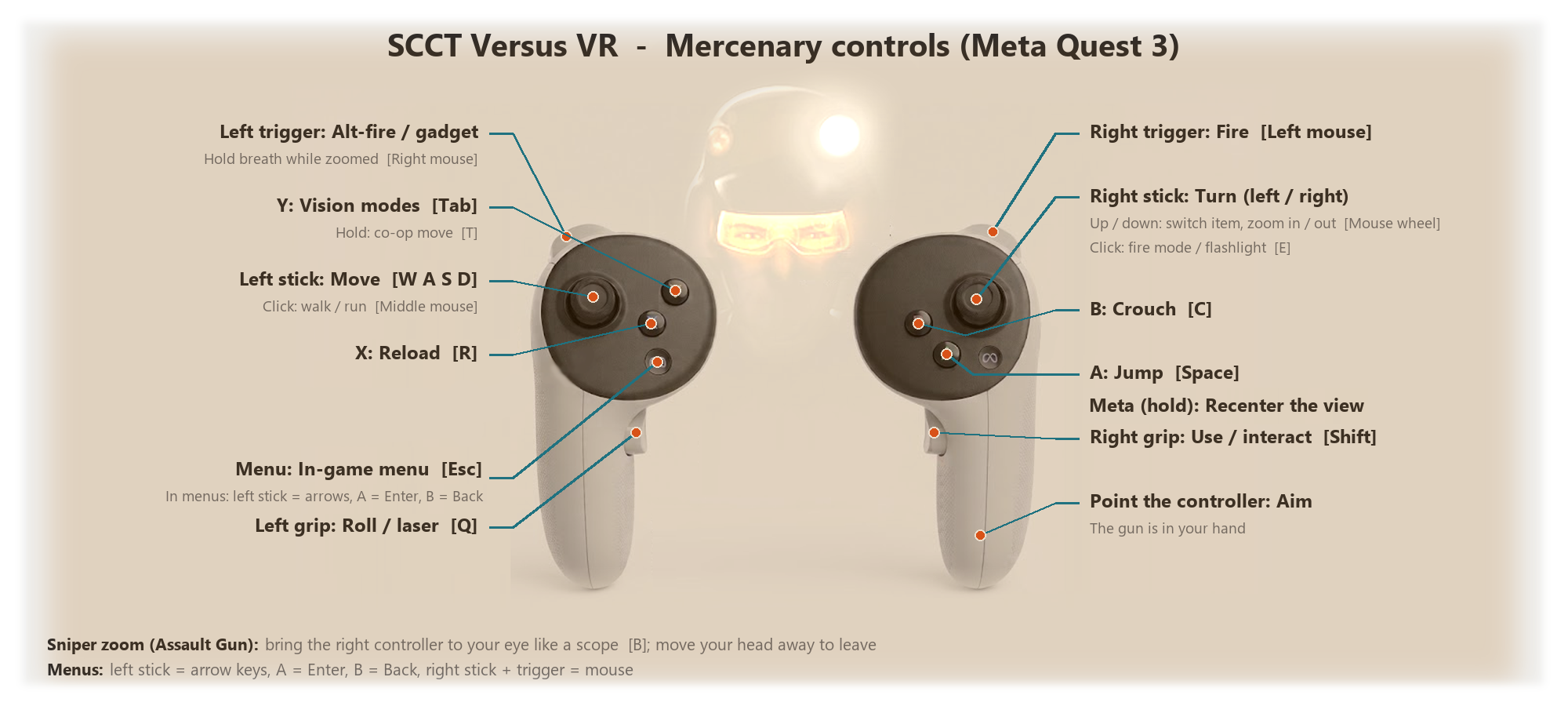
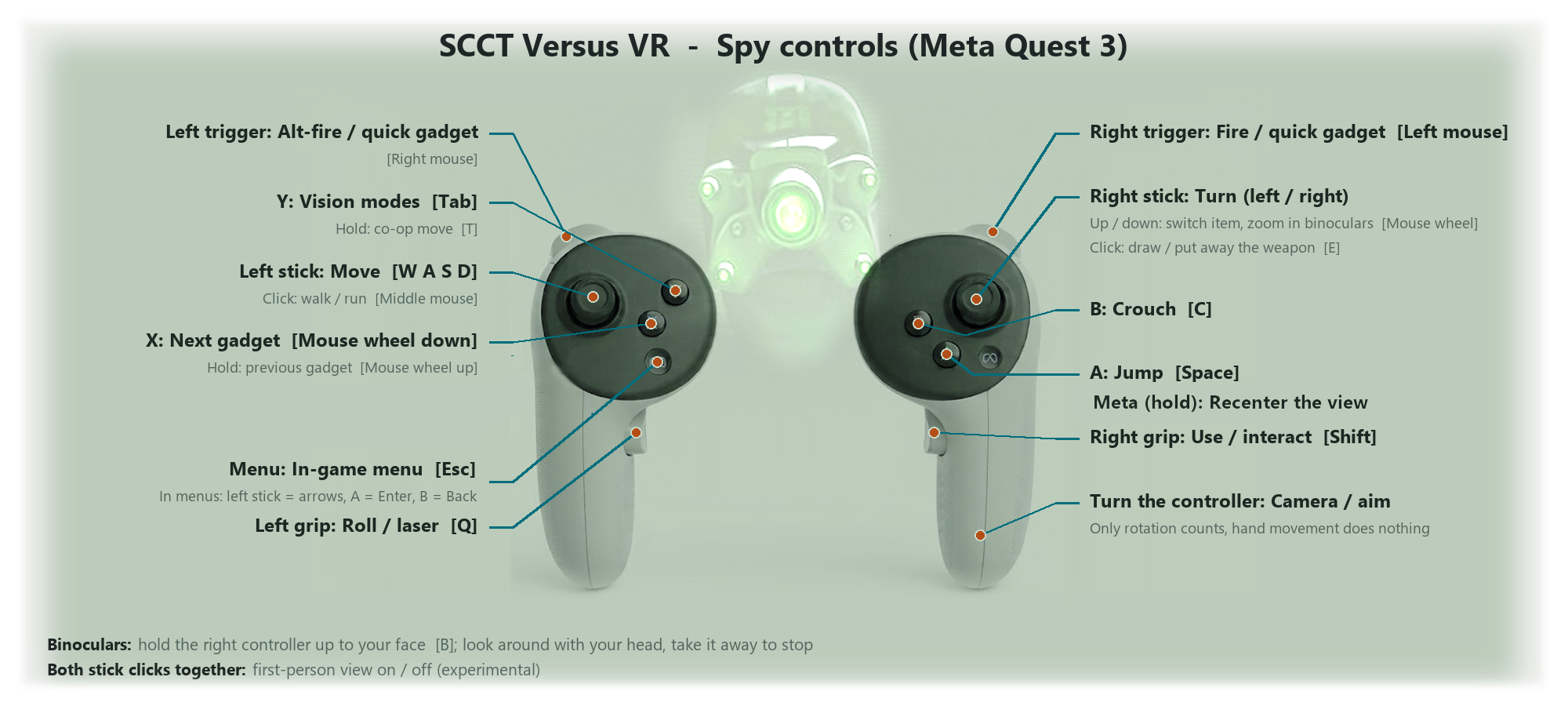
Full controller layout for both teams: controls.txt
SCCT Versus VR v0.8.4
Tested on Enhanced SCCT Versus v3.6
(includes SCCT Versus Reloaded 3.0a). Install that version first — other versions are not
supported.
A small update to v0.8.3
(PC window shows what the headset shows). See also
v0.8.1 (reload by hand) and
v0.8 (light shafts, camouflage).
▶ Gameplay video: https://www.youtube.com/watch?v=nbMLmVTR_hc
What's new since v0.8.3
Motion vision highlight fixed (Mercenary)
In the merc's motion-tracking vision, the box that highlights a moving object (a player, a
thrown grenade...) now sits on the object, in both eyes. Before, the game placed it as if
the screen followed the gun: it was in the same spot in both eyes (left in one, right in the
other) and could be far from the object when you looked somewhere else than where you aimed.
The game does not say how far the object is, so the mod assumes 6 m; for much nearer or farther
objects a small offset between the eyes remains. ScreenBoxDistance in SCCT_VR.ini changes
the distance, ReprojectScreenBoxes=0 turns the fix off.
Installation
- Install Enhanced SCCT Versus v3.6
(everyone you play with needs the same version). - Download
SCCT_VR_mod_v0.8.4.zipbelow and copyd3d9.dll,openxr_loader.dlland
SCCT_VR.iniinto the game'sSystemfolder (next toSCCT_Versus.exeand
Reloaded.Core.dll). Updating: replace all three files (copy over any values you changed in
your oldSCCT_VR.ini). - Start your VR runtime, put the headset on and start the game with
System\SCCT_Versus.exe.
Click the game window once so it has focus. - Recommended: set
"fps_merc"/"fps_spy"inSCCT_Versus.configto about twice your
headset refresh rate (e.g. 180 for 90 Hz) — each eye gets every second frame.
Full controls: controls.txt in the zip; everything else: README.md in the zip.
Known issues
- Looking behind you causes graphical glitches (missing geometry, black areas): the game only
draws what its own camera sees. - Spy first-person view (both stick clicks) is experimental.
Tested with Meta Quest 3 over Virtual Desktop (VDXR), RTX 3090.
SCCT Versus VR v0.8.3
Full controller layout for both teams: controls.txt
SCCT Versus VR v0.8.3
Tested on Enhanced SCCT Versus v3.6
(includes SCCT Versus Reloaded 3.0a). Install that version first — other versions are not
supported.
A small update to v0.8.1
(reload by hand, crosshair dot fix) and v0.8
(light shafts, camouflage, streaming-friendly PC window).
▶ Gameplay video: https://www.youtube.com/watch?v=nbMLmVTR_hc
What's new since v0.8.1
The PC window shows what you see in the headset
The game window on your PC now mirrors the headset: the right eye's view with the HUD exactly
where it is in VR — the crosshair, objective markers and distances follow the gun as you move
it, instead of the crosshair sitting in the middle of the screen. Great for streaming, recording
or friends watching.
DesktopMirror in SCCT_VR.ini:
2(new default) — like in the headset, HUD where you see it in VR;1— the previous mode, HUD over the whole window (crosshair in the middle);0— the raw headset frames (eyes alternate, no HUD).
Installation
- Install Enhanced SCCT Versus v3.6
(everyone you play with needs the same version). - Download
SCCT_VR_mod_v0.8.3.zipbelow and copyd3d9.dll,openxr_loader.dlland
SCCT_VR.iniinto the game'sSystemfolder (next toSCCT_Versus.exeand
Reloaded.Core.dll). Updating: replace all three files (copy over any values you changed in
your oldSCCT_VR.ini;DesktopMirroris now2). - Start your VR runtime, put the headset on and start the game with
System\SCCT_Versus.exe.
Click the game window once so it has focus. - Recommended: set
"fps_merc"/"fps_spy"inSCCT_Versus.configto about twice your
headset refresh rate (e.g. 180 for 90 Hz) — each eye gets every second frame.
Full controls: controls.txt in the zip; everything else: README.md in the zip.
Known issues
- Looking behind you causes graphical glitches (missing geometry, black areas): the game only
draws what its own camera sees. - Spy first-person view (both stick clicks) is experimental.
Tested with Meta Quest 3 over Virtual Desktop (VDXR), RTX 3090.
SCCT Versus VR v0.8.1
Full controller layout for both teams: controls.txt
SCCT Versus VR v0.8.1
Tested on Enhanced SCCT Versus v3.6
(includes SCCT Versus Reloaded 3.0a). Install that version first — other versions are not
supported.
A small update to v0.8.
▶ Gameplay video: https://www.youtube.com/watch?v=nbMLmVTR_hc
What's new since v0.8
Reload by hand (Mercenary)
Bring your left hand to the magazine of the gun — in front of and a little below your right
hand — and the gun reloads, like changing the magazine by hand. Pull the hand away before the
next reload. The X button still reloads too.
The spot can be tuned in SCCT_VR.ini: ReloadForward / ReloadDown (where the magazine is
relative to the right controller, in meters), ReloadRadius (how close the hand has to get),
ReloadGesture=0 turns it off and ReloadKey in [Bindings] sets the key it presses (R).
Crosshair fix
- The merc's crosshair dot no longer has a dark, semi-transparent square around it — it is just
the orange dot again, as in the original game. (Additive HUD elements no longer darken the
world behind the HUD layer; this also applies to the PC window.)
Installation
- Install Enhanced SCCT Versus v3.6
(everyone you play with needs the same version). - Download
SCCT_VR_mod_v0.8.1.zipbelow and copyd3d9.dll,openxr_loader.dlland
SCCT_VR.iniinto the game'sSystemfolder (next toSCCT_Versus.exeand
Reloaded.Core.dll). Updating: replace all three files (the newSCCT_VR.inihas the reload
options; copy over any values you changed). - Start your VR runtime, put the headset on and start the game with
System\SCCT_Versus.exe.
Click the game window once so it has focus. - Recommended: set
"fps_merc"/"fps_spy"inSCCT_Versus.configto about twice your
headset refresh rate (e.g. 180 for 90 Hz) — each eye gets every second frame.
Full controls: controls.txt in the zip; everything else: README.md in the zip.
Known issues
- Looking behind you causes graphical glitches (missing geometry, black areas): the game only
draws what its own camera sees. - Spy first-person view (both stick clicks) is experimental.
- In the PC window the HUD covers the whole window, so objective markers can sit slightly off
their targets there (in the headset they line up).
Tested with Meta Quest 3 over Virtual Desktop (VDXR), RTX 3090.
SCCT Versus VR v0.8
Full controller layout for both teams: controls.txt
SCCT Versus VR v0.8
Tested on Enhanced SCCT Versus v3.6
(includes SCCT Versus Reloaded 3.0a). Install that version first — other versions are not
supported.
Play Splinter Cell: Chaos Theory — Versus multiplayer in VR: stereo 3D with 6DoF head
tracking, the Mercenary's gun in your hand, the Spy steered by turning the controller — on top
of Enhanced SCCT Versus 3.6. Other players do not need the mod.
▶ Gameplay video: https://www.youtube.com/watch?v=nbMLmVTR_hc
What's new since v0.7
Lights and effects fixed in VR
- Volumetric light shafts (e.g. the sunbeams falling through the windows in Warehouse) no
longer move with the camera — they stay in place, in the right colour, in both eyes. - Mercenary flashlight cone seen from outside (looking at a merc as the Spy) is now centred
correctly instead of sitting left in one eye and right in the other. - Spy camouflage suit works in VR: the spy turns nearly invisible again, instead of showing
a distorted green image or a black silhouette.
Streaming-friendly PC window
- During gameplay the game window on your PC now shows a steady view (the right eye) with the
HUD, cropped to the window's proportions — no more flicker between the eyes, and the UI is
visible. Good for streaming, recording or friends watching. Menus look as before.
Turn it off withDesktopMirror=0inSCCT_VR.ini.
Diagnostics
- Frame dumps (Pause key) now record texture stages, blending and vertex shader constants, and
every Pause press gets its own file (SCCT_VR_frame_pause1.txt,pause2, ...). - New
DumpEverySecoption writes a dump every N seconds — useful in VR, where the keyboard is
out of reach.
Under the hood
- Vertex-shader effects (light shafts, camouflage) get their camera matrices switched to the eye
camera for each draw — the game passes them to the shaders in a way the mod could not see
before, which was found by disassembling the shaders from frame dumps. - Controller input reworked so the same bindings serve both PC VR and the upcoming standalone
Quest version. - Standalone Quest version (WinlatorXR) — work in progress, not released yet. The DLL already
contains its XR API backend; it switches on only inside WinlatorXR and has no effect on PC.
Installation
- Install Enhanced SCCT Versus v3.6
(everyone you play with needs the same version). - Download
SCCT_VR_mod_v0.8.zipbelow and copyd3d9.dll,openxr_loader.dlland
SCCT_VR.iniinto the game'sSystemfolder (next toSCCT_Versus.exeand
Reloaded.Core.dll). Updating from v0.7: replace all three files (the newSCCT_VR.inihas
the new options; copy over any values you changed). - Start your VR runtime, put the headset on and start the game with
System\SCCT_Versus.exe.
Click the game window once so it has focus. - Recommended: set
"fps_merc"/"fps_spy"inSCCT_Versus.configto about twice your
headset refresh rate (e.g. 180 for 90 Hz) — each eye gets every second frame.
Full controls: controls.txt in the zip; everything else: README.md in the zip.
Known issues
- Looking behind you causes graphical glitches (missing geometry, black areas): the game only
draws what its own camera sees. - Some effects can still disappear when you turn your head away from where the game's camera
looks (same cause). - Spy first-person view (both stick clicks) is experimental.
- In the PC window the HUD covers the whole window, so objective markers can sit slightly off
their targets there (in the headset they line up).
Tested with Meta Quest 3 over Virtual Desktop (VDXR), RTX 3090, including online matches.
SCCT Versus VR v0.7
Full controller layout for both teams: controls.txt
SCCT Versus VR v0.7
Tested on Enhanced SCCT Versus v3.6
(includes SCCT Versus Reloaded 3.0a). Install that version first — other versions are not
supported.
Play Splinter Cell: Chaos Theory — Versus multiplayer in VR: stereo 3D with 6DoF head
tracking, the Mercenary's gun in your hand aimed with the controller, the Spy steered by turning
the controller, a sniper scope you use by putting your eye to the gun, binoculars you look
through by moving your head — all on top of Enhanced SCCT Versus 3.6. Other players do not
need the mod.
Tested with Meta Quest 3 over Virtual Desktop (VDXR), RTX 3090, including online matches. Any
PC OpenXR runtime should work (Virtual Desktop, Quest Link / Air Link, SteamVR).
▶ Gameplay video: https://www.youtube.com/watch?v=nbMLmVTR_hc
Installation
- Install Enhanced SCCT Versus v3.6
(everyone you play with needs the same version). - Download
SCCT_VR_mod_v0.7.zipbelow and copyd3d9.dll,openxr_loader.dlland
SCCT_VR.iniinto the game'sSystemfolder (next toSCCT_Versus.exeand
Reloaded.Core.dll). - Start your VR runtime, put the headset on and start the game with
System\SCCT_Versus.exe.
Click the game window once so it has focus. - Recommended: set
"fps_merc"/"fps_spy"inSCCT_Versus.configto about twice your
headset refresh rate (e.g. 180 for 90 Hz) — each eye gets every second frame.
Full controls for both teams: controls.txt in the zip; everything else: README.md in the zip.
Spy first-person view (experimental)
While playing the Spy, click both thumbsticks at the same time to switch from the
third-person camera to the spy's eyes (click both again to go back). The view is attached to the
spy's head (follows crouching and climbing), you can see your hands, and using the binoculars
once measures the exact eye position.
⚠ This is experimental and needs more work. The game was never made for this view: it still
renders and hides objects from its own camera behind the spy, so it can go wild — geometry
appearing or disappearing near your head, walls when you stand with your back to them, odd
moments while climbing.
What it took to make SCCT work in VR
The mod is a single d3d9.dll proxy loaded by SCCT Versus Reloaded; no game file is patched.
Built over many iterations of play tests in the headset, logs, frame dumps and videos:
- Getting the image into the headset — OpenXR has no Direct3D 9 path, so the game runs on
D3D9On12 on the headset's GPU and every frame is copied into OpenXR swapchains.
Alternate-frame stereo (left eye, right eye, ...), eye cameras with the headset's asymmetric
FOV, 6DoF head tracking, recenter that waits for real tracking. - HUD and menus — a full analysis of how the game builds a frame (scene → composite → post
passes → objective markers → HUD) to pull the HUD out onto its own VR panel that follows the
game camera, so objective markers sit on their targets; menus on a virtual screen; the in-game
menu recognised and the controller switched to menu controls automatically. - Controller aiming — the game only knows the mouse, so the game camera is steered towards the
controller with emulated mouse motion in a closed loop (learned sensitivity, stall detection for
rolls and animations). The Mercenary's first-person weapon is moved into your hand. - The state-block discovery — the game sets almost all render state through D3D state blocks,
invisible to normal hooks; reading the state back from the device made the flashlight, shadow
projectors and glass reflections stay fixed to the world instead of following your head. - Quest/Touch controls — all keyboard/mouse actions on the controllers, separate binding sets
for the Spy and for menus, hold actions (co-op moves, gadget switching), recenter. - Sniper scope and binoculars — put your eye to the Assault Gun (or the controller to your face
for the Spy's binoculars) and the zoom switches on; the zoomed view runs at the full game frame
rate, the merc aims like with a mouse, the spy looks around with the head. - Spy in VR — the spy's camera orbits around the character, which made the VR view swing with
every hand movement; the mod finds the spy's model in the frame and keeps the view steady behind
him, while turning the controller steers the camera and aims. - Skybox — Unreal draws the sky from a miniature model far outside the map; with stereo eyes
it looked like a tiny box around your head. The sky is now rendered at infinity. - Multiplayer crash fix — online matches crashed after a while; traced with module maps and a
rebuilt symbol map to a stale vertex-buffer pointer in the mod, and fixed. - Spy first person (experimental) — thumbstick chord, eyes attached to the top of the head
read from the spy's model, gear like the night-vision goggles hidden, binocular calibration.
Known issues
- Looking behind you causes graphical glitches (missing walls/objects, black areas): the game
only draws what its own camera sees and leaves out the rest. We are still figuring out what to
do about it — the long-term plan is an engine hook that renders from your head. - The Spy first-person view is experimental (see above).
- The game needs about twice the headset refresh rate (alternate-frame stereo).
- The HUD follows the weapon (needed so objective markers line up).
- The game itself occasionally crashes when leaving a match (also without VR).
Credits
- Enhanced SCCT Versus — Joshhhuaaa; SCCT Versus Reloaded — AllyPal. This mod does not ship or
modify their files. - OpenXR loader — Khronos Group (Apache-2.0).
- Splinter Cell: Chaos Theory is © Ubisoft.