Repository navigation
Releases: DavidHurtadoAI/just-simple-planner
Release list
Just Simple Planner 0.5.6

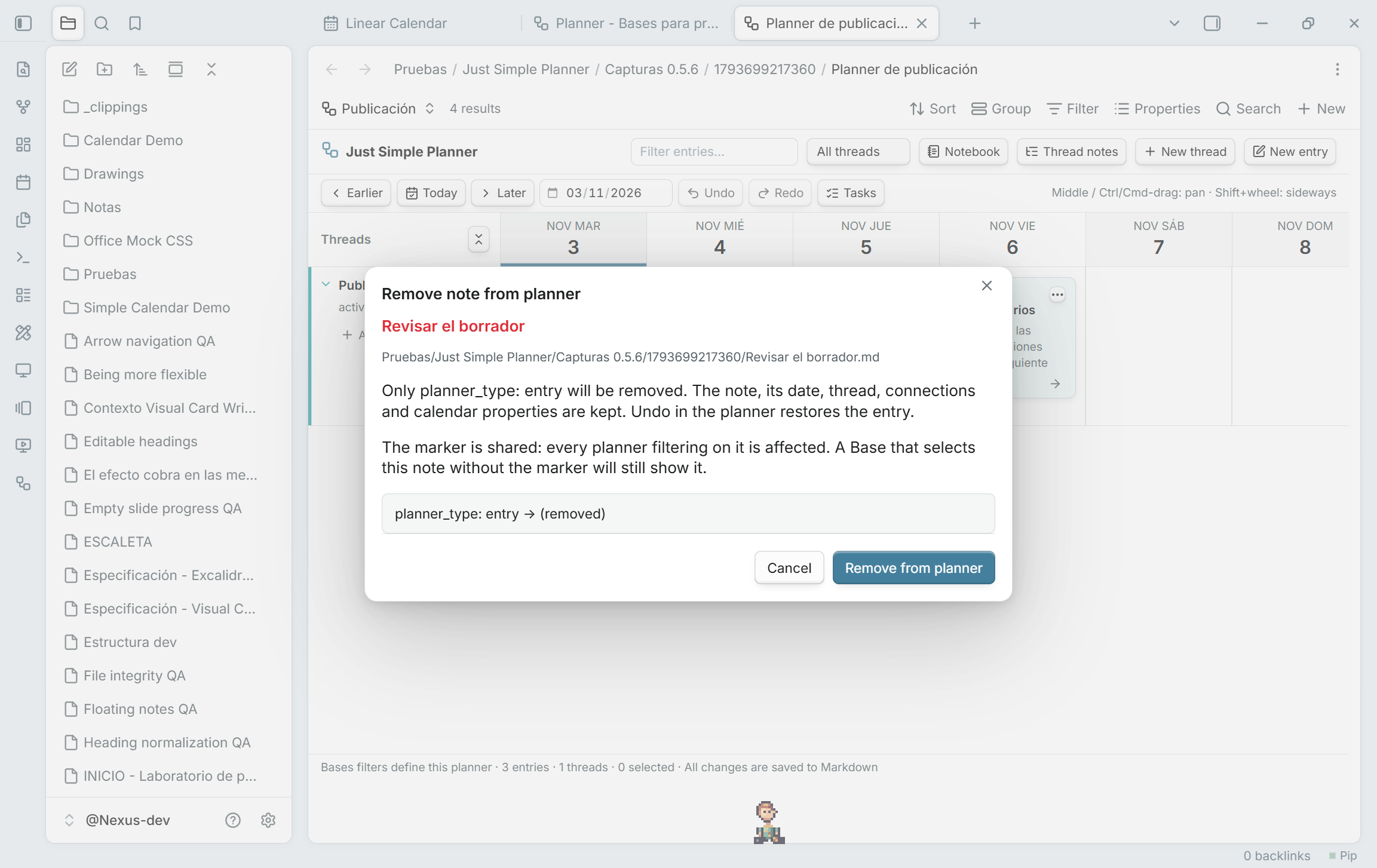
Remove from planner, keep the note
Remove note from planner… is now available from the right-click and three-dot card menus in Bases, as well as the retained classic view. The review removes only planner_type: entry. Your file, Markdown content, dates, thread, connections and scheduling properties remain. Undo/Redo restore or repeat the operation, even after the card leaves the current Base's results.
The usual Base filter is planner_type is entry OR planner_type is thread, under All views → Any of the following are true. Migration creates it automatically. With that filter, removing the entry marker removes the card from the planner. The marker belongs to the shared note, so other planners filtering on it are affected too. A custom Base query can still select the unmarked note; its filters decide membership. Removal is disabled for cards without the entry marker.
Preview notes on hover
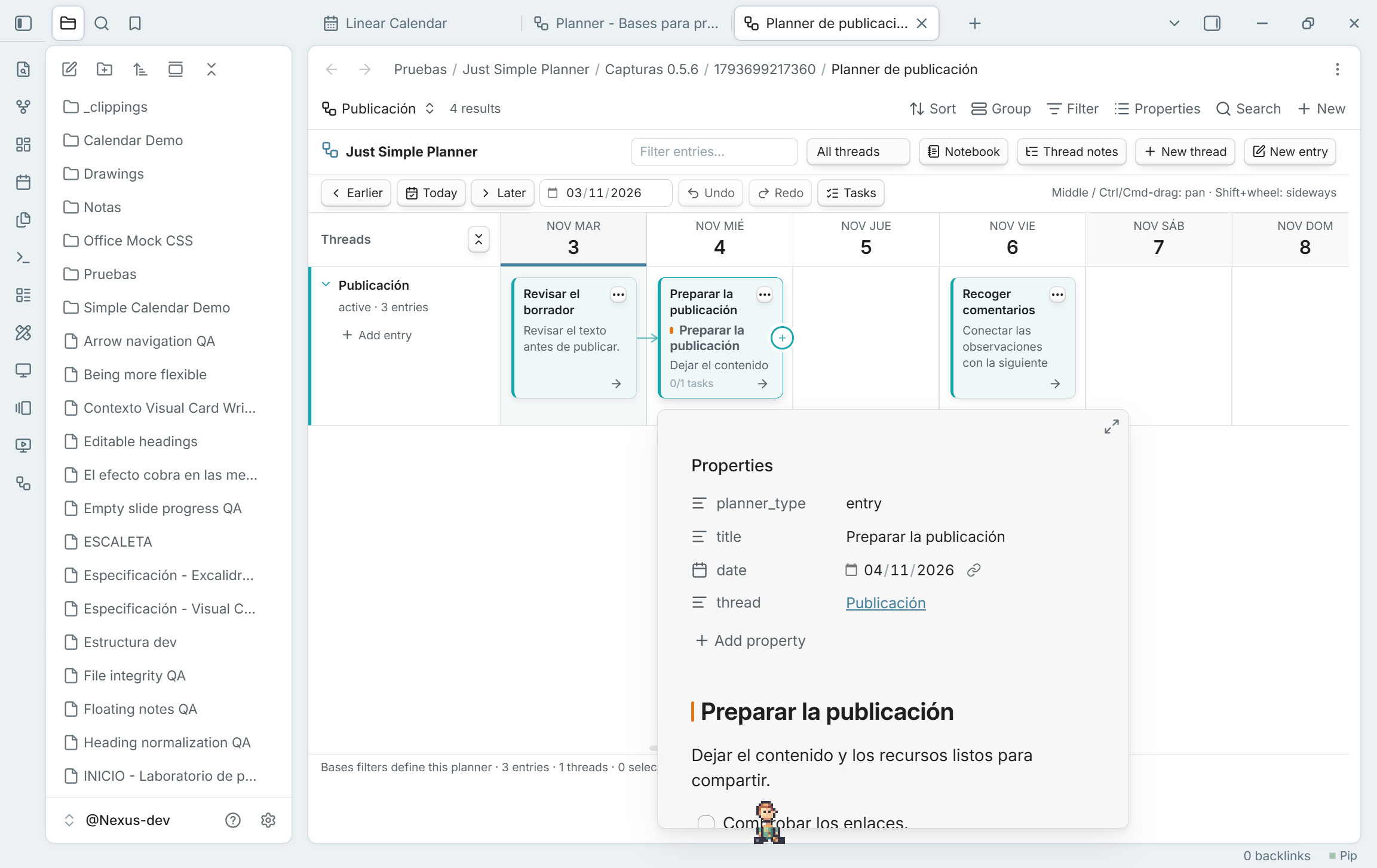
Hover a card to see Obsidian's native note preview, including properties and Markdown content. No click or Ctrl/Cmd is required by default. It works in board and Notebook, classic and Bases, including folded cards and repeated appearances of the same note.
Enable the Page preview core plugin. Its Just Simple Planner source setting controls whether a modifier key is required. Moving onto card buttons/links closes the card preview and keeps those controls' own actions. Starting a drag, pan or connection also closes the preview. Previews close when their cards are rebuilt, and a preview that finishes loading late cannot cover an active gesture or a closed view.
Updating and the Bases transition
Update the same Just Simple Planner plugin to 0.5.6. GitHub-based installers can detect it as a newer stable version. For a manual update, replace main.js, manifest.json and styles.css with the three assets below and reload the plugin or restart Obsidian. Keep data.json, your notes and existing .base files. Existing Bases planners do not need another migration.
The classic view remains deprecated and available; no removal date is set. The plugin itself is not deprecated. Migration creates a new Base reading the same Markdown notes, without moving or rewriting them. The migration-button, hidden-position and keyboard-priority fixes from 0.5.3–0.5.5 are included.
Validated with 63 unit tests and 177 native checks across 14 suites in the development vault. Original notes/settings are preserved. The validation document records the native popup resize warning separately from unexpected errors and describes platform limits.
Just Simple Planner 0.5.5
Migration, position and keyboard fixes
Update the same Just Simple Planner plugin to 0.5.5. This includes the working Create Base migration button from 0.5.3 and the hidden-tab/Notebook position correction from 0.5.4.
Expanded native tests found that Obsidian's global F2 shortcut could open Rename for the previously active file before Planner received the key. Planner now registers its keyboard handling through Obsidian's native keymap scope while its surface has focus. F2 edits the selected card; leaving or closing Planner releases that scope. Inputs, buttons and links keep their ordinary keyboard behavior.
For a manual update, replace main.js, manifest.json and styles.css with the files below and reload the plugin or restart Obsidian. Keep data.json, your notes and existing .base files. Existing Bases planners do not need another migration. GitHub-based installers can detect 0.5.5 as a newer stable version.
The classic view is deprecated but remains available, with no removal date set. Migration creates a new Base reading the same Markdown notes; it does not move or rewrite your notes/settings.
Migration guide · Guía en español · Features and screenshots · Validation
Just Simple Planner 0.5.4
Update available: 0.5.5 includes the Create Base migration-button fix, hidden-tab position preservation and native Planner keyboard handling. Update the same plugin and keep your notes, existing Bases and data.json.
Fixes for the Bases transition
Update the same Just Simple Planner plugin to 0.5.4. This release includes the 0.5.3 correction for the migration dialog's Create Base button and fixes another issue found during the expanded in-app regression tests.
When a Planner tab was hidden and a note changed, a background render could save its horizontal position as zero. Returning to the tab could then show a different date window. Hidden planners now retain their last visible position and apply pending updates when their pane becomes visible. This also preserves Notebook's vertical position and states restored while a tab is hidden.
For a manual update, replace main.js, manifest.json and styles.css with the files below, then reload the plugin or restart Obsidian. Keep data.json, your Markdown notes and existing .base files. Existing Bases planners do not need another migration. GitHub-based installers can detect 0.5.4 as a newer stable version.
Classic view and migration
The classic view is deprecated but remains available. No removal date is set. This is the same plugin and the same notes. Create Bases planner creates a new Base that reads existing entries and thread notes; it does not move or rewrite them. The new Base can then use its own filters and property mappings.
Migration guide · Guía en español · Bases features and screenshots
Validation details and the reproducible native regression runner are in TESTING.md. The release workflow checks the source, builds all three installable files and verifies their provenance.
Just Simple Planner 0.5.3
Update available: 0.5.5 includes the Create Base migration-button fix, hidden-tab position preservation and native Planner keyboard handling. Update the same plugin and keep your notes, existing Bases and data.json.
Fix: Create Base in the migration dialog
In 0.5.2, Create Base could look enabled after the review but ignore clicks. The dialog updated the HTML disabled attribute without updating Obsidian's ButtonComponent state.
0.5.3 fixes the control state after the initial review, Refresh review, creation attempts and errors. The button now creates and opens the Base through the existing migration flow.
If you installed 0.5.2, update the same plugin with main.js, manifest.json and styles.css below, reload it, and reopen Create Bases planner. Keep data.json and your notes. Existing Base files do not need to be migrated again.
The review also refreshes its cached membership when classic discovery resumes, excluding notes that were removed from the planner while it was paused. This prevents a stale count from blocking the initial migration comparison.
The classic view remains available during the transition, with no removal date set. Migration creates a new Base without moving, renaming or rewriting the original notes/settings.
Migration guide · Guía en español · 0.5.2 features and screenshots
Validation: 63 unit tests, strict TypeScript, official lint with zero warnings, production/package checks, eight in-app scenarios that activate the actual migration controls, and the 24 existing Bases integration checks. The UI scenarios cover the classic banner, the command with no classic view open, Refresh review, duplicate/invalid paths with retry, changed notes requiring a fresh review, and repeated clicks. Original note bytes, classic settings and the workspace layout are retained. GitHub Actions builds and verifies provenance for all three release files.
Just Simple Planner 0.5.2
Update available: 0.5.5 includes the Create Base migration-button fix, hidden-tab position preservation and native Planner keyboard handling. Update the same plugin and keep your notes, existing Bases and data.json.
Plan inside Bases, with the same Markdown notes
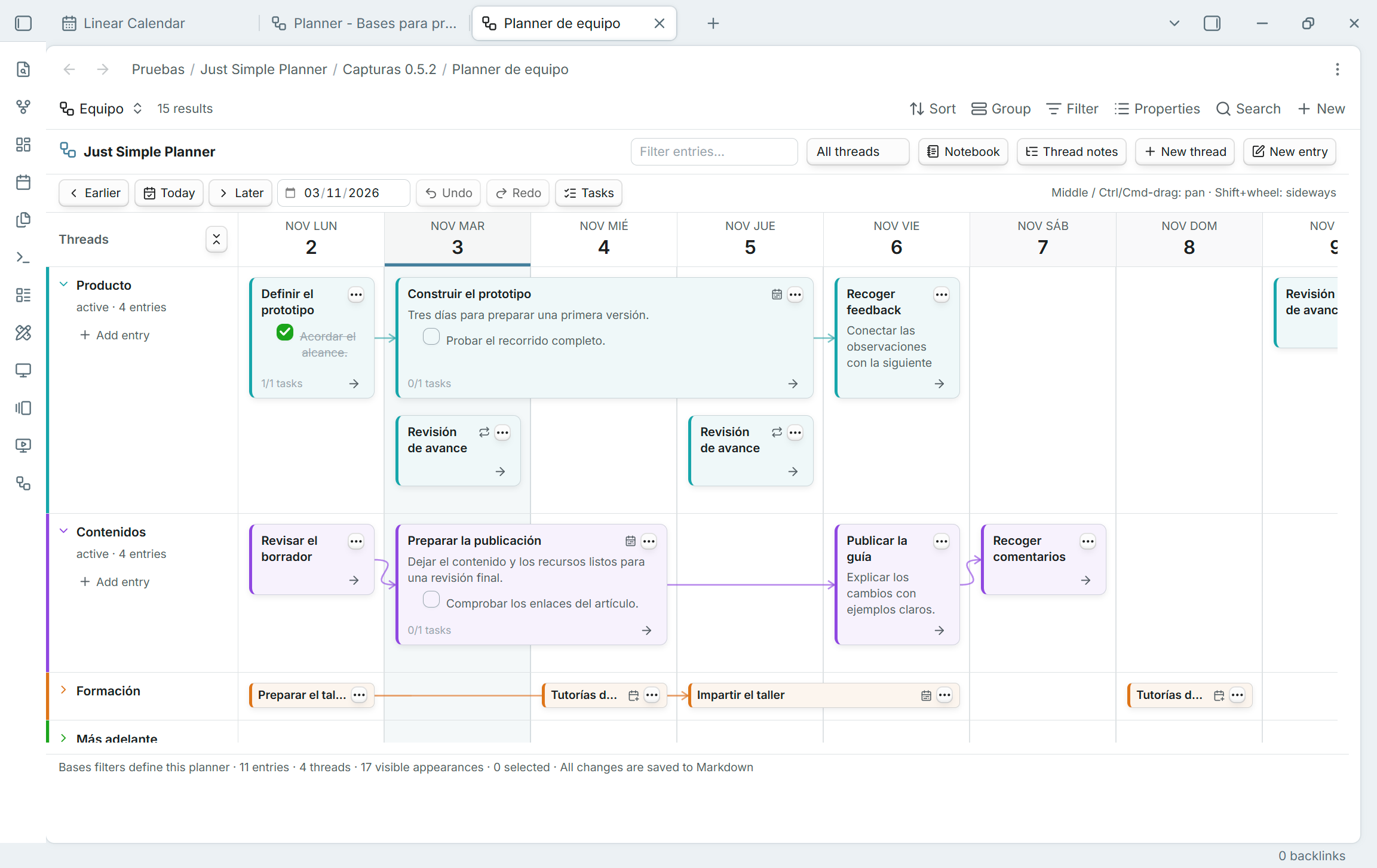
Just Simple Planner 0.5.2 adds Simple Planner as a native Obsidian Bases layout. Keep several planners in separate Base files or views, choose their notes with Bases filters, and configure date/title/thread/connections properties per view. Threads, arrows, the editor, Spotlight, Notebook, Tasks and undo/redo remain part of the planner.
Important for existing users: classic is deprecated, still available
The standalone classic view is deprecated. The plugin is not. This is an update to the same just-simple-planner plugin ID. Both views are included in this release; existing classic tabs, settings, command IDs and Markdown notes are retained. The ribbon icon still opens Open classic planner.
No removal date has been set. Retirement is planned after the Bases transition is validated. You can compare the new planner with classic during this transition. There is no separate replacement plugin to install and no automatic conversion of your notes.
Migrate your classic planner
- Update the same plugin and enable Bases in Core plugins. If Bases was previously disabled, reload Just Simple Planner.
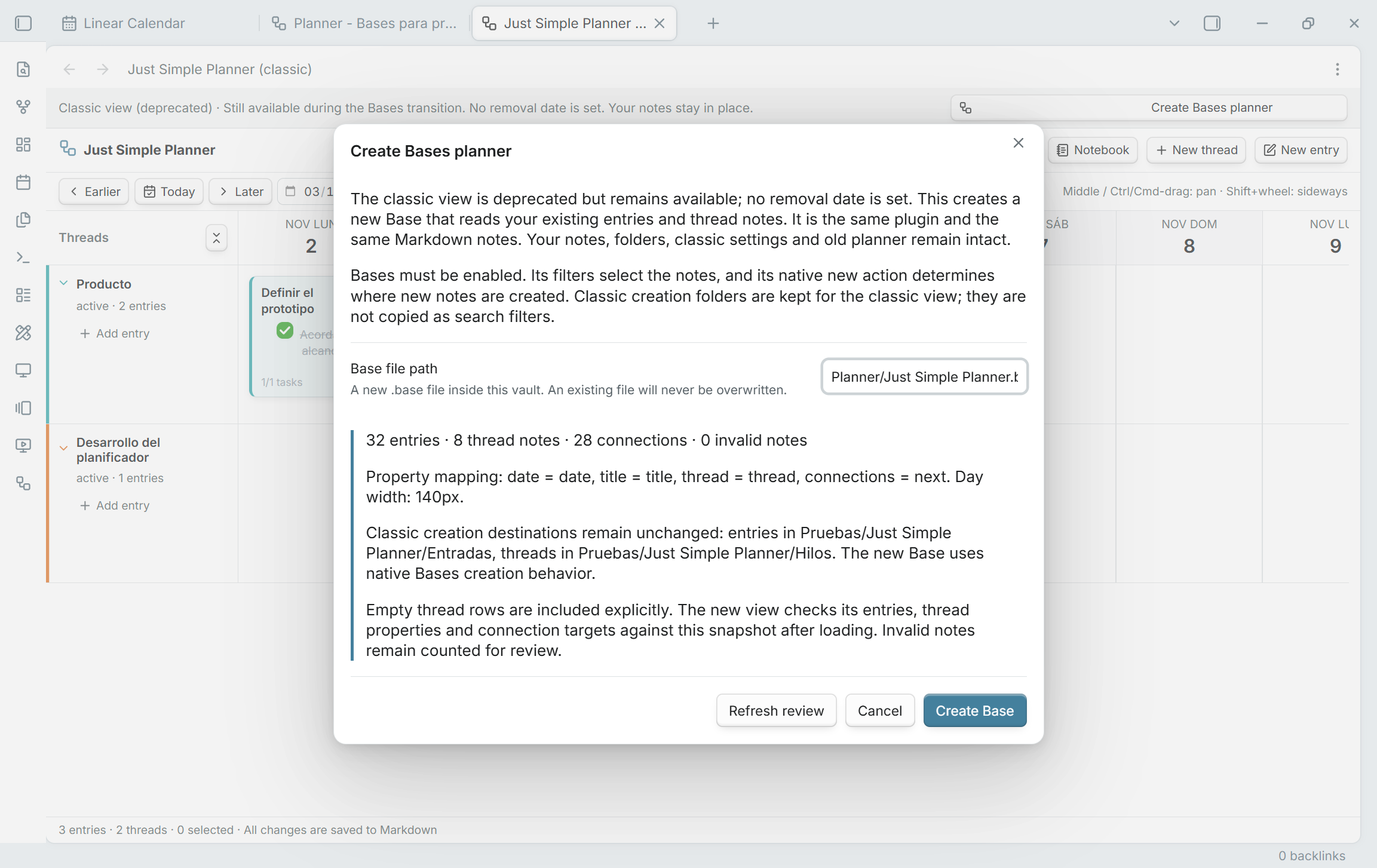
- Run Just Simple Planner: Create Bases planner from classic notes, or use Create Bases planner in the classic banner / Review migration in settings.
- Review the entry/thread/connection counts, property mapping and creation destinations. Choose a new vault-relative
.basepath, then click Create Base. - Wait for Migration verified before changing the initial query. The new view compares entry titles/dates, thread membership, connection targets and thread metadata, retaining empty thread rows.
- Compare your normal workflow, then tailor the filters or add other planners. Select optional scheduling properties explicitly in Configure view.
Migration creates a new Base that reads the original files. It does not move, rename, duplicate or rewrite your notes or replace classic settings. The initial query uses existing entry/thread markers across the vault. Classic creation folders are not copied as folder filters; new note creation follows Bases instead.
Read the complete migration guide or guía completa en español for differences, missing-note checks, creation behavior and returning to classic.
New in the Bases layout
- Several planners: independent Base queries and per-view settings/history. A note can appear in more than one planner without being copied. Views choosing the same note property share its changes.
- Multi-day cards: select End date property to extend cards through the inclusive last day. Overlapping ranges stack; ordinary moves preserve duration and written times/offsets, including when dragging from a later day. Notebook shows the full date range.
- Optional scheduling: repetitions, repeat-until, skipped days and additional dates. Use configured card-menu date editors for limits and date lists. Repeated appearances share one file, task set and connection graph; they do not create individual completion records or occurrence-specific graph nodes.
- Scoped editing: unmarked dated notes selected by a Base can appear. Whole-flow moves require all resolved successors in the query. Computed properties are read-only, and scheduled series are not draggable. Each view rejects stale/conflicting saves rather than overwriting another editor's work.
- Existing compact cards: title-only notes keep the shorter card height, while Markdown bodies retain a preview. Both heights work with spans and folded rows.
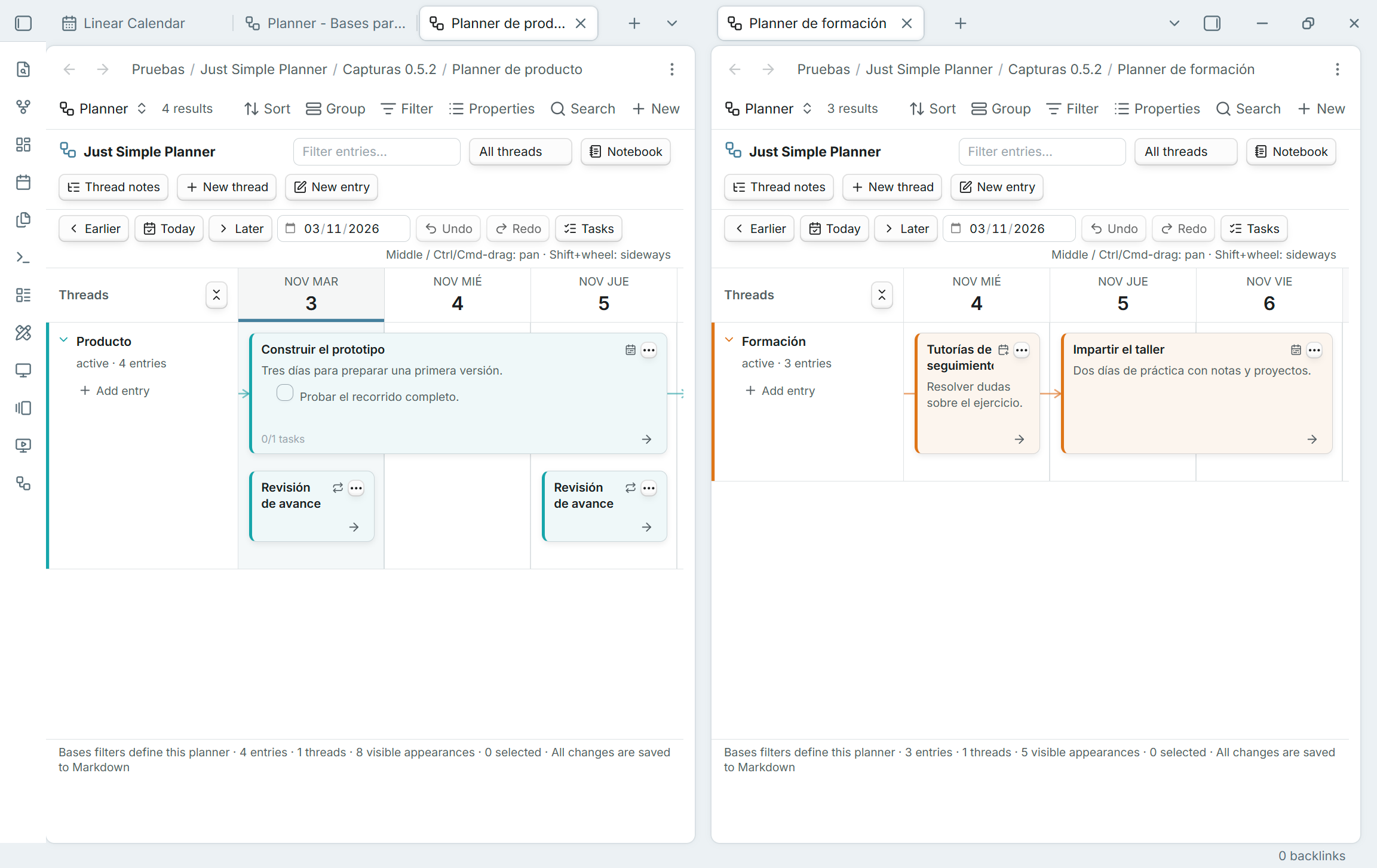
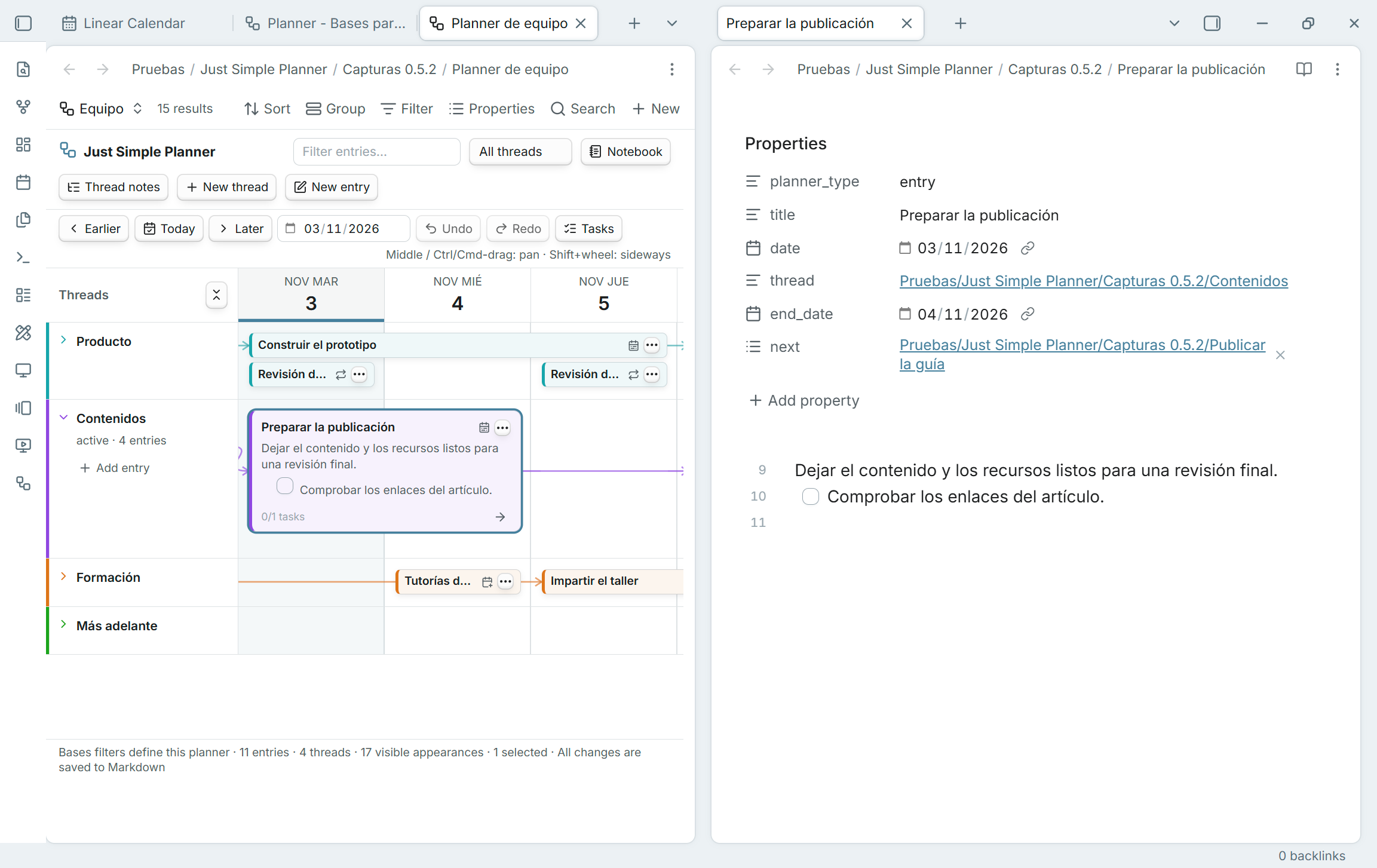
Scheduling features above belong to the Bases layout. Classic retains its previous scheduling behavior and membership rules. Just Simple Calendar remains a separate plugin and is not required. The board loads a 91-day window; date navigation changes it and the scheduled Notebook appearances.
Installation and validation
Requires Obsidian 1.10.2 or later, with the built-in Bases plugin enabled for the new layout. Download main.js, manifest.json and styles.css below into the existing just-simple-planner plugin folder. Keep data.json and your notes.
Validated with 63 unit tests, strict TypeScript, zero-warning official lint, package checks and 80 in-app checks in desktop Obsidian 1.15.0. Native screenshots use fictional Spanish examples. Original test-vault notes and classic settings were checked byte for byte. Physical mobile/touch and very large vaults have not been validated; see TESTING.md.
GitHub Actions builds, checks, attests and verifies the three installable assets before publication. This release includes the work from the unpublished 0.5.0/0.5.1 local development previews.
Just Simple Planner 0.4.2
Cards now adjust automatically to their content:
- Title only: notes with an empty Markdown body use a shorter card, keeping the two-line title, note menu, continuation arrow and connection handle. Frontmatter and blank lines do not require a full-height preview.
- With content: notes keep their normal preview height. Adding or removing content updates the card size, and same-day cards stack using their actual heights.
- Notebook: title-only cards also omit the empty preview space.
Predictable title fallback: the configured title property takes precedence. If it is missing or empty, the card shows the complete filename without .md, including any date prefix. Notes and filenames are not rewritten.
Validated with thirty-six automated tests, seven focused checks inside desktop Obsidian, and visual inspection in the dedicated development vault.
Requires Obsidian 1.10.2 or later. Install main.js, manifest.json and styles.css below. GitHub Actions builds, checks, attests and verifies all three files before publication.
Just Simple Planner 0.4.1
Thread titles now align to the left in both expanded and folded rows. Short and long titles share the same starting position, with the disclosure arrow beside them.
Validated in desktop Obsidian using the four-thread demo, with all thirty-three automated tests passing.
Requires Obsidian 1.10.2 or later. Install main.js, manifest.json and styles.css below. GitHub Actions builds, checks, attests and verifies all three files before publication.
Just Simple Planner 0.4.0
Bring existing notes into the planner without reorganizing your vault.
Add and remove from the file explorer
- Right-click a Markdown note and choose Add note to planner…. Review its date, thread and exact property changes before saving. The original file stays where it is; no duplicate is created.
- An included note offers Show in planner and Remove note from planner…. The card menu also offers removal.
- Removal deletes only
planner_type: entry. The note, date, calendar properties, title, thread, connections and body are retained. Undo and Redo cover both adding and removing.
Drag and drop existing notes
- Drop onto a thread header or notebook thread to keep the valid existing date.
- Drop onto a day cell to propose that day and thread.
- Every explorer drop opens a review. If the date changes, it warns that calendars using the same property will also reflect the change. Cancel writes nothing.
- One existing Markdown note from this vault at a time is supported. Existing cards are updated instead of duplicated. Normal dragging of cards already on the board still reschedules them directly.
Upgrading: folders now choose storage only
The old Planner folder scope is removed. Threads folder and New entries folder are now full, vault-relative creation paths. Older base and child paths are combined to preserve the existing destinations; files are not moved. Entries and threads already marked with planner_type are found anywhere, including outside the former scope. Unmarked notes remain excluded even if they have dates; Show all dated notes stays removed.
The Zoom in/out toolbar buttons are removed; Day width remains configurable in settings. The README and settings explain the new workflow and migration.
Requires Obsidian 1.10.2 or later. Install main.js, manifest.json and styles.css below. GitHub Actions builds, checks, attests and verifies all three files before publication.
Just Simple Planner 0.3.3
Make the board, notebook and task panel more compact.
- Board cards are about 15% shorter, with smaller row spacing and timeline headers.
- Thread labels and the notebook sidebar take less horizontal space.
- Toolbars use smaller controls and margins; notebook headings and text are more compact.
- The task panel is narrower, with tighter task spacing.
The existing Notebook/Board and Tasks buttons remain. Horizontal zoom settings are preserved.
Validated with twenty-nine unit tests, official Obsidian lint, strict TypeScript, package checks and native visual inspection of the board, notebook, tasks and folded threads in the canonical development vault.
Requires Obsidian 1.10.2 or later. Install main.js, manifest.json and styles.css below. GitHub Actions builds, checks, attests and verifies all three files before publication.
Just Simple Planner 0.3.2
Remove Show all dated notes and return to explicit planner entries.
Cards require planner_type: entry and a valid date in the configured Date property. Thread notes use planner_type: thread. The common Planner folder, its optional entry/thread subfolders, property mapping and automatic settings saving remain unchanged.
Updating from 0.3.0 or 0.3.1: the removed setting is ignored. Notes previously shown only because they had a date will disappear from the planner; their files and properties are preserved. Existing-note picker and external drag and drop remain deferred.
The settings help, README and screenshots explain the marked-note model.
Validated with twenty-nine unit tests, official Obsidian lint, strict TypeScript, package checks and twenty-six native checks in the canonical development vault. The original demo notes and saved settings are preserved.
Requires Obsidian 1.10.2 or later. Install main.js, manifest.json and styles.css below. GitHub Actions builds, checks, attests and verifies all three files before publication.